

Why does a workstation that appears pristine in a showroom begin to degrade after only two seasons of use? For many professionals, the frustration of a sagging desktop, a "sticky" electric motor, or the subtle, persistent scent of chemical off-gassing is an all-too-common reality. These issues are rarely the result of "bad luck." Instead, they are the predictable outcomes of material choices that fail to account for the complex interplay between regional climate, structural load, and rigorous safety standards.
In the global furniture market, compliance standards such as CARB (California Air Resources Board), EPA (Environmental Protection Agency), and various EU directives are often viewed by consumers as mere bureaucratic hurdles. However, these regulations serve as the foundational blueprint for material longevity and indoor air quality. Understanding the "why" behind these standards is essential for B2B procurement managers and home office users who prioritize long-term value over short-term savings.
The Physiology of the Workspace: Beyond the Surface
The human body is not designed for the static loads imposed by traditional office work. Prolonged sitting is increasingly linked to Musculoskeletal Disorders (MSDs), which affect the nerves, tendons, and muscles of the back, neck, and limbs. According to the Occupational Safety and Health Administration (OSHA), core risk factors for MSDs include repetitive tasks and poor posture. When a workstation fails—whether through structural sagging or inadequate adjustability—it forces the user into "compensatory postures" that accelerate physical strain.
The physical integrity of the desk is the first line of defense. If a desktop warps by even a few millimeters, it alters the "spinal neutral position" of the user. This misalignment can impede blood circulation and increase the static load on the lumbar spine. To mitigate these risks, ergonomic furniture must be viewed through the lens of engineering compliance. As explored in The 2026 Workstation White Paper: Converging Ergonomic Science and Sustainable Engineering, the convergence of material science and ergonomic design is what separates a professional-grade solution from a temporary fix.
Deciphering Global Compliance: CARB, EPA, and EU Standards
When evaluating a workstation, the certifications attached to the materials—specifically Medium-Density Fibreboard (MDF) and particleboard—dictate both health safety and structural durability.
Formaldehyde and Indoor Air Quality
Formaldehyde is a colorless, strong-smelling gas used in the resins that bond wood fibers together. High levels of off-gassing can lead to respiratory issues and long-term health risks.
- CARB ATCM / EPA TSCA Title VI: In North America, these are the gold standards. They limit formaldehyde emissions to approximately 0.05 parts per million (ppm) for MDF. According to the U.S. Environmental Protection Agency (EPA), these standards ensure that furniture does not compromise indoor air quality, which is critical for home offices with limited ventilation.
- EU E1 and E05 Standards: Europe often employs even more stringent thresholds. The E1 standard is the baseline, while the emerging E05 standard further reduces allowable emissions, reflecting a proactive approach to chemical safety.
The "Compliance Ceiling" vs. Real-World Durability
A common misconception is that meeting the minimum compliance level (like CARB P2) ensures a desk will last fifteen years. In reality, these standards focus primarily on emissions, not necessarily the mechanical endurance of the board under fluctuating humidity. Industry experts often note a "compliance ceiling" where manufacturers may stop at the minimum required testing. High-end professional solutions often seek third-party verification, such as UL GREENGUARD Gold, which tests for over 10,000 chemicals and VOCs, providing a higher level of assurance for sensitive environments like schools or healthcare facilities.
Material Science: The Humidity Factor and "Chipboard Blowout"
The most frequent cause of material failure in professional workstations is poor humidity management. MDF and particleboard are hygroscopic, meaning they absorb and release moisture from the air.
The Mechanism of Swelling
When humidity rises, wood fibers expand. If the edges of a desktop are not perfectly sealed, moisture penetrates the core. This leads to "chipboard blowout," where the edges swell, the laminate peels, and the structural integrity of the screw-fastened components (like motor mounts) is compromised.
In climates with large seasonal temperature differentials, such as the Northeastern United States or Central Europe, the problem is exacerbated by HVAC systems. Dry winter air causes contraction, while humid summers cause expansion. This "cyclic stress" can fatigue the wood fibers over time.
| Standard / Metric | Focus Area | Impact on Longevity |
|---|---|---|
| EPA TSCA Title VI | Formaldehyde Emissions | High (Indoor Air Quality) |
| EN 14322 | Cyclic Humidity Performance | Very High (Prevents Warping) |
| ANSI/BIFMA X5.5 | Desk Structural Safety | High (Load Bearing/Stability) |
| UL 962 | Electrical/Mechanical Safety | High (Motor Endurance) |
Table 1: Key standards affecting workstation performance. Values are categorized by their primary impact on the user's environment and equipment.
Scenario Analysis: The Professional Streamer vs. The Standard Office User
To understand why these standards matter, we must look at how different user profiles stress their furniture. We simulated the requirements for a high-end content creator setup versus a standard administrative workstation.
Scenario A: The Professional Content Creator (The Power User)
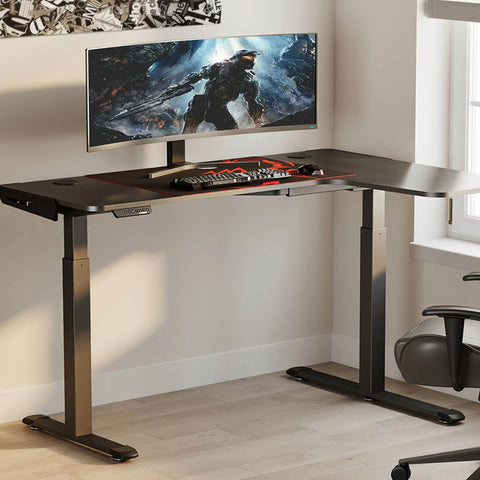
This user typically utilizes a 49-inch super ultrawide monitor and a full-tower liquid-cooled PC.
- The Stress Test: The total weight of this equipment, including the desktop itself, often reaches 82 kg.
- The Motor Load Logic: A single-motor system usually has a capacity of 80 kg. Operating at 102.5% capacity is a "red zone" scenario. For this user, a dual-motor system is mandatory. Operating a dual-motor system (120 kg capacity) at 82 kg places the load at 68.3%, well within the 80% safety threshold recommended for mechanical longevity.
- Visual Ergonomics: For a 49-inch monitor, the THX-recommended viewing distance is approximately 64 inches. On a standard 30-inch deep desk, this creates a 34-inch deficit. This necessitates the use of heavy-duty monitor arms to reclaim desk depth and maintain a healthy focal distance.
Scenario B: The Standard Administrative User
This user employs a laptop and a single 24-inch monitor.
- The Stress Test: Total load is approximately 15–20 kg.
- The Requirement: While a single-motor system is technically sufficient, the emphasis here shifts to material safety (CARB/EPA) and ease of adjustment to encourage a "20-8-2" sit-stand rhythm (20 minutes sitting, 8 minutes standing, 2 minutes moving).
Mechanical Integrity: Motors and Electronics
For electric standing desks, the "wood" is only half the story. The electronics and motors are susceptible to environmental degradation that standards like UL 962 aim to prevent.
Corrosion and Conformal Coating
A frequent failure point in humid environments is the control box or motor housing. Without adequate conformal coating—a thin polymeric film that protects circuit boards from moisture—internal components can corrode. This is especially prevalent when desks are placed against exterior walls in poorly insulated buildings, creating a microclimate of condensation.
BIFMA and Structural Rigidity
The Business and Institutional Furniture Manufacturers Association (BIFMA) provides the "X5.5" standard for desk products. This involves rigorous testing for leg strength, stability under load, and the endurance of the height-adjustment mechanism. A desk that meets BIFMA standards has been "stress-tested" to simulate years of daily use, ensuring that the "wobble" often found in budget desks is minimized.

Practical Recommendations for B2B and Home Buyers
When investing in a workstation intended to last a decade or more, use the following checklist to ensure compliance and quality.
1. Verify the "Under-Seal"
Look for desks where the underside and all edges (including grommet holes) are fully sealed or edge-banded. This prevents moisture ingress. In B2B contracts, specifically ask for test reports regarding EN 14322, which evaluates how materials handle moisture over time.
2. Match Motor Capacity to Load
Do not buy a desk based on its "maximum" capacity. Aim to operate the motor at 70% or less of its rated load. If you use multiple monitors or a heavy PC tower, a dual-motor system is a superior investment for long-term mechanical reliability.
3. Prioritize "Neutral Position" Adjustability
According to the BIFMA G1-2013 Ergonomics Guideline, a desk should accommodate the 5th to 95th percentile of the population. This means the desk must go low enough for a petite user to sit with feet flat (often 22–25 inches) and high enough for a tall user to stand without slouching.
4. Manage Your Microclimate
- Avoid Exterior Walls: In cold climates, keep the desk at least 4 inches away from exterior walls to prevent condensation.
- Use a CPU Holder: Mounting the PC under the desk reduces the load on the motor (if the holder is attached to the frame) and protects the computer from dust and pet hair, which can lead to overheating.

The ROI of Compliance
For a B2B buyer, the return on investment (ROI) for compliant furniture is found in reduced replacement cycles and lower health-related absenteeism. For the home user, it is found in the peace of mind that their workspace is not emitting harmful VOCs.
While "budget" options may satisfy the immediate need for a flat surface, they often lack the engineering required to withstand the synergistic effects of humidity, heavy equipment, and daily mechanical cycles. By prioritizing regional standards like CARB, EPA, and BIFMA, you are not just buying a piece of furniture; you are investing in a durable, health-conscious infrastructure for your professional life.
YMYL Disclaimer: This article is for informational purposes only and does not constitute professional medical, legal, or health advice. Ergonomic requirements can vary significantly based on individual physical conditions. If you have pre-existing musculoskeletal issues or chronic back pain, please consult a qualified physiotherapist or occupational health professional before implementing a new workstation setup.
References
- BIFMA G1-2013 Ergonomics Guideline for Furniture
- U.S. EPA - Facts About Formaldehyde
- OSHA - Identifying Ergonomic Problems
- UL GREENGUARD Certification Overview
- ISO 9241-5:2024 Workstation Layout & Postural Requirements
- Cornell University Ergonomics Web — Workstation Guides





Leave a comment