

The Hidden Health Impact of Gaming Desk Dimensions
Why does a gamer’s back pain often worsen as the afternoon progresses? For many parents and gift-givers, the search for a gaming desk begins with aesthetics—RGB lighting, sleek surfaces, and "pro" branding. However, the most critical factor for long-term health and performance is often the one most overlooked: physical dimensions.
Selecting the wrong desk size is not merely a matter of room fit; it is a decision that directly impacts the user’s musculoskeletal health. A desk that is too high, too shallow, or too narrow forces the body into compensatory postures. Over months and years, these "micro-stresses" accumulate into what clinicians call Musculoskeletal Disorders (MSDs). According to the U.S. Occupational Safety and Health Administration (OSHA), core risk factors for MSDs include repetitive tasks and, crucially, poor posture maintained over long periods.
For a parent, buying a gaming desk is an investment in a child’s or partner’s well-being. This guide moves beyond the marketing hype to provide a rigorous, evidence-based framework for choosing a desk size that supports a "Spinal Neutral Position" and promotes healthy blood circulation during even the most intense gaming sessions.
The Physiological Principles of Ergonomic Sizing
To understand why specific dimensions matter, we must look at how the human body interacts with a workstation. The goal of any ergonomic setup is to minimize "static load"—the physical strain caused by holding a single position for too long.
The Spinal Neutral Position
The human spine is not a straight line; it has natural curves at the neck (cervical), mid-back (thoracic), and lower back (lumbar). An ergonomic desk must allow the user to maintain these curves without effort. When a desk is too high, the shoulders shrug, leading to tension in the trapezius muscles. When it is too shallow, the user often hunches forward to see the screen, collapsing the chest and straining the neck.
Blood Circulation and Static Posture
Sitting for extended periods can lead to blood pooling in the lower extremities. The World Health Organization (WHO) 2020 Guidelines emphasize that reducing sedentary time and interrupting long periods of static behavior are essential for cardiovascular health. This is why height adjustability has transitioned from a luxury to a requirement. A sit-stand desk allows for "micro-movements" that restart the "muscle pump" in the calves, aiding venous return and maintaining energy levels.
The Mechanism of Tissue Adaptation
Based on the pathophysiological mechanisms of MSDs, tissues adapt to the stresses placed upon them. If a desk forces a user into a "forward head" posture because the monitor is too close (a common result of insufficient desk depth), the ligaments and muscles of the neck literally reshape over time, leading to chronic pain and reduced mobility.
Engineering the Solution: The Standards of Desk Sizing
When evaluating a desk, parents should look for adherence to industry standards rather than vague "ergonomic" claims. Authoritative bodies like BIFMA and ISO provide the "blueprint" for furniture that fits the human form.
Width: The "Battlestation" Footprint
A common mistake is selecting a desk based only on the computer tower's size. You must account for the "Dynamic Zone"—the area needed for mouse movement and arm placement.
- Single Monitor: A width of 48 inches (122 cm) is the functional minimum.
- Dual Monitors: At least 60 inches (152 cm) is required to prevent screens from hanging off the edge and to allow for proper speaker placement.
Depth: The 30-Inch Rule
In our experience handling ergonomic assessments, the most frequent error is underestimating desk depth. A depth of less than 30 inches (76 cm) often forces monitors too close to the eyes. This creates a "Viewing Distance Deficit," leading to digital eye strain and a tendency to lean back or hunch forward to compensate for the visual proximity.
Height: The "Forearm Rule"
The BIFMA G1-2013 Ergonomics Guideline provides recommended dimensions for the 5th to 95th percentile of the population. However, a simple heuristic for gift-givers is the Forearm Rule: When sitting upright, the user’s forearms should rest comfortably on the desk surface with a 90-degree angle at the elbow. If the elbows hang off or the shoulders must shrug to reach the surface, the desk is incorrectly sized.

Managing the Depth Deficit with Engineering Controls
While a 30-inch depth is the gold standard for large setups, many modern gaming desks, such as the GTG-L60 Pro, L shaped Glass Gaming Standing Desk (60"x23"), prioritize a sleeker footprint for home offices. In these cases, you can use "Engineering Controls"—a term used by OSHA to describe physical changes to a workstation—to restore ergonomic integrity.
A Single Monitor Arm or a Dual Monitor Arm is the most effective way to solve a depth deficit. By mounting the monitors on an adjustable arm, you can push the screens further back than a traditional stand allows, effectively "creating" depth on a 24-inch or 23-inch desk. This allows the user to maintain the THX-recommended viewing distance for cinematic immersion without sacrificing desk space.

Scenario Modeling: The Tall Gamer vs. Standard Furniture
To demonstrate how dimensions impact the user, we modeled a scenario for a "Tall Competitive Gamer" (195cm / 6'5"). This represents the 95th percentile of male height and highlights the limitations of standard furniture.
Modeling Note (Reproducible Parameters)
Logic Summary: This scenario models a tall user with a high-end triple-monitor setup. Calculations are based on ANSI/HFES 100-2007 anthropometric ratios.
| Parameter | Value | Unit | Rationale |
|---|---|---|---|
| User Stature | 195 | cm | 95th Percentile Male |
| Monitor Configuration | 3 x 34 | inch | Ultrawide Triple Setup |
| Setup Weight | ~86.5 | kg | Full Tower + Monitors + Arms |
| Recommended Sit Height | ~80.5 | cm | Elbow-to-floor ratio |
| Recommended Stand Height | ~119.5 | cm | Elbow-to-floor + Shoe correction |
The Findings
For this user, a standard 29-inch (73.7 cm) fixed-height desk is physically impossible to use ergonomically. It forces a "hunched shoulder" posture, elevating the elbows above the desk level and creating intense trapezius tension. Furthermore, with triple 34-inch monitors, the weight (86.5 kg) exceeds the capacity of many entry-level single-motor desks.
As detailed in The 2026 Workstation White Paper: Converging Ergonomic Science and Sustainable Engineering, high-stature users require dual-motor systems to ensure stability at maximum height. A single-motor desk at its limit will exhibit a perceptible "wobble" during intense mouse movements, which is both distracting and a sign of mechanical strain.
Practical Recommendations for Gift-Givers
When selecting a desk, use this checklist to ensure the gift supports the recipient’s health:
- Verify the Sit-Stand Ratio: Standing all day is just as harmful as sitting all day. The Cornell University Ergonomics Web recommends the 20-8-2 rhythm: 20 minutes of sitting, 8 minutes of standing, and 2 minutes of moving/stretching. A desk like the GTG-L60 Pro, L shaped Glass Gaming Standing Desk (60"x23") makes this transition seamless with programmable height presets.
- Check Room Clearance: A 30-inch deep desk requires approximately 132 inches (335 cm) of total room depth to accommodate the desk, the chair's "Dynamic Zone" (42 inches), and a primary walkway (36 inches).
- Don't Forget the Feet: For shorter users or when sitting at a desk that doesn't go low enough, the feet may dangle, putting pressure on the back of the thighs and restricting circulation. An Adjustable Ergonomic Footrest is an essential accessory to ensure the feet are supported, keeping the knees at a healthy 90-degree angle.
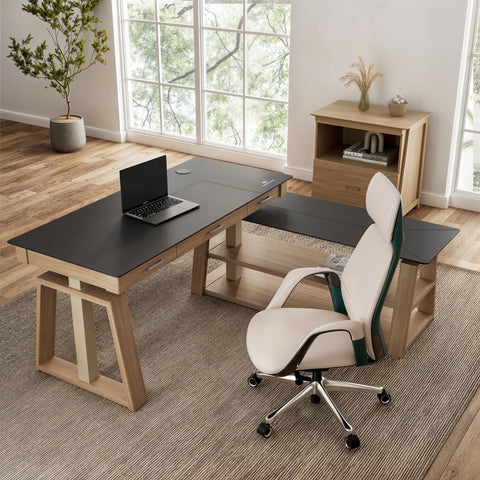
- L-Shaped Logic: If choosing an L-shaped desk, ensure the corner leg does not interfere with the user's chair or leg space. This is a common design oversight that ruins the ergonomic benefit of the extended surface.
Eureka Ergonomic under desk footrest with textured surface for circulation.
Safety and Compliance: Beyond the Measurements
A desk’s "size" also includes its ability to safely hold the equipment you place on it. For parents, safety certifications are the ultimate "trust marks."
- UL 962: This certification covers the electrical and mechanical safety of height-adjustable desks. It ensures the motors won't overheat and the frame won't collapse under its rated load.
- GREENGUARD Gold: Since gaming often happens in small, enclosed bedrooms, indoor air quality is vital. UL GREENGUARD Gold certification ensures the desk has low chemical emissions (VOCs), making it safer for long-term indoor use.
- BIFMA X5.5: This standard tests the structural adequacy of desks, including "tip-over" resistance. This is particularly important for L-shaped desks or desks holding heavy PC towers.
Summary of Ergonomic Sizing
| Feature | Requirement | Why it Matters |
|---|---|---|
| Minimum Width | 48" (Single) / 60" (Dual) | Prevents cramped arms and monitor overhang. |
| Ideal Depth | 30" | Maintains healthy viewing distance and reduces eye strain. |
| Height Range | 24" to 48"+ | Accommodates both sitting and standing for most heights. |
| Weight Capacity | 150 lbs+ | Ensures stability and motor longevity for heavy gear. |
| Certifications | UL 962 / BIFMA | Guarantees mechanical safety and structural integrity. |
Choosing the right gaming desk size is a balance of room logistics and human physiology. By prioritizing depth, height adjustability, and verified safety standards, you aren't just buying furniture—you are engineering a healthier, more productive environment for the gamer in your life.
YMYL Disclaimer: This article is for informational purposes only and does not constitute professional medical advice. Ergonomic requirements can vary significantly based on individual physical conditions. If the user has pre-existing musculoskeletal issues or chronic back pain, please consult a qualified physiotherapist or occupational health professional before making significant changes to a workstation setup.
References
- BIFMA G1-2013 Ergonomics Guideline for Furniture
- OSHA eTools: Computer Workstations - Neutral Working Postures
- WHO 2020 Guidelines on Physical Activity and Sedentary Behaviour
- ISO 9241-5:2024 Workstation layout & postural requirements
- Cornell University Ergonomics Web — Workstation Guides
- Cochrane: Workplace interventions for reducing sitting at work
- The 2026 Workstation White Paper: Converging Ergonomic Science and Sustainable Engineering




Leave a comment