

Don't Let a Small Apartment Cramp Your Work Style
Working from home in a compact apartment often feels like a compromise. You want the comfort of a dedicated workspace, but you don't have the square footage for a separate office. Many people end up working from the sofa or a dining chair, leading to persistent neck strain, back pain, and a dip in productivity. But what if the solution wasn't a traditional office chair, but something far more comfortable and versatile?
Enter the ergonomic recliner. Far from being just a place for an afternoon nap, a modern recliner can be the centerpiece of a highly effective and comfortable small-space workstation. This guide will show you how to select the right recliner and set it up to create an ergonomic oasis that supports both focused work and deep relaxation, even in the tightest of spaces.

The Ergonomic Advantage of a Recliner Workstation
The most significant health risk in a desk job isn't just sitting, but static sitting. Holding a single, rigid posture for hours on end is what leads to musculoskeletal strain. An ergonomic recliner, by its very nature, encourages dynamic movement and posture variation, which is a core principle of workplace health.
Debunking the Myth: Productivity vs. Relaxation
A common myth is that recliners are inherently bad for work posture and encourage laziness. In reality, the opposite can be true when set up correctly. Traditional upright chairs can force your lower back into a stressful 90-degree angle. A slight recline of 10-20 degrees can actually open up your torso angle, reduce pressure on your spinal discs, and promote better blood circulation. According to OSHA's eTools for computer workstations, achieving a neutral body posture where muscles are relaxed is the primary goal. A supportive recliner makes it easier to find and maintain this neutral state, reducing the physical stress that drains mental energy.
The Dual-Purpose Powerhouse for Small Spaces
In a small home, every piece of furniture needs to earn its keep. A recliner serves as both a high-performance work chair and a comfortable lounge seat. This dual functionality eliminates the need for separate pieces of furniture, freeing up valuable floor space and creating a more cohesive, less cluttered living area. It's a minimalist approach that maximizes both comfort and utility.

Choosing the Right Ergonomic Recliner: A Feature Checklist
Not all recliners are created equal. For a recliner to function as an effective workstation chair, it must have the right ergonomic features. A mistake I often see is people choosing a deep, plush recliner that feels great for five minutes but forces them into an awkward, forward-leaning posture during work. Always prioritize ergonomic support over a "sink-in" feeling.
Here is a checklist of what to look for, based on established ergonomic principles:
| Feature | What to Look For & Why | Common Pitfall to Avoid |
|---|---|---|
| Seat Dimensions | Seat Height: Should allow your feet to rest flat on the floor with knees at a 90-100° angle. Seat Depth: Should be roughly your thigh length minus 2-3 cm, leaving space behind your knees. | Choosing a seat that is too deep. This forces you to either slouch back or sit on the edge, eliminating back support. |
| Lumbar Support | Firm, contoured support that matches the natural curve of your lower back. This prevents posterior pelvic tilt, the slouching that flattens your spine. | Overly soft or pillowy backrests that provide no real structural support, causing your lower back to round after 30 minutes. |
| Recline & Swivel | A smooth recline mechanism and a 360° swivel base provide flexibility to change your position and orientation easily without straining. | A manual recline that requires significant force to operate, or a fixed base that limits movement in a tight space. |
| Material | Breathable fabrics or mesh. In a small, potentially stuffy room, these materials improve thermal comfort during long work sessions, as noted in our guide on how a breathable chair boosts productivity. | Non-breathable leather or vinyl, which can trap heat and cause discomfort and sweating during extended periods of sitting. |
| Armrests | Padded and positioned to allow your shoulders to remain relaxed and your elbows to rest at a roughly 90-degree angle. | Armrests that are too high (shrugging shoulders) or too low (leaning to one side), creating neck and shoulder strain. |
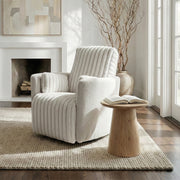
For instance, a model like the Grayson, Manual Recliner Chair Rocking Swivel with Storage integrates many of these features. Its chenille fabric is breathable, the swivel base offers flexibility, and its compact design includes hidden storage—a critical bonus for small spaces.

The Blueprint for a Perfect Recliner Workstation Setup
Once you've chosen the right recliner, the next step is to build your workstation around it. Proper setup is the key to unlocking the ergonomic benefits and avoiding strain. This is where we translate guidelines from authorities like Cornell University's Ergonomics Web into practical steps.

Step 1: Find Your Neutral Reclined Posture
Start by adjusting the recliner to a slight recline, typically between 10 and 20 degrees. Your back should be fully supported by the chair, from your lumbar region to your shoulders. Your head should rest comfortably against the headrest, with your chin in a neutral position, not jutting forward. This posture minimizes the gravitational load on your spine.
Step 2: Position Your Monitor for Eye-Level Comfort
A common setup error is leaving the laptop on your lap, forcing your neck into severe flexion. This is a direct path to strain. Instead, you must elevate your screen.
- Height: The top of your monitor should be positioned at or slightly below your eye level. When reclined, this means the screen will be higher than it would be on a standard desk.
- Distance: Keep the screen at about an arm's length away (typically 60-80 cm). This allows you to see the entire screen without moving your head.
- Angle: Tilt the monitor back slightly so it is perpendicular to your line of sight. This prevents you from having to crane your neck up or down.
Using a monitor arm mounted to a nearby surface or a sturdy laptop stand is essential for achieving this.
Step 3: Arrange Your Keyboard and Mouse for Neutral Wrists
Typing with your keyboard on your lap forces your wrists into an extended position, a known risk factor for Repetitive Strain Injury (RSI). The solution is a separate, height-adjustable surface.
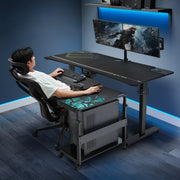
This is where a product like the Mobile Height Adjustable CPU Cart becomes a game-changer. It’s not just for a CPU; its adjustable height (from 22 9/16'' to 32 11/16'') and mobility make it the perfect side table for your keyboard and mouse. Adjust the surface height so that when you type, your wrists remain straight (neutral) and your elbows are bent at a comfortable 90-100 degree angle. This simple fix was the key to eliminating my own wrist pain during long writing sessions.

Step 4: Don't Forget Your Feet
If the recliner’s seat height doesn’t allow your feet to rest flat on the floor, you must use a footrest. This provides stability and prevents pressure on the backs of your thighs, which can restrict blood circulation. Avoid soft poufs that your feet sink into; opt for a firm, adjustable footrest that allows you to maintain that crucial 90-100 degree knee angle.
Optimizing Your Workflow: The Recliner Work-Rest Rhythm
Ergonomics is not just about equipment; it's also about behavior. Even in the most perfect setup, staying static for too long is harmful. The World Health Organization's guidelines emphasize the importance of interrupting long periods of sedentary behavior. I found that a structured rhythm was the key to all-day energy.
Adopt a "work-recline" cycle similar to the popular sit-stand ratio:
- 45-60 Minutes of Focused Work: Sit in your neutral, slightly reclined work posture. Engage in your tasks without interruption.
- 10-15 Minutes of Relaxed Recline: After a work block, fully recline the chair. Take your hands off the keyboard, close your eyes, or do some gentle stretches. This allows your muscles to relax and your spine to decompress.
This cycle prevents static loading and keeps your body feeling fresh. It’s a principle you can learn more about in our article on finding your optimal sit-stand ratio, as the concept of posture variation is universal.
Wrapping Up: Key Takeaways for Your Compact Ergonomic Oasis
Creating a productive and comfortable workspace in a small home office doesn't require a traditional desk and chair. An ergonomic recliner, when chosen and set up with care, offers a superior solution that enhances well-being without sacrificing performance.
Remember these key principles:
- Choose Wisely: Prioritize a recliner with correct seat dimensions, firm lumbar support, and breathable materials, like the Lucia,Swivel Rocking Manual Recliner, whose compact, ergonomic design and soft fabric are ideal for home use.
- Set Up for Success: Elevate your monitor to eye level and use an adjustable surface for your keyboard and mouse to maintain neutral postures.
- Work in Rhythms: Alternate between focused work sessions and relaxed recline breaks to combat static posture fatigue.
By following this blueprint, you can transform a corner of your small apartment into a powerful hub of productivity and a sanctuary for relaxation.
Frequently Asked Questions (FAQ)
Is working from a recliner bad for my back?
Not if it's an ergonomic recliner set up correctly. A supportive recliner that allows for a slight recline (10-20 degrees) can actually reduce spinal pressure compared to sitting upright in a traditional chair. The key is ensuring proper lumbar support and pairing it with correct monitor and keyboard placement to maintain a neutral spine. You can explore more on this topic in our article discussing if ergonomic chairs can relieve sciatica and lower back pain.
How much space do I need behind a recliner?
This is a critical consideration for small spaces. Before buying, check the product specifications for recline clearance. As a general rule, you should plan for at least 20-30 cm (8-12 inches) of empty space behind the chair to allow for a full, unobstructed recline motion.
Can I use a recliner for gaming?
Absolutely. The ergonomic principles for a work setup apply equally to a gaming setup. Maintaining a neutral posture, ensuring proper screen height and distance, and keeping your wrists straight are essential for preventing strain during long gaming sessions. A swivel base is particularly useful for immersive gaming environments.
Disclaimer: This article is for informational purposes only and does not constitute professional medical advice. If you have pre-existing health conditions, such as chronic back pain, consult with a physician or a certified ergonomist to determine the best workstation setup for your specific needs.
References
- Cornell University Ergonomics Web — Workstation Guides: https://ergo.human.cornell.edu/ergoguide.html
- OSHA eTools: Computer Workstations - Neutral Working Postures: https://www.osha.gov/etools/computer-workstations/positions
- WHO 2020 Guidelines on Physical Activity & Sedentary Behaviour: https://www.who.int/publications/i/item/9789240015128





Leave a comment