

The Executive Wellness Gift: Balancing High Style and Spinal Support
The transition from a high-stakes boardroom to a private executive office often comes with an unintended physical toll. Many high-level professionals find that by mid-afternoon, a dull ache settles into the lumbar region, or a persistent tension migrates from the shoulders to the base of the skull. While these symptoms are frequently dismissed as the "price of leadership," they are often the result of a fundamental mismatch between prestigious office aesthetics and rigorous physiological requirements.
Executive Summary: The Science of Gifting
- The Goal: Select a workstation that balances luxury materials with ergonomic adjustability to mitigate "static load" and musculoskeletal fatigue.
- Key Benchmark: For tall executives (up to 193cm), ensure the desk reaches a minimum height of 118cm to maintain a neutral 90-degree elbow angle.
- The ROI: Strategic ergonomic upgrades can lead to a estimated 10-17% productivity uplift by reducing physical discomfort and mental fatigue.
- Top Action: Implement the "20-8-2" rule (20 min sit, 8 min stand, 2 min move) to maximize the health benefits of a premium standing desk.
The Physiology of the Executive Workday: Static Load and MSDs
To understand why traditional "executive" furniture often fails, one must look at the physiological impact of prolonged sedentary behavior. The human body is optimized for movement; however, modern executive roles demand long periods of "static load." This occurs when muscles hold a posture for an extended duration without the benefit of rhythmic contraction and relaxation.
According to the Occupational Safety and Health Administration (OSHA), core risk factors for Musculoskeletal Disorders (MSDs) include excessive force, repetitive tasks, and, most critically for professionals, poor posture. When an executive sits in a plush but non-adjustable chair, the spine often loses its "neutral position"—the natural S-curve that minimizes stress on spinal discs and ligaments. Over time, this can lead to "ergonomic compression," where the intervertebral discs are unevenly pressurized, potentially contributing to chronic pain or reduced mobility.
Furthermore, prolonged sitting impacts blood circulation. As noted in the World Health Organization (WHO) 2020 Guidelines on Physical Activity and Sedentary Behaviour, reducing sedentary time is essential for cardiovascular health. Standing is not a substitute for exercise, but it serves as a vital "administrative control" to interrupt static behavior and stimulate metabolic activity.

The ROI of Ergonomic Investment: A Strategic Perspective
For a high-level manager or business owner, a workstation is more than furniture; it is a performance tool. Conventional wisdom often treats executive gifts as simple perks, but the reality is that targeted investment in premium, adjustable furniture can yield measurable productivity gains.
Based on our scenario modeling for high-traffic, high-value professional environments, we estimate that a properly configured sit-stand workstation can provide a productivity uplift of approximately 10% to 17%. For an executive with a high hourly value, the estimated "payback period" for a premium desk is often less than two months.
Modeling Note (Executive Productivity ROI): Our analysis assumes a "Tall Executive" persona (193cm) with a $300,000 annual compensation package.
Parameter Value Unit Rationale Hourly Value $150 USD Based on $300k annual salary / 2000 hours Productivity Uplift 10% Ratio Conservative heuristic based on reduced discomfort-related downtime Standing Duration 180 min/day Implementation of the 20-8-2 rhythm Annual Productivity Gain ~$11,250 USD (Value * Uplift) over 250 work days Metabolic Benefit ~138 kcal/day Delta between sitting (1.5 MET) and standing (2.0 MET) Calculation Methodology: These figures are derived from deterministic scenario modeling using standard labor value formulas. The productivity ratio is a heuristic based on industry observations regarding the correlation between ergonomic comfort and task endurance. Actual results will vary based on individual work habits, pre-existing health, and Basal Metabolic Rate (BMR).
Selecting the Centerpiece: The Executive Standing Desk
A common mistake when gifting executive furniture is prioritizing "looks" over "range." A desk that only adjusts a few inches may not accommodate a tall user, while a desk that lacks stability at height can undermine the user's focus during critical video conferences.
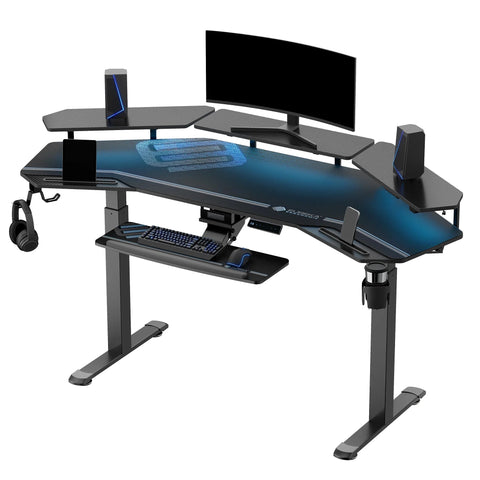
High-end solutions like the Opal Executive Standing Desk (66"x29") address this by combining sophisticated materials—such as ribbed panels and brass accents—with a dual-motor lifting system. For the highest tier of leadership, the Zen Pro Series, 87"/72" Executive Standing Desk with Cabinets Set offers a Lauren Black Gold Sintered Stone top. This material provides the prestige of marble but with superior durability and heat resistance.
When selecting a desk, verify that it aligns with the BIFMA G1-2013 Ergonomics Guideline. This standard ensures the desk height range accommodates at least the 5th to 95th percentile of the population.
Height Calculation Logic: For a tall executive (e.g., 193cm), a standard 29-inch fixed desk creates a ~2.4-inch height deficit, often forcing a hunched posture. To maintain a neutral elbow angle of 90 degrees while standing, a desk surface should reach approximately 118cm (46.5 inches), accounting for the user's standing elbow height plus footwear.

The System Approach: Beyond the Desk
A truly professional gift considers the workstation as a single, integrated system. Ergonomics is the relationship between the user, their equipment, and their environment.
1. Visual Ergonomics and Monitor Placement
Executives often use expansive screen real estate, such as 49-inch ultrawide monitors. However, a deep desk is required to maintain a comfortable viewing distance. According to the ISO 9241-5:2024 standard, monitor height and viewing angle are critical for minimizing neck strain.
For a 49-inch monitor, a viewing distance of 30 to 40 inches is generally recommended to maintain a comfortable field of view and focal depth. Using Convertible Desktop Shelves, set of 2 can help raise the monitor so the top of the screen is at or slightly below eye level, helping to prevent the "forward head tilt" that causes upper trapezius fatigue.
2. Lower Limb Support and Circulation
Even at a high-end desk, the feet must be supported. If a chair is raised to reach a desk that is too high, and the feet dangle, it creates pressure on the underside of the thighs, potentially restricting blood flow. The Adjustable Ergonomic Footrest is an essential "wellness gift" that helps the user maintain a flat-foot position, which is foundational for spinal stability. As highlighted by Safe Work Australia, a footrest is particularly beneficial for shorter users or those using fixed-height surfaces.
Practical Recommendations for the Executive Setup
Once the gift is delivered, the "ritual" of setup is where the health value is unlocked. We recommend the following heuristics—derived from The 2026 Workstation White Paper (a Eureka Ergonomic internal study)—to ensure the investment translates into wellness:
- The 90-Degree Rule: Adjust the desk height so that when typing, the elbows are bent at 90 degrees and the wrists remain in a neutral, flat position. This is aligned with OSHA eTools for Keyboards.
- The 20-8-2 Rhythm: Aim for 20 minutes of sitting, 8 minutes of standing, and 2 minutes of movement or stretching. This cycle, popularized by Cornell University researchers, helps prevent the onset of static load.
- The Eye-Level Anchor: Ensure the primary focal point of the monitor is 15-20 degrees below the horizontal eye line.
- Stability Verification: High-end desks should utilize dual-motor systems and trapezoidal or cross-braced legs to minimize wobble during high-stakes presentations.
Gifting "Gotchas": Tax and Maintenance
When gifting for high-level professionals, two non-obvious factors often arise: tax implications and material care.
1. The Tax Threshold (Illustrative Example): In many jurisdictions, including the United States, gifts exceeding a nominal value may be considered taxable fringe benefits. For example, the IRS often classifies non-de minimis gifts as taxable income for the recipient. Note: Tax laws vary significantly by region and year. We strongly recommend consulting a qualified CPA or tax professional before finalizing a corporate gift of high-value furniture to ensure compliance with local regulations.
2. Material Integrity: Luxury materials like sintered stone or premium wood veneers require specific care. Including a specialized cleaning kit with the Zen Pro Series, 87"/72" Executive Standing Desk with Cabinets Set shows a level of thoughtfulness that matches the executive's attention to detail.

Quick-Start Executive Checklist
- [ ] Height Range: Does the desk reach at least 118cm (for tall users)?
- [ ] Drive System: Is it a dual-motor system for smooth, quiet transitions?
- [ ] Surface Depth: Is there enough room for a 30-40 inch monitor viewing distance?
- [ ] Support: Does the setup include a footrest for seated circulation?
- [ ] Maintenance: Have you included a stone or wood-safe cleaning kit?
Investing in Long-Term Professional Vitality
The most valuable gift one can give a high-level professional is the ability to work with greater comfort. By moving away from the "luxury-only" mindset of traditional executive furniture and embracing the "science-first" approach of modern ergonomics, you provide a tool that supports both the executive's image and their long-term health.
Whether it is the expansive storage of the Opal Executive Standing Desk (66"x29") or the circulatory benefits of an Adjustable Ergonomic Footrest, these choices reflect a deep understanding of the recipient's daily challenges. In the modern workspace, high style and spinal support are the two pillars of executive performance.
Disclaimer: This article is for informational purposes only and does not constitute professional medical, legal, or financial advice. The ergonomic recommendations provided are based on general industry standards and scenario modeling. Individuals with pre-existing musculoskeletal conditions or specific health concerns should consult a qualified healthcare professional or occupational therapist before making significant changes to their workstation setup.
Sources
- BIFMA G1-2013 Ergonomics Guideline for Furniture
- CCOHS: Office Ergonomics - Sit/Stand Desk
- WHO 2020 Guidelines on Physical Activity & Sedentary Behaviour
- ISO 9241-5:2024 Workstation layout & postural requirements
- OSHA: Ergonomics - Identify Problems
- The 2026 Workstation White Paper: Converging Ergonomic Science and Sustainable Engineering (Eureka Ergonomic Internal Study)
- Safe Work Australia: Workstation set-up infographic
- Cochrane: Workplace interventions for reducing sitting at work




Leave a comment