

The Agility Tax: Why Static Furniture Hinders Startup Velocity
In the high-stakes environment of agile software development, the only constant is change. Teams reconfigure for new sprints, "war rooms" are established for critical deployments, and seating charts evolve as rapidly as the codebases they support. However, many tech companies overlook a critical friction point: the physical immobility of the workstation. When office furniture is fixed or equipped with substandard mobility solutions, the "agility tax" manifests as lost productive hours, increased risk of workplace injury, and a fundamental breakdown in collaborative flow.
A common misconception among procurement teams is that heavy-duty casters are a luxury or a purely aesthetic "add-on." In reality, the choice of workstation mobility is a strategic engineering decision. According to research insights regarding workspace reconfiguration, mobile furniture can reduce workspace reset time by 70–85% compared to fixed layouts. For a team conducting frequent reconfigurations, this translates to reclaiming 5–10 hours per month of high-value development time.
The Biomechanics of Mobility: Preventing Musculoskeletal Disorders (MSDs)
The necessity of high-performance casters extends beyond operational efficiency; it is a matter of musculoskeletal health. The U.S. Occupational Safety and Health Administration (OSHA) identifies excessive force and awkward postures as primary risk factors for Musculoskeletal Disorders (MSDs). When staff members attempt to slide or lift heavy, static desks to reorganize a collaborative space, they subject themselves to acute spinal load and potential soft-tissue strain.
The Physiology of Static Load and Movement
Working in an agile environment often requires shifting between individual focus and group collaboration. If moving a workstation is difficult, employees are more likely to remain in a suboptimal, static position for hours. As noted by EU-OSHA, prolonged static sitting leads to reduced blood circulation and increased pressure on intervertebral discs.
By integrating heavy-duty casters, the workstation transforms from a static weight into a dynamic tool. This aligns with the "Hierarchy of Controls" framework provided by OSHA, where engineering controls—such as mobility-enhanced furniture—are prioritized over administrative controls like "taking breaks" because they fundamentally remove the hazard of manual material handling.
Engineering the Agile Station: A Technical Load Analysis
To understand why "heavy-duty" is the required standard for tech teams, one must analyze the cumulative weight of a modern professional setup. A standard developer workstation is no longer just a laptop; it is a complex array of high-performance hardware.
Modeling the High-Performance Workspace
We modeled a typical agile workstation setup to determine the actual stress placed on mobility components. This scenario assumes a 180cm tall developer (75th percentile height) utilizing a dual-monitor configuration.
| Parameter | Value | Rationale / Source |
|---|---|---|
| Mid-Tower PC Weight | ~15 kg | Standard developer hardware |
| Dual 34" Ultrawide Monitors | ~18 kg | Including stands/arms |
| Dual-Motor Desk Frame | ~30 kg | Professional-grade stability |
| Tabletop (1.6m Composite) | ~20 kg | [BIFMA X5.5 Standard Weight] |
| Total System Load | ~83 kg (183 lbs) | Calculated cumulative weight |
Logic Summary: Our analysis assumes a static distributed load. However, practitioners recommend selecting casters rated for at least 50% more than the calculated static load to account for dynamic forces—such as the momentum generated when a desk is pushed across a floor transition or carpet edge.

Under this load, standard plastic casters often fail. They develop "flat spots," increase rolling resistance, and can eventually crack under the stress of a 180-lb workstation. This is why professional-grade solutions, such as those discussed in The 2026 Workstation White Paper: Converging Ergonomic Science and Sustainable Engineering, prioritize structural integrity and material science in their mobility components.
Practical Recommendations: Selecting the Right Caster System
Not all wheels are created equal. For agile startup teams, the selection process must balance maneuverability with stability.
1. Swivel vs. Dual-Wheel Locking Casters
Based on patterns from customer support and warranty handling, a frequent mistake is choosing the wrong caster type for the specific task.
- Swivel Casters: Offer superior 360-degree maneuverability. These are ideal for open-plan areas where desks are moved in multi-directional paths to form "pods."
- Dual-Wheel Locking Casters: Provide a "planted" feel. These are essential for standing desks where even minor vibrations from typing can be amplified by monitor arms. The locking mechanism ensures that once the "war room" is set, the desks remain immobile during intense focus sessions.
2. Material Matters: Polyurethane vs. Hard Plastic
For tech offices with hardwood, laminate, or polished concrete floors, polyurethane (PU) wheels are non-negotiable. Hard plastic or metal wheels are a frequent source of expensive floor damage and disruptive noise in collaborative spaces. PU wheels provide the necessary grip to prevent "skating" while offering enough cushion to dampen sound and protect floor finishes.
3. Integrating Mobile Accessories
To maintain true agility, the entire workstation ecosystem must be mobile. Peripheral components, such as the Mobile Height Adjustable CPU Cart, allow the most sensitive hardware (the PC tower) to move in tandem with the desk. This prevents cable strain—a common "gotcha" where a desk is moved but the PC remains tethered, leading to port damage or disconnected sessions.
For teams requiring more specialized aesthetics or visibility, the Height-Adjustable Illuminated Panel CPU Cart provides the same mobility benefits while enhancing the visual environment of the workspace.

Ergonomic Precision and Spatial Planning
When workstations become mobile, spatial planning becomes a dynamic exercise. According to BIFMA G1-2013 Ergonomics Guidelines, furniture must accommodate the 5th to 95th percentile of the population. Mobility aids this by allowing users to adjust their environment to their specific anthropometric needs.
The "Vision-Quest" Viewing Distance
Mobile desks allow for the optimization of viewing angles. For a 34-inch ultrawide monitor, our modeling suggests a recommended viewing distance of ~27 inches to maintain a 60-degree field of view. A mobile setup allows developers to easily shift their desk depth relative to walls or other furniture to achieve this ergonomic sweet spot without being constrained by floor outlets or fixed partitions.
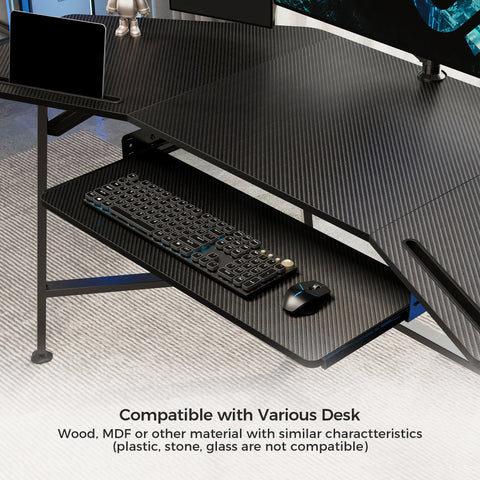
To further optimize the workspace, the use of a Dual Monitor Arm and a Pull-out Keyboard Tray ensures that even when the desk is in motion, the relative "Neutral Position" of the user's joints is maintained.
Safety Standards and Compliance
Agile teams must not sacrifice safety for speed. When outfitting a workspace with heavy-duty casters, ensure the components meet international safety standards:
- ANSI/BIFMA X5.5: This standard covers desk products and includes specific tests for desk stability and the durability of adjustment mechanisms.
- UL 962: For electric height-adjustable desks, UL 962 provides essential safety assessments regarding mechanical and electrical integrity.
- ISO 9241-5:2024: The latest international standard for workstation layout and postural requirements, emphasizing the need for furniture that supports frequent posture changes.
Preventing Tip-Overs
A mobile workstation with a high center of gravity (e.g., a standing desk with multiple monitors) presents a tip-over risk if the base is too narrow or the casters are too small. We recommend a base-to-height ratio that ensures stability even at the desk’s maximum elevation. Always engage the caster locks when the desk is at standing height to prevent unintended movement during use.
The ROI of Workspace Mobility
Investing in heavy-duty casters is an investment in a startup’s most valuable asset: its people. By reducing the time required to reconfigure teams and eliminating the physical strain of manual furniture movement, companies can foster a culture of true agility.
Beyond the immediate productivity gains, the long-term health benefits are significant. As confirmed by a meta-analysis in Santos et al. (2025), ergonomic interventions significantly reduce work-related musculoskeletal pain. When mobility is effortless, the barriers to creating an ergonomically sound, collaborative environment disappear.
For agile teams, the question is no longer whether they can afford heavy-duty casters, but whether they can afford the cost of remaining static.
Disclaimer: This article is for informational purposes only and does not constitute professional medical, legal, or occupational health advice. Always consult with a qualified ergonomic specialist or healthcare provider before making significant changes to your workstation or physical work routine, especially if you have pre-existing musculoskeletal conditions.
References
- BIFMA G1-2013 Ergonomics Guideline for Furniture
- OSHA: Ergonomics - Solutions to Control Hazards
- CDC / NIOSH: About Ergonomics and MSDs
- ISO 9241-5:2024 Workstation layout & postural requirements
- Cochrane: Workplace interventions for reducing sitting at work (2018)
- The 2026 Workstation White Paper: Converging Ergonomic Science and Sustainable Engineering
- Santos et al., 2025 – Ergonomic Interventions & Musculoskeletal Pain



Leave a comment