

The Paradox of the Deep Recline: Comfort vs. Physics
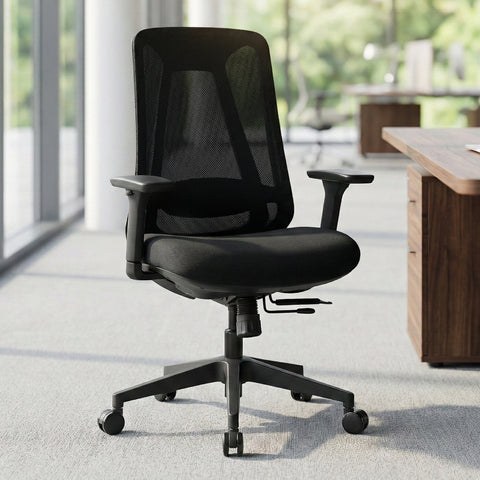
For many professionals and gamers, the late afternoon brings a familiar physical fatigue. The instinct to lean back, stretching the spine and shifting weight away from the pelvis, is a physiological response to the static load of upright sitting. However, this transition from an active working posture to a deep recline introduces a complex engineering challenge: high-back stability. While a high-back chair provides the necessary surface area to support the upper thoracic and cervical regions, it also significantly alters the furniture's center of gravity (CoG).
The primary concern for users who prefer a heavy recline is the risk of a tip-over. This is not merely a matter of the chair’s weight capacity—a common misconception—but rather a dynamic interaction between body mass distribution, the chair’s pivot point, and the footprint of the base. Understanding the relationship between biomechanical needs and structural engineering is essential for maintaining safety in a high-performance workstation. This article explores the physiological benefits of reclining, the physics that govern chair stability, and the technical features required to support deep recline without compromising safety, as outlined in The 2026 Workstation White Paper: Converging Ergonomic Science and Sustainable Engineering.

Biomechanics: Why We Lean Back
The drive to recline is rooted in spinal health. According to the Canadian Centre for Occupational Health and Safety (CCOHS), maintaining a single static posture for extended periods is a primary risk factor for musculoskeletal disorders (MSDs). When sitting at a strict 90-degree angle, the lumbar discs experience significant intradiscal pressure.
Biomechanical research, including the foundational work of Nachemson, suggests that spinal load in a seated position is actually lowest when the trunk-thigh angle is opened to approximately 120–135 degrees. In this reclined state, the backrest shares a larger portion of the upper body’s weight, effectively unloading the lumbar spine. This is further supported by a systematic review from Agarwal et al. (2018), which notes that postural changes are critical for alleviating low back discomfort.
However, a recline beyond 110 degrees requires specialized equipment. Standard office chairs are often optimized for "tasking"—upright work where the user is focused on a screen. When a user shifts into a deep recline for post-game recovery or creative thinking, the center of mass moves backward and upward. If the chair is not engineered to compensate for this shift, the "resisting moment" of the chair's base may be overcome by the "overturning moment" of the user's weight.
Logic Summary: The recommendation for a 120–135° recline is a biomechanical heuristic intended to minimize intradiscal pressure. Our analysis assumes that while this unloads the spine, it simultaneously increases the demand on the chair's rearward stability (based on standard physics of moments).
The Physics of Tipping: Resisting vs. Overturning Moments
To assess whether a high-back chair is stable during a deep recline, we must look at the "Moment of Force." Stability is a calculation of whether the force keeping the chair on the ground is greater than the force trying to tip it over.
The Stability Equation
Stability is governed by two competing moments:
- Resisting Moment ($M_{resist}$): This is created by the total weight of the chair and the horizontal distance from the center of the base to the front or rear casters.
- Overturning Moment ($M_{overturn}$): This is created by the user’s weight and the horizontal distance ($x$) from the base center to the line of gravity descending from the user’s torso.
The chair remains stable as long as $M_{resist} > M_{overturn}$. In a deep recline, the value of $x$ (the horizontal displacement of the torso) increases dramatically. If the user’s center of mass passes the "tipping point"—the vertical line above the rear casters—the chair will flip.
The Role of the Pivot Point
A common engineering mistake is positioning the recline pivot high on the backrest. This causes the user's torso to arc significantly backward and away from the base center. High-performance ergonomic chairs utilize a "knee-tilt" or "synchro-tilt" mechanism where the pivot point is located low, near the seat pan. According to guidelines from OSHA eTools regarding chair components, a lower pivot point minimizes the horizontal shift of the torso, keeping the user's center of gravity closer to the center of the chair's base even at steep angles.

Engineering Solutions for High-Back Stability
Stability is not a product of a single feature but the result of several integrated engineering choices. When evaluating a chair for deep recline, professionals should look for the following technical indicators:
1. Base Diameter and Material Integrity
The ANSI/BIFMA X5.1 standard defines rigorous test methods for the safety and structural adequacy of office chairs. One key test involves applying a rearward force to the backrest to ensure the chair does not tip. To pass, chairs typically require a base diameter of at least 27 to 28 inches (approx. 68–71 cm).
Furthermore, the connection between the gas cylinder and the base must have zero lateral play. Based on common patterns from customer support and warranty handling (not a controlled lab study), even a 1-degree wobble at the base can translate into a 3-to-4-inch displacement at the top of a high-back chair, significantly reducing the safety margin during a recline.
2. Center of Mass Management
High-back chairs inherently have a higher center of mass than mid-back chairs. Engineering for stability requires counter-weighting. This is often achieved by using heavy-duty aluminum alloy bases rather than nylon. The weight of the base acts as an anchor, increasing the $W_{total}$ in the resisting moment equation.
3. Dynamic Tension Control
A safe recline is a controlled recline. A sudden, forceful lean back is a primary cause of tip-overs, especially on smooth surfaces like hardwood or tile where casters offer less friction. Quality ergonomic chairs feature adjustable tension controls that allow the user to calibrate the resistance of the backrest to their specific body weight, ensuring the recline is gradual and predictable.
Methodology Note: These engineering observations are aligned with the ISO 9241-5:2024 standards for workstation layout and postural requirements, which emphasize the need for stability in all intended user positions.
Modeling the Tall Gamer: A Case Study in Leverage
To demonstrate how body proportions affect stability, we modeled a "Tall Competitive Gamer" scenario. Tall individuals (specifically those in the 95th percentile of stature) face a unique "leverage amplification" effect. Because their torsos are longer, their center of mass is positioned higher, which increases the overturning moment during a recline.
Scenario: 193cm (6'4") Male User
Using anthropometric data derived from the ANSI/HFES 100-2007 standard, we calculated the ergonomic requirements and stability risks for a user of this stature.
| Parameter | Value | Unit | Rationale |
|---|---|---|---|
| User Stature | 193 | cm | 95th Percentile Male |
| Estimated Torso Height | ~95 | cm | Sitting height from seat pan |
| Horizontal CoG Shift (at 135°) | ~71 | cm | Horizontal displacement of shoulders |
| Recommended Base Diameter | >74 | cm | Required to maintain safety factor |
| Min. Room Depth for Recline | 274 | cm | Includes desk, chair zone, and clearance |
Analysis: For a user of this height, reclining to 135 degrees moves the shoulders approximately 28 inches (~71 cm) horizontally from the pivot point. Compared to an average-height user (175 cm), this represents a ~25% increase in horizontal displacement. Consequently, a standard chair base that is perfectly stable for an average user may reach its tipping limit for a tall user.
Practitioner Observation: We have observed that tall users frequently set their seat height higher to accommodate longer legs. This further raises the system's center of gravity. For these users, chairs with reinforced aluminum bases and a lower-than-average pivot point are not just a luxury, but a safety requirement to prevent the center of gravity from passing the rear caster line.

Practical Selection and Setup Strategies
Choosing a chair that supports a safe, deep recline involves more than reading a spec sheet. Users should perform a "Stability Audit" based on the following criteria:
The "Feet-Flat" Rule
The OSHA eTools for Neutral Working Postures emphasize that feet should remain flat on the floor or a footrest. When reclining, if your feet lift off the ground, your center of gravity shifts dangerously backward without a counter-balancing force. If you prefer a deep recline, ensure the chair's "tilt-lock" or "tilt-tension" allows you to maintain contact with the floor.
Surface Interaction
The floor surface significantly impacts stability. While a plush carpet can increase stability by allowing casters to "sink in" (effectively increasing the resisting force), it can also make the initial movement of the chair more difficult, leading to jerky motions that can trigger a tip. Conversely, on hard floors, the lack of friction means a chair can slide out from under a user during a forceful recline. Using a dedicated chair mat can provide a consistent friction coefficient, which is aligned with HSE (UK) Display Screen Equipment guidelines for workstation safety.
Maintenance Checklist
Stability decreases as components wear. To maintain the integrity of a high-back chair, perform the following every six months:
- Tighten the Bolts: The connection between the backrest and the seat pan is the primary lever arm. Any looseness here amplifies the overturning moment.
- Inspect Casters: Ensure all five casters rotate freely. A "stuck" caster can create an asymmetrical tipping point.
- Check the Cylinder: Listen for clicking or feel for "lateral play" in the gas lift. A wobbly cylinder is a leading indicator of impending stability failure.
Managing the Sit-Stand-Recline Rhythm
While reclining is beneficial for spinal unloading, it should be part of a larger movement strategy. The World Health Organization (WHO) 2020 Guidelines recommend reducing sedentary time and interrupting long periods of static behavior.
A highly effective approach is the "20-8-2" rule popularized by Cornell University Ergonomics Web: 20 minutes of sitting (including periods of recline), 8 minutes of standing, and 2 minutes of moving/stretching. By alternating between an active tasking posture and a supported recline, you can maximize the benefits of your ergonomic furniture while minimizing the risks associated with static loads.
Appendix: Modeling Transparency (Reproducible Parameters)
The stability and anthropometric calculations presented in this article are based on a deterministic parameterized model. These figures are scenario-specific estimates and should be used as a general guide rather than absolute safety thresholds.
| Parameter | Value/Range | Unit | Source Category |
|---|---|---|---|
| User Height Input | 193 | cm | Anthropometric Benchmark (95th Male) |
| Pivot Point Height | 5–8 | cm | Standard Knee-Tilt Engineering |
| Recline Angle | 110–135 | deg | Biomechanical Optimal Range |
| Base Footprint | 68–74 | cm | BIFMA X5.1 Compliance Range |
| Safety Factor ($SF$) | 1.2 | ratio | Engineering Standard for Furniture |
Boundary Conditions: This model assumes a static recline on a level, non-slip surface. It does not account for dynamic impact forces (e.g., jumping into the chair) or use on uneven flooring. Users with pre-existing vestibular or balance disorders should consult a healthcare professional before utilizing deep recline features.
Disclaimer: This article is for informational purposes only and does not constitute professional medical, legal, or engineering advice. The ergonomic recommendations provided are based on general industry standards and may not be suitable for every individual. Readers should consult with a qualified ergonomic specialist or healthcare provider, especially if they have pre-existing musculoskeletal conditions or specific safety concerns.
References
- BIFMA G1-2013 Ergonomics Guideline for Furniture
- CCOHS: Office Ergonomics - Sit/Stand Desk
- Cornell University Ergonomics Web — Workstation Guides
- ISO 9241-5:2024 Workstation layout & postural requirements
- OSHA eTools: Computer Workstations - Chairs
- WHO 2020 Guidelines on Physical Activity & Sedentary Behaviour
- Agarwal et al., 2018 – Sit-Stand Desks & Low Back Discomfort
- ANSI/BIFMA X5.1 General-Purpose Office Chairs





Leave a comment