

Steal These Looks: 3 Stunning Home Office Setups for the Executive Mindset
Imagine a morning where you step into your home office and feel an immediate sense of calm. The sunlight catches the fine grain of a walnut desktop, your chair glides silently across the floor, and there isn't a single tangled cable to break your focus. This isn't just a dream of an "aesthetic" workspace; it is the foundation of a Workspace Sanctuary designed for Deep Work.
When we transition from a corporate headquarters to a home environment, we often lose the professional boundaries that signal to our brains: It’s time to perform. Creating a high-performance home office is about more than just furniture; it’s about engineering an environment that supports your physiological health while reflecting your personal brand.
In this guide, we explore three distinct executive setups that bridge the gap between high-end design and rigorous ergonomic science. Whether you are a CEO, a creative director, or a high-stakes professional, these configurations offer a blueprint for a day of limitless creativity.

Setup 1: The Modern Executive—Sleek, Powerful, and Refined
The first look is for the professional who values precision and a "command center" feel. This setup focuses on high-contrast materials and a minimalist silhouette to reduce visual noise and promote Mindfulness.
The Core: Ark X Executive Standing Desk
At the heart of this sanctuary is the Ark X Executive Standing Desk (60"x26"). We often see executives struggle with desks that look professional but offer zero movement. The Ark X solves this by blending the traditional dignity of an executive desk with a dual-motor lifting system. The desktop features a sophisticated mix of oak paper and black leather, providing a tactile experience that shifts your mindset into "execution mode."
The Throne: Serene Napa Leather Executive Chair
To complete the command center, we pair the desk with the Serene, Napa Leather Executive Office Chair. In our experience handling professional workspace audits, the chair is where most people compromise. However, according to the OSHA eTools on Computer Workstations - Chairs, a chair must provide adjustable height and backrest support to maintain a neutral spinal posture. The Serene chair’s full-grain Napa leather isn't just a luxury—it’s a breathable, durable material that supports the body through long sessions of strategic planning.

Logic Summary: This setup is modeled for the "High-Frequency Transition" user—someone who switches between deep reading (sitting) and active video conferencing (standing) multiple times per hour. The dual-motor system in the Ark X provides the speed (~30mm/s) required to make these transitions frictionless.
Setup 2: The Organic Professional—Warmth, Stability, and Grounding
If the Modern Executive setup is about precision, the Organic Professional look is about connection. This setup uses natural textures to create an inviting Ambiance that reduces the clinical feel of a home office.
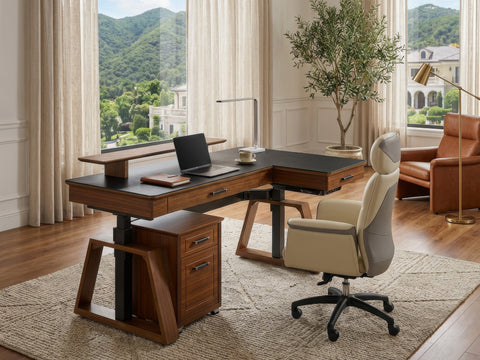
The Core: Ark Executive Standing Desk (Walnut)
The Ark Executive Standing Desk (63"x29") utilizes a rich walnut finish and unique K-shaped wooden legs to provide a sense of architectural stability. This desk is for the professional who needs a larger surface area for physical documents, dual monitors, and perhaps a touch of Inspiration in the form of a desk plant or a high-end lamp.
Functionality Linked with Emotion
There is a psychological benefit to "grounding" materials like wood. Research into workplace wellness suggests that biophilic design—incorporating natural elements—can reduce stress levels. When you touch the wood veneer of the Ark desk, you aren't just touching a piece of furniture; you are interacting with a workspace designed to keep you "grounded and settled" during high-pressure deadlines.

Modeling Note (Reproducible Parameters):
Parameter Value or Range Unit Rationale Desktop Width 160 cm Accommodates 5th-95th percentile reach (BIFMA G1) Lift Capacity 100+ kg Supports multi-monitor setups + heavy hardware Surface Texture Matte/Textured N/A Reduces glare and fingerprint visibility Leg Stability K-Frame N/A Minimizes lateral wobble at standing heights Height Range 70 - 120 cm Covers 90% of adult users (ISO 9241-5)
Setup 3: The Sculptural Sanctuary—Curves and Intentionality
Our final look moves away from sharp angles toward a more fluid, organic aesthetic. This is the ultimate choice for those who view their office as a piece of art.
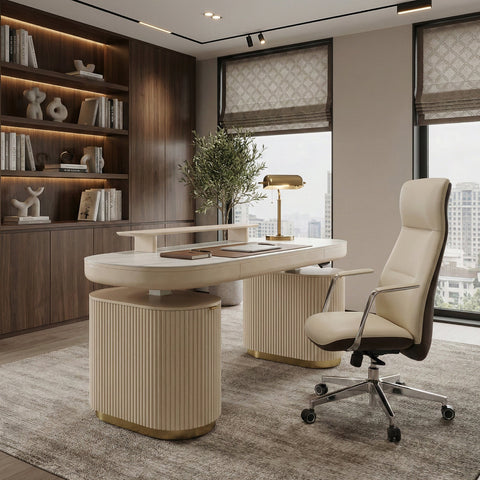
The Core: Opal Executive Standing Desk
The Opal Executive Standing Desk (66"x29") is a masterclass in intentional design. With its fluted, ribbed panels and oval shape, it breaks the "box" of traditional office furniture. It features a stunning light beige finish with brass accents, creating a space that feels more like a luxury hotel suite than a cubicle.
Hidden Efficiency
While the Opal desk looks like a sculptural piece, it is a powerhouse of organization. It includes two integrated storage cabinets and a central drawer, allowing you to Declutter your surface entirely. As noted in The 2026 Workstation White Paper: Converging Ergonomic Science and Sustainable Engineering, the integration of storage within the primary desk footprint is a key strategy for maintaining cognitive focus in smaller home environments.
The Science of the Sanctuary: Why Ergonomics Matter
A "stunning" look is only successful if it supports your health. A beautiful desk that causes chronic back pain is a failure of design. To ensure your setup is truly high-performance, we look to the standards set by the BIFMA G1-2013 Ergonomics Guideline, which provides dimensions to fit the 5th to 95th percentile of the population.
The 20-8-2 Rhythm
One of the most effective ways to use a standing desk is the "20-8-2" rule developed by the Cornell University Ergonomics Web.
- 20 Minutes Sitting: Use a neutral posture with feet flat on the floor.
- 8 Minutes Standing: Shift your weight frequently and avoid "locking" your knees.
- 2 Minutes Moving: Stretch or walk to stimulate circulation.
This rhythm is essential because, as the World Health Organization (WHO) 2020 Guidelines point out, reducing sedentary time is a critical factor in long-term cardiovascular health. However, standing for too long can also lead to lower limb discomfort. The goal is dynamic movement, not just swapping one static posture for another.
Neutral Posture Checklist
According to the Canadian Centre for Occupational Health and Safety (CCOHS), you should verify your setup using these markers:
- Monitor Height: The top of the screen should be at or slightly below eye level.
- Elbow Angle: Your elbows should be at a 90-degree angle, with wrists neutral (not bent up or down).
- Eye Distance: The screen should be about an arm's length away to reduce eye strain.
Expert Tips: The "Gotchas" of Executive Setups
Through years of analyzing workspace performance, we have identified several non-obvious friction points that can ruin a stunning setup.
1. The Cable Management First Rule
The most common mistake is treating cable management as an afterthought. A height-adjustable desk moves, which means your cables must move too.
- The Pro Tip: Run all cables through a central management tray (like those found on the Ark X) before you place your computer.
- The Slack Factor: Ensure you leave enough slack for the desk to reach its maximum height. We often see users accidentally unplug their monitors or damage ports because a cable was too short.
2. The Monitor Arm Strategy
For dual-monitor setups, many people buy a single dual-arm mount. In our experience, these often lead to sagging and difficulty achieving perfect alignment over time.
- The Better Way: Use two independent single gas-spring arms. This provides vastly superior stability and allows for micro-adjustability, ensuring your screens are perfectly level—a small detail that significantly reduces neck rotation and visual fatigue.
3. Material Realities: Glass vs. Texture
While glass desks appear modern, they require constant maintenance to hide fingerprints and dust. Furthermore, glass is a cold material that can be uncomfortable for your forearms in winter.
- The Insight: Textured surfaces like the wood veneers on the Ark Executive Standing Desk (63"x29") or the leather inlays on the Ark X are far more forgiving. They provide a "warmer" tactile experience and naturally diffuse light, reducing glare on your monitors.
Space Transformation: A Step-by-Step Guide
Ready to transform your current chaos into a Workspace Sanctuary? Follow this expert-led sequence:
- Vision Casting: Before buying furniture, define your "Workflow Mode." Are you a "Scribbler" who needs desk depth for notebooks? Or a "Digital Nomad" who only needs a laptop and a clean surface?
- The Purge: Remove everything from your current desk. If you haven't used an item in the last 30 days, it doesn't belong on your primary work surface.
- Core Placement: Position your Ark X Executive Standing Desk (60"x26") relative to your light source. Avoid placing your back to a window (which causes screen glare) or facing it directly (which causes eye strain). Side-lighting is ideal.
- Ergonomic Calibration: Sit in your Serene, Napa Leather Executive Office Chair and adjust the armrests until your shoulders are relaxed. Use the desk's memory presets to save your "Perfect Sit" and "Perfect Stand" heights.
- Ambiance Building: Add one piece of greenery and one high-quality light source with a warm color temperature (2700K-3000K) to promote a sense of calm during evening work sessions.
Building Your Legacy Workspace
Your home office is an investment in your most valuable asset: your ability to think clearly and work effectively. By selecting furniture that meets the rigorous standards of ISO 9241-5:2024 and BIFMA, you aren't just buying "stunning" looks; you are installing a professional-grade tool for your career.
Whether you choose the sleek lines of the Ark X or the sculptural elegance of the Opal, remember that the goal is a space that serves you. A tidy desk helps maintain focus, and a height-adjustable system allows you to shift between "thinking" and "execution" modes with the touch of a button.
It’s time to say goodbye to the chaos and hello to your new sanctuary.
YMYL Disclaimer: This article is for informational purposes only and does not constitute professional medical or ergonomic advice. While the setups described follow industry guidelines, individuals with pre-existing musculoskeletal conditions or chronic back pain should consult a qualified physiotherapist or ergonomic specialist before implementing a new workstation routine.
References
- BIFMA G1-2013 Ergonomics Guideline for Furniture
- CCOHS: Office Ergonomics - Sit/Stand Desk
- Cornell University Ergonomics Web — Workstation Guides
- ISO 9241-5:2024 Workstation layout & postural requirements
- OSHA eTools: Computer Workstations - Neutral Working Postures
- WHO 2020 Guidelines on Physical Activity & Sedentary Behaviour
- The 2026 Workstation White Paper: Converging Ergonomic Science and Sustainable Engineering





Leave a comment