

Mastering the Dorm Nook: L-Shaped Desks for Shared Student Rooms
Quick Guide: Optimizing Your Dorm Workspace To maximize a shared dorm room, utilize corner geometry to create a "private nook" that defines your territory. 3-Step Setup Checklist:
- Measure Your Depth: Aim for a 24-inch desk surface to balance monitor space with floor clearance.
- Check Your Elbow Height: If your desk is fixed at 29 inches (standard) and you are under 5'6", use a footrest to align your elbows without straining your shoulders.
- Calculate Mouse Clearance: For competitive gaming, ensure at least 50cm of lateral space to avoid "keyboard collision" during low-sensitivity tracking.
Shared dorm rooms present a unique architectural and psychological challenge. For many students, the transition to university life involves a sudden shift from a private bedroom to a high-density, multi-use environment. This "space poverty" can result in a lack of privacy and a potential compromise in ergonomic health. Standard-issue university furniture is typically designed for durability and mass procurement rather than the specific physiological needs of a diverse student population.
The primary conflict in a shared dorm is often the struggle to define personal territory without encroaching on a roommate's space. In many cases, an L-shaped desk serves as a strategic intervention. By utilizing corner geometry, an L-shaped configuration creates a "study nook"—a semi-enclosed personal zone that can provide a clear boundary between work and sleep, or between one's own space and a roommate's.
The Physiology of the Student Workstation
The academic workday is characterized by prolonged periods of sedentary behavior and static loading. According to the ISO 11226:2000 standard for evaluating static working postures, maintaining a fixed position for extended durations can lead to muscle fatigue and increased pressure on musculoskeletal structures. For students, this often manifests as neck strain, lower back discomfort, or repetitive strain injuries (RSI).
The U.S. Occupational Safety and Health Administration (OSHA) identifies poor posture and repetitive tasks as core risk factors for Musculoskeletal Disorders (MSDs). In a dorm setting, these risks are frequently exacerbated by furniture that does not "fit" the user. A standard 29-inch fixed-height desk is often too high for shorter students and too low for taller ones, potentially forcing the body out of a "neutral position."
When a desk is too high, a student may shrug their shoulders to reach the keyboard, which can lead to tension in the trapezius muscles. Conversely, a desk that is too low often encourages a "slumped" posture, which increases intradiscal pressure in the lumbar spine. Over time, these micro-stresses contribute to chronic pain that can impede academic performance.
Engineering the Solution: The L-Shaped Advantage
Transitioning from a traditional rectangular desk to an L-shaped configuration is more than an aesthetic choice; it can be viewed as an engineering control. In the OSHA hierarchy of controls, engineering controls are considered more effective than administrative controls because they physically change the environment to reduce hazards.
The GTG - L60, L-Shaped Glass LED Gaming Desk (60"x40") (Manufacturer Specification) exemplifies this principle. Its reversible design allows students to adapt the desk to the specific corner of their dorm room, helping to utilize floor space that might otherwise be wasted.

Spatial Efficiency and Privacy
In a shared room, the orientation of the desk is critical. Positioning the long side of an L-shaped desk so it acts as a visual barrier from the room's entry point can be a highly effective strategy for creating privacy. This "nook" effect helps reduce visual distractions, potentially allowing for deeper focus during intense study sessions.
However, a common mistake in small setups is choosing a desk that is too deep. Based on our observations of standard residence hall layouts, a primary surface depth of 24 inches is often the "sweet spot." It provides enough room for a monitor and keyboard while leaving sufficient floor space for movement. The GTG - L60 (Brand Example) maintains a compact footprint that aligns with these spatial constraints, helping to ensure it does not become a liability in tight quarters.
Modeling the Ergonomic Gap: A Case Study
To understand the necessity of adjustable furniture, we modeled the requirements for a petite female engineering student (155cm / 5'1"). This persona represents the 5th percentile of the student population, who are often the most underserved by standard dorm furniture.
Modeling Methodology: This scenario uses a deterministic parameterized model based on anthropometric ratios from ANSI/HFES 100-2007.
- Required Room Depth (94 in) Calculation: Derived from 24" desk depth + 30" chair clearance (standard task chair footprint) + 40" egress walkway (recommended for fire safety and accessibility in multi-occupant rooms).
| Parameter | Value | Unit | Rationale |
|---|---|---|---|
| User Stature | 155 | cm | 5th Percentile Female |
| Standard Dorm Desk Height | 29 | in | Typical University Spec |
| Recommended Sit Height | ~25 | in | Based on Elbow-to-Floor Height |
| Height Mismatch | 4 | in | The "Ergonomic Gap" |
| Required Room Depth | 94 | in | Desk (24") + Chair (30") + Path (40") |
Our analysis reveals a significant 4-inch gap between standard furniture and this student's physiological needs. This mismatch often forces the student into a "shrugged" shoulder posture. To mitigate this, a Footstool with Wheels (Brand Example) is a vital accessory. By elevating the feet, the student can raise their chair to align their elbows with the desk surface while maintaining firm foot support, which is essential for reducing pressure on the underside of the thighs.

The Dual-Use Reality: Study Meets Gaming
Modern workstations must often function as a high-stakes testing center by day and a competitive gaming hub by night. This dual-use requirement necessitates a larger surface area than a standard rectangular desk typically provides.
For competitive gaming, horizontal space is a performance requirement. Our modeling shows that a player using 800 DPI and a 0.35 sensitivity (common in titles like Valorant) requires approximately 47cm for a full 360° turn.
Calculation Logic: At 280 eDPI (800 DPI x 0.35), the physical distance required for a $360^{\circ}$ rotation is approximately 46.6 cm. We recommend a minimum mousepad width of 56cm (~22 inches) to provide a safety buffer and prevent "keyboard collision" during intense aiming.
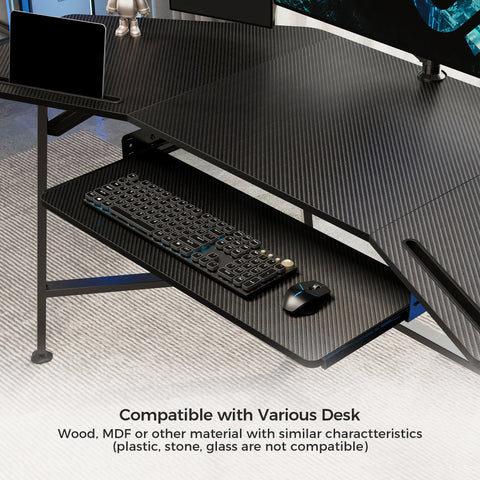
An L-shaped desk like the GTG - L60 (Brand Example) provides the necessary width on one wing for expansive mouse movements while the other wing serves as the primary academic zone for textbooks or a second monitor.
Optimizing the Visual Field
Neck strain is often associated with improper monitor height. The Canadian Centre for Occupational Health and Safety (CCOHS) suggests that the top of the monitor screen be at or slightly below eye level. In many dorm setups, the monitor is placed directly on the desk, which may force the student to look down, potentially straining the cervical spine.
To address this, the use of a Dual Monitor Arm or a Carbon Fiber Dual Monitor Stand (Brand Examples) is recommended. These tools allow for precise adjustments, helping to ensure the screen is at the correct viewing distance (typically 20-30 inches from the eyes) to minimize eye fatigue.

Safety, Compliance, and Sustainability
When selecting furniture for a dorm, safety standards are essential. Because dorms are high-density living environments, fire safety and chemical emissions are critical concerns.
- Chemical Safety: Ensure the desk uses lead-free coatings. The CPSC Business Guidance on Lead in Paint outlines strict regulations for consumer furniture.
- Indoor Air Quality: Look for certifications like UL GREENGUARD Gold, which indicates low chemical emissions—an important factor for small, often poorly ventilated dorm rooms.
- Stability: The CPSC STURDY Act emphasizes anti-tip-over designs. While primarily for storage units, these stability principles are relevant for desks supporting heavy monitor setups.
- Sustainability: Responsible sourcing, such as FSC Certification, helps ensure the wood products used are environmentally sound.
Practical Recommendations for the Academic Year
To maximize the benefits of an ergonomic L-shaped desk, students should consider adopting a dynamic working style. The Cornell University Ergonomics Web suggests the "20-8-2" rhythm: 20 minutes of sitting, 8 minutes of standing, and 2 minutes of moving/stretching.
- Cable Management: To avoid fire hazards and tripping, use desks with pre-drilled grommets and management trays to keep cables organized and away from feet.
- The Sit-Stand Transition: If using a height-adjustable L-desk, the Cochrane Library notes that such workstations can significantly reduce daily sitting time. This reduction is often linked to improved metabolic health, as highlighted by the WHO 2020 Guidelines on Physical Activity.
- Storage Security: In shared rooms, desks with built-in, lockable storage can provide peace of mind and help maintain a clutter-free workspace.
As detailed in The 2026 Workstation White Paper: Converging Ergonomic Science and Sustainable Engineering, the future of student productivity lies in the integration of specialized geometry and user-centric design. By choosing an L-shaped desk that respects both spatial constraints and physiological needs, students can transform a cramped dorm corner into a functional study nook.
YMYL Disclaimer: This article is for informational purposes only and does not constitute professional medical, legal, or financial advice. The ergonomic recommendations provided are based on general industry standards and scenario modeling. Individuals with pre-existing musculoskeletal conditions or specific health concerns should consult a qualified healthcare professional or occupational therapist before making changes to their workstation setup.
References
- BIFMA G1-2013 Ergonomics Guideline for Furniture
- CCOHS: Office Ergonomics - Sit/Stand Desk
- ISO 9241-5:2024 Workstation layout & postural requirements
- OSHA eTools: Computer Workstations - Neutral Working Postures
- WHO 2020 Guidelines on Physical Activity & Sedentary Behaviour
- Cochrane: Workplace interventions for reducing sitting at work (2018)
- UL GREENGUARD Certification Overview



Leave a comment