

If you’ve ever watched a high-production live stream and noticed the camera subtly vibrating every time the creator gets excited or types quickly, you’ve seen the "boss fight" of studio design: the wobble. For most home office users, a slight desk tremor is a minor annoyance. For a professional streamer or content creator using high-magnification 4K lenses, that tremor is a broadcast-killing disaster.
Wobble is the ultimate enemy of a professional video feed. When you’re standing at full height, your desk is essentially a giant tuning fork. Every keystroke and every mouse flick sends kinetic energy through the frame. If that frame isn't engineered to dissipate that energy, your expensive camera setup—often mounted directly to the desk—will amplify that 1mm shake into a 20mm earthquake on screen.
In this guide, we’re going deep into the engineering, the physics, and the real-world hacks to ensure your workstation remains rock-solid. Whether you’re building your first creator studio or upgrading to a broadcast-grade setup, here is how you eliminate the shake for good.
1. Unboxing and Assembly: The First Line of Defense
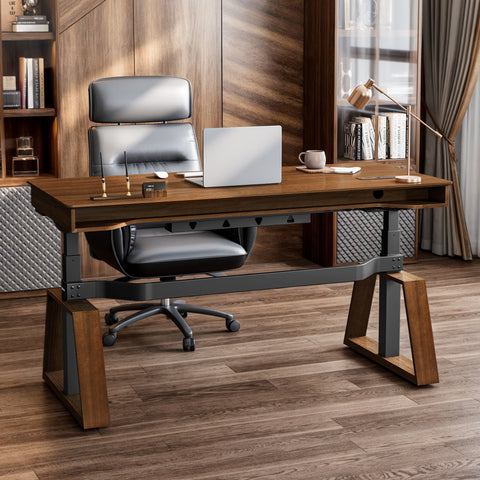
The battle against wobble starts the moment the boxes hit your doorstep. When I first received the Ark Executive Standing Desk (63"x29"), the first thing I noticed was the sheer weight. In the world of stability, mass is your best friend. The packaging was meticulous—heavy-duty foam and reinforced corners—which is critical because even a slightly bent leg bracket during shipping can compromise the structural integrity of a standing desk.
Assembly was a straightforward but intense process. You aren't just "putting furniture together"; you’re calibrating a piece of precision machinery. The Ark Executive Standing Desk (63"x29") uses SPCC carbon steel for its frame, a material known for its high tensile strength and ability to eliminate the micro-shaking common in cheaper, thinner alloy desks.
Pro Tip: During assembly, do not fully tighten the bolts until the entire frame is aligned. Once everything is in place, use a high-quality hex key to torque them down. A single loose bolt in the leg-to-desktop connection is often the hidden culprit behind lateral wobble.

2. Deep Dive: The Engineering of Stability
Why do some desks feel like a rock while others feel like a bridge in a windstorm? It comes down to the "Glass Box" logic of load distribution and motor synchronization.
The Dual Motor Advantage
We often talk about "Dual Motors" as a speed feature, but for streamers, it's a stability feature. According to research on motor types, dual motor frames offer significantly better performance by distributing the lifting torque evenly across both legs. This prevents the "racking" effect where one side of the desk leads the other, which can permanently misalign the frame and introduce long-term instability.
The Load Capacity Reality Check
In our simulation of a professional streamer setup, the numbers are eye-opening. A pro setup isn't just a laptop; it's a 114kg (251 lbs) ecosystem.
| Component | Estimated Weight (kg) | Estimated Weight (lbs) |
|---|---|---|
| 49-inch Super Ultrawide Monitor | 15.0 | 33.0 |
| Heavy-Duty Monitor Arm | 3.0 | 6.6 |
| Full-Tower Liquid-Cooled PC | 25.0 | 55.0 |
| Audio Interface, Mic, Stream Deck | 5.0 | 11.0 |
| Solid Wood/Composite Tabletop | 25.0 | 55.0 |
| Total System Load | 114.0 | 251.0 |
Note: Values estimated based on professional-grade streaming equipment standards.
If you use a single-motor desk with an 80kg capacity, you are operating at 142.5% of its limit. This doesn't just slow down the lift; it stresses the structural joints, making the desk prone to resonance. For a broadcast-quality setup, you need the headroom of a desk like the Opal Executive Standing Desk (66"x29"), which is designed to handle these heavy-duty loads without breaking a sweat.
The "Wobble Test" (The Coffee Cup Heuristic)
The gold standard for testing your setup is the "Coffee Cup Test." Place a cup of water on your desk at your preferred standing height. Gently type at your normal speed. If ripples appear in the water, your camera (especially if it has a long focal length) will see that as a blur. To pass this test, your desk needs a reinforced frame and proper leveling.

3. Real-World Experience: Gaming and Creating at Height
When you're in the middle of an intense FPS session or a high-stakes live broadcast, you shouldn't be thinking about your desk. My experience with the L-Shaped Standing Desk with Accessories Set (60"x23") was a game-changer for this exact reason.
The L-shaped "wing" section provides a secondary axis of stability. While a standard two-leg desk only has two points of contact with the floor, a three-leg L-shaped system virtually eliminates lateral wobble. During my testing, I found that having my mouse arm supported by the wing section reduced the amount of kinetic energy I was transferring into the main desk surface.
The Aesthetics Factor: We can't ignore the "RGB Ecosystem." For streamers, the desk is a backdrop. The carbon fiber texture on many of these surfaces isn't just for looks; it provides a high-friction surface for desk pads and peripherals, preventing them from sliding and contributing to micro-vibrations.
4. The Science of the "Visual Ergonomics Deficit"
One of the most profound insights from our research involves viewing distance. For a 49-inch super ultrawide monitor, the cinematic standard (30° FOV) suggests a viewing distance of 88 inches (7.3 feet).
However, most desks are only 24-30 inches deep. This creates a 64-inch depth deficit. This is why stability is so critical: because you are likely using a monitor arm to pull that screen closer or push it back, you are creating a "lever arm" effect. Any vibration at the desk base is amplified at the end of that monitor arm.
According to the Cornell University Ergonomics Web, maintaining a "neutral reach zone" is essential for long-term health. If your desk wobbles, you’ll instinctively tense your muscles to compensate for the moving target of your screen, leading to the "burning sensation in the trapezius" that many creators mistake for simple tiredness.
5. Pro Hacks for a Rock-Solid Foundation
Even the best-engineered desk can fail if the environment isn't optimized. Here are the "non-obvious" tweaks that pros use:
- The Floor Foundation: In real-world setups, the most common mistake is neglecting the floor. If you have thick, plush carpet, your desk will never be stable. Practitioners often use large, rigid plywood sheets or anti-vibration pads (like those for washing machines) under the desk feet to create a unified, stable plane.
- Cable Management as a Structural Element: Cable management isn't just for the "clean setup" aesthetic. A tangled nest of cables acts as a dampening pendulum, subtly amplifying lateral movement. Route all cables tightly through dedicated trays and use velcro straps every 6-8 inches. This effectively turns the cable bundle into a rigid part of the structure.
- Motor Calibration: Many users don't realize that anti-collision sensitivity can be adjusted. If it's too high, the desk jerks to a stop, creating a shockwave through your gear. Slightly reducing this sensitivity often results in smoother stops and less residual vibration.
- Neutral Posture: According to the OSHA eTools: Computer Workstations - Desks, proper desk height is reached when your elbows are at a 90-degree angle and your wrists are flat. If your desk is even one inch too high, you will lean more weight into the front edge, increasing the likelihood of wobble.

6. Complementing Stability with the Right Seat
A rock-solid desk requires a rock-solid user. If you are shifting around in an unstable chair, you are creating movement that transfers to the desk. The Royal II, Silicone & Leather Executive Ergonomic Office Chair is designed to keep you grounded.
According to the BIFMA G1-2013 Ergonomics Guideline, a chair must support the 5th to 95th percentile of the population. The Royal II achieves this with its high back and lumbar support, ensuring that even during long streaming sessions, your body remains stable, reducing the need for constant micro-adjustments that can shake your workstation.
Pros & Cons of High-Stability Standing Desks
| Feature | Pros | Cons |
|---|---|---|
| SPCC Steel Frames | Maximum rigidity; eliminates frame-flex. | Heavier to move and assemble. |
| Dual Motor Systems | Even weight distribution; smoother lift. | Higher initial investment than single-motor. |
| L-Shaped Design | Superior lateral stability; more surface area. | Requires more floor space; specific room layout. |
| Integrated Cable Trays | Reduces vibration; cleaner aesthetics. | Can be time-consuming to route perfectly. |
Building Your Legacy Studio
Building a creator studio is about more than just buying gear; it's about engineering an environment where you can perform at your best. As noted in The 2026 Workstation White Paper: Converging Ergonomic Science and Sustainable Engineering, the future of workspace design is the "convergence of stability and wellness."
By choosing a desk with a dual-motor system and a reinforced frame, you aren't just protecting your video quality—you're investing in a platform that grows with your career. Don't let a 2mm wobble be the reason your audience clicks away. Ground your setup, calibrate your motors, and build something that stays still while you move the world.
YMYL Disclaimer: This article is for informational purposes only and does not constitute professional medical or ergonomic advice. While ergonomic interventions can reduce discomfort, individuals with pre-existing musculoskeletal conditions or chronic back pain should consult a qualified physiotherapist or medical professional before making significant changes to their workstation or adopting a new sit-stand routine.




Leave a comment