

Editorial Disclosure: This article is published by Eureka Ergonomic and features our own products alongside industry-standard ergonomic guidelines. Our recommendations are based on internal R&D, BIFMA standards, and published ergonomic research to help you make an informed decision for your workspace.
Imagine a home office designed for professional focus—a space where clutter is minimized and every element is an intentional choice for your personal brand. A well-chosen executive chair is more than furniture; it is a primary tool for maintaining physical longevity throughout your career.
In high-end design, there is often a perceived choice between the "look" of a corner office and the "feel" of a medical-grade ergonomic tool. However, great design integrates both. This guide explores how modern ergonomic features are integrated into executive chairs, proving that style and comfort can coexist.
The Vision of the Workspace Sanctuary
When curating an executive environment, your chair is your primary interface with your work. If that interface is rigid or physically draining, your productivity may eventually reflect those limitations.
A true transformation begins with a "Before & After" mindset. The "Before" is often a heavy, traditional leather chair that looks impressive but lacks lumbar support. The "After" involves a chair like the Serene Ella, Napa Leather Executive Chair, which uses full-grain Napa leather—a material noted for its durability and soft texture—to provide an upholstered frame designed for long-term strategic planning.
The Science of Sophisticated Support
To build a benchmark-level workspace, we look at the standards that define professional safety. According to the BIFMA G1-2013 Ergonomics Guideline, furniture should provide dimensions that accommodate the 5th to 95th percentile of the population. For those demanding higher precision, ISO 9241-5:2024 specifies postural requirements to help maintain a neutral spine.
A common pitfall is prioritizing a silhouette over adjustability. An executive chair without "synchronized tilt" or "adjustable seat depth" can lead to prolonged static sitting. As noted in the EU-OSHA guide, immobility is a primary risk factor for musculoskeletal disorders (MSDs).
To illustrate the importance of precision, consider the requirements for a tall executive.
Data-Driven Ergonomics: The Tall Executive Scenario
Estimates based on standard anthropometric ratios (e.g., seated elbow height and popliteal height).
| Feature | Standard User Recommendation | Tall Executive (195cm/6'5") Estimate | The Impact of Mismatch |
|---|---|---|---|
| Ideal Seat Height | 40cm - 48cm | 51.25cm (20.2") | Standard chairs often max out at 48cm, potentially causing "knee-up" strain. |
| Seated Desk Height | 72cm - 75cm | 80.5cm (31.7") | A significant gap may force a hunched posture and neck fatigue. |
| Lumbar Support | Fixed or 2cm depth | 2cm - 4cm Protrusion | Insufficient depth may fail to support the natural S-curve of the spine. |
| Seat-Knee Gap | 5cm - 10cm | 5cm - 10cm | Requires seat depth adjustment to ensure proper thigh support. |
For these requirements, we recommend chairs like the Forma, Ergonomic Executive Office Chair. Its aluminum alloy curved back frame provides stable lumbar support that remains consistent during recline—a functional necessity for maintaining the coverage recommended by BIFMA.

How to Measure Your Ideal Setup: A Step-by-Step Checklist
To move beyond estimates, use a tape measure and the following steps to calibrate your chair:
- Seat Height: Measure from the floor to the crease behind your knee (popliteal height). Your chair seat should be set at or slightly below this height so your feet rest flat.
- Seat Depth: Sit back fully. Measure the distance between the front edge of the seat and the back of your knees. A gap of 2–3 fingers (approx. 5cm) is ideal to prevent circulation issues.
- Armrest Height: With shoulders relaxed, bend your elbows to 90 degrees. Adjust armrests until they just touch the underside of your elbows.
- Lumbar Position: Locate the curve of your lower back (lumbar spine). Adjust the chair’s support so it fits snugly into this curve.
Linking Functionality with Workflow
In a premium workspace, adjustment should be intuitive. We suggest a "30-second test": if a user cannot find and set a comfortable lumbar and armrest position within 30 seconds, the ergonomics are not sufficiently accessible.
Height adjustment also serves a psychological function. Raising your desk to stand can signal a shift to high-energy execution, while lowering it and reclining in a chair like the Nox, Genuine Leather Executive Office Chair supports reflective, strategic work.
The Material Truth: Leather vs. Mesh
While premium leather conveys status, it has different thermal properties than mesh. Internal comparative observations suggest that non-breathable materials can increase skin contact temperature by an estimated 5–7°C (9–13°F) during prolonged use compared to high-quality mesh.
If you choose leather, top-grain or Napa leather (as found in the Serene Ella) is preferred for its ability to conform to the body over time. For warmer climates, consider Pairing Desks with Ergonomic Chairs that offer hybrid support.
Space Transformation: The Holistic Sanctuary
An executive chair is the centerpiece of a larger ecosystem, including your desk and hardware.
For setups involving dual ultrawide monitors and heavy hardware, motor safety is critical. A high-end setup can reach 80kg - 82kg.
- Single-Motor Risk: If a desk has an 80kg capacity, a 82kg load represents 102.5% utilization, which may lead to motor strain or instability.
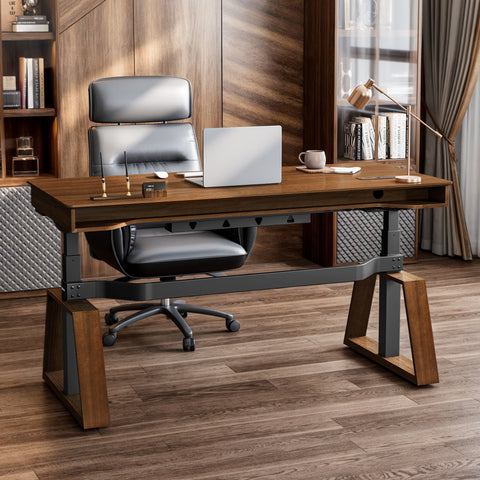
- Dual-Motor Solution: Using a system like the Zen Pro Series Executive Standing Desk (often rated for higher loads) drops utilization to approximately 68%, staying within the 80% best-practice threshold for motor longevity.

Expert Tips for Atmosphere Building
- The 20-8-2 Rhythm: Cornell University Ergonomics Web suggests 20 minutes of sitting, 8 minutes of standing, and 2 minutes of moving.
- Biophilic Design: Introduce greenery to reduce stress. Look for UL GREENGUARD Certified products to ensure low VOC emissions.
- Lighting: Use a combination of natural light and adjustable lamps to reduce monitor glare, as recommended by OSHA.
Achieving Proper Posture
According to the Canadian Centre for Occupational Health and Safety (CCOHS), your monitor should be at a height where the top line of text is at or slightly below eye level. This helps prevent "forward head" posture.
When sitting, ensure your feet are flat or on a footrest, and elbows are at a 90-degree angle. For further technical details, consult The 2026 Workstation White Paper on integrated workspace design.
A Legacy of Comfort
Investing in an executive chair like the Forma or the Serene Ella is an investment in your health. By blending BIFMA and ISO standards with premium materials, you create a space designed for sustained professional performance.
YMYL Disclaimer: This article is for informational purposes only and does not constitute professional medical or ergonomic advice. While ergonomic furniture can reduce the risk of musculoskeletal disorders, individuals with pre-existing back, neck, or joint conditions should consult a qualified healthcare professional or physiotherapist before making significant changes to their workstation setup.
References
- BIFMA G1-2013 Ergonomics Guideline for Furniture
- ISO 9241-5:2024 Workstation layout & postural requirements
- CCOHS: Office Ergonomics - Sit/Stand Desk
- Cornell University Ergonomics Web — Workstation Guides
- EU-OSHA: Musculoskeletal disorders and prolonged static sitting
- OSHA eTools: Computer Workstations - Environment
- UL GREENGUARD Certification Overview




Leave a comment