

The Philosophy of Minimalist Ergonomics: More Than Just an Empty Desk
Imagine a workspace that breathes. A desk where your best ideas have room to flourish, free from the visual noise of tangled cables and scattered papers. This is the promise of a minimalist setup. But I’ve learned that true minimalism isn’t about sterile emptiness; it’s about profound intentionality. It's the art of creating a workspace sanctuary where every single item serves a purpose, enhancing your focus and workflow.
The core principle is simple: a minimalist desk must first be an ergonomic one. A beautiful desk that causes back pain is a failure. A clean setup that forces you to crane your neck is counterproductive. The goal is to design a space that supports your body, allowing you to sink into deep work without physical strain. This philosophy is about creating an environment of effortless productivity, where the space itself gets out of your way and lets you create.
Debunking a Common Misconception: The "Empty Desk" Myth
A common myth is that a minimalist desk must be completely bare. In reality, forcing every essential tool into a drawer increases what experts call "cognitive load"—the mental effort required to find and use what you need. A truly functional minimalist space, according to research from the Nielsen Norman Group, keeps high-frequency tools visible and within easy reach. The goal isn't emptiness; it's efficiency.
Foundation First: Choosing Your Minimalist Desk
The desk is the centerpiece of your workspace, the foundation upon which your productivity is built. A minimalist approach demands a desk that is both aesthetically clean and functionally robust. This means prioritizing clean lines, quality materials, and, most importantly, ergonomic adjustability.
Idea 1: The Executive Minimalist
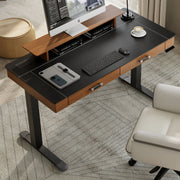
For those who appreciate a touch of elegance and integrated functionality, the ideal desk combines form and function seamlessly. Imagine a surface that feels luxurious to the touch yet is built for performance. The Faux Saddle Leather Adjustable Standing Desk (55"x23") embodies this principle. Its faux saddle leather top provides a warm, tactile experience, while the integrated, self-closing drawer offers a discreet home for notebooks and pens, eliminating the need for bulky desktop organizers. This single piece of furniture elevates the entire room, proving that minimalism can be sophisticated and warm. The ability to switch from sitting to standing is the final touch, making it a true workspace sanctuary.

Idea 2: The Expansive Creator
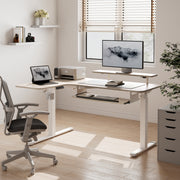
Minimalism doesn't have to mean small. For creators, designers, and anyone who juggles multiple projects, ample space is a necessity. The challenge is to maintain a clean aesthetic without feeling cramped. An L-shaped desk offers a brilliant solution, allowing you to compartmentalize your workflow. You can dedicate one wing to your digital tasks—monitor, keyboard, and mouse—and the other to analog work like sketching or reviewing documents. The L-Shaped Standing Desk with Accessories Set (60"x23") provides this expansive canvas while retaining a sleek, modern look. Its dual motors ensure a smooth, stable transition from sitting to standing, even with a heavy multi-monitor setup.

Idea 3: The Compact Achiever
Working in a smaller space presents a unique challenge: how to create a functional and inspiring desk setup without overwhelming the room. The key is to choose pieces that are powerful and versatile. A high-quality standing desk can serve as your primary work surface, a creative station, and more. When space is at a premium, every item must justify its existence. You can explore various stylish standing desk designs for small home offices that prove you don't need a large room to have a highly effective and beautiful workspace.
Pro Tip: Desk Size Matters More Than You Think
Conventional wisdom often suggests that a minimalist setup must be ultra-compact. However, I’ve seen many people make the mistake of choosing a desk that's too shallow. A desk that is not deep enough forces you to sit too close to your monitor, causing eye strain and poor posture. For a primary workstation, a depth of at least 60-80 cm (about 24-31 inches) is a better minimalist rule than simply "smaller is better." This provides enough room to place your monitor an arm's length away, a guideline recommended by authorities like the Canadian Centre for Occupational Health and Safety (CCOHS), ensuring a comfortable and ergonomically sound viewing distance.
The Art of Strategic Decluttering
Once you have your foundation, the next step is to curate what goes on and around it. This is about creating systems that keep clutter at bay automatically.
Idea 4: Master Your Cable Management
Visible cables are the number one enemy of a minimalist aesthetic. A web of tangled wires creates immediate visual chaos and stress. Taming them is the single most impactful step you can take.
Your Cable Management Checklist:
- Centralize Power: Use a single, high-quality power strip or surge protector mounted underneath your desk. This creates one central hub for all your power needs.
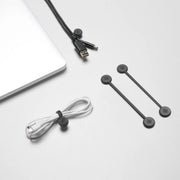
- Bundle and Route: Group cables running to the same location (e.g., your computer, your monitor) together. Simple tools like Magnetic Cable Ties are fantastic for this, as they are reusable and don't attract dust like traditional velcro.
- Use a Cable Tray: Mount a cable tray or netting to the underside of your desk. This is where your power strip and bundled cables will live, completely out of sight.
- Measure and Buy: Use cables that are the correct length. An overly long cable is just as messy as a short one that's stretched taut.
Idea 5: Embrace Vertical Storage
To keep your desk surface clear, think vertically. A single, tall bookshelf or a narrow filing cabinet can house books, binders, and other items you don't need daily. The goal is to have one designated place for storage, rather than letting items pile up on your desk or floor. This keeps your immediate workspace clear and your mind focused on the task at hand.
Idea 6: The "Invisible" Tech Zone
For items like docking stations, USB hubs, or external hard drives, consider mounting them to the underside of your desk with heavy-duty adhesive strips or custom brackets. This keeps them accessible but completely hidden, preserving the clean surfaces that define a minimalist setup.
Idea 7: Curate the "Reach Zone"
The surface of your desk should be reserved for only the most essential, daily-use items. For me, this means my keyboard, mouse, monitor, and a single coaster for my water bottle. Everything else has a designated home off the desk. Ask yourself: "Do I use this every single hour?" If the answer is no, find another place for it.
Curating Your Minimalist Accessories
With the core elements in place, the final layer involves choosing accessories that add function and a touch of personality without creating clutter.
Idea 8: The Single Source of Light
Instead of relying solely on harsh overhead room lighting, a dedicated task lamp provides focused, adjustable light that can significantly reduce eye strain. Look for a lamp with a minimal profile and a flexible arm. Aim the light at your documents or keyboard, not directly at your screen, to avoid glare. This single point of light creates a cozy, focused ambiance for late-night work sessions.
Idea 9: The Unified Monitor Setup
A cluttered monitor setup can undermine an otherwise minimalist desk. Elevating your screens not only frees up valuable desk space but is also critical for good ergonomics. According to the U.S. Occupational Safety and Health Administration (OSHA), your monitor should be placed so the top of the screen is at or slightly below eye level. A product like the Carbon Fiber Dual Monitor Stand achieves this while adding a sleek, modern look and a convenient shelf for your phone or small notebooks.

Idea 10: A Touch of Nature
A minimalist space doesn't have to be devoid of life. A single, low-maintenance plant, like a snake plant or a succulent, can add a touch of organic texture and color. It's a simple addition that can make a workspace feel more grounded and serene without adding to the clutter.
Expert Warning: Minimalism Doesn't Mean Cold
There's a misconception that a modern, minimal workspace must be sterile, filled with only black, white, and gray. In reality, color preferences are highly individual. A single, strong accent color or the warmth of natural wood can make a space feel more personal and inviting without sacrificing the principles of minimalism. The key is to be intentional. Choose one or two textures or colors to act as a focal point, rather than overwhelming the space with competing elements.
Bringing It All Together: Your Minimalist Workflow
A minimalist desk is not a static art piece; it's a dynamic tool for productivity. To get the most out of it, you need to integrate ergonomic principles into your daily routine. For a complete guide, you can review how to set up your standing desk for peak productivity.
I’ve found that the best approach is to listen to my body, but a structured starting point is helpful. Many experts, including those at Cornell University's Ergonomics Web, suggest alternating between sitting and standing every 30-60 minutes. The goal is to avoid long periods of static posture, whether sitting or standing.
Here is a simple table to guide your initial ergonomic setup:
| Component | Action | The "Why" (Ergonomic Goal) |
|---|---|---|
| Chair Height | Sit with your feet flat on the floor and your knees at a roughly 90-degree angle. | Provides a stable base and promotes good circulation. |
| Desk Height | Adjust the desk so your forearms are roughly parallel to the floor when typing. | Reduces strain on your shoulders, neck, and wrists. |
| Monitor Height | Position the monitor so the top of the screen is at or slightly below eye level. | Helps you maintain a neutral neck posture, preventing strain. |
| Monitor Distance | Place the screen about an arm's length away from your face. | Reduces eye strain and allows you to see the entire screen without turning your head. |

Key Takeaways: Your Workspace Sanctuary Awaits
Creating a minimalist workspace is a journey of intention. It’s about more than just decluttering; it’s about designing a space that actively supports your work and well-being.
- Start with an Ergonomic Foundation: Your first priority should always be a high-quality, adjustable desk that fits your body.
- Master Your Cables: Taming cable clutter is the fastest way to create a sense of calm and order.
- Be Ruthless with Your "Reach Zone": Only allow essential, daily-use items to live on your desk surface.
- Choose Accessories with Purpose: Every item should add significant function or a touch of intentional beauty.
By embracing these ideas, you can transform your desk from a source of stress into a true workspace sanctuary—a place where you feel inspired, focused, and ready to do your best work.
Disclaimer: This article is for informational purposes only and does not constitute professional medical advice. If you have pre-existing health conditions or experience persistent pain, please consult a qualified healthcare professional or a certified ergonomist to design a workspace tailored to your specific needs.




Leave a comment