

Imagine walking into your workspace and feeling an immediate sense of calm. The morning light hits a clean, glass surface; there are no tangled wires snaking across the floor, no stacks of forgotten paperwork, and no visual noise competing for your attention. This isn't just a dream of an organized life—it is the foundation of a "Workspace Sanctuary."
Full Disclosure: This guide features products from Eureka Ergonomic to illustrate minimalist principles. While these examples represent high-quality solutions, readers are encouraged to compare these specifications with other reputable brands to find the best fit for their specific needs and budget.
As we step into a new year, many of us are embracing the "Minimalist Resolution." This isn't about owning nothing; it’s about ensuring that every item in your environment serves a purpose, sparks inspiration, or enhances your workflow. For gamers and remote professionals, the battlestation is often the most cluttered area of the home. By transitioning from a state of "clutter creep" to a curated, minimalist setup, we can potentially unlock higher levels of Deep Work and mindfulness.
The Psychology of the Sanctuary: Why Minimalism Matters
Our physical environment is often a mirror of our mental state. Research indicates that visual clutter competes for our neural resources, which may limit our ability to focus and process information. According to the National Institutes of Health (NIH), distractions in our environment can impair memory and cognitive performance in certain settings.
When we declutter, we aren't just cleaning a desk; we are removing the "friction points" that can lead to procrastination. A minimalist setup allows you to enter "execution mode" more readily. By integrating smart furniture and intentional organization, we transform the battlestation from a source of stress into a tool for creativity.
Vision Casting: From Chaos to Clarity
Before we dive into the "how," let’s visualize the "after." Imagine a setup where your monitors seem to float above the desk, your cables are nearly invisible, and your desk height adjusts silently to match your energy levels throughout the day. This transformation begins with selecting a foundation that supports both your aesthetic goals and your physical health.
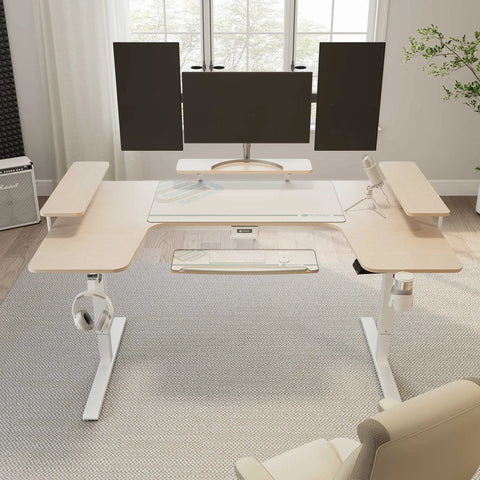
One effective way to achieve this is through an L-shaped standing desk. The GTG-L60 Pro, L shaped Glass Gaming Standing Desk (60"x23") serves as a representative example of "integrated minimalism." Its glass top provides a clean, reflective surface that enhances the sense of space, while the L-shape allows for "Zonal Minimalism"—keeping your primary work area clear while designating the side wing for secondary tasks or hardware.

Section 1: The Foundation of Ergonomic Excellence
A minimalist resolution should be grounded in health principles. A desk that looks good but contributes to discomfort is a failure of design. To ensure your sanctuary is functional, we look to international standards like the BIFMA G1-2013 Ergonomics Guideline, which provides dimensions intended to fit the 5th to 95th percentile of the population.
The ROI of the Standing Desk
We often view ergonomic furniture as a luxury, but data suggests it can be a high-return investment. In our analysis of professional streaming and remote work setups, we calculated the potential impact of switching to a high-performance standing desk.
Table 1: Estimated Impact of an Ergonomic Standing Desk
| Metric | Impact Value | Basis of Calculation |
|---|---|---|
| Potential Metabolic Shift | ~178.5 kcal/day | Standing 4 hours vs. Sitting (Assumes MET 2.5 vs MET 1.3) |
| Annual Weight Management | ~12.7 lb equivalent | Cumulative caloric deficit over 250 workdays (3,500 kcal/lb) |
| Productivity Potential | ~$8,100 / year | 9% efficiency gain at a $45/hr wage (approx. 43 mins/day) |
| Safety Margin | 78.3% Motor Load | Dual-motor system handling a 94kg total load (120kg capacity) |
Methodology & Assumptions:
- Metabolic Data: Based on the Compendium of Physical Activities, where sitting (office work) is ~1.3 METs and standing (light office work) is ~2.5 METs. Calculation: (1.2 MET difference * 75kg body weight * 4 hours) / 24.
-
Productivity ROI: Calculated as
[Hourly Wage ($45)] x [Work Hours (2,000)] x [Efficiency Boost (0.09)]. Note: Efficiency gains are subjective and based on self-reported focus improvements in ergonomic studies. - Safety Margin: Based on the GTG-L60 Pro dual-motor weight capacity of 264 lbs (approx 120kg).
Note: These are simulations for illustrative purposes. Individual results will vary based on body weight, specific tasks, and existing health conditions.
For power users with heavy equipment—such as liquid-cooled PCs and triple monitors—a dual-motor system is highly recommended to maintain a safety margin under 80% load utilization. This helps prevent motor fatigue and ensures your sanctuary remains functional for years to come.
Section 2: Elevating Your Perspective with Monitor Arms
In a minimalist setup, the desk surface is valuable "real estate." Standard monitor stands are often bulky and create visual clutter. To reclaim this space, we recommend moving monitors off the desk and onto adjustable arms.
The Productivity Multiplier
Industry observations, such as those cited by John Peddy Research, suggest that dual-monitor setups may increase productivity by up to 42% for specific data-intensive tasks. However, the key to minimalism isn't just having more screens—it's organizing them. Using a Dual Monitor Arm allows you to align your displays, reducing the "functional clutter" that occurs when monitors are at different heights.
For those who prefer a single, high-resolution ultrawide display, the Single Monitor Arm provides similar benefits of space reclamation. By elevating the screen, you also adhere to the OSHA guidelines for monitor placement, which suggest that the top line of text should be at or slightly below eye level to help reduce neck strain.

Section 3: The Hidden Art of Cable Management
The biggest threat to a minimalist aesthetic is "cable creep." We recommend a "15-20% Rule": dedicate at least 15-20% of your total setup time solely to planning and executing your cable routing.
Maintenance-First Organization
Traditional Velcro ties are common, but they can attract dust and pet hair over time. A more maintainable solution is the Magnetic Cable Tie. These allow you to snap cables into place along the steel frame of your desk, creating clean vertical runs that are easy to adjust.
Pro Tip: When setting up a standing desk, always leave a "service loop"—a small amount of slack—near the moving parts of your monitor arms. This helps prevent cables from snagging or unplugging when you transition from sitting to standing.

Section 4: Lighting, Ambiance, and Mindfulness
Minimalism doesn't have to feel sterile. A true "Workspace Sanctuary" should feel inviting. The trend is shifting away from overwhelming "rainbow" effects toward intentional, zone-based lighting.
Bias Lighting for Eye Health
Using subtle, diffused LED strips behind your monitors creates "bias lighting." This reduces the contrast between the bright screen and the dark wall behind it, which, according to HSE DSE guidelines, can help mitigate eye fatigue and glare-related headaches for many users.
The GTG-L60 Pro features integrated lighting that can be synchronized with your environment, providing an immersive experience without the need for external, clutter-inducing lamps.
Section 5: Developing a "Deep Work" Workflow
Once your space is transformed, the final step is changing how you interact with it. A minimalist desk is a tool for the "20-8-2" rhythm, a recommendation popularized by Cornell University Ergonomics Web.
- 20 Minutes Sitting: Use this time for high-focus "execution" tasks.
- 8 Minutes Standing: Use this shift to re-energize during meetings or while reading.
- 2 Minutes Moving: Step away from the sanctuary to stretch or hydrate.
Applicability Note: This rhythm is a general guideline for healthy adults. However, it may not be suitable for individuals with certain circulatory issues (like varicose veins), advanced joint degradation, or specific orthopedic conditions. Always listen to your body and adjust these intervals based on your personal comfort.
This rhythm is designed to help address the risks associated with "prolonged static sitting," which the EU-OSHA identifies as a risk factor for musculoskeletal disorders (MSDs).
Section 6: Sustainable Minimalism and the "One-In, One-Out" Rule
True minimalism prioritizes sustainability—choosing high-quality components that are built to last. To maintain your sanctuary, consider the "One-In, One-Out" rule: for every new accessory you add to your desk, one must be removed or stored. This helps prevent the gradual "clutter creep" that often happens after a major reorganization.
Summary of the Minimalist Transformation
Achieving a minimalist battlestation is a journey of intentionality. By starting with a robust foundation, reclaiming space with monitor arms, and mastering cable management, you create an environment that supports your focus.
Checklist for Your Minimalist Resolution:
- Audit Your Surface: Remove everything that isn't used daily.
- Elevate Your Displays: Use a Single Monitor Arm or Dual Monitor Arm to clear desk space.
- Route with Purpose: Use Magnetic Cable Ties for hidden wire management.
- Calibrate Your Height: Set your standing and sitting presets based on BIFMA/ISO standards.
- Curate the Ambiance: Focus on diffused, indirect lighting to help reduce eye strain.
YMYL Disclaimer: This article is for informational purposes only and does not constitute professional medical, financial, or ergonomic advice. While ergonomic furniture can reduce the risk of musculoskeletal disorders, it is not a guaranteed cure or prevention for any medical condition. Individuals with pre-existing back, neck, or joint conditions, or circulatory issues, should consult a qualified physiotherapist or medical professional before making significant changes to their workstation or activity levels. ROI and health calculations are estimates based on specific assumptions and may not reflect your individual experience.
References
- BIFMA G1-2013 Ergonomics Guideline for Furniture
- Canadian Centre for Occupational Health and Safety (CCOHS): Office Ergonomics - Sit/Stand Desk
- Cornell University Ergonomics Web — Workstation Guides
- HSE: Working safely with display screen equipment (DSE)
- ISO 9241-5:2024 Workstation layout & postural requirements
- OSHA eTools: Computer Workstations - Monitors
- World Health Organization (WHO) 2020 Guidelines on Physical Activity & Sedentary Behaviour




Leave a comment