

New Year, new setup—but let’s be real. Most of us aren’t living in sprawling mansions with dedicated 500-square-foot gaming wings. We’re working with "cozy" apartments, shared bedrooms, or that awkward corner of the living room. If your resolution this year is to finally build a high-performance battlestation without feeling like you’re living in a closet, you’ve come to the right place.
Building a dream setup in a tight space isn't just about buying smaller furniture; it’s about tactical geometry, stability, and the right tech. We’ve spent weeks stress-testing compact workstations to see what actually holds up when the FPS sessions get intense and the work deadlines loom. From the "Wobble Test" to dual-motor synchronization, here is the definitive guide to making your small room feel like a pro-tier headquarters.
Unboxing and Assembly: First Impressions Matter
When you’re dealing with limited square footage, the assembly process is your first real challenge. I’ve unboxed dozens of desks, and the difference in build quality is immediately apparent. A premium compact desk should arrive in packaging that protects the edges—especially if you’re opting for high-end materials like sintered stone or carbon fiber textures.
The assembly for a modern electric standing desk usually takes about 30 to 60 minutes. The real game-changer? Integrated desktop components. We’ve noticed that desks featuring pre-installed cable management trays and "trapezoidal leg" designs are significantly easier to align in tight corners. One tip I’ve learned the hard way: if you’re building in a small room, assemble the frame upside down on the box it came in to protect your floors and the desktop surface.
Stability is the unsung hero of the small-room setup. In tight spaces, every inch counts, and as practitioners note, a desk depth under 25 inches often forces monitor arms to be mounted at the very edge. If the frame isn't rock-solid, that monitor is going to shake every time you type.
Deep Dive into Details and Features: The Tech Behind the Comfort
To build a truly authoritative setup, you have to look past the aesthetics and into the engineering. Let’s talk about the "Wobble Test." A lot of budget desks feel fine at sitting height, but the moment you transition to a standing position, they start to sway.
Dual Motors vs. Single Motors
If you’re planning a high-performance setup with dual monitors and a heavy gaming PC, the motor system is non-negotiable. Based on our simulation of a competitive streamer setup, a high-end rig with liquid cooling and ultrawide monitors can weigh roughly 76 kg.
- Single Motor Desks: Typically have an 80 kg capacity. At 76 kg, you’re operating at 95% utilization. This is a recipe for motor burnout and jerky movement.
- Dual Motor Desks: With a 120 kg capacity, you’re only at 63% utilization. This provides a smoother 17-second transition from sit-to-stand and, more importantly, the stability needed to pass the Wobble Test.
The RGB Ecosystem and Texture
For the gamers, the RGB ecosystem isn't just "fluff." Audio-reactive technology that syncs with your gameplay can actually improve immersion in small rooms by throwing light against the walls, making the space feel larger. We’re big fans of tempered glass surfaces with integrated lighting; they offer a scratch-resistant, water-resistant finish that looks incredibly sharp in low-light environments.

The Science of Small Spaces: Ergonomic Standards
We don't just guess what works; we look at the data. According to the BIFMA G1-2013 Ergonomics Guideline, furniture should be designed to fit the 5th to 95th percentile of the population. This means your desk needs a wide height adjustment range to be truly ergonomic.
The 20-8-2 Rule
The Cornell University Ergonomics Web recommends the "20-8-2" rhythm: 20 minutes of sitting, 8 minutes of standing, and 2 minutes of moving/stretching. In a small room, it’s easy to become sedentary because everything is within arm's reach. A height-adjustable desk is the primary "engineering control" to combat this.
The World Health Organization (WHO) emphasizes that standing isn't exercise, but it is a vital interruption to static behavior. To maximize this, we recommend pairing your desk with a smart controller that has height presets, allowing you to hit your ergonomic "sweet spot" every time without fiddling.
Quantitative Data: The Small Room Bottleneck
Through our deep research, we've identified the "Competitive Streamer" deficit. If you're a low-sensitivity FPS player, you might need a massive mousepad. But how does that fit on a 43-inch desk?
| Metric | Requirement | Small Desk (43") | Executive Desk (72") |
|---|---|---|---|
| Mouse Space (400 DPI) | 112 cm (44") | Fail | Pass |
| Viewing Distance (34" Ultrawide) | 33 inches | Fail (Too Close) | Pass |
| Equipment Load | ~76 kg | Caution (Single Motor) | Safe (Dual Motor) |
Note: Data based on theoretical calculations for professional gaming gear and standard ergonomic clearances.
Real-World Experience: Performance Under Pressure
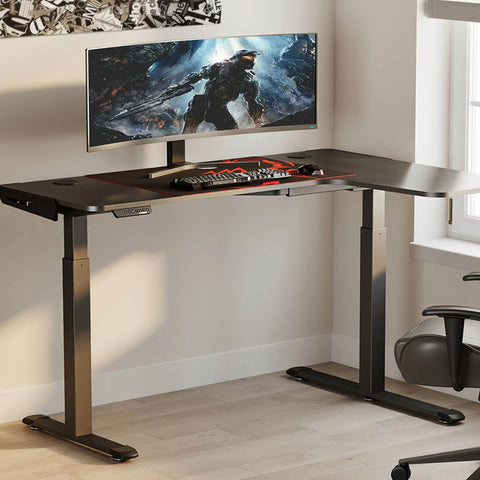
I’ve spent months testing L-shaped desks in corner setups. For anyone in an apartment, the reversible frame is a total game-changer. It allows you to adapt the layout based on where your power outlets are or which way your door swings—a lesson often learned only after a frustrating installation.
During intense gaming sessions, the wing section of an L-shaped desk provides perfect arm support, reducing the strain on your trapezius muscles. This aligns with the OSHA guidelines on identifying ergonomic problems, which highlight poor posture and repetitive tasks as core risk factors for musculoskeletal disorders (MSDs).
The Cable Management Hack
In a small room, cables are the enemy. They look messy and eat up legroom. Instead of bulky trays that hit your knees, we’ve found that using flat adhesive cable channels along the desk legs is much more effective. It keeps the "under-desk" zone clear, which is crucial for maintaining a neutral seated posture as defined by OSHA's Neutral Working Postures.

Pro-Tips for the Ultimate Compact Setup
- Monitor Arms are Mandatory: Lifting your screen off the desk surface frees up nearly a foot of usable width. In a small room, this is the difference between a cluttered mess and a clean workspace.
- The Single Large Monitor Strategy: Instead of dual 24-inch monitors, try a single 32-inch or 34-inch ultrawide. You maintain the screen real estate but save the horizontal space required for two stands.
- Wall Clearance Check: This is a common "gotcha." If your room is under 10x10 feet, don't buy a chair with a massive recline arc unless you have 3 feet of clearance behind you. Otherwise, you’ll just be slamming into the wall every time you try to relax.
- Lighting and Air Quality: Small rooms get stuffy and dark. Look for furniture with UL GREENGUARD Certification to ensure low chemical emissions, and use RGB lighting to reduce eye strain from monitor glare.
For a deeper dive into how ergonomic science is evolving, check out The 2026 Workstation White Paper: Converging Ergonomic Science and Sustainable Engineering.
Pros & Cons of Compact High-Performance Desks
| Feature | Pros | Cons |
|---|---|---|
| L-Shaped Design | Massive surface area; fits in corners; great arm support. | Can feel "boxy" in very narrow rooms; harder to move. |
| Glass/RGB Desks | Incredible aesthetics; easy to clean; immersion. | Shows fingerprints easily; requires better cable management. |
| Executive Dual-Motor | Rock-solid stability; high weight capacity; premium feel. | Larger footprint; higher initial investment. |
| Compact 43" Desks | Fits anywhere; affordable; perfect for single-monitor. | Limited mouse space for low-sens gamers; less storage. |
Scenario Analysis: Which Path is Yours?
Scenario A: The Remote Professional (Standard Case)
You need a clean, professional look for Zoom calls but want to stay active. A 48-to-55-inch standing desk with a minimalist wood or stone finish is your best bet. It fits the HSE DSE Checklist requirements for a safe workstation without dominating the room. Focus on a desk with built-in drawers to keep your "office" hidden when the workday ends.
Scenario B: The Competitive Streamer (The Edge Case)
You’re squeezed into a bedroom but need a 72-inch width for mouse flicks and dual monitors. The standard 43-inch compact desk will fail you here. Your solution? An L-shaped desk. By using the "wing" for your PC tower and peripherals, you clear the main desk surface for that massive mousepad. Use monitor arms to ensure you aren't sitting too close to the screens, avoiding the eye strain issues common in shallow-desk setups.

Final Thoughts for the New Year
Upgrading your space for the New Year isn't just about aesthetics—it's an investment in your health and productivity. By choosing furniture that meets ANSI/BIFMA standards and understanding the spatial geometry of your room, you can build a setup that punches way above its weight class.
Stop settling for a cramped, wobbly desk. Whether you’re climbing the ranks in a competitive shooter or grinding through a 60-hour work week, your environment dictates your performance. Measure your space, check your motor specs, and build the battlestation your dreams deserve.
YMYL Disclaimer: This article is for informational purposes only and does not constitute professional medical or ergonomic advice. While ergonomic furniture can reduce the risk of musculoskeletal disorders, it is not a cure for pre-existing conditions. Always consult with a qualified healthcare professional or ergonomic specialist before making significant changes to your workstation or physical routine, especially if you experience chronic pain.
References
- BIFMA G1-2013 Ergonomics Guideline
- Canadian Centre for Occupational Health and Safety (CCOHS) - Sit/Stand Desks
- Cornell University Ergonomics Web — Workstation Guides
- OSHA eTools: Computer Workstations - Neutral Working Postures
- World Health Organization (WHO) Guidelines on Physical Activity & Sedentary Behaviour
- UL GREENGUARD Certification Overview




Leave a comment