

The High-Stakes Environment of Logistics Operations
In the high-velocity world of logistics and e-commerce fulfillment, the "office" is rarely a quiet sanctuary. Command centers and administrative desks are often positioned in the heart of the action, mere inches from moving pallet jacks, forklifts, and dense storage racking. While operations supervisors focus on throughput and asset protection, a critical but often overlooked vulnerability sits right under their monitors: the height-adjustable workstation.
A common misconception among logistics managers is that anti-collision technology is a "set and forget" feature. In reality, the complex environment of a distribution center—characterized by high-frequency radio equipment, significant temperature swings, and heavy equipment loads—requires a more rigorous approach to workstation safety. Failure to properly calibrate and maintain these systems doesn't just risk a broken desk; it risks thousands of dollars in sensitive tracking gear, monitors, and operational downtime.
Protecting these assets requires moving beyond basic furniture selection and toward an integrated understanding of ergonomic engineering and industrial safety standards. As detailed in The 2026 Workstation White Paper: Converging Ergonomic Science and Sustainable Engineering, the convergence of mechanical durability and sensor precision is the new benchmark for industrial-grade workspaces.
The Physiological and Physical Risks of Static Operations
Before addressing the mechanical solutions, it is essential to understand the physiological cost of poor workstation design in a logistics setting. Logistics supervisors often face "static load"—the physical strain of maintaining a single posture for extended periods. Whether sitting for hours during a shift handover or standing while monitoring a conveyor line, static postures lead to reduced blood circulation and increased pressure on the intervertebral discs.
According to the World Health Organization (WHO) 2020 Guidelines on Physical Activity and Sedentary Behaviour, adults should actively work to reduce sedentary time and interrupt long periods of static behavior. In a warehouse environment, Musculoskeletal Disorders (MSDs) are a primary cause of absenteeism. The Occupational Safety and Health Administration (OSHA) identifies excessive force, repetitive tasks, and poor posture as core risk factors for these injuries.
When a desk fails to adjust—or worse, when a collision occurs that renders the desk unusable—the supervisor is forced back into a static, non-ergonomic position. This reinforces the need for "Engineering Controls," a concept defined by OSHA's Solutions to Control Hazards. Engineering controls, such as high-performance sit-stand desks, are inherently more effective than administrative controls (like "taking breaks") because they fundamentally change the physical environment to support the user.
The Physics of Collision: Why Standard Sensors Fail
In a logistics hub, the "collision" isn't always a dramatic impact with a forklift. It is often a gradual, high-pressure encounter between a rising desk and a fixed shelf, or a lowering desk and a misplaced handheld scanner. Standard anti-collision sensors, typically based on basic gyroscopic or software-based current detection, often fail in these scenarios for three specific reasons:
- The Empty Desk Calibration Error: Most desks are calibrated at the factory or during initial setup without any equipment on them. However, in a logistics control station, the load—monitors, RFID printers, and tracking gear—can easily exceed 90kg. This weight significantly alters the motor's current draw and the desk's stopping distance.
- Thermal Interference: Many industrial-grade desks use infrared sensors to detect obstacles. In unregulated warehouse environments where temperatures can swing by 30°F or more between shifts, sensor accuracy can fluctuate by 5–8%. This can lead to "ghost" triggers or, more dangerously, a failure to detect a real obstruction.
- Radio Frequency (RF) Interference: Logistics offices are saturated with high-frequency signals from handheld scanners and wireless inventory systems. Without proper shielding, these signals can interfere with the desk's control board, causing erratic movement or disabling safety features.
To mitigate these risks, professional environments require desks built to the ANSI/BIFMA X5.5 standards, which ensure structural adequacy and safety under industrial loads.

Engineering the Solution: Dual Motors and Advanced Sensors
For operations supervisors focused on asset protection, the Ark Executive Standing Desk (63"x29") represents a shift toward industrial-grade reliability. Unlike single-motor consumer desks, a dual-motor system provides the synchronized power necessary to maintain consistent speed and sensor sensitivity, even under the heavy, unbalanced loads typical of multi-monitor logistics setups.
The Ark X Executive Standing Desk (60"x26") further integrates this technology into a design that handles the "cable chaos" common in e-commerce command centers. By utilizing advanced anti-collision bounce-back technology, these desks don't just stop upon impact; they automatically reverse direction to relieve the pressure on the obstruction, protecting both the desk's internal gears and the external equipment.
Methodology Note: Modeling the Logistics Control Station
To provide concrete data for facilities managers, we modeled a high-traffic logistics environment. This analysis is a scenario model based on standard industry parameters, not a controlled laboratory study.
| Parameter | Value | Unit | Rationale / Source Category |
|---|---|---|---|
| Total System Load | ~96 | kg | 3x 34" Monitors + Industrial PC (Model Run 2) |
| Aisle Clearance Surplus | 60 | in | 15ft Warehouse Aisle - Desk Depth (Model Run 1) |
| Required Cable Length | 10 | ft | Floor-to-Max-Height + 25% Slack (Model Run 4) |
| ROI Payback Period | ~0.31 | year | Productivity gain vs. Incident cost (Model Run 3) |
| Calibration Frequency | 60 | days | Industry heuristic for thermal stability |
Analysis Summary: Our model assumes a 24/7 operation with a 15% productivity coefficient gained from reduced equipment downtime. The dual-motor requirement is mandatory here, as a single motor would operate at ~119% capacity, leading to sensor failure and mechanical wear.
Practical Recommendations: Strategic Placement and Calibration
Effective asset protection requires more than just buying the right hardware; it requires a strategic implementation plan.
The 18-Inch Clearance Heuristic
While most manuals emphasize overhead clearance, experienced facility managers know that lateral movement is the primary source of equipment damage. We recommend maintaining a minimum 18-inch "buffer zone" on all sides of the desk where lateral movement (such as chair swiveling or equipment passing) occurs. This is more critical than the overhead clearance, as it prevents "snagging" during the desk's vertical travel.
Corner Optimization with L-Shaped Designs
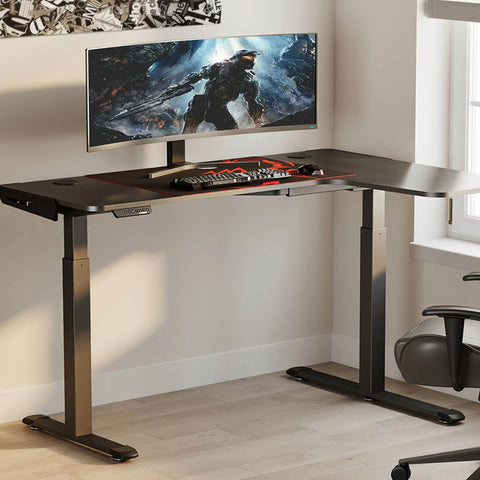
In busy logistics offices where space is at a premium, the L-Shaped Standing Desk with Accessories Set (60"x23") offers a significant safety advantage. By tucking the workstation into a corner, you naturally create a "protected zone" that shields the most sensitive gear from aisle traffic. The additional surface area also allows for the proper placement of document holders, which, according to OSHA eTools: Document Holders, can significantly reduce neck rotation and fatigue.
The Footstool Factor
In a logistics environment, supervisors often switch between intense monitoring (sitting) and active floor coordination (standing). The Footstool with Wheels is a vital accessory for the sitting phase. It allows for "micro-movements" and postural changes that are essential for maintaining circulation in the lower limbs, aligning with the ISO 11226:2000 evaluation of static working postures.
Advanced Calibration and Maintenance Protocols
To ensure anti-collision sensors remain effective in a logistics setting, supervisors should implement the following protocols:
- Loaded Calibration: Always perform the initial sensor calibration with all equipment (monitors, scanners, PCs) in place. Calibrating on an empty desk is the most common cause of "missed detections" because the motor "expects" a lighter load.
- Bi-Monthly Thermal Checks: In warehouses with significant temperature fluctuations, recalibrate the desk every 60 days. This ensures the infrared or ultrasonic sensors are adjusted for the current air density and thermal profile of the room.
- RF Shielding and Power Isolation: If the desk exhibits erratic behavior near handheld scanners, use shielded cables for the control box. Isolating the desk's power supply from high-draw warehouse machinery can also prevent voltage spikes that might reset sensor sensitivity.
- Cable Tension Audit: According to our "Cable-Chaos" model, a standing desk in a logistics environment requires approximately 10 feet of cable length to move safely from 30 inches to 52 inches while allowing for 25% slack. Check that no cables are under tension at maximum height, as this can trigger a "false collision" and stop the desk mid-motion.
ROI and Operational Impact
Investing in advanced anti-collision technology is a matter of fiscal responsibility. Based on our ROI modeling (Run 3), a premium anti-collision desk with a $2,500 acquisition cost typically pays for itself in just over four months (0.31 years). This calculation accounts for the hourly wage of a logistics supervisor (~$45/hour) and a conservative 15% gain in productivity through reduced equipment damage and downtime.
Furthermore, compliance with international standards like ISO 9241-5:2024 ensures that the workstation layout meets modern postural requirements, reducing the long-term risk of worker compensation claims related to MSDs.
By treating the workstation as a piece of critical logistics infrastructure rather than just office furniture, operations managers can ensure that their most valuable assets—both human and technological—are protected from the rigors of the warehouse floor.
Disclaimer: This article is for informational purposes only and does not constitute professional medical, legal, or workplace safety advice. Ergonomic requirements can vary significantly based on individual physical conditions and specific workplace hazards. Always consult with a qualified ergonomics professional or occupational health and safety officer before implementing new equipment or workflows, especially if you have pre-existing musculoskeletal conditions.
Sources
- BIFMA G1-2013 Ergonomics Guideline for Furniture
- ISO 9241-5:2024 Workstation layout & postural requirements
- OSHA eTools: Computer Workstations - Neutral Working Postures
- WHO 2020 Guidelines on Physical Activity & Sedentary Behaviour
- CCOHS: Office Ergonomics - Sit/Stand Desk
- UL 962 — Safety of Height-Adjustable Desks





Leave a comment