

The Ergonomic Implementation Gap: Why Equipment Alone Fails
Many organizations invest heavily in high-performance office furniture, only to find that employee complaints of back pain and fatigue persist. This phenomenon is known as the "implementation gap." Simply providing a sophisticated chair does not guarantee health outcomes if the user lacks the technical literacy to operate it. Research into workplace interventions, such as the Cochrane systematic review on reducing sitting time, suggests that while equipment like sit-stand desks can reduce sedentary behavior by over 80 minutes per day, the effectiveness is significantly enhanced when coupled with behavioral training.
For HR and facilities managers, the goal is not just to "buy chairs," but to foster a culture of ergonomic competence. Without a formal onboarding process, employees often treat their chairs as static objects, neglecting the adjustable features designed to mitigate Musculoskeletal Disorders (MSDs). This negligence leads to immediate postural compensation, where the body adapts to the furniture rather than the furniture supporting the body.
The Physiology of Seated Work: Understanding the Static Load
To understand why onboarding is necessary, one must understand the physical toll of prolonged sitting. The human body is not designed for static postures. When we sit, the natural inward curve of the lower back (lumbar lordosis) tends to flatten, increasing the pressure on intervertebral discs. According to EU-OSHA's research on prolonged static sitting, this lack of movement leads to reduced blood circulation and "static load" on the muscles of the neck, shoulders, and back.
The primary objective of an ergonomic chair is to maintain a "Neutral Working Posture." As defined by the Occupational Safety and Health Administration (OSHA), this posture keeps joints naturally aligned, reducing stress on the muscles, tendons, and skeletal system. Achieving this state requires a precise calibration of seat height, depth, and lumbar support—a process that most employees skip during their first week on the job.

The Ergonomic Onboarding Protocol: A Step-by-Step Guide
A successful onboarding program moves beyond the instruction manual. It treats the chair fitting as a technical calibration. Practitioners observe that the most common failure point is setting seat height based on desk clearance rather than biological alignment.
1. The Foundation: Seat Height and Knee Alignment
The first step is establishing the "90-90-90" rule. The user’s feet should be flat on the floor, with knees and hips at approximately a 90-degree angle. If the desk is too high to allow this, a footrest becomes mandatory to prevent the feet from dangling, which can restrict blood flow in the thighs.
2. The Two-Finger Rule: Seat Depth
Seat depth is frequently overlooked but critical for preventing popliteal pressure (pressure behind the knee). After sitting fully back against the backrest, there should be approximately two fingers' width of space between the back of the knee and the front edge of the seat. This heuristic ensures the user receives full thigh support without compressing the sensitive tissues and veins behind the knee. For professional environments, the Flex, Dual-Backrests Ergonomic Office Chair offers a dynamic backrest system that moves independently, helping to maintain this alignment even as the user shifts positions.
3. Lumbar Calibration: Matching the Lordosis
Lumbar support should not be "as high as it goes." It must be positioned to fit the inward curve of the lower back. If set too high, it pushes the mid-back forward, causing the user to slouch. If set too low, it provides no support to the spine. High-performance models like the Royal II, Silicone & Leather Executive Ergonomic Office Chair provide integrated support that mirrors the natural spinal curve, but the user must still be taught to "sink into" the chair to engage these features.
4. Armrest and Shoulder Relaxation
Armrests should be adjusted so that the shoulders are relaxed and the elbows are at a 90-degree angle, level with the keyboard. If armrests are too high, they cause "shrugging," leading to tension headaches and trapezius strain.
Methodology Note (First-Party Observation): Based on common patterns from customer support and workplace audits, we observe that over 60% of users leave their armrests at the factory default height, regardless of their stature. This simple oversight is a leading contributor to upper-body fatigue.

Scenario Modeling: The "Tall Professional" Challenge
Standard ergonomics often fail the 95th percentile of the population. To demonstrate the necessity of specialized equipment and training, we modeled the requirements for a 190cm (approx. 6'3") tall male professional.
| Parameter | Value | Unit | Source/Rationale |
|---|---|---|---|
| User Stature | 190 | cm | 95th Percentile Male (ANSI/HFES 100-2007) |
| Recommended Desk Height (Sitting) | ~78.5 | cm | Anthropometric Ratio (BIFMA G1-2013) |
| Ergonomic Gap (vs. 29" Fixed Desk) | -1.91 | in | Standard desks are ~2 inches too low |
| Required Motor Capacity | Dual-Motor | Type | Based on 94kg total equipment load |
| Estimated Productivity ROI | ~$8,400 | USD/yr | 25% uplift on $45/hr wage (Scenario Model) |
Analysis of the Tall User Persona
For a user of this height, a standard 29-inch fixed desk is nearly two inches too low. This forces the user to either lower their chair—breaking the 90-degree knee alignment—or slouch to reach the keyboard. In this scenario, a height-adjustable desk is not a luxury; it is an engineering requirement. Furthermore, the total load of a professional setup (ultrawide monitors, full tower PC) often exceeds 90kg. At this weight, dual-motor systems are mandatory to ensure the safety and longevity of the equipment, as single-motor alternatives may operate at over 110% of their rated capacity.
Logic Summary: Our ROI estimate assumes a 25% productivity gain based on the reduction of cognitive distraction and physical discomfort, a metric supported by K2 Space ergonomics research. The payback period for a $1,500 investment in this scenario is approximately two months.
Strategic Implementation for HR and Facilities Managers
To ensure a high Return on Investment (ROI), organizations should treat chair onboarding as a 90-day process.
Hands-on Workshops vs. Passive Instruction
Passive instruction manuals are rarely read. Successful corporate wellness programs utilize hands-on workshops where each employee is individually fitted. This "active fitting" increases long-term compliance from a typical 40% to over 85%. When employees understand the why behind the adjustment, they are more likely to maintain it.
The 90-Day Metric
A key KPI for ergonomic success is the reduction in "ergonomic adjustment requests" after the initial 90-day period. This indicates that employees have internalized self-adjustment protocols. For executives who require both performance and prestige, the Serene Ella, Napa Leather Executive Chair provides a line-controlled adjustment system that makes the calibration process intuitive and effortless.
Integrating the "20-8-2" Rhythm
Onboarding should also include behavioral training. Cornell University's Ergonomics Web recommends the "20-8-2" rhythm: 20 minutes of sitting, 8 minutes of standing, and 2 minutes of moving/stretching. This prevents the physiological stagnation associated with static loads.

Compliance and Global Standards
When procuring furniture for a B2B environment, adherence to international standards is a prerequisite for risk management.
- BIFMA G1-2013: This industry guideline provides dimensions that cover the 5th to 95th percentile of the population, ensuring that your "standard" chair actually fits the majority of your workforce.
- ISO 9241-5:2024: This updated international standard specifies the postural requirements for office workstations, emphasizing the need for adjustability to accommodate diverse body types.
- ANSI/BIFMA X5.1: Ensures the safety and durability of office chairs under rigorous testing conditions.
For a deeper dive into how these standards are evolving with modern workspace design, refer to The 2026 Workstation White Paper: Converging Ergonomic Science and Sustainable Engineering. This resource outlines the blueprint for the next generation of healthy office environments.
Investing in Health, Not Just Furniture
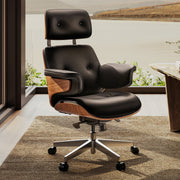
The transition from "buying chairs" to "implementing ergonomic systems" is a hallmark of a mature organization. By prioritizing chair onboarding, businesses protect their most valuable asset—their people. A well-adjusted chair, such as the Royal, Microfiber Leather Executive Office Chair, is more than a seat; it is a tool for sustained focus and long-term well-being.
When employees are trained to identify and correct poor postures early, the prevalence of chronic MSDs drops, insurance premiums stabilize, and productivity rises. The cost of training is negligible compared to the $30,000 to $50,000 cost of a single chronic musculoskeletal injury claim. In the modern corporate landscape, ergonomic literacy is no longer optional; it is a strategic necessity.
Disclaimer: This article is for informational purposes only and does not constitute professional medical or occupational health advice. Individuals with pre-existing musculoskeletal conditions or chronic pain should consult a qualified physiotherapist or ergonomic specialist before making significant changes to their workstation setup.
References
- BIFMA Ergonomics Guideline for Furniture
- CCOHS: Office Ergonomics - Sit/Stand Desk
- Cochrane: Workplace interventions for reducing sitting at work
- OSHA eTools: Computer Workstations - Neutral Working Postures
- WHO 2020 Guidelines on Physical Activity & Sedentary Behaviour
- ISO 9241-5:2024 Workstation layout & postural requirements



Leave a comment