

In the quest for the perfect home office setup, one question often arises: should your desk face a window? Beyond just aesthetics, this decision impacts your productivity, mood, and even your energy levels, touching on principles like Feng Shui and biophilic design. The answer isn't a simple yes or no, since it depends on a few factors that cater to your unique needs and preferences.
The Pros:
1. Natural Light: One of the most significant advantages of having your desk face a window is the abundant natural light it provides. Sunlight not only brightens up your workspace but also has numerous health benefits, including boosting mood and productivity.
2. Scenic Views & Nature Connection: A picturesque view provides inspiration and a vital mental break. Gazing at nature, even for a few moments, can reduce stress and mental fatigue, connecting you to the outdoors and improving overall well-being.
3. Enhanced Productivity and Focus: Studies consistently show that exposure to natural daylight helps regulate our circadian rhythms, leading to better sleep and higher daytime alertness. This can directly translate to improved focus and productivity.
The Cons:
1. Screen Glare and Visual Distractions: The biggest drawback is potential screen glare, which causes eye strain. Movement outside, like passing cars or pedestrians, can easily break your concentration and pull you out of a state of deep work.
2. Temperature Control: Depending on the season, direct sunlight through your window can make your workspace too hot or too cold, leading to discomfort.
3. Furniture Placement: The layout of your office may not always allow for an optimal desk-window alignment, limiting your choices for desk placement.
Finding the Perfect Balance: Actionable Tips
To strike the perfect balance between the pros and cons, consider these tips:
1. Use Window Coverings: Invest in window coverings like blinds or curtains to control glare and maintain a comfortable temperature.
2. Adjustable Desk: Choose an ergonomic, adjustable desk that can be easily repositioned to accommodate changing lighting conditions and your comfort.
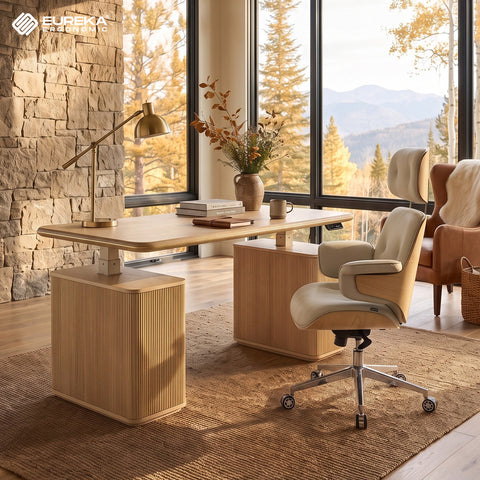
3. Find the Right Angle: The ideal setup is often placing your desk perpendicular (at a 90-degree angle) to the window. This allows you to enjoy natural light from the side and easily glance outside without having the window directly in your line of sight, minimizing both glare and distraction.
4. Personal Preferences: Ultimately, the decision should align with your personal preferences and work style. Experiment with different setups to find what works best for you.
Your Perfect Workspace Awaits
Ultimately, there's no single "correct" answer. The best office desk position is one that works for you. The right setup helps you work and study smarter. Experiment with these suggestions, pay attention to how you feel and perform, and don't be afraid to rearrange your space. Creating a workspace that supports your well-being is the first step toward a more productive and enjoyable workday.





Leave a comment