

Desk Size Calculator: How to Find the Right Fit for Your Room
Unsure whether an L-shaped or rectangular desk will actually fit in your room once the chair, walkways, and cables are in place? That uncertainty is exactly where a desk size calculator concept becomes powerful.
Instead of guessing from photos, a calculator lets you enter your room dimensions, test different desk shapes, and immediately see how much space is left for movement. When it is paired with ergonomic guidelines, it goes beyond “will it fit?” to “will it support healthy posture and workflow?”.
This guide explains how to think like a desk size calculator, how L-shaped and rectangular desks compare in real rooms, and how to translate standards-based ergonomics into simple measurements you can use before you buy.

1. How a Desk Size Calculator Should Work
A useful desk size calculator does more than subtract desk width from room width. It needs to account for three critical factors:
- Human dimensions (your body and chair).
- Ergonomic clearance (for posture, movement, and shared spaces).
- Desk shape and workflow (L-shaped vs. rectangular layouts).
1.1 Start From the Person, Not the Desk
Ergonomics standards such as ANSI/HFES 100 and BIFMA G1-2013 are built around the 5th–95th percentile adult population. They show that comfortable sitting desk height, when adjustable, typically spans about 22–33 in (56–84 cm). Research summarized in an office ergonomics guide referencing ANSI/HFES 100 confirms that a fixed 29–30 in desk only fits a portion of adults comfortably.
A calculator that takes ergonomics seriously should therefore:
- Ask for user height (and ideally inseam) to suggest a target desk height.
- Cross-check that height against the desk’s adjustable range.
- Flag desks that sit outside that range for many users.
Pro Tip – Why Height Range Matters
According to the BIFMA G1-2013 guideline for furniture dimensions, products designed around the 5th–95th percentile fit most users in an office population. A height-adjustable desk that spans roughly 24–50 in (61–127 cm) typically covers comfortable sit and stand positions for a large majority of adults, whereas a fixed-height desk cannot make that claim.
1.2 Build in Clearance, Not Just Furniture Dimensions
In real installations, the number one mistake is treating the desk as a flat rectangle and ignoring:
- Baseboards and wall obstacles.
- Door swings and radiators.
- Chair movement and walkways.
Experienced installers routinely “measure twice” by:
- Measuring finished floor-to-wall dimensions.
- Subtracting 0.5–1 in (1–2.5 cm) to account for baseboards.
- Leaving 24–36 in (61–91 cm) of clearance behind the chair and along main walkways, with 36 in preferred in busy corridors.
A good calculator would prompt:
“Enter room length and width, then reserve at least 24–36 in for a main passage behind the chair.”
This aligns with accessibility logic as well. For example, ADA Standards for Accessible Design commonly use a 60 in (152 cm) turning circle for wheelchair users. Even if your home office does not need formal accessibility, layouts that feel generous for ambulatory users can be tight or unusable for wheeled chairs.
1.3 Visualizing the Layout
Ideally, the calculator should produce a simple top-down visualization showing:
- Room outline and door swing.
- Desk footprint (L-shaped or rectangular).
- Chair position and clearance zone.
- Optional accessories (monitor stand, CPU cart, footrest).
Even if you sketch this by hand, following the same logic will help you avoid cramped, non-ergonomic setups.
2. L-Shaped vs. Rectangular Desks: Space & Ergonomics Compared
Choosing between an L-shaped and a rectangular desk is not just a style decision. It directly affects how efficiently you use corners, how far you must reach, and how easily you can switch between tasks.
2.1 Core Size & Space Utilization
The table below compares typical layouts for home offices and gaming setups.
| Feature / Scenario | Rectangular Desk (e.g., 60" x 24") | L-Shaped Desk (e.g., 60" x 23" + 40" x 20") |
|---|---|---|
| Minimum room width for comfortable sit-back clearance | ~60–66" (desk) + 24–30" chair clearance | Shorter wall of the L must still allow 24–30" behind chair |
| Corner usage | Often leaves corner of room unused | Fills corner and frees remaining wall space |
| Primary reach zone (20–24") | Straight ahead only | Along main run + shallow corner intersection |
| Ideal for | Single-monitor, linear workflow | Multitasking, dual setups (e.g., work + gaming) |
These dimensions follow practical rules that installers rely on:
- 24 in (61 cm) depth is a workable minimum for a single monitor.
- 30–36 in (76–91 cm) depth is preferred for dual or ultra-wide monitors to avoid feeling cramped and to keep the monitor 20–24 in (50–60 cm) from your eyes.
2.2 L-Shaped Ergonomics: When They Shine
L-shaped desks are especially effective when you:
- Place the primary work area on the longer run of the L.
- Use the return for secondary tasks (printers, console, documents).
- Keep the corner intersection depth to about 18–24 in (46–61 cm) so your primary reach zone stays within 20–24 in from your torso.
This setup keeps keyboards and primary monitors directly in front of you while still letting you swivel slightly for other tasks, reducing awkward reaches that contribute to musculoskeletal strain.
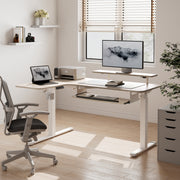
An L-shaped standing desk with built-in accessories, such as the L-Shaped Standing Desk with Accessories Set (60"x23"), illustrates this logic well. The main run supports your keyboard, mouse, and primary monitor, while the return can host secondary screens, a printer, or a console, all within a controlled reach distance.

2.3 Rectangular Desks: When Simple Is Better
A rectangular desk tends to be the better choice when:
- The room is narrow (for example, smaller than 7 ft/213 cm deep).
- You primarily use one monitor and a laptop.
- You want maximum legroom and the ability to reposition the desk easily.
According to the OSHA eTool on Desks, desks should provide sufficient legroom and allow you to keep the keyboard and mouse at a height that lets your shoulders relax and elbows stay close to 90 degrees. In tight spaces, a modest-depth rectangular desk (24–30 in) often makes it easier to maintain these neutral joint angles without hitting walls or radiators when you roll back.
3. Turning Ergonomics Standards into Calculator Inputs
To build or mentally use a desk size calculator that aligns with best practices, you can translate formal standards into a handful of practical inputs.
3.1 Desk Height and User Height
The ANSI/HFES 100-based data summarized in common office ergonomics guides show that comfortable sitting heights cluster around that 22–33 in range. Taller users tend to sit toward the upper end, shorter users at the lower end.
A calculator could use a simple model like:
- User height 5'2"–5'6" (157–168 cm): target sitting desk height ~23–26 in (58–66 cm).
- User height 5'7"–5'11" (170–180 cm): ~25–28 in (63–71 cm).
- User height 6'0"–6'4" (183–193 cm): ~27–30 in (69–76 cm).
These are starting points, not medical prescriptions. They assume typical chair height adjustment and standard keyboard use. Users with specific musculoskeletal conditions should consult a clinician or ergonomist before locking in heights.
In standing mode, guidance from ISO 9241-5:2024 and related ergonomics literature focuses on maintaining neutral joint angles. In practice, this often means:
- Desk surface around elbow height when standing.
- Shoulders relaxed, elbows near 90 degrees, wrists straight.
A dual-motor standing desk with generous range (for example, roughly mid-20s to near 50 in) makes it easier to hit these targets for multiple users. The L-Shaped Standing Desk with Accessories Set (60"x23") uses a dual-motor system that travels about 1 in per second with preset memory, which is particularly convenient in shared spaces or hot-desking scenarios.
3.2 Sit-Stand Ratio & Time-Based Prompts
A calculator can also help plan how you use the desk, not just its size.
The Cornell University Ergonomics team suggests a "20-8-2" rhythm for computer work: in each 30-minute block, aim for
- 20 minutes sitting,
- 8 minutes standing,
- 2 minutes of light movement or stretching.
This pattern is designed to reduce static load on tissues while acknowledging that both long-term sitting and long-term standing have risks. ISO 11226 on static postures supports this principle: it highlights that maintaining fixed postures for prolonged periods increases musculoskeletal load and should be limited.
A sophisticated desk calculator (or app) could:
- Ask how many hours per day you work.
- Propose a sit-stand schedule based on the 20-8-2 pattern.
- Suggest pairing your desk with reminders or a timer to actually follow through.
The Cochrane review on workplace interventions found that sit-stand desks reduced sitting time at work by roughly 84–116 minutes per day. However, the authors emphasized that evidence for long-term health outcomes is still limited. That is why pairing equipment with behavior (like 20-8-2) is important.
3.3 Movement Space and Accessibility
To keep the layout safe and efficient, combine:
- Installer guidance: 24–36 in behind the chair for movement.
- Basic accessibility logic: 60 in turning circle if wheelchair maneuvering is expected.
A calculator should warn you when your chosen desk and chair depth leave you with less than 24 in of clearance in a main pathway.
Expert Warning – "Looks Fine on Paper" Is Not Enough
Experience from office fit-outs shows that layouts that “fit” numerically often fail when drawers cannot open, chairs hit radiators, or people must twist to reach equipment. When you input room size, also include shared equipment zones and door swing. A layout that reserves an extra 6–12 in around obstacles usually tests as significantly more comfortable in practice.
4. Workflow Scenarios: Which Desk Shape Works Where?
Instead of asking “Is L-shaped better than rectangular?”, it is more useful to compare the two shapes across real-world use cases.
4.1 Single-User Home Office (Laptop + Monitor)
Scenario: 10' x 11' (305 x 335 cm) bedroom office, one external monitor and a laptop.
- Rectangular desk: A 48–60 in wide, 24–30 in deep standing desk centered on the short wall usually leaves enough space for a 24–30 in pathway behind the chair and modest storage.
- L-shaped desk: An L-shape can fit, but the short leg of the L may make the room feel cramped, and the return can be under-utilized.
In this situation, a calculator will often show that the rectangular desk plus vertical storage yields more open floor space and a simpler traffic pattern.
For monitor placement, the OSHA eTool on Monitors recommends placing the screen so that the top line of text is at or slightly below eye level and about 20–40 in (50–100 cm) away, depending on character size and vision. A simple desk plus a riser like the Carbon Fiber Dual Monitor Stand can make fine-tuning that height easier without changing desk dimensions.

4.2 Dual-Use Space: Work by Day, Gaming by Night
Scenario: Shared living room corner, two monitors for work plus a console.
Here an L-shaped standing desk often wins:
- One run holds the work monitor, keyboard tray, and documents.
- The return holds the gaming monitor and console, keeping cables contained to one corner.
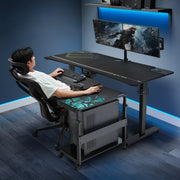
- A mobile CPU cart, such as the Mobile Height Adjustable CPU Cart, lets the computer move with you while preserving safe cable slack during sit-stand adjustments.

Installer experience shows that cable slack should equal the desk’s maximum height travel plus 6–12 in (15–30 cm). Without that allowance, raising the desk can pull on ports or unseat plugs.
A calculator can prompt you to specify:
- Desk travel (e.g., 25–49 in).
- CPU location (on floor vs. cart).
- Cable routing path.
Then it can check whether you have left enough cable slack for safe operation.
4.3 Multi-User or Family Workspace
Scenario: Two adults sharing a desk in shifts, with different heights and chair preferences.
Key requirements are:
- Wide height-adjustment range for sitting and standing.
- Programmable presets so each person can return to their preferred heights quickly.
- Sufficient legroom on both runs in an L-shape or along the full width of a rectangular desk.
Here, L-shaped and rectangular both work, but an L-shaped desk with dual motors and multiple memory presets typically provides a more natural division of zones: one user can own the main run, the other the return, without crowding equipment.
The WHO 2020 Guidelines on Physical Activity and Sedentary Behaviour emphasize reducing sedentary time and interrupting long sitting periods. A shared sit-stand workstation with a planned sit-stand schedule (for example, alternating standing sessions around meetings) helps multi-user households or teams integrate this guidance into daily work habits.
5. Common Myths and Mistakes About Desk Size
5.1 Myth: "If It Fits on the Wall, It Fits the Room"
This is one of the most common misconceptions. Users often measure only the wall length, confirm that the desk is shorter, and conclude the desk will fit.
In reality, this ignores:
- Chair depth and movement.
- Walkway clearance (24–36 in).
- Door swing and radiator intrusion.
A proper calculator forces you to enter depth and clearance values so you see the real remaining floor space.
5.2 Myth: "L-Shaped Desks Always Save Space"
L-shaped desks optimize corner usage, but they do not always save space. They can:
- Overestimate usable corner space where wall outlets, windowsills, or heaters exist.
- Reduce flexibility for future reconfigurations.
- Create dead zones if the return is too deep or too long.
Installer experience shows that keeping the return modest (for example, 40–48 in long, 20–24 in deep) often delivers better functional space than a massive L that dominates a small room.
5.3 Mistake: Ignoring Static Posture Risks
Users sometimes assume that simply owning a standing desk solves posture issues, even if the desk is too large, too small, or poorly adjusted.
Research summarized by OSHwiki on prolonged static sitting explains that long periods of fixed sitting increase the risk of musculoskeletal disorders (MSDs). A sister article on prolonged static standing stresses that standing still for long periods carries its own risks, especially for the lower limbs.
The takeaway:
- Right-sized furniture is a foundation, not a cure-all.
- The calculator can help you find dimensions that support movement and posture change, but you still need regular position changes and micro-breaks.
For more on how a standing desk fits into an overall strategy to reduce sedentary time, see the guide on using a standing desk to fight a sedentary life.
6. A Practical Checklist: "Calculator-Ready" Measurements
Use this checklist before you buy or configure any desk. A good desk size calculator should include fields for each of these items.
6.1 Room & Obstacle Data
- Room length and width (finished floor-to-wall).
- Baseboard thickness (usually 0.5–1 in).
- Door location and swing radius.
- Radiators, vents, or low windowsills.
- Power outlets and data ports you need to reach.
6.2 User & Chair Data
- Your height (and others who will use the desk).
- Chair depth and base diameter (including wheels).
- Preferred sitting height range if you already know it.
- Any special requirements (e.g., footrest use).
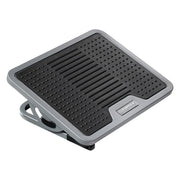
Accessories such as the Adjustable Ergonomic Footrest can help shorter users or those with circulation concerns achieve a neutral seated position even when the desk and chair are optimized.
6.3 Desk & Equipment Data
- Desk width, depth, and if L-shaped, both run lengths and depths.
- Adjustable height range and whether it uses dual motors.
- Number and size of monitors; whether you use monitor arms or stands.
- CPU location (on floor, on desk, or on a mobile cart).
- Cable routing path and required slack (desk travel plus 6–12 in).
6.4 Ergonomic Targets
- Sitting desk height target, derived from user height and ANSI/HFES guidance (within roughly 22–33 in).
- Standing desk height target (around elbow height).
- Minimum clearance behind chair (24–36 in).
- If needed, turning space for mobility devices (up to 60 in diameter).
When a calculator incorporates all 18 points, it becomes a decision tool rather than a simple ruler.
For guidance on fitting standing desks into smaller rooms, see the article on stylish standing desk designs for small home offices and the comparison of standing vs. sitting desks for small offices.
Key Takeaways: Designing Your Own Desk Size Calculator
A well-designed desk size calculator helps you go beyond “Will it fit along this wall?” to “Will this desk shape, size, and height support healthy posture, movement, and workflow in my actual room?”.
Core lessons:
- Start from the user. Use ANSI/HFES and BIFMA-inspired ranges (about 22–33 in for sitting height) as anchors and choose desks whose adjustment ranges actually reach those values.
- Reserve movement space. Always factor in 24–36 in of clearance behind the chair and consider a 60 in turning circle if accessibility is a concern.
- Match shape to workflow. Rectangular desks excel in narrow rooms and simple workflows; L-shaped desks shine in multitasking or dual-use setups, especially when you control corner depth and return size.
- Plan for sit-stand behavior. Incorporate the 20-8-2 rhythm and cable slack into your layout, recognizing that equipment is a tool to reduce sedentary time, not a complete solution by itself.
By treating these points as required inputs—whether in a software calculator or a careful hand-drawn plan—you significantly increase the chances that your next desk, L-shaped or rectangular, will fit both your room and your body.
Disclaimer
This article is for informational purposes only and does not constitute medical, occupational health, or safety advice. Desk height, layout, and sit-stand routines should be tailored to individual needs. Individuals with existing musculoskeletal or cardiovascular conditions should consult a qualified healthcare professional or certified ergonomist before making significant changes to their workstation or activity patterns.
References
- BIFMA G1-2013 Ergonomics Guideline for Furniture
- ANSI/HFES 100 – Computer Workstations (summary)
- OSHA eTools: Computer Workstations – Desks
- OSHA eTools: Computer Workstations – Monitors
- Cornell University Ergonomics Web – Ergoguide
- Cochrane Review – Workplace interventions for reducing sitting at work
- WHO 2020 Guidelines on Physical Activity and Sedentary Behaviour
- OSHwiki – Musculoskeletal disorders and prolonged static sitting
- OSHwiki – Musculoskeletal disorders and prolonged static standing
- 2010 ADA Standards for Accessible Design




Leave a comment