

Why Accurate Measurements Matter
Choosing a new desk is an investment in your productivity and well-being. But even the most advanced ergonomic desk can become a source of frustration if it doesn't fit your room. A desk that is too large can make a space feel cramped and obstruct movement, while a desk that is too small can fail to meet your workflow needs. The goal is to find that perfect balance where the desk integrates seamlessly into your environment, creating a workspace that is both functional and comfortable.
Many of us have been there: a beautiful piece of furniture arrives, only to discover it won’t fit through the doorway or completely overwhelms the room. This guide is designed to prevent that exact scenario. By following a systematic measurement process, you can move forward with your purchase confidently, knowing you’ve accounted for every critical dimension. We’ll go beyond simple wall-to-wall measurements to cover movement, ergonomics, and even the delivery path.
The Foundation: Measuring Your Primary Workspace
Before you fall in love with a specific desk model, you need to understand the canvas you’re working with: your room. A few foundational measurements will form the basis of all your decisions.
Beyond Wall-to-Wall: Defining Your Available Area
First, grab a tape measure and note the total length and width of your room. But don't stop there. Look for any obstructions that protrude into the space. This includes radiators, columns, built-in shelving, or any architectural features that reduce the usable floor area. Measure the space you intend for the desk, from the wall to the edge of any obstruction.
This initial step helps you create a realistic "bounding box" for your new workspace. It ensures you’re not planning to place a desk in an area that’s already partially claimed by an immovable object.
The Desk's Footprint: Width, Depth, and Height
Every desk is defined by three key dimensions:
- Width: The side-to-side measurement. This is often the first number people look for, as it determines how much horizontal surface area you have.
- Depth: The front-to-back measurement. This is crucial for ensuring you have enough space for your monitor, keyboard, and any other desktop items without feeling cramped. According to Cornell University's Ergonomics Web, your monitor should be at least an arm's length away (typically 20-30 inches), and a desk depth of 24 to 30 inches is usually sufficient to achieve this.
- Height: For standing desks, this is an adjustable range. Note the minimum and maximum height to ensure it accommodates your body for both sitting and standing postures.
Expert Warning: The Delivery Path Is Part of Your Room
A common mistake I’ve seen countless times is forgetting to measure the path the desk will take to get into the room. A desk that technically fits in your office is useless if you can't get it through the front door.
Before you finalize any purchase, measure the narrowest points of your delivery route:
- All doorways (measure the opening, not the frame)
- Hallways (especially at any turns)
- Stairwells (width and any low ceilings)
- Elevator interiors (if applicable)
As a rule of thumb, allow at least 2-4 inches of clearance for carrying the item by hand and 6 inches or more if it’s staying in the box. This simple check can save you from a major headache on delivery day.
Planning for Movement and Ergonomics
A desk doesn't exist in a vacuum. You need to plan for the space around it to ensure you can move freely and work comfortably. This is a key principle outlined by workplace safety authorities like the U.S. Occupational Safety and Health Administration (OSHA), which emphasizes achieving neutral body postures.
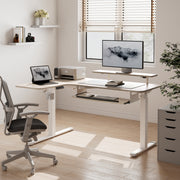
Eureka Ergonomic L-Shaped Standing Desk With Accessories, Ergonomic Workspace Setup.
The "Work Zone" Clearance
This is the space directly in front of your desk where you sit and move. For a comfortable primary work zone, you should allow for 36 inches (91 cm) of clearance between the front edge of the desk and the nearest wall or object behind you. This provides ample room for your chair and for you to sit down and get up without feeling constrained. In tighter spaces, a minimum of 30 inches (76 cm) can work, but it will feel less spacious.
Sit, Stand, and Recline: Mapping Your Chair's Movement
Your office chair also needs room to operate. To account for pushing back from your desk and reclining slightly, plan for 24 to 30 inches (61–76 cm) of space behind the chair. Combine this with the chair’s own depth to ensure you aren’t bumping into a wall or bookshelf every time you adjust your position.
Vertical Space: The Overlooked Dimension for Standing Desks
For height-adjustable desks, your measurements need to go vertical. Before buying, extend your tape measure to the desk’s maximum height at the exact spot you plan to place it. Check for clearance issues above the desk:
- Low-hanging shelves: Ensure the desk won’t collide when raised.
- Windowsills: A common obstruction that can limit desk placement.
- Lighting fixtures.
Remember to account for your monitor. A monitor on a stand or arm adds significant height. A good practice is to allow for the desk’s maximum height plus your monitor’s height, with an extra 4-6 inches of buffer space.
Advanced Measurements for Specific Setups
Not all workspaces are a simple rectangle with a single desk. If your needs are more complex, your measurement strategy needs to adapt.
The L-Shaped Desk Dilemma: Measuring for Corners
L-shaped desks are fantastic for creating distinct work zones, but they require careful measurement. For a model like the L-Shaped Standing Desk with Accessories Set (60"x23"), you need to measure both wall lengths from the corner outward. Confirm that the desk’s dimensions (e.g., 60" on one side, 43" on the other) fit within your available wall space.
Think about how you’ll use it. Designate one wing as your primary work area (for your main computer tasks) and the other as a secondary surface for paperwork, peripherals, or other activities. This helps you plan your layout and ensure the "L" is oriented correctly for your workflow. Many L-desks are reversible, which offers flexibility if you ever rearrange your room.
Multi-Monitor Rigs: Calculating Desktop Real Estate
Power users with multiple monitors need more desktop width. A standard 24-inch monitor is about 21-22 inches wide. A common rule of thumb is to start with a base desk width and add 6-12 inches of extra space for each additional screen to allow for angling and cable management. For expansive setups, an L-shaped desk can be a more ergonomic solution than an exceptionally long straight desk, as it keeps all screens within a comfortable turning radius.
Debunking a Common Myth
A frequent misconception is that you only need to measure the wall space your desk will sit against. This ignores the three-dimensional reality of a workspace. As we've discussed, you must account for pathways for delivery, clearance for your chair, vertical space for a standing desk, and room for accessories. A desk "fitting" is not just about its footprint, but about how it allows you to function comfortably and safely in the entire space.
Your Measurement Toolkit & Checklist
Proper measurement doesn’t require a lot of fancy equipment. Here’s what you’ll need:
- Tape Measure: A 25-foot (or 7.5-meter) locking tape measure is ideal.
- Notepad & Pen or a Digital App: To record your numbers.
- A Helper (Optional): Makes measuring long distances easier and more accurate.
Use this comprehensive checklist to ensure you cover all your bases.
| Measurement Area | Task | Dimensions to Record | Pro Tip |
|---|---|---|---|
| Room & Placement | Measure the intended desk area. | Width, Depth, Height (floor to ceiling). | Note obstructions like radiators or windows. |
| Delivery Path | Measure the narrowest point of entry. | Doorway width, Hallway width, Elevator interior. | Allow 2-4 inches of clearance for hand-carrying. |
| Ergonomic Space | Plan for movement around the desk. | 36" clearance in front of desk; 24-30" behind chair. | This is your "breathing room." Don't skip it. |
| Vertical Clearance | Check for overhead obstructions (for standing desks). | Height from floor to lowest shelf/windowsill. | Test at the desk's max height + monitor height. |
| Accessory Space | Account for items under the desk. | Space for CPU holder, footrest, or storage cabinets. | Ensure cables are long enough for a standing desk's full range of motion. |
Wrapping Up: From Measurement to Masterpiece
By taking the time to measure thoughtfully, you transform desk buying from a game of chance into a strategic decision. You’re not just buying a piece of furniture; you’re designing an environment tailored to your body and your work. Remember the core principles: measure your room, measure your pathways, and measure for movement. This ensures that when your new desk arrives, it will be the perfect foundation for a healthier and more productive workday.
Frequently Asked Questions (FAQ)
What is the minimum recommended desk depth? For most users, a desk depth between 24 and 30 inches is recommended. This allows you to place your monitor at a comfortable viewing distance (about an arm's length away) while still having space for a keyboard and mouse, which aligns with guidelines from sources like the BIFMA G1-2013 Ergonomics Guideline.
How should I account for baseboards or uneven walls? Always measure from the narrowest point. If you have thick baseboards, measure from the baseboard, not the wall itself, as this is the true limit of your space. If your walls are uneven, take measurements at a few different points and use the smallest number to be safe.
Can I place a standing desk under a window? Yes, but with caution. You must measure the height of the windowsill and compare it to the maximum height of the standing desk, including the monitor that will be on it. Ensure there is at least 4-6 inches of clearance to prevent any collisions when the desk is raised.
Disclaimer: This article is for informational purposes only and does not constitute professional medical or safety advice. The ergonomic suggestions provided are general guidelines. If you have pre-existing health conditions or specific concerns, please consult a qualified healthcare professional or a certified ergonomist to design a workspace that is appropriate for your individual needs.






Leave a comment