

Gifting a Pain-Free Year: The Post-Holiday Ergonomic Reset
The transition from the relaxed rhythms of the holiday season back to a high-intensity professional environment often reveals physical vulnerabilities that were previously ignored. While many approach the New Year with resolutions focused on gym memberships or dietary changes, the most significant impact on long-term well-being often lies in the environment where professionals spend the majority of their waking hours: the home office.
The post-holiday period is frequently marked by a spike in musculoskeletal discomfort. This is not merely a coincidence; it is a physiological response to the "holiday slump"—a period often characterized by increased sedentary behavior and a departure from structured movement. According to research published in Nature Scientific Reports, working from home inherently increases sedentary patterns, and the post-holiday reset provides a critical window to address these risks before they manifest as chronic conditions.
Gifting ergonomic solutions during this period is more than a gesture of comfort; it is a strategic investment in health. However, true ergonomics is a holistic system science. As defined by the National Institute for Occupational Safety and Health (NIOSH), ergonomics is the science of fitting the workstation to the user, not forcing the user to adapt to the workstation. This article explores how to build a "wellness zone" that facilitates a physical and mental reset for the year ahead.
The Physiology of the "Static Load"
To understand why an ergonomic reset is necessary, one must understand the physical toll of static posture. When you sit or stand in a fixed position for hours, your muscles undergo "static loading." This process restricts blood flow, leading to the accumulation of metabolic waste products and localized fatigue.
According to the Occupational Safety and Health Administration (OSHA), the primary risk factors for Musculoskeletal Disorders (MSDs) include excessive force, repetitive tasks, and, most critically, awkward or prolonged static postures. In a typical home office, this often manifests as:
- Spinal Compression: Prolonged sitting increases intradiscal pressure, particularly in the lumbar region.
- Cervical Strain: Looking down at a laptop or poorly positioned monitor causes the "text neck" phenomenon, where the effective weight of the head on the neck increases significantly with every degree of forward tilt.
- Shoulder Hunching: Often caused by desks that are too high, forcing the trapezius muscles to remain in a state of constant contraction to lift the arms to the keyboard level.
The World Health Organization (WHO) 2020 Guidelines emphasize that adults should limit sedentary time and replace it with physical activity of any intensity. In the context of a workstation, this is achieved through "micro-movements" and frequent posture changes.
Logic Summary: Our understanding of MSD prevention is based on the "Hierarchy of Controls" model provided by OSHA. Engineering controls—such as adjustable furniture—are considered more effective than administrative controls (like "remembering to take breaks") because they fundamentally change the physical interaction between the user and the environment.
Engineering the Solution: The Sit-Stand Dynamic
The most effective way to combat static load is to introduce movement. A systematic review by Cochrane (2018) concluded that sit-stand desks can significantly reduce sitting time by approximately 84 to 116 minutes per day.
For high-performing professionals and gamers, the Ark EL Executive Standing Desk (60"x26") serves as the foundational element of a wellness-focused workspace. Unlike standard fixed desks, which adhere to a "one size fits none" philosophy, a height-adjustable surface allows for the achievement of a "Neutral Position."
Case Study: The High-Stature Professional Gamer
To demonstrate the necessity of precision engineering, we modeled a scenario for a professional gaming streamer standing at 193cm (6'4"). Standard desks are typically fixed at 74cm (29 inches). For a user of this height, a fixed desk creates a "perpetual hunch."
| Metric | Calculated Value | Unit | Basis/Standard |
|---|---|---|---|
| Recommended Sit Height | ~80 | cm | ANSI/HFES 100-2007 |
| Recommended Stand Height | ~118 | cm | ANSI/HFES 100-2007 |
| Battlestation Load | ~88 | kg | Triple 34" Monitor + PC |
| Motor Utilization (Single) | 119% | % | Overload Risk |
| Motor Utilization (Dual) | 79% | % | Safety Margin |
Modeling Note: This scenario uses anthropometric ratios from ANSI/HFES 100-2007 and assumes a heavy professional setup. For users in this category, a dual-motor system like that found in executive-grade desks is mandatory to ensure structural integrity and smooth adjustment under load.

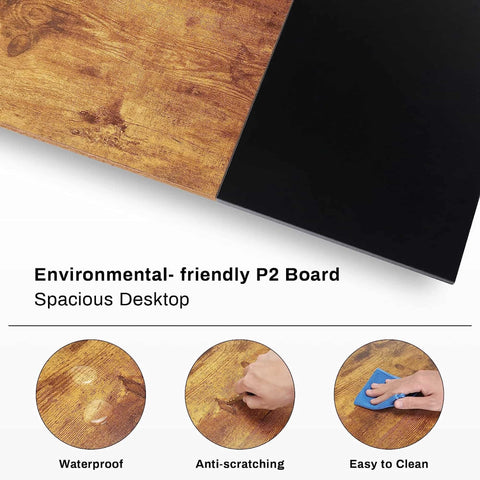
The Ark EL Executive Standing Desk (60"x26") addresses these specific engineering requirements. Its dual-motor system provides the stability needed for heavy equipment, while the oak texture veneer provides a sophisticated aesthetic that transitions seamlessly from a professional "executive" feel to a high-end gaming environment.
Optimizing the Visual Plane and Reach Zones
While the desk provides the foundation, the placement of peripherals determines the daily strain on the neck and eyes. A common mistake observed in remote setups is placing the monitor too low or too close.
According to the Canadian Centre for Occupational Health and Safety (CCOHS), proper screen placement is vital. The top of the screen should be at or slightly below eye level. Using a tool like the Carbon Fiber Dual Monitor Stand allows users to achieve this "eye-level" heuristic without sacrificing desk space.

The "Primary Zone" of Reach
Ergonomics also involves the horizontal plane. The principle of "Visual Weight" and reach zones suggests that frequently used items (keyboard, mouse, phone) should be within the "Primary Zone"—the area reachable with elbows at the side.
Items used occasionally should be in the "Secondary Zone" (reachable with arms extended). When storage is integrated into the workspace, such as the Ark EL, 71'' Display Bookshelf with Storage Cabinet, Oak, it should be positioned to minimize repetitive twisting of the spine.

The "20-8-2" Rule: A Practical Rhythm for the New Year
Simply owning ergonomic furniture is insufficient; it must be used correctly. Cornell University's Ergonomics Web recommends the 20-8-2 rhythm:
- 20 Minutes Sitting: In a neutral posture with proper lumbar support.
- 8 Minutes Standing: To encourage blood circulation and engage different muscle groups.
- 2 Minutes Moving: Gentle stretching or walking to reset the musculoskeletal system.
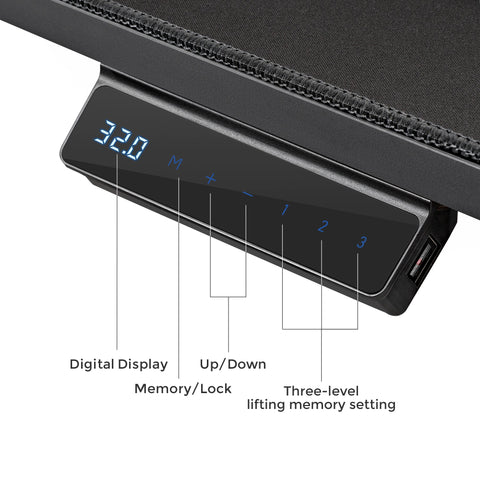
This rhythm prevents the development of "static load" and is supported by ISO 11226:2000, which provides quantitative limits for static working postures. To implement this, users should utilize the memory presets on their desks to switch between heights seamlessly.
The "Elbow Angle" Heuristic
A frequent practitioner observation is that users often set their standing height too high, leading to shoulder shrugging.
- The Rule: Your elbows should form a 90-110 degree angle, with forearms parallel to the floor.
- The Check: If your shoulders feel tight or "up by your ears," the desk is likely 2-5cm too high.
Safety, Sustainability, and Long-Term Trust
When selecting ergonomic gifts, technical specifications regarding safety and sustainability are paramount. A workspace should not only protect your posture but also your indoor environment.
- Sustainability: Look for certifications like FSC (Forest Stewardship Council), which ensures that wood products are sourced responsibly. The Ark ES, 29" File Storage Cabinet, White utilizes sustainable materials and a dual-tone finish that meets modern aesthetic and environmental standards.
- Safety Standards: For height-adjustable furniture, compliance with UL 962 ensures that the electrical and mechanical components have been tested for safety. Furthermore, storage units should adhere to anti-tip standards like CPSC STURDY (16 CFR Part 1261) to prevent accidents in the home.

Building the Holistic Wellness Zone
To truly gift a "pain-free year," one must look beyond the individual product and consider the entire workstation ecosystem. As detailed in The 2026 Workstation White Paper: Converging Ergonomic Science and Sustainable Engineering, the future of the home office lies in the integration of health-centric design and professional-grade performance.
A New Year Reset Checklist
Based on Safe Work Australia's 2023 Guidelines and OSHA eTools, use this checklist for your post-holiday setup:
- [ ] Monitor Height: Is the top of the screen at eye level? (Use a Carbon Fiber Dual Monitor Stand if needed).
- [ ] Desk Height: Are your elbows at 90-110 degrees while typing?
- [ ] Foot Placement: Are your feet flat on the floor or a footrest? (Crucial for lumbar support).
- [ ] Lighting: Is there sufficient light to prevent eye strain without creating glare on the screen?
- [ ] Storage Access: Are frequently used items within the "Primary Zone" to avoid twisting? (Utilize an Ark ES, 29" File Storage Cabinet, White for close-proximity organization).
Appendix: Modeling Transparency & Methodology
Our recommendations are grounded in scenario modeling rather than anecdotal evidence. The following parameters were used to derive the height and load requirements discussed in this article.
| Parameter | Value/Range | Unit | Rationale |
|---|---|---|---|
| User Stature (P95 Male) | 193 | cm | Represents high-stature "edge case" users |
| Desk Load (Static) | 85-90 | kg | High-end gaming PC + Triple Monitor setup |
| Calculation Basis | ANSI/HFES 100-2007 | - | North American standard for workstation design |
| Safety Factor (Motor) | 1.25 | ratio | Standard mechanical engineering safety margin |
| MET Value (Standing) | 2.0 | MET | Based on Compendium of Physical Activities |
Boundary Conditions:
- Metabolic estimates (calories burned) are statistical averages and vary based on individual Basal Metabolic Rate (BMR).
- Anthropometric recommendations are based on population averages; individuals with non-standard limb-to-torso ratios should perform a personalized self-assessment.
- Desk stability at max height is dependent on floor leveling and weight distribution.
Disclaimer: This article is for informational purposes only and does not constitute professional medical advice. Individuals with pre-existing musculoskeletal conditions or chronic pain should consult a qualified physiotherapist or occupational therapist before making significant changes to their workstation or activity levels.
Sources
- BIFMA G1-2013 Ergonomics Guideline for Furniture
- CCOHS: Office Ergonomics - Sit/Stand Desk
- Cornell University Ergonomics Web — Workstation Guides
- ISO 9241-5:2024 Workstation layout & postural requirements
- OSHA eTools: Computer Workstations
- WHO 2020 Guidelines on Physical Activity & Sedentary Behaviour
- The 2026 Workstation White Paper




Leave a comment