


A standing desk for hybrid work and gaming should handle spreadsheets, video calls, and after-hours gaming without wobble, clutter, or a cramped surface. The best fit is usually the desk that matches your heaviest setup first, then your room shape and cable needs. If one of those fails, the desk will feel frustrating fast.

What a Hybrid Desk Has to Handle
A hybrid desk is doing more than a normal home office desk. In one day, it may support a laptop, dual monitors, a docking station, a mic arm, and a full gaming rig. That means the surface has to stay stable, the layout has to switch cleanly, and the room still has to look presentable on camera.
For most buyers, the real question is not "standing or sitting," but "can one workstation handle both modes without extra rearranging?" A Remote Worker's Checklist for a New Desk Setup is useful if you want a broader setup checklist, but the key filter here is simpler: choose a desk that supports your busiest workday and your most active gaming session.
A useful decision sentence is this: if the desk feels just big enough for work but too tight for gaming gear, it is probably the wrong size. Another one: if cable management will force a full teardown every time you switch modes, the convenience benefit of a standing desk starts to disappear.
Stability and Weight Capacity Matter Most
Stability is the first thing to check because it changes how the desk feels at full height, not just how it looks on the product page. Dual monitors, a PC tower, a mic arm, and accessories can add up quickly. In many hybrid setups, real-world load can reach the point where published capacity alone is not enough unless you leave room for movement and future add-ons.

OSHA's desk layout guidance is a good reminder that desk depth should let monitors sit at a sensible distance while still leaving leg clearance. For a standing desk, that matters even more once the desk is raised and you start moving a mouse quickly or leaning in during game play.
A practical rule is to keep a buffer below the maximum rating, especially when monitors are mounted on arms. That is not about chasing a perfect number; it is about keeping the desk feeling solid when it is in motion, raised, or loaded with arms that shift leverage.
A second decision sentence: if you are planning dual monitors plus a tower and accessories, a desk with only modest headroom is a poor fit. If you expect to add more gear later, the safer choice is the frame that gives you room before wobble becomes a problem.
For buyers comparing structure, Why Desk Load Capacity is Key for a Streamer Setup is a useful follow-up, and How to Maximize Your Standing Desk's Stability is worth a look if you already know you will use the desk at standing height for long sessions.
Match the Surface to Both Modes
The best shape depends on whether your room is work-first or gaming-first. Rectangular desks usually make sense when you want a clean, centered setup for typing, calls, and a single main viewing area. L-shaped desks usually work better when you want to split work and play into separate zones or tuck the desk into a corner.
| Scenario | Better-Fit Shape | Why It Helps | When It Breaks Down |
|---|---|---|---|
| Work-first hybrid setup | Rectangular | Easier to center around a keyboard, laptop, and two monitors | Can feel tight if you spread out tools or add wide gaming gear |
| Gaming-first corner setup | L-shaped | Makes it easier to separate screens, peripherals, and documents | Needs enough room to avoid crowding the corner |
| Shared room or spare bedroom | Either, depending on footprint | Pick the shape that preserves walk space and chair clearance | A large desk can overpower a small room quickly |
If you are comparing layouts, the choice often flips on one thing: whether you need one main work zone or two separate zones. A work-first setup usually benefits from a simpler rectangle. A gaming-first setup often benefits from the corner efficiency of an L-shape.
For a broader comparison, L-Shaped vs. Straight Desk for a 3-Monitor Setup helps if you are deciding between desk families, while the L Shaped Desks collection is the easier place to browse if you already know an angled layout is the direction you want.
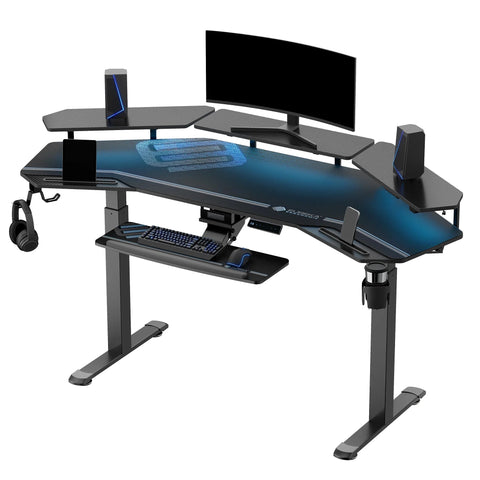
The featured GTG-L60 Pro L-shaped gaming standing desk is a strong navigation point if your setup leans toward gaming and corner use. It has an L-shaped layout, a 220 lb capacity, a 30" to 48.6" height range, dual motors, and a tempered glass desktop, so it fits the kind of mixed-use room where style and gaming presence both matter.
Build a Cleaner Work-And-Play Setup
Once the desk shape is right, the next friction point is usually clutter. The setup can look great on day one and still become annoying if cables, power bricks, and peripherals take over the floor. That is why accessories matter more in a hybrid room than they do in a single-purpose office.
A monitor arm is one of the highest-value add-ons because it frees desk depth and makes the viewing position easier to change for work or gaming. The Dual Monitor Arm supports most 17" to 32" monitors up to 17.6 lb each, with VESA 75x75 mm and 100x100 mm support plus C-clamp or grommet mounting. That makes it a practical match when you need screen flexibility without giving up too much surface space.
A good cable strategy should do two things: reduce visible clutter and make mode-switching faster. Managing Cables on an L-Desk for a Clean Stream Look is a helpful reference if your setup needs to look clean on camera, especially in a room that doubles as a work space.
A third decision sentence: if cable management will still leave cords draped across the floor, the desk is only solving half the problem. If your gaming PC sits under the desk, an under-desk CPU holder can also keep the floor clearer and reduce accidental bumps.
The Ark SWS collection offers a good browsing path if you want to compare executive-style desks that lean toward storage and built-in organization.
Choose a Desk That Fits Your Daily Routine
- Start with the heaviest real setup, not the lightest office version. Count the monitors, mounts, tower, and accessories you actually use.
- Measure the room before choosing shape. A desk that technically fits may still block chair movement or make the room feel crowded.
- Check the height range for both sitting and standing use. The desk should feel comfortable for typing first, then still work when you switch into gaming mode.
- Decide whether the layout needs one zone or two. A rectangular desk is often cleaner for work-first routines, while an L-shape is often better for corner-based gaming setups.
- Verify cable routing, storage, and accessory mounting before you buy. Those features should reduce friction, not add more setup steps.
For this step, the Ark SWS Pro Executive Standing Desk (63"x29") is the strongest fit if your priority is a more traditional rectangular workstation with built-in organization. It has a 63" x 29" footprint, a 220 lb capacity, a 29.5" to 48" height range, three soft-close drawers, a cable bracket, USB ports, and wireless charging. That makes it a better fit when day-to-day work organization matters as much as gaming surface space.
If you want the broader category view instead of a single model, the Executive Standing Desk collection is the cleaner place to browse rectangular, storage-friendly options.
Final Checks Before You Buy
- Verify the desk's published capacity against your actual monitors, mounts, PC, and accessories, then leave room for movement and future upgrades.
- Confirm the height range works for your seated typing position and your standing gaming posture.
- Check that the surface shape leaves enough room for cable routing, leg clearance, and chair movement.
- Review shipping, return, and warranty terms before checkout so you know what happens if the desk arrives too large or does not fit the room.
- Make sure any accessory mount or monitor arm fits the desktop thickness and layout.
If you want a quick final browse, the Home Office collection is a practical place to compare desk formats for a mixed work space.
A standing desk for hybrid work and gaming only feels premium when it removes friction instead of adding it. If stability, fit, and cable control all check out, you are close. If one of them fails, keep browsing until the desk matches the way you actually work and play.
FAQs
Q1. How Do I Know If a Standing Desk Can Handle Dual Monitors and a PC?
Add the weight of your monitors, mounts, tower, and accessories, then compare that total with the desk's published capacity. Leave a buffer rather than treating the maximum rating as the everyday target, especially if the monitors will sit on arms or the desk will stay raised for long stretches.
Q2. What Desk Shape Works Best for Work by Day and Gaming by Night?
Rectangular desks usually work best when you want a centered, work-first setup with fewer layout decisions. L-shaped desks are usually better when the room gives you a corner and you want separate work and gaming zones. The right answer depends on how much room you have and which mode is used more often.
Q3. Can a Standing Desk Help Reduce Cable Clutter in a Hybrid Setup?
Yes, but only if the desk has a real path for cables and your accessories support it. A cable bracket, monitor arm, and CPU holder can reduce visible clutter and make switching modes easier. Without those, the desk may still look busy once the work gear and gaming gear share the same surface.
Q4. Why Does Height Range Matter So Much for Remote Work and Gaming?
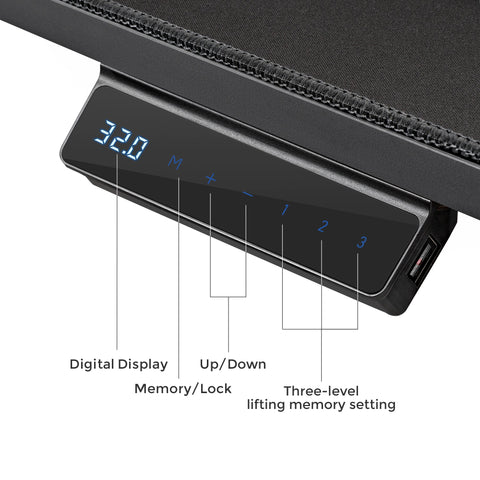
The desk has to feel good in both seated and standing positions, not just one of them. A usable height range and memory presets make that switch less annoying during a long workday. If the range does not fit your body and chair height, the desk can still be a poor ergonomic match even if everything else looks right.
Q5. What Should I Check Before Buying a Desk for a Small Home Office?
Measure the footprint, chair clearance, and legroom first. Then check whether the desk shape leaves enough room for cables, monitors, and a PC without crowding the space. In a smaller room, the wrong desk can make the whole setup feel harder to use, even if the specs look good on paper.





Leave a comment