

The stability of a home office desk is often perceived as a matter of convenience—a way to prevent a monitor from shaking during a video call or a coffee cup from rattling. However, in a household with children and pets, structural integrity is a critical safety metric. The transition from a professional office to a home environment introduces dynamic variables that standard residential furniture is rarely engineered to handle. When an external force is applied—such as a child leaning against a desk or a pet brushing past a heavy workstation—the margin between stability and structural compromise often depends on the engineering standards used during manufacturing.
Understanding these standards, specifically those set by the Business and Institutional Furniture Manufacturers Association (BIFMA), is essential for families who require durable furniture for shared spaces. This guide explores the technical foundations of professional-grade structural testing and its role in a safe home office environment.
The Physiology of Stability: Musculoskeletal Health and Static Loads
The human body is not designed for the "static load" of prolonged sitting or standing. According to the Occupational Safety and Health Administration (OSHA), poor posture and repetitive tasks are primary risk factors for Musculoskeletal Disorders (MSDs). In a home setting, these risks can be exacerbated by equipment that lacks sufficient stability.
When a desk surface is unstable, the user often makes micro-adjustments in their posture to compensate for the movement. These subtle shifts may prevent the body from maintaining a "neutral position"—the posture where joints are naturally aligned and muscle strain is minimized. Over time, these micro-adjustments are associated with increased risks of Repetitive Strain Injury (RSI) and chronic discomfort.
Furthermore, the Canadian Centre for Occupational Health and Safety (CCOHS) emphasizes that "the stability of the work surface is fundamental to maintaining a safe working environment." An unstable desk doesn't just impact the user; it can create hazards for others in the room. If a desk wobbles under the weight of multiple monitors, the center of gravity shifts, which may increase the risk of a tip-over event under dynamic pressure.
The BIFMA Benchmark: Engineering for Dynamic Environments
While residential furniture is often tested for light or "average" use, BIFMA standards represent a rigorous, commercial-grade evaluation of safety and durability. Specifically, the ANSI/BIFMA X5.5 standard for desk products involves a battery of tests that simulate years of heavy use.
One of the most critical benchmarks is the Top Load Ease Test and the Stability Under Vertical Load Test. In a family setting, this isn't just about how much equipment the desk can hold; it’s about "side-load stability." Residential desks may struggle when horizontal force is applied—such as a child climbing or leaning on the edge. BIFMA-compliant models are engineered to resist these lateral forces, maintaining frame rigidity even under unexpected dynamic loads.
Comparison: BIFMA vs. Standard Residential Testing
| Feature | BIFMA (Commercial Grade) | Standard Residential (Typical) |
|---|---|---|
| Static Load Capacity | 225+ lbs (Functional/Proof testing) | Often 50–100 lbs (Estimated) |
| Cycle Testing | 20,000+ height adjustments | Minimal or inconsistent testing |
| Lateral Stability | High resistance to "racking" forces | Prone to sway at standing heights |
| Material Integrity | Strict VOC limits (ANSI/BIFMA M7.1) | Variable; may lack VOC certification |
| Durability Expectancy | Engineered for 10+ years of daily use | Designed for light, occasional use |
Beyond the primary frame, BIFMA testing evaluates "secondary connections." In active households, potential failure points include drawer slides that weaken over time or cable management trays that may detach upon impact. BIFMA-compliant furniture is designed to ensure these components meet the same safety thresholds as the main structure.
The Safety Trilemma: Load, Space, and Sightlines
In our analysis of family home office setups, we have identified the "Safety Trilemma": the intersection of equipment load, spatial constraints, and viewing ergonomics. For a household with high-end computing equipment, optimizing these dimensions requires verified engineering capacities.
Representative Stress Test: The 94 kg Load Model
To understand the limits of home office equipment, we modeled a heavy-duty family workstation. This simulation is based on a "power user" setup with the following estimated weights:
- Hardware: Full-tower PC (25 kg), three 34-inch ultrawide monitors (24 kg total).
- Mounting: Heavy-duty monitor arms (9 kg), peripherals/UPS (8 kg).
- Structure: Solid hardwood or reinforced tabletop (25 kg).
- Total Model Load: 94 kg (approx. 207 lbs).
Based on standard motor specifications, we calculated the utilization rates for single vs. dual motor systems:
- Single Motor Utilization (80 kg capacity): 117.5% ($94 \div 80 \times 100$). This exceeds standard safety ratings and may lead to premature motor failure or instability during transition.
- Dual Motor Utilization (120 kg capacity): 78.33% ($94 \div 120 \times 100$). This remains within the recommended 80% safety buffer for mechanical components.
Using a system near or above its rated capacity increases the risk of mechanical "stutter" or tip-over if the load becomes unbalanced. Dual-motor systems generally provide the necessary safety margin to handle these compound stresses.
Spatial Safety and Circulation
The Consumer Product Safety Commission (CPSC) reports that furniture tip-overs remain a significant home safety concern. To mitigate this, families must consider the "circulation zone."
A standard 9-foot (108-inch) room depth may be insufficient for a professional setup. A 30-inch deep desk combined with a 48-inch two-way circulation zone (recommended for safe passage behind a chair) requires 120 inches of depth. When space is constrained, the structural rigidity of the desk becomes even more vital, as the likelihood of accidental bumps increases.
Comparative Engineering Solutions
The following examples demonstrate how different design architectures address the stability requirements of a shared home environment.
| Product Series | Key Design Feature | Primary Safety Benefit |
|---|---|---|
| Ark EL Series | Trapezoidal Leg Architecture | Wider base footprint improves lateral stability and reduces "sway" at height. |
| Ark X Series | Integrated Structural Storage | Built-in drawers lower the center of gravity while keeping heavy items secure. |
| Opal Series | High-Torque Dual Motors | Provides consistent lifting power (up to 120kg+) to prevent motor stutter under heavy loads. |
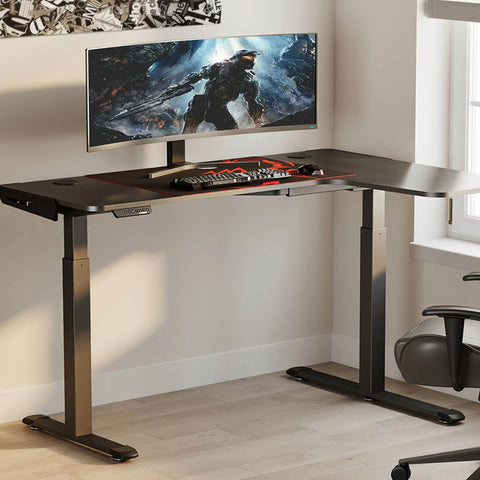
| L-Shaped Series | Multi-Point Frame Support | Essential for "corner loading" scenarios where equipment weight is unevenly distributed. |
Disclosure: This section includes examples of Eureka Ergonomic products to illustrate BIFMA-grade engineering principles. Readers should compare specifications against their specific load requirements.

For those requiring more surface area, the Opal Executive Standing Desk (66"x29") utilizes dual lifting legs. This ensures more consistent performance across the temperature and humidity variations common in residential environments, which can sometimes cause lower-grade motors to fail.

Practical Recommendations: A Family Safety Checklist
Selecting a BIFMA-compliant desk is the first step, but proper setup is equally important. Follow these actionable guidelines based on Cornell University Ergonomics Web recommendations:
- Verify Anti-Tip Features: The CPSC STURDY Act highlights the importance of anchoring. Ensure your desk has leveling feet that maintain a full grip on your specific flooring type (hardwood vs. carpet).
- The 20-8-2 Rhythm: To reduce the risks of prolonged static behavior, follow the Cornell rhythm: 20 minutes of sitting, 8 minutes of standing, and 2 minutes of moving/stretching. Use memory presets to make these transitions consistent.
- Cable Management Integrity: Loose cables are a primary trip hazard. Use integrated trays with reinforced mounting points to ensure they stay secure even if accidentally pulled.
- Monitor Viewing Distance: For a 34-inch ultrawide monitor, the recommended viewing distance is approximately 58 inches for optimal focus. If using a monitor arm, ensure it is BIFMA-rated to prevent the "lever effect" from destabilizing the desk frame.

The Projected Value of Structural Integrity
Investing in BIFMA-compliant furniture for the home is an investment in durability. While residential-grade desks may have a lower initial cost, engineering models suggest they may require more frequent replacement in high-use, multi-user environments.
The Cochrane Library’s review on workplace interventions notes that while sit-stand desks can reduce sedentary time, their effectiveness is often tied to the user's confidence in the equipment. A desk that feels unstable at height may discourage the user from standing, potentially negating the intended health benefits.
For families, the "Return on Investment" typically includes:
- Durability: BIFMA desks are tested to survive the rigors of daily family life for a decade or more.
- Health Support: Maintaining neutral postures may reduce long-term risks associated with MSDs.
- Environmental Stability: Professional-grade frames are less susceptible to the "wobble" that can lead to equipment damage in shared spaces.
Structural integrity is the silent protector of the modern home office. By prioritizing BIFMA standards and dual-motor reliability, families can create a workspace that is engineered for both productivity and safety.
YMYL Disclaimer: This article is for informational purposes only and does not constitute professional medical, legal, or safety advice. Ergonomic requirements vary by individual; those with pre-existing musculoskeletal conditions should consult a qualified healthcare professional or ergonomic specialist before implementing new workstation setups or routines.
Sources
- BIFMA: ANSI/BIFMA X5.5 Desk and Table Products
- CCOHS: Office Ergonomics - Sit/Stand Desk Guidelines
- CPSC: Furniture Tip-Over Prevention and the STURDY Act
- Cornell University: Workstation Setup Guides
- OSHA: Computer Workstations - Neutral Working Postures
- ISO 9241-5:2024: Workstation layout and postural requirements




Leave a comment