

The Art of the Workspace Sanctuary: Designing for Deep Work in Small Spaces
Imagine a home office that sparks your limitless creativity—a space where every inch is intentional, and the boundary between your living sanctuary and your professional workflow is seamless. Here is how a day of deep work begins once you say goodbye to the chaos of an unoptimized studio. You wake up in a room that feels expansive, despite its compact footprint, because the "math" of your layout has been solved with precision.
In urban living, the challenge isn't just fitting furniture into a room; it's about calculating the "use footprint" to ensure your environment supports both physical health and mental clarity. We often observe that the most common mistake in studio planning is purchasing furniture based on its nominal dimensions without accounting for the area needed for access and movement (based on common patterns from customer support and layout feedback). A desk isn't just a 60-inch surface; it is a 90-inch zone of productivity.
Space Transformation: From Floor Plan to Functional Zones
To transform a cramped studio into a high-performance workspace, we must move beyond simple measurements and embrace spatial math. The goal is to create a "Workspace Sanctuary" that respects the BIFMA G1-2013 Ergonomics Guideline, which emphasizes that furniture must accommodate a wide range of users to be truly effective.
The Use Footprint: The 30-36 Inch Rule
A common approach in interior design is the "Pivot Test." Place a chair in front of a potential desk location and simulate rolling back and turning. If you hit a wall, bed, or bookshelf, the zone is too small. In our experience, a 60-inch desk requires a minimum clearance of 30 to 36 inches behind it for a chair. This turns a 5-foot piece of furniture into an 8-foot functional zone.
According to the HSE: Working safely with display screen equipment (DSE), ensuring adequate space to change position and move is a fundamental requirement for preventing musculoskeletal disorders. When you ignore this "hidden math," you create a "dead zone" that leads to frustration and physical strain.

The 60/40 Heuristic for Studio Living
In standard apartments, a 60/40 split (60% living/sleep, 40% work) is a helpful heuristic for balancing your lifestyle. However, in ultra-compact studios under 250 square feet, a 50/50 split is often necessary. This might mean sacrificing a larger lounge area to ensure your workstation meets the ISO 9241-5:2024 standards for layout and postural requirements.
Visual Zoning and Atmosphere
A tidy desk isn’t just beautiful—it helps reduce distractions and maintain focus. To define these zones without making your studio feel like a series of caves, use low bookcases (under 48 inches tall). These act as functional dividers that preserve natural light and maintain an open ambiance while signaling to your brain that you have entered "execution mode."
Modeling the Tall Professional: When Standard Math Fails
For users who fall outside the 50th percentile of height, standard furniture dimensions can be a source of chronic discomfort. We modeled a scenario for a 190cm (6'3") professional to understand how ergonomic requirements shift in a compact space.
Modeling Note (Reproducible Parameters): This analysis uses a deterministic parameterized model based on ANSI/HFES 100-2007 anthropometric ratios. It is a scenario model, not a controlled lab study.
| Parameter | Value | Unit | Rationale / Source |
|---|---|---|---|
| User Stature | 190 | cm | 95th Percentile Male Stature |
| Shoe Correction | 2.5 | cm | Standard office footwear |
| Room Depth | 120 | in | Typical 10-foot studio constraint |
| Desk Depth | 30 | in | Required for visual distance |
| Sitting Height | 78.5 | cm | Calculated for neutral posture |
Our analysis reveals a significant "desk height gap." A tall user typically requires a sitting desk height of approximately 78.5cm, which is nearly 5cm higher than standard 29-inch fixed desks. This discrepancy forces the user into a hunched posture, violating the core ergonomic objective of maintaining neutral wrists and elbows.
As highlighted in The 2026 Workstation White Paper: Converging Ergonomic Science and Sustainable Engineering, the solution lies in dynamic adjustability. A height-adjustable desk isn't just a luxury; it is a tool to bridge the gap between fixed architectural constraints and biological needs.

Linking Functionality with Emotion: The Power of Movement
Height adjustment isn’t just for physical health—it’s a way to shift between 'thinking' and 'execution' modes. Transitioning from sitting to standing can interrupt the "prolonged static sitting" that EU-OSHA identifies as a major risk factor for musculoskeletal disorders.
The Productivity ROI
Standing for three hours a day doesn't just reduce sedentary time; it can lead to a metabolic boost. Based on our scenario modeling using MET (Metabolic Equivalent of Task) values, a 90kg professional could burn an extra 140 calories daily simply by switching postures. Over a year, this equates to roughly 10 lbs of potential fat loss.
Furthermore, research from the Cochrane Library suggests that sit-stand desks can significantly reduce sitting time by 84–116 minutes per day. When combined with a 12% productivity uplift (estimated from Texas A&M study correlations), the "payback period" for a premium ergonomic investment can be as short as four to five months.
Choosing the Right Foundation
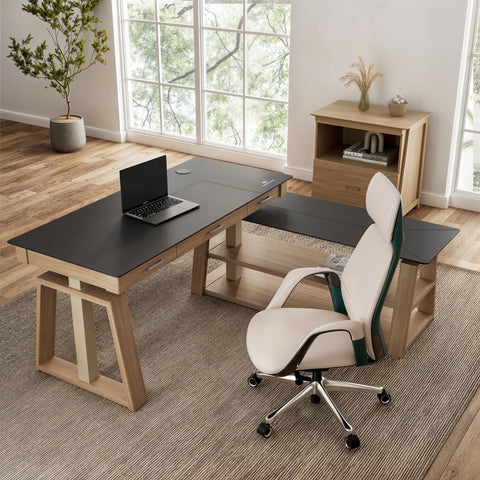
For those seeking a blend of mature craftsmanship and modern technology, the Ark EL Executive Standing Desk (60"x26") offers a unique trapezoidal leg design that provides stability even at full extension. Its oak texture veneer adds a vintage charm that elevates the aesthetic of any urban studio.
If your workflow requires even more surface area and a deeper wood aesthetic, the Ark Executive Standing Desk (63"x29") provides a walnut finish and dual-motor performance. This extra depth is crucial for users with large monitors, as it helps maintain the recommended viewing distance to minimize eye strain.

Practical Tips for Spatial Efficiency and Mindfulness
Creating a Workspace Sanctuary requires a holistic approach that integrates furniture, lighting, and organization.
- The 20-8-2 Rhythm: Following Cornell University’s Ergonomics Web recommendations, aim for 20 minutes of sitting, 8 minutes of standing, and 2 minutes of moving or stretching. This rhythm prevents the "static load" on your spine and keeps your mind engaged.
- Vertical Decluttering: In small rooms, floor space is gold. Use storage solutions like the Ark ES, 29" File Storage Cabinet, White to move paperwork and peripherals off your desk. Its wave design adds a touch of elegance while maintaining a clean workflow.
- Lighting and Greenery: Position your desk near natural light if possible, but use monitor arms to prevent glare. Adding a small plant (biophilia) has been shown to reduce stress and improve air quality, which is vital in compact studios.
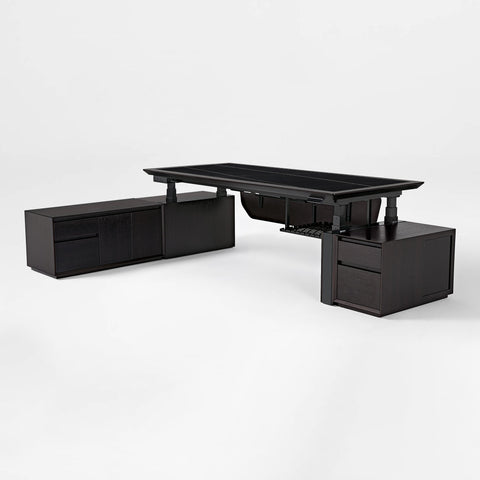
- Cable Management: A clutter of cables is a visual distraction that breaks your mindfulness. Use the built-in management systems in desks like the Opal Executive Standing Desk (66"x29") to keep your sanctuary looking sharp.
Calculating the Fit: A Quick Reference Guide
To help you plan your space, we have compiled a table of standard clearances and ergonomic targets based on industry heuristics and the CCOHS Sit/Stand Desk guide.
| Element | Recommended Clearance / Height | Why It Matters |
|---|---|---|
| Chair Rollback | 30–36 inches | Prevents hitting walls; allows easy egress. |
| Primary Walkway | 36 inches | Aligned with ADA/OSHA safety standards. |
| Monitor Distance | 20–30 inches | Reduces eye strain and neck flexion. |
| Keyboard Height | Elbow level (90° angle) | Prevents carpal tunnel and wrist strain. |
| Visual Zone Divider | < 48 inches tall | Defines space without blocking light/air. |

Creating Your Sanctuary
Your studio apartment shouldn't feel like a compromise. By applying the "math" of zoning and choosing furniture that respects your biological needs, you can create a home that is both a restful retreat and a powerhouse of productivity. Whether it’s the vintage charm of the Ark EL or the refined storage of the Opal Executive, the right pieces help you say goodbye to chaos and hello to a day of deep, inspired work.
Remember, ergonomics is not a one-size-fits-all solution. Always listen to your body and adjust your setup to find your unique "neutral" position. By investing in your space, you are ultimately investing in your long-term health and your creative legacy.
YMYL Disclaimer: This article is for informational purposes only and does not constitute professional medical, legal, or architectural advice. Ergonomic needs vary by individual; please consult with an occupational therapist or medical professional if you have pre-existing musculoskeletal conditions.
Sources and References
- BIFMA G1-2013: Ergonomics Guideline for Furniture
- CCOHS: Office Ergonomics - Sit/Stand Desk Guide
- Cochrane Library: Workplace interventions for reducing sitting at work
- Cornell University: Ergonomics Web Workstation Guides
- HSE: Working safely with display screen equipment (DSE)
- ISO 9241-5:2024: Workstation layout & postural requirements
- EU-OSHA: Musculoskeletal disorders and prolonged static sitting
- White Paper: The 2026 Workstation White Paper




Leave a comment