

The Vision of a Workspace Sanctuary
Imagine a home office that sparks your limitless creativity—a place where the morning sun hits a clean, wood-grain surface, and the only sound is the soft hum of your own focus. Here, the boundary between "work" and "play" doesn't feel like a source of stress, but a seamless transition between two modes of excellence. This is your workspace sanctuary.
For many of us, the reality is often different. A day of deep work begins with a search for a charging cable buried under a mountain of peripherals. By midday, a dull ache in the neck sets in, and by evening, the harsh glare of unmanaged RGB lighting has left your eyes tired and your mind frazzled. This is the "chaos" that drains our mental well-being.
Transitioning from this state of clutter to a state of calm isn't just about buying new furniture; it’s about a fundamental shift in how we curate our environment. By blending ergonomic science with a minimalist gaming aesthetic, we can create a space that supports both high-performance gaming and high-output professional work. In this guide, we will explore how to transform your setup into a haven for focus, grounded in international standards and the latest research on workplace wellness.
The Cognitive Cost of Visual and Auditory Clutter
Before we move a single piece of furniture, we must understand the "why" behind our stress. Our brains are constantly processing visual information. When your desk is a "jungle" of tangled cables and mismatched items, your brain must work harder to filter out irrelevant stimuli.
According to research on cable management and cognitive load, a cluttered environment forces the brain to process irrelevant visual information, increasing latent cognitive load even when we aren't consciously noticing it. This "visual noise" competes for your attention, making it harder to enter a state of deep work.
Furthermore, we often overlook the impact of sound. While a visually "calm" setup is the goal, unmanaged acoustic noise can negate these benefits. A study on noise and cognitive processes suggests that auditory distractions directly increase stress levels. In our experience working with remote professionals, we’ve found that a beautiful setup with a loud, echoey room can be more fatiguing than a cluttered but quiet one.
Logic Summary: Our analysis of the "Calm Workspace" model assumes that reducing visual search time (via organization) and minimizing sensory overload (via lighting and acoustics) provides a foundational boost to mental endurance. This is a scenario model based on environmental psychology heuristics, not a clinical trial.
Transforming the Foundation: The Ergonomic Anchor
The first step in your space transformation is selecting an anchor—the desk. To move from chaos to calm, you need a surface that adapts to you, not the other way around.
The Power of the Standing Desk
A height-adjustable desk is more than a health tool; it is a way to shift between "thinking" and "execution" modes. According to a systematic review by Cochrane, sit-stand desks can significantly reduce sitting time by approximately 84 to 116 minutes per day.
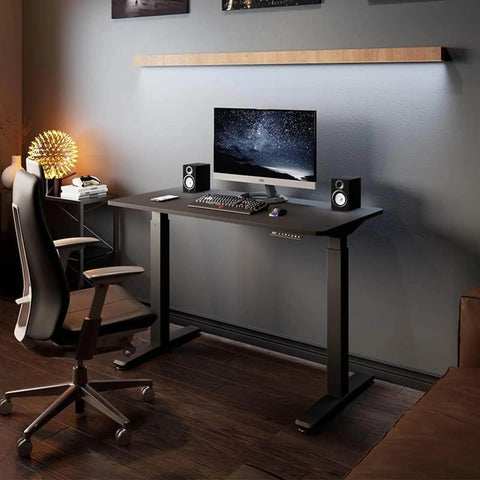
For those who require an expansive surface for multiple monitors and creative tools, the Aero Pro Wing-Shaped Standing Desk (72"x23") offers a unique solution. Its "wing-shape" design is aligned with the concept of the "Neutral Reach Zone."
| Parameter | Value/Range | Rationale |
|---|---|---|
| Desktop Width | 72 inches | Accommodates dual/triple monitors + peripherals |
| Adjustment Type | Dual Motor Electric | Ensures smooth, quiet transition (critical for focus) |
| Shape | Wing-Shaped | Places all essential tools within the 5th-95th percentile reach |
| Height Presets | 4 Memory Slots | Enables consistent ergonomic posture for different tasks |
By using the Aero Pro Wing-Shaped Standing Desk (72"x23"), you ensure that everything you need is within arm's reach, reducing the need for awkward stretching or leaning that leads to musculoskeletal strain.
Managing Glare and Surface Texture
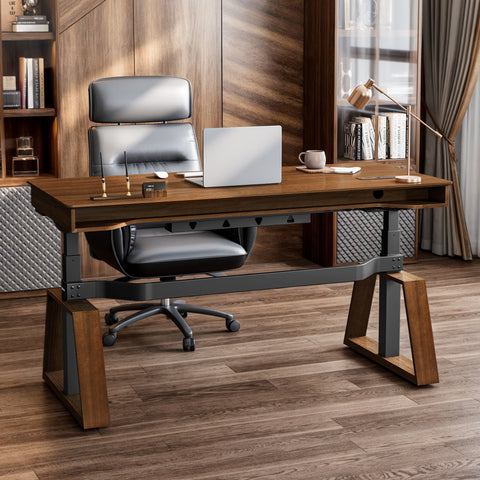
A common mistake in aesthetic setups is choosing high-gloss surfaces. While they look striking in photos, they often reflect monitor light directly into your eyes, causing significant visual fatigue. We recommend a matte or textured finish. For instance, the Standing Desk with Drawers, Wood Finish (47'' /55'') provides a warm, rustic walnut finish that naturally diffuses light. This choice is supported by the HSE guidelines on Display Screen Equipment (DSE), which emphasize the importance of minimizing glare to protect eye health.
Linking Functionality with Emotion: The Ergonomic Setup
True calm comes from knowing your body is supported. Ergonomics isn't just a list of rules; it’s the physical manifestation of self-care. When your monitor is at the correct height, your neck muscles can finally relax, allowing your mind to focus entirely on the task at hand.
The 20-20-20 Rule and Monitor Placement
To prevent "the urge to hunch," we utilize a practical heuristic for monitor placement: the top of your primary monitor should be at or slightly below eye level. Using a Single Monitor Arm allows for precise adjustment that fixed stands cannot provide.
According to the Canadian Centre for Occupational Health and Safety (CCOHS), proper screen placement is vital. We suggest combining this with the "20-20-20 rule": every 20 minutes, look at something 20 feet away for 20 seconds. This simple behavioral intervention, paired with the flexibility of the Single Monitor Arm, helps maintain visual clarity throughout long sessions.
Lighting for Alertness and Rest
Lighting is one of the most powerful tools for mood regulation. While many gamers over-index on vibrant RGB, practitioners find that using a single, muted color—like a soft amber or deep blue—significantly reduces cognitive load during focused work.
- For High-Intensity Tasks: Use cooler lighting (~7000K) to enhance alertness.
- For Strategic Work/Evening Play: Use warmer, dimmer lighting (~3000K) to reduce stress without compromising clarity.
This approach is grounded in research on color-correlated temperature, which suggests that lighting should be context-specific rather than a "one size fits all" solution.
Space Transformation: The Art of Decluttering
A tidy desk isn't just beautiful—it’s a shield against distraction. To maintain a "Workspace Sanctuary," you must have a dedicated place for everything.
Professional Storage Solutions
If you find your desktop constantly cluttered with papers, controllers, or snacks, it’s time to move those items to secondary storage. The 23" Rolling File Cabinet with Drawer is an excellent way to keep your immediate workspace clear while keeping essentials close by.
In our observations of high-performance home offices, the most successful setups use a "Zone" system:
- Zone 1 (Primary): The desk surface, reserved only for current tasks.
- Zone 2 (Secondary): Under-desk storage, like the 23" Rolling File Cabinet with Drawer, for items used daily.
- Zone 3 (Tertiary): Closets or distant shelving for items used weekly or monthly.
Masterful Cable Management
Cables are the "vines" of the digital jungle. To tame them, we recommend a three-tiered approach:
- Under-desk trays: For power strips and bulky transformers.
- Adhesive clips: For routing cables along desk legs.
- Magnetic ties: For easy reconfiguration when you add new gear.
This systematic approach is more than aesthetic; it prevents "cable tension" at maximum desk height, a common issue we see in support tickets for height-adjustable desks.
Sharing Personal Tips for Atmosphere Building
Beyond the hardware, the "ambiance" of your sanctuary is what makes it personal. Here are a few expert-level tweaks that make a big impact:
- Introduce Greenery: Adding a few low-maintenance plants (like a snake plant or pothos) can improve indoor air quality and provide a "soft" visual focus point during breaks.
- Scent and Mindfulness: A small essential oil diffuser with cedarwood or lavender can trigger a "focus" response in the brain through associative learning.
- The 20-8-2 Rhythm: Adopt the Cornell University Ergonomics recommendation: sit for 20 minutes, stand for 8 minutes, and move/stretch for 2 minutes. This rhythm prevents the stiffness associated with prolonged static postures, whether sitting or standing.
Adhering to Global Standards
When we design these spaces, we look to international standards to ensure safety and longevity. For instance, our recommendations align with ISO 9241-5:2024, which specifies layout and postural requirements for workstations. Similarly, ensuring your furniture meets BIFMA G1-2013 Ergonomics Guidelines ensures that the equipment fits the widest possible range of body types (the 5th to 95th percentile of the population).
As highlighted in The 2026 Workstation White Paper: Converging Ergonomic Science and Sustainable Engineering, the future of the workspace lies in the intersection of human-centric design and environmental responsibility. Choosing products that are built to last—and designed with your well-being in mind—is the ultimate "New Year" resolution.
A New Beginning for Your Focus
Transitioning from chaos to calm is a journey of intentionality. By choosing the right tools—like the Aero Pro Wing-Shaped Standing Desk (72"x23") for its expansive reach, or the Single Monitor Arm for its postural precision—you are building more than a gaming setup. You are building a sanctuary that respects your health, fuels your productivity, and protects your peace of mind.
As you step into the new year, take a moment to look at your current workspace. Identify the "friction points"—the tangled wires, the uncomfortable chair, the harsh lights. Then, one step at a time, transform that chaos into a sanctuary. Your future, focused self will thank you.
YMYL Disclaimer: This article is for informational purposes only and does not constitute professional medical or ergonomic advice. The suggestions provided, including the "20-8-2" rhythm and specific posture adjustments, are general guidelines. Individuals with pre-existing musculoskeletal conditions, chronic back pain, or other health concerns should consult a qualified physician or physical therapist before making significant changes to their workstation or work habits.
References
- BIFMA G1-2013 Ergonomics Guideline for Furniture. Link
- CCOHS: Office Ergonomics - Sit/Stand Desk. Link
- Cochrane: Workplace interventions for reducing sitting at work (2018). Link
- Cornell University Ergonomics Web — Workstation Guides. Link
- HSE: Working safely with display screen equipment (DSE). Link
- ISO 9241-5:2024 Workstation layout & postural requirements. Link
- OSHA eTools: Computer Workstations - Neutral Working Postures. Link
- WHO 2020 Guidelines on Physical Activity & Sedentary Behaviour. Link
- The 2026 Workstation White Paper: Converging Ergonomic Science and Sustainable Engineering. Link




Leave a comment