

A standing desk back pain routine can help some people feel more comfortable, but it works best as a flexible workday habit, not a cure. The goal is to alternate positions, keep moving a little, and stop standing before fatigue starts to build. If you want a routine that fits real work, start small and adjust over a few days.

Why Alternating Positions Can Help
Alternating sitting and standing may help ease pressure from prolonged sitting, which is one reason desk workers often feel better when they change positions instead of staying still all day. UT Southwestern notes that alternating positions may help ease pressure from sitting for some people, but that is different from promising pain relief.
Think of this as a comfort strategy. Sitting, standing, and moving each change how load is shared through your back, hips, and legs. If one position starts to feel stale, the point is not to power through it. The point is to rotate before discomfort becomes the main thing you notice.

That is why a standing desk back pain routine is usually a movement plan, not just a timer.
Build a Workday Sit-Stand Rhythm
A good starter schedule is simple, provisional, and easy to repeat. Cornell's ergonomics guidance uses a starter 20-8-2 sit-stand rhythm, meaning 20 minutes sitting, 8 minutes standing, and 2 minutes moving or stretching. Treat that as a starting point, not a prescription.
A Simple Starter Schedule
Begin with one cycle during a focused work block and see how your back, legs, and attention respond. If standing feels fine, repeat the pattern. If it feels tiring too quickly, shorten the standing block and keep the movement break.
A useful rule is this: keep the routine long enough to change position, but short enough that you can still concentrate. For many office workers, that means using standing as a reset between tasks, not trying to stand through an entire afternoon.
Match Positions to Task Type
For long typing stretches or deep-focus work, sitting may feel easier and more productive. Standing often works better for email cleanup, light admin, calls, and quick review tasks when you want to reset stiffness without breaking concentration.
This is where the routine becomes realistic. Instead of asking yourself to stand on command, tie it to the work you are already doing. When a task needs attention and stability, sit. When the work is lighter or the body feels stiff, stand and move.
Use Movement Breaks as Reset Points
The routine should not become static standing. Mayo Clinic advises movement breaks that reset stiffness, so brief walks, stretches, or posture changes matter just as much as standing time.
Good reset points are natural transitions: after a meeting, after a call, after finishing a document, or before starting the next task block. That makes the habit easier to keep on a busy workday because you are attaching it to something you already do.
Adjust for Longer or Shorter Days
Meeting-heavy days usually need shorter standing blocks, because you lose the chance to move as often. Lighter days can allow a little more standing if comfort stays steady. If fatigue climbs, reduce the standing window instead of trying to "earn" more time upright.
That flexibility is what keeps a sit-stand routine for back pain useful across office, remote, and hybrid schedules. The routine should fit the day you actually have, not the day you wish you had.
Posture Cues That Keep You Comfortable
For standing comfort, the important cues are simple: keep your monitor at eye level, your wrists straight, and your feet flat on the floor or on a stable support. Mayo Clinic's monitor, wrist, and foot alignment guidance gives you a practical starting point.
Set Up Your Feet, Hips, and Screen
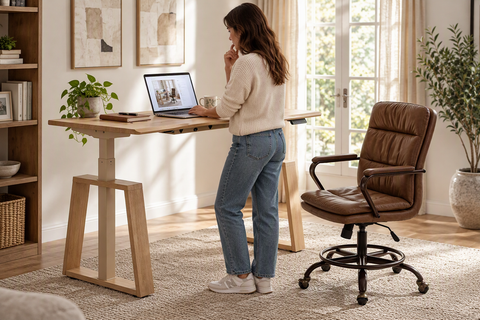
Stand with your weight balanced, not jammed into one hip. Your screen should be high enough that you are not dropping your chin, and your hands should land around elbow height or slightly below it. If your feet feel restless, change stance before the discomfort builds.
That setup matters more than trying to hold a perfect pose. The goal is relaxed stability, not rigid form.
Relaxed Alignment Without Locking Joints
Keep your knees soft and your elbows easy. Locked joints tend to make standing feel harsher, especially during long blocks of typing or reading. A comfortable standing posture should feel supported, not braced.
If you notice yourself leaning, shrugging, or constantly shifting to find relief, that is usually a sign to change positions sooner. Standing is only useful when it stays easy enough to repeat.
Warning Signs to Switch Positions
Use a comfort-based stop rule: if standing makes discomfort or fatigue worse instead of better, switch back to sitting or take a movement break. That is a practical boundary, not a diagnosis.
Common signs include growing lower-back fatigue, stiff legs, or the feeling that you cannot settle into the task. Once standing starts becoming distracting, you have usually stayed upright long enough for that block.
Small Tweaks That Improve Comfort
Small changes often help more than big ones. Try a different foot position, a short walk, or a quick reset before the next standing block. A footrest can also be a comfort accessory for some people, but it is optional.
If you want another simple way to compare comfort strategies, our standing vs. sitting analysis covers how the two positions differ in a broader workday routine.
Choose the Right Desk and Chair Mix
A better routine is easier to keep when the setup matches it. The desk lets you alternate, the chair gives you a seated reset point, and a foot support can help some people stay comfortable while standing. None of those pieces is a cure, but the wrong setup can make the routine harder than it needs to be.
Desk, Chair, and Foot Support
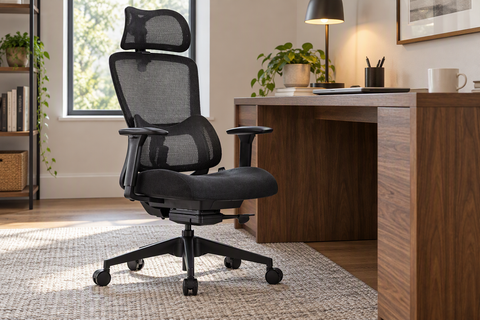
An adjustable standing desk is the base if you want a real sit-stand rhythm. A supportive office chair matters because you still need a good seated position between standing blocks. A footrest is optional, but it can make standing feel more manageable for some users.
For shoppers, the question is not "Which one fixes back discomfort?" It is "Which piece helps me alternate positions more comfortably during a normal workday?" That is a better buying filter and usually a more realistic one.
If you want to browse a basic adjustable standing desk, the goal is to confirm that the desk height and workspace size fit your setup. If your seated reset is the weak link, a contoured office chair may matter more than adding another accessory. And if standing blocks leave your feet tired, under-desk foot support can be a useful comfort add-on.
When This Setup Breaks Down
This setup is not a fit if you try to stand for long stretches without moving, if your monitor height forces your neck down, or if your chair is too poor to support a real seated reset. In those cases, the routine will feel like extra effort instead of relief.
That is also why setup and routine should be judged together. A good desk cannot rescue a bad cadence, and a good cadence cannot fully compensate for a workspace that fights your posture.
A Practical Routine for Better Back Comfort
Use this as a one-day test, not a permanent rule on day one.
- Start with one work block using a sit-stand rhythm such as 20 minutes sitting, 8 minutes standing, and 2 minutes moving.
- Match the position to the task. Sit for deep focus or long typing, and stand for lighter work or calls.
- Add a movement reset after meetings, file review, or any block where stiffness starts to build.
- Check whether your feet, wrists, and monitor still feel comfortable after each standing segment.
- After two to four workdays, adjust the standing time up or down based on comfort, not on a fixed target.
The best standing desk back pain routine is the one you can repeat without dreading it. If standing makes your back or legs feel worse, shorten the block and move earlier. If the routine feels manageable, keep it simple and consistent.
What to Check Before Making It Your Daily Routine
Before you turn this into a habit, check three things: comfort, realism, and response. If your back feels steadier, your focus stays usable, and your setup supports the position you are using, the routine is probably in the right range. If symptoms keep climbing, ease off and rethink the cadence.
You do not need to force a perfect schedule. You need a routine that fits your meetings, your workspace, and your tolerance on most days. Start with the cadence, test it for a few workdays, and adjust the setup if the discomfort never settles.
Wrap-Up
A standing desk routine can ease lower back discomfort for some people when it stays flexible, movement-friendly, and realistic for a normal workday. Start with a conservative cadence, keep posture simple, and switch positions when standing stops feeling helpful. Try the routine for a few days, then compare your comfort and focus. If the workspace still feels off, review the desk, chair, and support setup before you make standing your default.
FAQs
How Long Should I Stand at My Desk to Help Back Comfort?
Start with a short standing block that you can tolerate without leg fatigue or back tension building quickly. A useful first test is the Cornell-style 20-8-2 rhythm, then adjust it down or up based on how you feel after a few workdays. The right length is the one that still feels easy to repeat.
What Sit-Stand Schedule Works for Lower Back Discomfort?
A flexible sit-stand schedule tied to task blocks usually works better than a rigid clock-only rule. Use standing for calls, light email, or brief resets, then sit for long typing or deep focus. Add a movement break when stiffness starts to creep in, especially on meeting-heavy days.
Can a Standing Desk Make Lower Back Pain Worse?
Yes, it can if you stand too long, lock your joints, or stay in one position without movement. The warning sign is not simply that you stood, but that standing started to feel more tiring or distracting than sitting. When that happens, shorten the block and change positions sooner.
What Should I Do If Standing Still Feels Uncomfortable?
Switch positions sooner, take a short walk, and check whether your monitor, wrists, and feet are set up comfortably. If the discomfort shows up in every standing block, the issue may be your cadence or your setup, not the idea of alternating positions itself. Make one change at a time so you can tell what helped.
Do I Need a Footrest With a Standing Desk Routine?
No, a footrest is optional. Some people find it helpful for comfort and weight shifting, while others do fine without it. If your feet or lower legs feel tired during standing blocks, a footrest is worth testing, but it should support the routine rather than becoming a requirement for it.




Leave a comment