

A standing desk for tall people works best when you treat it as a full setup, not just a taller desktop. Neutral posture means your body stays aligned and relaxed instead of reaching, shrugging, or curling forward. For taller users, the problem is often not only desk height; it is also where the monitor sits and whether the chair still supports a natural seated position.

Start With Your Tall-User Fit Problem
Most standard standing desk ranges are built around average-height users, so taller people often end up reaching forward, lifting their shoulders, or tipping their head down to see the screen. In practice, that can show up as bent wrists, a screen that still feels too low, or a setup that feels fine for ten minutes and then gets awkward.
That is why the first step is not picking a desk model. It is checking whether your workstation can keep your elbows near the work surface, your wrists straight, and your upper arms close to your body, which is the posture pattern OSHA recommends for computer workstations.

If you are shopping for a standing desk for tall people, think in terms of the whole chain: desk height, monitor placement, chair fit, and accessory clearance. When one link is off, the rest of the setup tends to compensate in a way that creates strain.
For a broader browse path, start with professional desk options once you know what height range you need.
Dial in Desk Height for Standing and Sitting
For a user around 6'3", a useful starting point is roughly 42.5 inches for standing and around 26 inches for sitting, based on an independent desk-height calculator. Treat those numbers as a starting anchor, not a universal prescription. Shoes, keyboard thickness, desk accessories, and arm length can all change the right working height.
A simple way to test the fit is to check standing first, then sitting, because the right compromise is not always the same in both positions.
- Set the desk near your starting height.
- Stand with your shoulders relaxed and your elbows near the surface.
- Type or rest your hands on the keyboard and mouse, then check whether your wrists stay straight.
- Sit back down and repeat the same check, making sure the chair does not force you to reach up or drop too low.
What matters most is the working surface, not the spec sheet. A desk can offer a tall max height and still feel wrong if the keyboard, a monitor riser, or a deep desktop pushes your hands and shoulders out of line. The best setup is the one where standing and sitting both feel close to neutral, even if neither position lands on a perfect number.
The Ark Executive Standing Desk gives a 63" x 29" work surface with a height range of 28" to 49 3/16" H, soft-close drawers, and monitor-arm compatibility. Its upper range can give taller users more margin than many standard desks, but the real fit still depends on whether your keyboard and monitor stack stay comfortable at that height.
The Ark SWS Pro Executive Standing Desk is another 63" x 29" option with a range from 29.5" to 48" and three programmable settings. It also adds built-in cable management, USB ports, and a wireless charging pad. That kind of feature set is useful when you want a cleaner desktop, but it does not replace the posture check.
Position the Monitor Without Reaching
Tall users often fix desk height and then discover the screen is still wrong. That usually happens when the monitor is raised, but not brought close enough to the eyes, or when the screen is close, but still too low to keep the neck relaxed. Monitor height and viewing distance have to work together.
A practical target is to keep the display near eye level and roughly arm's length away, which the ergonomic workstation checklist describes as about 20 to 30 inches. That is not a rigid rule for every body type, but it is a strong starting point for tall users who want to avoid neck craning.
A monitor arm is often more useful than a fixed riser because it gives you both vertical travel and depth adjustment. That matters when your desk is near its upper range, since a screen can look correctly raised but still sit too far away after the desk is elevated. If the screen feels readable only when you lean forward, the problem is usually distance, not height.
Set Screen Height From Your Natural Head Position
Start with your head in a relaxed, upright position, then raise the monitor until you are not looking down at it as much as you would at a low fixed screen. For a tall user, that small change can matter more than adding a second riser. The goal is a screen that meets your eyes without forcing the chin up or down.
Use Arm Reach to Keep the Screen Close Enough
For most tall users, the bigger mistake is not enough reach, not not enough height. If the screen ends up too far away, you will lean in, and the monitor height becomes less useful. A good arm should let you pull the display in, then fine-tune tilt so the top of the screen stays usable without crowding the keyboard area.
Match Dual-Monitor Layouts to Tall-User Viewing Distance
Dual monitors are the hardest fit case because the desk has to keep both screens readable without forcing constant neck rotation. If the displays sit at different heights or distances, the body keeps compensating. That is where a longer arm range or a cleaner cable path usually helps more than a bigger screen.
Check Compatibility Before You Buy a Monitor Arm
Before you order an arm, verify the monitor size, weight, VESA pattern, and table thickness. The Dual Monitor Arm supports most 17" to 32" monitors, up to 17.6 lbs each, with 75x75 mm and 100x100 mm VESA patterns, and it fits table thicknesses from 0.4" to 3.5" with clamp or grommet installation. For a tall setup, that range is helpful because it gives you more movement, but only if the desk depth and cable slack still leave room to position the screen correctly.
Pair the Right Chair With Standing Height
A tall-user standing desk setup is not complete if the chair only works by itself. The seated position still has to land at a natural height, with enough seat depth, armrest lift, and back support to keep you from reaching up to the keyboard. The NIH workstation self-assessment checklist also emphasizes elbow-height work surfaces and clear leg space, which is why chair fit and desk fit should be checked together.
| Fit Feature | Why It Matters For Tall Users | What To Check | Common Mistake |
|---|---|---|---|
| Seat height | Keeps the knees, hips, and keyboard position aligned when seated | Can your feet rest naturally without forcing the desk too low? | Choosing a chair that is too short for your legs |
| Seat depth | Supports longer thighs without crowding the back of the knees | Do you have enough seat length without sliding forward? | Using a shallow seat that forces a slouched sit |
| Armrest lift | Helps your shoulders stay relaxed at keyboard height | Can the armrests adjust high enough to match your elbows? | Leaving armrests too low or too wide to use |
| Back support | Helps the seated position stay neutral instead of collapsed | Does the backrest support you without pushing you forward? | Assuming lumbar support alone fixes a poor desk height |
| Leg clearance | Prevents the desk or accessories from crowding the lower body | Is there room for knees, feet, and cable routing? | Filling the area under the desk with storage that blocks posture |
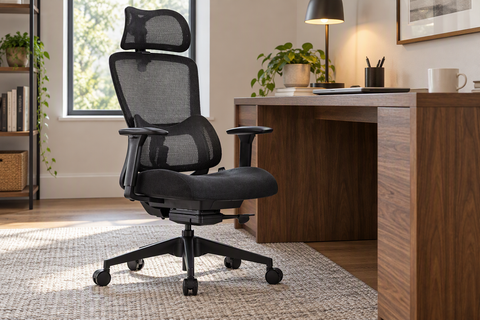
The Hoss Big & Tall Ergonomic Office Chair is a strong fit to check for taller users because it is rated up to 500 lbs, with a seat height of 18.5" to 22.25", a seat depth of 20.5", and height-adjustable armrests that lift from 25" to 28.94". Those numbers matter because they show whether the chair can support the seated position without making the desk feel too high or too low.
For broader chair browsing, chair options are easier to compare once you know your seat-height and armrest targets.
Check the Full Workstation Before You Commit
The best standing desk for tall people is the one where the desk, chair, monitor, and accessories work together at the same time. A desk can have enough lift, but still fail if the monitor arm is too short, the desktop is too shallow, or the chair cannot reach the right seated height. That is why a full-workstation check is more useful than comparing one spec in isolation.
Measure the Whole Sitting-And-Standing Range
Check the highest and lowest positions you will actually use, not just the advertised numbers. If the desk, chair, and monitor cannot all stay comfortable across both positions, the setup is not truly finished.
Choose a Desk Shape That Fits the Workflow
A larger rectangular desk works well when you mainly need a clean standing surface and one monitor. An L-shaped standing desk makes more sense when you need extra side space for multiple screens, paperwork, or peripherals, because it can reduce reach across the desktop.
Use a Final Fit Checklist Before You Order
Before you buy, check height range, monitor-arm compatibility, chair range, and desk depth. Then verify shipping, returns, and warranty terms so you know how much flexibility you have if the first setup is close but not perfect. If the fit still feels borderline, compare a few standing desk for tall people options before checkout.
FAQs
What Desk Height Works for Someone 6'3"?
For many 6'3" users, a good starting point is around 42.5 inches standing and around 26 inches seated, but the real answer depends on elbow height, keyboard thickness, and shoe height. Use those numbers as a checkpoint, then confirm that your wrists stay straight and your shoulders stay relaxed at the keyboard.
Can a Standard Monitor Arm Work for a Tall User?
Sometimes, yes, but only if it has enough height travel, forward reach, desk thickness clearance, and weight capacity for your monitor. If the screen still sits too low or too far away after adjustment, the arm is not solving the fit problem. Check VESA pattern and arm length before you buy.
How Should a Tall User Pair a Chair With a Standing Desk?
The chair should let you sit high enough to keep the keyboard close to elbow height without raising the desk too much. Look first at seat height, seat depth, and armrest lift. If those three do not work together, even a good standing desk can feel awkward when you sit down.
What Should I Check Before Buying a Desk for a Taller Frame?
Start with height range, then move to desk depth, monitor-arm compatibility, and accessory clearance. A desk can still be a poor fit if it looks tall enough but leaves no room for a monitor arm or keyboard tray. Shipping, returns, and warranty matter too if you are comparing close alternatives.
Why Does My Tall-User Setup Still Feel Strained After Adjustment?
The usual causes are too little monitor travel, a desk that stops short of your standing height, or a chair that sits too high or too low. When that happens, the body starts compensating with the neck, shoulders, or wrists. Recheck the full system instead of changing only one part.




Leave a comment