

The Hidden Cost of UI Precision: Why Your Shoulders Burn
For frontend developers and software engineers, the workday is often defined by a high-frequency alternating rhythm: rapid-fire keyboard input followed by the surgical precision of mouse-driven UI debugging. While much of the ergonomic conversation focuses on lumbar support and monitor height, a specific, localized discomfort often emerges by 3:00 PM—a dull, burning sensation in the upper trapezius and a sharp tightness in the shoulder blade.
This discomfort is rarely a result of a single "bad" movement. Instead, it is the cumulative effect of static load and repetitive strain. When you are adjusting CSS properties or dragging elements in a design tool, your shoulder girdle acts as a stabilizer for the fine motor movements of your hand. If your armrests are improperly calibrated, your muscles must work overtime to hold the weight of your arm against gravity.
According to the Occupational Safety and Health Administration (OSHA), these sustained postures are primary risk factors for Musculoskeletal Disorders (MSDs). For the professional developer, solving this isn't just about comfort; it is about maintaining the career longevity required for a high-output engineering role.
The Biomechanics of the Mouse-Heavy Workflow
To understand why armrest pivot is critical, we must look at the physiological mechanisms of the arm and shoulder. When using a mouse, the forearm naturally wants to rotate inward—a movement known as pronation.
If an armrest is fixed in a strictly parallel position to the desk, it forces the user into one of two sub-optimal positions:
- Shoulder Abduction: Moving the elbow away from the body to align the forearm with the mouse, which creates significant torque on the rotator cuff.
- Ulnar Deviation: Keeping the elbow on the armrest but "flicking" the wrist outward to reach the mouse, which compresses the ulnar nerve and increases the risk of Repetitive Strain Injury (RSI).
Research provided in The 2026 Workstation White Paper: Converging Ergonomic Science and Sustainable Engineering suggests that a "neutral" position is a dynamic target, not a static one. For mouse-intensive tasks, the ideal support follows the natural angle of the forearm as it moves toward the center of the desk.
The Role of Static Working Postures
The ISO 11226:2000 standard specifies limits for static working postures, emphasizing that the duration of a hold is as important as the angle. During UI debugging, developers often hold their mouse-hand in a high-tension state for minutes at a time. Without proper support, this leads to "shoulder creep"—a gradual, unconscious shrugging of the shoulders to compensate for lack of stability.

Armrest Pivot: The 15-30 Degree Rule
The introduction of 4D armrests—adjustable in height, width, depth, and pivot—has fundamentally changed how we address these biomechanical needs. Unlike 2D or 3D variants, a 4D armrest allows the user to rotate the support pad inward.
Practitioners in the field have identified that a 15-30 degree inward pivot from the parallel desk edge typically matches the natural angle of the forearm when using a mouse. This setting allows the armrest to support the fleshy part of the forearm rather than just the elbow. Supporting the forearm is critical; as noted in our internal observations, supporting only the elbow can lead to ulnar nerve compression, causing that "pins and needles" sensation in the ring and pinky fingers.
The Synergy of Height and Pivot
Armrest pivot cannot be adjusted in a vacuum. It must work in tandem with height. A common mistake we observe in professional setups is setting armrests too high, which elevates the shoulders and leads to chronic trapezius strain.
The ideal starting point is to have the armrest height level with the desk surface. This allows the forearm to rest parallel to the floor with a slight downward slope from the elbow to the wrist. When you achieve this, you satisfy the "90-90-90 rule" (ankles, knees, hips at 90 degrees) while extending the principle to the upper body, where the elbow should ideally maintain a 90-110 degree angle.
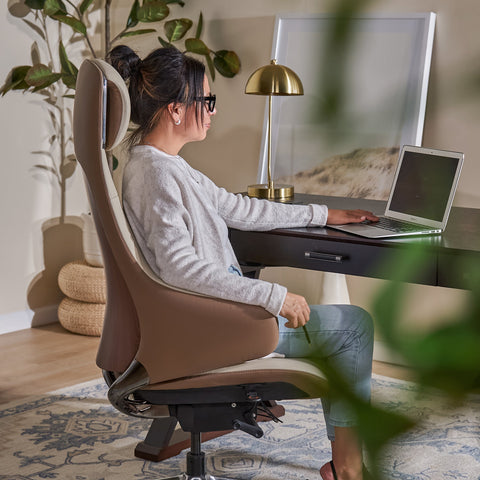
For developers seeking this level of precision, the Flex, Dual-Backrests Ergonomic Office Chair provides the necessary 4D adjustability to lock in these specific angles. Its dual-backrest design further supports the spine during the subtle torso shifts that occur during multi-monitor navigation.
The Systemic Mismatch: Desk Height and the Tall Developer
While armrest settings are vital, they are often undermined by the "foundational mismatch" of desk height. This is particularly prevalent among taller developers.
In our scenario modeling for a 95th percentile male developer (188cm/6'2"), we found that standard fixed-height desks (typically 73-74cm) create a significant ergonomic deficit. A developer of this stature requires a seated desk height of approximately 76.2cm to maintain neutral posture.
Modeling Note: Our analysis of a 188cm user assumes a popliteal height ratio consistent with ANSI/HFES 100-2007 standards. Under these assumptions, a standard desk forces the user into "shoulder shrugging" because the chair cannot be raised high enough without the knees hitting the underside of the desk.
| Parameter | Value | Unit | Rationale |
|---|---|---|---|
| User Height | 188 | cm | 95th Percentile Male |
| Recommended Seat Height | 48 | cm | ANSI/HFES 100-2007 baseline |
| Ideal Seated Desk Height | 76.2 | cm | Calculated for 90° elbow angle |
| Standard Desk Height | 73.7 | cm | Typical fixed-height furniture |
| Ergonomic Deficit | 2.5 | cm | Forces compensatory shrugging |
For these users, the solution is often a combination of an adjustable desk and a chair like the Onyx, Ergonomic Office Chair, which offers a robust height range to bridge this 2.5cm gap. Furthermore, integrating a Pull-out Keyboard Tray can help fine-tune the relationship between the input devices and the armrest height, effectively lowering the "working surface" without requiring a new desk.
ROI Analysis: The Financial Case for Ergonomic Investment
Beyond health, there is a clear productivity argument for optimizing armrest and desk configurations. While generic marketing often claims massive speed improvements, we prefer a more conservative, logic-based estimation.
Based on our Performance ROI Modeling, a senior frontend developer earning $65/hour can see a significant return on investment through reduced fatigue and increased "deep work" duration. If ergonomic improvements result in just a 10% productivity uplift—equivalent to staying focused for an extra 48 minutes over an 8-hour day—the annual value gain is approximately $4,875.
Metabolic Benefits
The WHO 2020 Guidelines on Physical Activity and Sedentary Behaviour recommend reducing long periods of static behavior. By using a sit-stand rhythm (such as the Cornell 20-8-2 rule: 20 minutes sitting, 8 minutes standing, 2 minutes moving), a developer can also see metabolic gains.
Our modeling suggests that standing for 180 minutes per work day can burn approximately 134 extra calories for an 85kg user. Over a year, this is the metabolic equivalent of losing nearly 9.5 lbs of fat, simply by interrupting sedentary patterns.
A Practitioner’s Guide to Calibration
To prevent RSI and shoulder strain during mouse-heavy workflows, follow this calibration sequence. This process addresses the hardware first, then the user’s interaction with it.
- Establish the Base: Adjust your chair height so your feet are flat on the floor. If your desk is too high to allow this, use a Footstool with Wheels to support your lower limbs. This prevents pressure on the underside of the thighs, which can impede blood circulation.
- Match the Desk: Raise your chair (or lower your desk) until your elbows are at a 90-110 degree angle when your hands are on the keyboard.
- Set Armrest Height: Adjust the armrests so they just barely touch the underside of your forearms. They should provide support without pushing your shoulders up.
- Pivot for the Mouse: Rotate the armrest on your mouse-hand side inward by 15-30 degrees. Ensure the pad supports the forearm, leaving the elbow free to move slightly to avoid nerve compression.
- Width Adjustment: Ensure the armrests are close enough to your body that you don't have to "reach" outward (abduction). According to BIFMA G1-2013, furniture should accommodate the 5th to 95th percentile of the population, meaning width adjustability is a requirement for a truly ergonomic fit.
The "Mouse Surface" Factor
For precision UI work, developers often use lower mouse sensitivity (DPI) to ensure pixel-perfect accuracy. This requires more lateral arm movement. Our modeling for "Aim-Lab" style precision suggests that a professional setup benefit from a mousepad width of roughly 135cm to avoid "edge cramping." If your desk is cluttered, your armrest pivot becomes even more important as it acts as the "pivot point" for these wider sweeps.
Safety Standards and Compliance
When selecting equipment to support these workflows, look for certifications that guarantee durability and safety. The ANSI/BIFMA X5.1 standard is the North American benchmark for office chair safety and structural integrity.
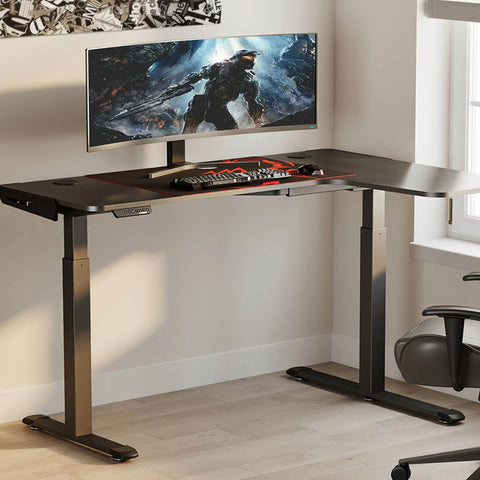
For electric height-adjustable desks, UL 962 certification ensures that the mechanical and electrical components meet rigorous safety standards. This is particularly important for professional "battlestations" that may hold three ultrawide monitors and a high-end PC. Our Motor Safety Margin Analysis indicates that a setup totaling ~74kg (common for senior developers) should ideally utilize a dual-motor system to maintain a safety buffer and ensure motor longevity, as single-motor systems often operate at >90% capacity under such loads.
Methodology and Assumptions
The recommendations and data points in this article are derived from a combination of industry standards and scenario-based modeling. They are intended as decision aids, not medical prescriptions.
- Anthropometric Data: Based on 95th percentile male stature (188cm) using ratios from the ANSI/HFES 100-2007.
- Productivity ROI: Calculated using a 10% efficiency coefficient applied to a $65/hr wage over a 250-day work year.
- Metabolic Estimates: Derived from the Compendium of Physical Activities, assuming a MET delta of 0.5 between sitting (1.5) and standing (2.0).
- Load Calculations: Based on component weights for 34-inch ultrawide monitors (~8kg each) and standard mid-tower PC cases (~15-20kg).
Disclaimer: This article is for informational purposes only and does not constitute professional medical advice. Ergonomic needs vary significantly based on individual physiology and pre-existing conditions. Always consult with an occupational therapist or medical professional before making significant changes to your workstation if you are experiencing chronic pain.
References
- BIFMA G1-2013 Ergonomics Guideline for Furniture
- OSHA Computer Workstations eTool
- ISO 9241-5:2024 Workstation layout & postural requirements
- Cochrane Library: Workplace interventions for reducing sitting at work
- WHO 2020 Guidelines on Physical Activity & Sedentary Behaviour
- HSE: Working safely with display screen equipment (DSE)




Leave a comment