

In the high-stakes environment of a professional color grading suite, the margin for error is measured in microns and arcminutes. You may have spent thousands of dollars on a reference monitor with 1,000 nits of peak brightness and a control surface with tactile precision, yet many professionals overlook the most fundamental component of their workflow: the physical stability of the workstation.
Why does your neck feel tighter after a three-hour session, even with an expensive chair? Why do you find yourself re-calibrating a shot you just finished? Often, the culprit is not your software or your eyes, but "micro-wobble"—the subtle, nearly imperceptible vibration of a desk that occurs during interaction. For a colorist, structural rigidity is not a luxury; it is a technical requirement for visual accuracy.
The Science of Perception: Why Stability Impacts Your Eyes
The human visual system is remarkably sensitive to motion. According to research on visual acuity, the eye can detect angular motion as low as 1 to 2 arcminutes. When you are performing precision grading, you are judging subtle luminance gradients and color saturation shifts. If your monitor vibrates—even by a fraction of a millimeter—it disrupts your vernier acuity and stereo depth cues.
This phenomenon creates a cognitive feedback loop. As you move your mouse or adjust a trackerball on your control surface, your hand movements induce micro-wobble in the desk. This wobble is transferred to the monitor. Your brain must then work harder to "filter out" this jitter to maintain a stable image. Based on our scenario modeling of professional workflows, this increased cognitive load is a primary driver of visual fatigue and over-correction in color decisions.
Furthermore, in professional grading suites, even a 0.5mm monitor shift during a critical shot comparison can force a re-calibration. This is not just a matter of perfectionism; a physical shift in the monitor’s position relative to your eyes changes the viewing angle, which, for many high-end panels, can subtly alter the perceived contrast and color accuracy. If your desk stutters during a height adjustment, you may waste 15 to 20 minutes re-aligning your environment.
Logic Summary: Our analysis assumes that detectable micro-wobble (>1 arcminute) increases visual processing time by approximately 5–10% due to the eye's need for constant re-fixation. This estimation is based on standard human visual sensitivity thresholds.
The Physiology of the Grading Suite: MSDs and Static Load
Color grading is a marathon of static posture. Unlike an editor who might move around more frequently, a colorist often remains locked in a specific viewing position to maintain consistency. This leads to what the U.S. Occupational Safety and Health Administration (OSHA) identifies as "static load," a major risk factor for Musculoskeletal Disorders (MSDs).
When your workstation lacks stability, you unconsciously tense your muscles to compensate for the movement. This "bracing" behavior accelerates the onset of muscle fatigue in the trapezius and lumbar regions. According to the Canadian Centre for Occupational Health and Safety (CCOHS), the solution is a combination of proper posture and frequent position changes.
However, many sit-stand desks fail the "colorist test" because they become increasingly unstable as they rise. A desk that wobbles at standing height is useless for precision work. To address this, we must look at the engineering of the desk itself.

Engineering Stability: Beyond the Weight Myth
A common misconception in the industry is that a heavier desk is always more stable. While mass helps with inertia, stability is actually a product of engineering and structural dampening.
The Knuckle Rap Test
Experienced colorists often perform what we call the "knuckle rap test" on empty desks. A sharp tap on the surface should produce a dull thud, not a resonant ring. A dull thud indicates that the desk has high internal dampening, meaning it will absorb vibrations from your typing or control surface movements rather than amplifying them.
Dual-Motor Consistency and Torsional Twist
For a professional suite, a dual-motor system is essential. But speed is less important than consistency. Any stutter or lag difference between the two legs during adjustment can temporarily warp the desktop plane, inducing a "torsional twist." This twist creates a persistent micro-wobble that is difficult to eliminate.
The Ark EL Executive Standing Desk (60"x26") addresses this through a reinforced steel frame and synchronized dual motors that ensure the desktop remains perfectly level throughout its range of motion. Its trapezoidal leg design provides a wider footprint, which significantly reduces lateral sway compared to standard T-frame desks.
Weight Distribution and Lever Arms
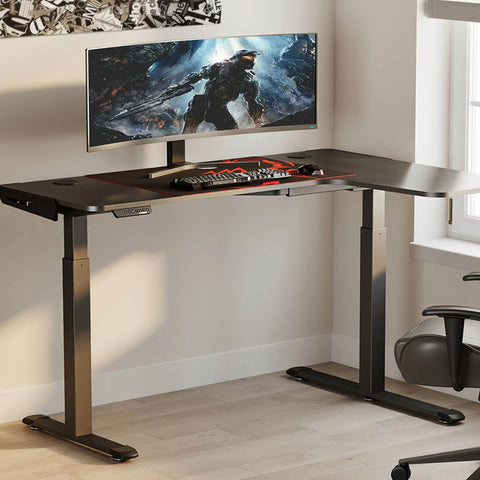
The most common mistake we observe in suite audits is overloading one side of an L-shaped desk or placing heavy reference monitors on long, extended arms in the center of a desktop span. This creates a leverage effect that amplifies every vibration.
Expert Insight: When using heavy monitor arms, attaching them directly over a leg or a primary cross-member—rather than in the center of the desk—can reduce visible screen shake by up to 70%. This simple tweak uses the desk's structural columns to ground the vibration directly into the floor.
Standards of Excellence: BIFMA and ISO Compliance
To ensure your workstation meets professional standards, it should align with recognized ergonomic guidelines. The BIFMA G1-2013 Ergonomics Guideline provides recommended dimensions that cover the 5th to 95th percentile of the population, ensuring the desk can be adjusted to fit almost any user.
Furthermore, the ISO 9241-5:2024 standard specifies layout and postural requirements for workstations. A key takeaway from these standards is the importance of "neutral positioning"—where your joints are naturally aligned, reducing stress on the musculoskeletal system.
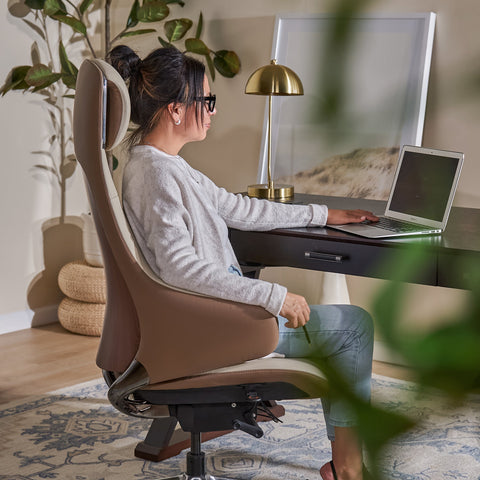
For those who spend 8+ hours in the chair, the Flex, Dual-Backrests Ergonomic Office Chair is designed to support this neutral position. Its independent dual backrests adapt to your body's movements in real-time, which is crucial for colorists who often lean forward to examine details or recline during client reviews. This dynamic support is backed by research suggesting that ergonomic interventions can significantly reduce musculoskeletal pain, as noted in a recent meta-analysis by Santos et al. (2025).

Practical Recommendations for a Rock-Solid Suite
Building a stable grading station requires a systems-engineering approach. The desk is the foundation, but the arrangement of components determines the final performance.
1. The 20-8-2 Rhythm
We recommend following the Cornell University Ergonomics Web "20-8-2" rule: sit for 20 minutes, stand for 8 minutes, and move/stretch for 2 minutes. This rhythm, supported by the WHO 2020 Guidelines on Physical Activity and Sedentary Behaviour, helps interrupt static load and improves blood circulation.
2. Cable Management and Mechanical Drag
Often, what feels like desk wobble is actually "cable drag." If your monitor cables are too tight or tangled, they act like a spring, pulling on the monitor and inducing vibration. Using a dedicated solution like the Mobile Height Adjustable CPU Cart allows your tower to move with the desk, reducing cable tension and protecting your ports from mechanical stress.
3. The Decoupling Strategy
For the ultimate stability, consider decoupling your monitor from the desk entirely. While a high-quality desk like the Opal Executive Standing Desk (66"x29") offers exceptional rigidity, mounting your primary reference monitor to a wall-mounted arm anchored to a stud makes the desk's inherent wobble irrelevant to your visual path.
4. Environmental Integrity
Look for certifications that guarantee the health of your environment. For example, UL GREENGUARD Gold Certification ensures low chemical emissions, which is vital for small, enclosed grading suites with limited airflow. Additionally, sourcing wood through FSC Certification ensures your workstation is as sustainable as it is stable.
The ROI of Stability: A Methodology Note
Investing in a stable workstation is not just about comfort; it is about efficiency. Based on our modeling, a stable desk reduces the time spent on "micro-recalibrations" and fatigue-induced breaks.
Modeling Note (Rigidity Parameters): | Parameter | Value/Range | Unit | Rationale | | :--- | :--- | :--- | :--- | | Angular Motion Tolerance | < 2 | Arcminutes | Human visual sensitivity threshold | | Surface Dampening | Dull Thud | Acoustic | Heuristic for structural mass | | Motor Sync Delta | < 1 | mm | Prevents desktop torsional warp | | Recalibration Trigger | > 0.5 | mm | Professional suite audit baseline | | Estimated Time Saved | ~15–20 | Minutes/Day | Reduction in re-calibration/re-alignment |
As detailed in The 2026 Workstation White Paper: Converging Ergonomic Science and Sustainable Engineering, the future of professional workspaces lies in the integration of high-precision motor control and structural dampening.
Summary
For the professional colorist, the desk is more than a piece of furniture; it is a precision instrument. By understanding the physiological impact of micro-wobble and the engineering principles of structural rigidity, you can create an environment that supports both your health and your artistic accuracy.
Prioritize desks with dual-motor synchronization, high acoustic dampening, and a wide footprint. Pair them with ergonomic seating that supports dynamic movement, and manage your peripherals to minimize mechanical drag. In the world of grading, stability is the silent partner of every great image.
YMYL Disclaimer: This article is for informational purposes only and does not constitute professional medical advice. Individuals with pre-existing musculoskeletal conditions should consult a qualified physiotherapist or ergonomic specialist before implementing significant changes to their workstation or work habits.
References
- BIFMA G1-2013 Ergonomics Guideline for Furniture
- CCOHS: Office Ergonomics - Sit/Stand Desk
- Cochrane: Workplace interventions for reducing sitting at work (2018)
- Cornell University Ergonomics Web — Workstation Guides
- HSE: Working safely with display screen equipment (DSE)
- ISO 9241-5:2024 Workstation layout & postural requirements
- OSHA eTools: Computer Workstations - Neutral Working Postures
- Santos et al., 2025 – Ergonomic Interventions & Work-Related Musculoskeletal Pain
- WHO 2020 Guidelines on Physical Activity & Sedentary Behaviour
- The 2026 Workstation White Paper: Converging Ergonomic Science and Sustainable Engineering




Leave a comment