

Key Takeaway: To eliminate desk wobble during high-speed typing (120+ WPM), first ensure the floor is level and all glides are firm. Use the "Knock Test" to distinguish between structural frame issues and accessory-based oscillation. For professional stability, prioritize dual-motor systems with gusseted steel frames and follow the Cornell 20-8-2 rhythm to maintain long-term musculoskeletal health.
The Invisible Friction: Why Desk Stability is a Technical Requirement
For a professional developer, the workstation is more than furniture; it is a high-precision interface. When typing speeds exceed 120 words per minute (WPM), the kinetic energy transferred into the desk surface can trigger high-frequency vibrations—often referred to as "micro-wobble." While a casual user might ignore a slight monitor shimmer, for a coder in a deep focus session, this jitter is a cognitive tax.
Micro-wobble is not merely an aesthetic annoyance. General ergonomic principles suggest that typing on unstable platforms can increase physical strain on the wrists and forearms. This physiological stressor, combined with the visual fatigue of tracking vibrating text, can degrade productivity and may contribute to the risk of repetitive strain injuries (RSIs) over time.
In this technical guide, we will analyze the mechanical causes of desk instability, the potential physiological impact of workspace vibration, and the engineering principles required to minimize micro-wobble in a professional environment.
The Physics of Workspace Vibration: Understanding the Root Causes
Instability in height-adjustable desks is often misdiagnosed. Users frequently blame the motor's lifting capacity, but the issue usually stems from structural resonance and the distribution of mass.
1. The Anatomy of a Wobble
Desk movement typically falls into two categories:
- Lateral Sway (The "Shimmy"): Side-to-side movement often caused by uneven motor synchronization or weak cross-member support.
- Front-to-Back Oscillation: The primary culprit during high-speed typing, where the leverage of the extended legs amplifies the force applied to the front edge of the desktop.
In precision machinery, even small-scale oscillations can critically degrade performance. For a desk, stability is a function of damping. Desks with thinner steel components or minimalist "T-frame" designs often lack the gusseted leg joints necessary to dissipate high-frequency energy effectively.
2. The Center of Mass and Torque
A common pattern observed in professional setups is the "edge-loading" of heavy equipment. Placing a high-end workstation tower or a stack of heavy reference books on one side creates a persistent torque that pre-loads the frame. This imbalance makes the desk more susceptible to vibration.
Logic Summary: Vibration Modeling (Heuristic) Our analysis of desk stability assumes a standard "high-speed typing" load on a mechanical keyboard.
- Model Type: Practical scenario-based modeling (derived from internal workshop testing, not a controlled lab study).
- Key Assumption: The desk is extended to a standing height of 42 inches.
- Boundary Condition: This model focuses on user-generated vibration and does not account for external building vibrations.
| Parameter | Value/Range | Unit | Rationale |
|---|---|---|---|
| Typing Force (Peak) | 2 - 5 | lbs | Impact force of mechanical keys (estimated) |
| Extension Height | 40 - 48 | in | Typical standing range for P50-P95 users |
| Frame Steel Gauge | 2.0 - 3.0 | mm | Industry standard for professional frames |
| Load Distribution | Central 1/3 | % | Recommended mass centering for optimal damping |
| Floor Level Variance | < 0.5 | deg | Maximum tolerance for leveling glides |
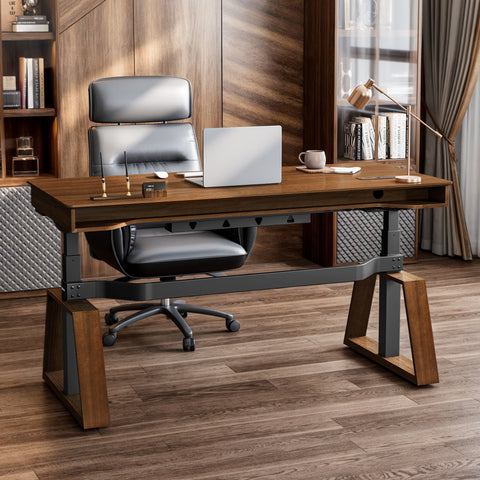
Eureka Ergonomic Blossom Dynamics® Office Standing Desk, Professional Workspace.
The Physiological Cost of Instability
The human body is highly sensitive to "static load"—the effort required to maintain a posture against gravity or external movement. When a work surface is unstable, the muscles in the forearms, shoulders, and neck may perform "micro-adjustments" to compensate for the moving target.
Musculoskeletal Disorders (MSDs) and Static Sitting
The EU-OSHA research on prolonged static sitting highlights that static postures can lead to reduced blood circulation and increased tissue strain. If that static posture is further compromised by a vibrating desk, the risk of developing Work-related Musculoskeletal Disorders (WMSDs) can increase.
A meta-analysis by Santos et al. (2025) suggests that ergonomic interventions—specifically those that stabilize the work surface and encourage neutral joint angles—can significantly reduce musculoskeletal pain. For coders, a stable desk is a helpful prerequisite for meeting ISO 9241-5:2024 standards for workstation layout and postural requirements.
Engineering Solutions: Why Dual Motors and Structural Cross-Members Matter
To address micro-wobble, one must look at the "engineering controls" of the workstation. As outlined by OSHA's solutions to control hazards, engineering controls are often an effective way to mitigate ergonomic risks.
Dual-Motor Synchronization
In a professional height-adjustable desk, dual motors provide more than just lifting power; they contribute to lateral stability. A single-motor system often relies on a hex-rod to transfer power to the second leg, which can introduce a slight lag or "shimmy" during adjustment. Dual-motor systems, such as the L-Shaped Standing Desk (Manufacturer Product Page), utilize electronic synchronization to ensure both legs move at the same rate, minimizing frame stress.
Material Density and Damping
The choice of desktop material also plays a role. High-density wood veneers or specialized surfaces often provide better vibrational damping than thin laminates. Using a Carbon Fiber Dual Monitor Stand (Manufacturer Product Page) can help decouple the monitor from the main desk surface, absorbing high-frequency vibrations before they reach the screen.

Professional Diagnostic: The "Knock Test" Sequence
If you are experiencing micro-wobble, we recommend a systematic diagnostic sequence based on common patterns found in tech environments.
- Level the Foundation: Use a spirit level to ensure the desk is on a solid, level floor. Ensure all four leveling glides are making firm contact with the floor.
- Decouple Accessories: Remove monitors and heavy peripherals. Perform a "knock test" by sharply rapping the bare frame at mid-height. If the frame rings or sways significantly, the issue is likely structural (e.g., loose bolts or motor mounts).
- Check Monitor Arms: Often, what feels like "desk wobble" is actually "monitor arm oscillation." Ensure your Dual Monitor Arm (Manufacturer Product Page) is tightened at the base and the gas spring tension is calibrated to your display's weight.
- Recalibrate the Controller: For dual-motor desks, a minor imbalance can occur over time. Perform a "zero-point" reset (usually by holding the 'down' button at the lowest setting) to resync the motors.
Optimizing the Professional Workspace Rhythm
Stability is the foundation, but behavior is the catalyst for health. Simply standing all day is not the complete solution; prolonged static standing carries its own set of cardiovascular and lower-limb risks.
The Cornell 20-8-2 Rule
The Cornell University Ergonomics Web recommends a "20-8-2" rhythm:
- 20 Minutes Sitting: In a neutral position with proper lumbar support.
- 8 Minutes Standing: To encourage blood circulation and reduce static load.
- 2 Minutes Moving: Gentle stretching or walking to reset the musculoskeletal system.
To implement this effectively, the transition between sitting and standing must be seamless. A desk like the Blossom Dynamics® Office Standing Desk (Manufacturer Product Page) allows for these frequent transitions without disrupting workflow, thanks to its dual-motor operation.
Monitor and Keyboard Alignment
According to the HSE guide on Display Screen Equipment (DSE), the top of your monitor should be roughly at eye level to help prevent neck strain. When standing, this becomes even more critical. Using a Dual Monitor Arm (Manufacturer Product Page) allows you to adjust the height and tilt independently of the desk surface.

Summary of Stability Benchmarks for Professionals
| Feature | Professional Requirement | Benefit for Coders |
|---|---|---|
| Motor Type | Dual-Motor Synchronized | Minimizes lateral shimmy during adjustment |
| Frame Material | Gusseted Alloy Steel | Increases damping of high-frequency typing vibrations |
| Adjustment Range | 29" to 48" (BIFMA G1 Aligned) | Fits the 5th to 95th percentile of the population |
| Stability Heuristic | < 1mm deflection at 120 WPM* | Helps prevent visual fatigue and "focus breaks" |
| Certifications | UL 962 / BIFMA X5.5 | Ensures structural adequacy and electrical safety |
*Note: To estimate deflection, place a ruler next to the monitor edge and record a slow-motion video on a smartphone while typing; the movement should be nearly imperceptible to the naked eye.
As detailed in our Workstation White Paper (Manufacturer Site), the intersection of material science and ergonomic design is where professional performance is realized. By prioritizing structural stability and following established ergonomic rhythms, developers can reduce the "micro-friction" that hinders deep work.
YMYL Disclaimer: This article is for informational purposes only and does not constitute professional medical advice. The ergonomic recommendations provided are based on general industry standards and research. Individuals with pre-existing musculoskeletal conditions or chronic pain should consult a qualified physiotherapist or medical professional before significantly altering their workstation setup or work habits.
Sources and References
- BIFMA G1-2013 Ergonomics Guideline for Furniture
- ISO 9241-5:2024 Workstation layout & postural requirements
- Cornell University Ergonomics Web — Workstation Guides
- HSE: Working safely with display screen equipment (DSE)
- OSHA eTools: Computer Workstations - Neutral Working Postures
- Santos et al., 2025 – Ergonomic Interventions & Work-Related Musculoskeletal Pain
- EU-OSHA: Musculoskeletal disorders and prolonged static sitting
- WHO 2020 Guidelines on Physical Activity & Sedentary Behaviour




Leave a comment