

The Executive Fidget: Addressing the Hidden Costs of Boardroom Fatigue
Every executive has experienced the "fiftyminute fidget." It begins as a subtle shift in weight, followed by a conscious adjustment of the lower back, and eventually leads to a full-body stretch or a premature request to adjourn. While these movements appear minor, they represent a significant breakdown in cognitive focus. In high-stakes corporate environments, where the hourly value of the leadership team can exceed thousands of dollars, these micro-interruptions are not merely a matter of comfort; they are a drain on corporate efficiency.
Traditional boardroom design often prioritizes uniform aesthetics—imposing tables and matching chairs—over individual physiological requirements. This "one-size-fits-none" approach ignores the fundamental principles of musculoskeletal health. When an executive's physical support system fails, the brain must divert metabolic resources toward maintaining posture and managing discomfort. This phenomenon, often referred to as focus fatigue, directly compromises decision velocity and strategic depth.
By reframing ergonomic seating as a strategic investment rather than a furniture expense, B2B organizations can unlock measurable gains in meeting productivity. Transitioning from static, aesthetic-heavy seating to high-performance ergonomic solutions addresses the physiological triggers of meeting fatigue at their source.
The Physiology of Static Load and Cognitive Decline
The human body is not designed for prolonged static sitting. When an individual remains in a fixed position, they experience "static load," a condition where muscles remain under constant tension to support the skeleton without the benefit of movement-driven blood circulation.
Musculoskeletal Disorders (MSDs) and Blood Circulation
According to the U.S. National Institute for Occupational Safety and Health (NIOSH), musculoskeletal disorders (MSDs) are often the result of repetitive tasks or awkward, static postures. In a boardroom setting, static load restricts blood flow to the lower extremities and the spinal discs. The Occupational Safety and Health Administration (OSHA) identifies poor posture and excessive force (even the force of gravity on a slumped spine) as primary risk factors for workplace injuries.
As blood circulation slows, oxygen delivery to the brain and muscles decreases. This leads to the buildup of metabolic byproducts, causing the physical "burning" sensation in the trapezius or the dull ache in the lumbar region. The EU-OSHA (European Agency for Safety and Health at Work) notes that prolonged static sitting is a significant contributor to long-term health risks, including cardiovascular issues and chronic back pain.
The Spinal Neutral Position
The primary goal of any professional workstation is to maintain a "neutral position." As defined by OSHA eTools, a neutral posture involves keeping the joints naturally aligned, which minimizes stress on the muscles, tendons, and skeletal system. In a meeting context, maintaining this alignment becomes increasingly difficult as the duration exceeds 60 minutes. Without dynamic support, the spine loses its natural S-curve, leading to disc compression and localized fatigue.
Modeling the ROI: Why Comfort Equals Capital
To understand the business case for high-end ergonomics, organizations must look beyond the initial procurement cost and analyze the impact on executive productivity. Using scenario modeling based on industry heuristics and anthropometric standards, we can quantify the potential return on investment (ROI) for a premium boardroom upgrade.
Scenario Modeling: The Enterprise Executive Boardroom
In this model, we analyze a leadership team conducting strategic meetings. We assume an average executive compensation of $300,000 annually ($150/hour) and a conservative productivity coefficient of 0.08, representing an 8% gain in meeting efficiency through reduced posture breaks and improved focus.
| Parameter | Value | Unit | Rationale |
|---|---|---|---|
| Executive Hourly Rate | 150 | USD | Based on $300k annual salary |
| Meeting Efficiency Gain | 8% | Ratio | Reduction in "fidget time" and focus breaks |
| Annual Work Days | 220 | Days | Standard corporate calendar |
| Premium Chair Cost | 1,200 | USD | High-end executive ergonomic model |
| Payback Period | ~0.23 | Years | Time to recover investment through productivity |
Methodology Note: This analysis is a scenario model, not a controlled lab study. Productivity gains are estimated based on MET (Metabolic Equivalent of Task) frameworks adapted for cognitive work and observational studies of posture break frequency. Actual results may vary based on meeting intensity and individual health factors.
Based on this model, the annual productivity value gain per executive is approximately $5,280. For a boardroom chair costing $1,200, the investment pays for itself in less than three months. This 8% efficiency gain translates to roughly 14 minutes saved in a three-hour meeting—time that can be reinvested into strategic decision-making or reducing the need for follow-up sessions.

Strategic Solutions: Beyond the Lumbar Pillow
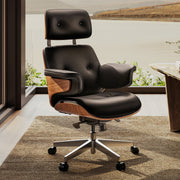
Addressing meeting fatigue requires furniture that adapts to the user's movement rather than forcing the user to adapt to the chair. High-end ergonomic chairs, such as the Royal II, Silicone & Leather Executive Ergonomic Office Chair, utilize dynamic mechanisms that support the spine through various ranges of motion.
Dynamic Lumbar Support vs. Static Cushions
A common procurement mistake is selecting chairs with static lumbar pillows. While these may look comfortable, they often force the user into a single, rigid position. Executives frequently lean forward during intense discussions or recline during presentations. A chair with a dynamic, height- and depth-adjustable lumbar mechanism allows the support to move with the user. This ensures that the neutral spinal alignment is maintained whether the individual is upright or leaning in.
Material Science and Thermal Comfort
Discomfort from heat and moisture is a primary, often unspoken, reason meeting participants seek to adjourn early. Boardrooms are frequently high-temperature environments due to hardware and occupancy. Utilizing breathable mesh or premium perforated leather is non-negotiable for maintaining thermal comfort. The Serene Ella, Napa Leather Executive Chair addresses this by combining the luxury of full-grain Napa leather with ergonomic curves that facilitate airflow, reducing the physical irritability that leads to "meeting friction."

The Role of Adjustability in B2B Procurement
The BIFMA G1-2013 Ergonomics Guideline provides recommended dimensions to fit the 5th to 95th percentile of the population. For B2B buyers, choosing chairs that meet or exceed ANSI/BIFMA X5.1 standards ensures durability and safety for a diverse workforce. Solutions like the Royal Slim, Executive Office Chair offer the high-back support necessary for taller executives while maintaining a refined aesthetic suitable for the C-suite.
Practical Recommendations for Boardroom Optimization
Implementing an ergonomic strategy requires more than just purchasing new chairs. It involves a holistic approach to the meeting environment, aligned with international standards such as ISO 9241-5:2024.
1. Identify the "Fit Gap"
One of the most significant practitioner observations in executive settings is the "chair-to-table mismatch." For a tall executive (approx. 185cm), the recommended sitting desk height is roughly 74.5cm. However, the standard boardroom table is often fixed at 73.7cm (29 inches).
This 0.8cm gap may seem negligible, but it forces the user into either slumped shoulders or elevated elbows. Over a 90-minute session, this creates significant trapezius strain. Organizations should prioritize chairs with a wide seat-height adjustment range to compensate for fixed table heights.
2. Manage Space and Circulation
Ergonomic comfort is also dependent on the "dynamic zone"—the space required for a chair to recline and for the user to move freely. According to spatial modeling based on ADA Standards for Accessible Design, a standard boardroom layout requires approximately 108 inches (9 feet) of depth for proper chair clearance and circulation. Ensuring this space prevents the "cramped" feeling that contributes to psychological fatigue during long sessions.
3. Implement the "20-8-2" Rhythm
While chairs provide the foundation, behavior is equally important. Cornell University's Ergonomics Web recommends a "20-8-2" rhythm: 20 minutes of sitting, 8 minutes of standing, and 2 minutes of moving. In a boardroom context, this can be facilitated by incorporating height-adjustable "breakout" stations or simply encouraging standing during brief presentation segments.
4. Optimize the Visual Plane
Neck strain is a frequent byproduct of poorly positioned monitors or document holders. OSHA eTools for Monitors suggests that the top of the screen should be at or slightly below eye level. In boardrooms with large central displays, ensure that seating is arranged to minimize excessive neck rotation, which OSHA notes can lead to rapid fatigue.
For organizations looking to scale these improvements across the entire office ecosystem, consulting resources like The 2026 Workstation White Paper: Converging Ergonomic Science and Sustainable Engineering can provide a comprehensive blueprint for integrating health-centric design with corporate sustainability goals.

The Procurement Pilot: A Data-Driven Approach
The most successful corporate rollouts avoid the "one-size-fits-all" trap by engaging in a pilot program. Instead of a full-scale deployment, organizations should place 3-4 different high-adjustability models, such as the Onyx, Ergonomic Office Chair for general staff or the Royal series for executives, in a single high-traffic room.
Allowing teams to self-select and provide feedback provides tangible data on preference and perceived comfort gains. This "worker participation" approach is supported by EU-OSHA strategies for preventing MSDs, as it ensures the final solution is tailored to the actual needs of the workforce.
Investing in the Future of Work
Ergonomic chairs are no longer a luxury "perk"; they are a fundamental component of the corporate office ecosystem. By addressing the physiological roots of meeting fatigue, businesses can significantly improve executive focus, reduce the prevalence of musculoskeletal discomfort, and achieve a rapid ROI through enhanced productivity. As the workplace continues to evolve, the organizations that prioritize the physical well-being of their leadership teams will be the ones that maintain the highest levels of decision quality and talent retention.
YMYL Disclaimer: This article is for informational purposes only and does not constitute professional medical, legal, or financial advice. The ergonomic recommendations provided are based on general industry standards and scenario modeling. Individuals with pre-existing musculoskeletal conditions or chronic pain should consult a qualified healthcare professional or occupational therapist before making significant changes to their workstation setup.
References
- BIFMA G1-2013 Ergonomics Guideline for Furniture
- ISO 9241-5:2024 Workstation layout & postural requirements
- OSHA eTools: Computer Workstations - Neutral Working Postures
- NIOSH – About Ergonomics and Musculoskeletal Disorders
- EU-OSHA: Musculoskeletal disorders and prolonged static sitting
- Cornell University Ergonomics Web — Workstation Guides
- ANSI/BIFMA X5.1 General-Purpose Office Chairs
- ADA Standards for Accessible Design (2010)



Leave a comment