


An executive gaming desk works best when it looks polished in meetings and still gives you enough room, cable control, and monitor space to play comfortably after hours. The real test is not whether it looks like a gaming desk or an office desk, but whether it handles both roles without turning the room into a constant reset project.

Why Executive Style Matters for Gaming Setups
A true executive gaming desk has to solve a presentation problem as much as a workspace problem. In a client-facing home office or shared den, flashy hardware can make the room feel temporary, while a cleaner furniture-first look makes the setup feel more intentional. That does not mean gaming styling is wrong. It means the style should match how visible the desk is during the day.
The best fit is usually a desk that reads as professional first and functional second. If the surface, finish, and storage look calm when the screens are off, the room is easier to use for calls, meetings, and focused work. If the desk is too minimal, though, it can become frustrating once monitors, chargers, and peripherals move in.
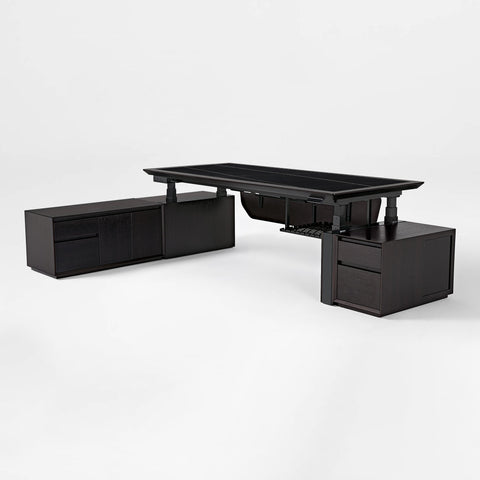
That trade-off is why an executive desk series is a useful starting point when you want furniture-forward styling without losing day-to-night flexibility. It is also why an executive gaming desk should be judged by the room it lives in, not by the label alone.
For most buyers, the right question is simple: will this desk still look composed when the gaming gear is tucked away? If the answer is no, the desk may be better for a game room than for a hybrid office.
What Buyers Need From a Dual-Use Desk
A dual-use desk should solve four practical problems at once: meetings, multi-monitor use, cable concealment, and room aesthetics. If it only handles one of those well, the setup usually breaks down in daily use.
Surface Layout for Work and Play
Surface layout matters before anything else. A laptop, keyboard, mouse, dock, notebook, and one or two monitors can crowd a desk faster than people expect. If the usable area feels tight, the setup starts to look cluttered even when the desk itself is attractive.
For the buyer, this means checking depth and width before thinking about accessories. A wider surface can make it easier to separate work from play, especially if you want one side of the desk to hold a controller, a headset, or a second screen while the center stays clear. A compact desk can still work, but only if the monitor count and accessory load stay modest.
Hidden Tech Without Visual Clutter
Hidden tech integration usually means cable routing, concealed power, discreet controls, and accessory storage that keeps the desktop visually calm. It does not mean every desk hides hardware equally well. The details are model-specific, so the layout matters more than the marketing phrase.
That is the main reason a hybrid setup can look polished in photos but feel annoying in real use. If the routing paths do not fit your power brick, dock, and display cables, the desk still ends up busy. If you want a cleaner room impression, an aesthetic gaming setup guide can help you think about the room as a whole, not just the desktop.
Dual Monitors and Accessory Spacing
Dual monitors change the desk decision quickly. OSHA advises positioning the primary display directly in front of you and angling the secondary screen slightly so you do not spend the day turning your head side to side. That advice is not just about comfort. It also tells you how much usable width and depth the desk really needs. OSHA's monitor guidance makes the fit question easier: if the monitors cannot sit naturally, the desk is too small for the setup.
For a polished look, the monitors should sit close enough together that the whole setup reads as one work zone instead of two random screens. CCOHS monitor positioning also points toward a cleaner visual line when the screens are aligned instead of scattered.
Storage That Keeps the Room Polished
Storage is what keeps the room from drifting into clutter. Drawers, trays, hooks, and hidden compartments help you keep controllers, chargers, documents, and spare accessories off the main surface. That matters more in an executive space because visual noise changes the tone of the room fast.
If you need a desk that helps hide the small stuff, a desks with storage browse path makes sense. It is especially useful when the same desk must support work during the day and gaming at night without leaving peripherals in plain sight.
Executive Desk Features That Support Gaming
The most useful feature check is not "Does this desk have gaming features?" It is "Which features actually improve a hybrid setup?" A desk can be styled like executive furniture and still be frustrating if the screen height, storage, or accessory layout does not fit your routine.
Mayo Clinic's office ergonomics guidance is a good reminder that comfort starts with screen position. The top of the monitor should be at or slightly below eye level, which means the desk, riser, or monitor arm needs to support that placement without forcing your neck upward.
| Feature Area | Why It Matters For Work | Why It Matters For Gaming | What To Verify | Common Trade-Off |
|---|---|---|---|---|
| Surface size and shape | Fits laptop, notes, and a centered main monitor | Leaves room for a second screen and peripherals | Measure depth, width, and corner clearance | Compact desks can feel tidy but crowded |
| Monitor height support | Helps keep the top of the screen near eye level | Makes long sessions feel less awkward | Check whether a riser or arm is included | More hardware can improve fit but add clutter |
| Storage and trays | Keeps documents and charging gear out of sight | Frees the desktop for play | Confirm drawers, trays, or hooks are actually included | Hidden storage can be less convenient for fast access |
| Cable routing | Reduces visible clutter during calls | Makes reset after a session easier | Look for trays, pass-throughs, or rear routing | Clean routing depends on your gear layout |
| Visual finish | Makes the desk feel furniture-first | Works better in shared or client-facing rooms | Match finish to the room and lighting | More expressive surfaces can be harder to blend in |
| Accessory set | Simplifies setup and reduces add-on purchases | Keeps controllers, headsets, and mouse gear organized | Check what is included versus optional | More included pieces can help, but only if you will use them |
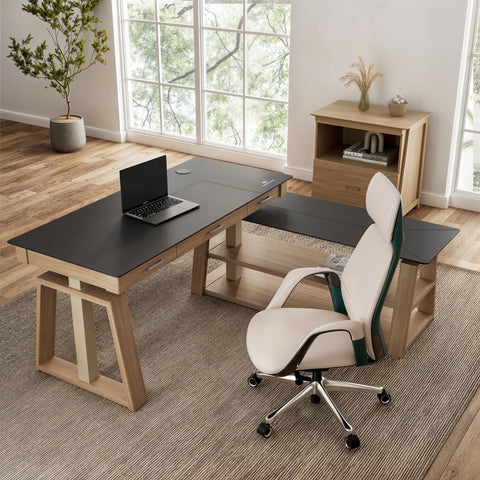
If you want a concrete fit example, the L-shaped standing desk with accessories shows how a more executive-leaning layout can still support a serious workstation. Its accessory set includes a cable management tray, keyboard tray, monitor riser, headphone hook, cup holder, and mouse pad, which makes it a stronger candidate when you want fewer loose items on the desktop.
The right feature mix depends on the room. If the desk is visible in meetings, prioritize restrained styling and concealed storage. If it lives in a dedicated game room, you can give more weight to expressive lighting and accessory integration.
Cable Management and Hidden Hardware
Cable management matters more in an executive setup because visible cords change how the room feels. A tangled desktop can make even a premium desk look unfinished, while a tidy routing path helps the whole setup read as intentional.
Routing Power and Peripheral Cables
The cleanest setups usually send display and peripheral cables straight toward the back edge or under the desk instead of across the surface. That keeps cords from splitting the visual line of the desktop. It also makes it easier to switch between work and play without rethreading everything each time.
For creators and hybrid workers, advanced cable management becomes more important as the device count grows. A dock, monitor, microphone, lamp, and charger can all compete for space if there is no planned routing path.
Managing Power Strips and Bricks
Power bricks are usually the messiest part of the setup. They are bulky, they stack up quickly, and they rarely stay visually neat on their own. Trays and under-desk placement help, but only if there is enough clearance for the adapters you actually use.
That is why hidden hardware should be treated as a fit check, not a category promise. If the desk can hide the gear you own today, it is more likely to stay clean in daily use. If it only works on paper, the clutter returns within a week.
Keeping Chargers and Docks Accessible
A good executive gaming desk should hide the mess without making the setup annoying to use. If you unplug devices often, the access points still need to feel easy. Front-edge access, side access, or a smart open area near the dock can matter as much as concealment.
Maintaining a Clean Meeting-Ready Look
The final goal is not "no cables at all." It is a desk surface that looks ready for a meeting without extra cleanup. That usually means fewer exposed bricks, fewer dangling cords, and a clear path for the eye when someone walks into the room.
For buyers who want a gaming-forward desk with more obvious lighting, the GTG LED glass desk is a useful contrast case. It includes a cable management tray, controller stand, cup holder, headphone hook, and mousepad, but its full-surface RGB styling makes it better for a gaming-first room than for a restrained client-facing office.
How to Choose the Right Executive Gaming Desk
Use a simple order of operations so you do not get distracted by finish before fit.
- Measure the room and confirm the desk footprint will not block traffic flow.
- Map your current gear, including monitor count, dock, laptop, and any arm-mounted accessories.
- Decide how hidden you want the hardware to be during meetings.
- Check whether the desk supports your preferred monitor height and spacing.
- Review storage, trays, and cable paths based on how often you reset the space.
- Compare the surface style to the rest of the room, then confirm shipping, returns, and warranty details before buying.
If you want a more refined surface and are comfortable with a statement look, the Wonder glowing glass desk is a fit example rather than a universal recommendation. It has a built-in drawer, dual-motor height adjustment from 29.5" to 47.2", and a 220 lb capacity, but the luminous glass style is better for buyers who want a premium visual cue and are willing to let the desk stand out.
The choice usually flips in one of two situations. If your workspace is visible to clients or coworkers on video calls, choose the more restrained, furniture-first option. If the desk lives in a private room and you want more visual personality, a gaming-leaning surface can make sense as long as it still supports your monitor layout.

Quick Self-Check Before You Buy
- Will two monitors fit without forcing head turns?
- Can the top of the screen sit at or slightly below eye level?
- Is there enough depth for keyboard, mouse, and a relaxed arm position?
- Are storage and cable paths included, or will you need add-ons?
- Does the desk still look appropriate when the gaming gear is put away?
- Would this surface still feel right in a client call or shared room?
If one of those answers is no, keep looking. The best executive gaming desk is the one that fits the room, the gear, and the way you actually work.
Related Resources
FAQs
Can One Desk Work for Both Client Meetings and Gaming?
Yes, if it balances restrained styling, enough surface area, and hidden storage that keeps gaming gear from dominating the room. The key is to make the desk look intentional when peripherals are tucked away, not merely functional.
What Makes a Desk Look More Executive Than Gaming-Focused?
Cleaner finishes, concealed hardware, fewer visible accessories, and more furniture-like proportions usually create a more executive impression. Bright lighting and exposed gear push the look in the other direction.
How Important Is Cable Management for a Dual-Use Setup?
Very important. Visible cords can make a polished room feel unfinished and can slow down the reset between work and play. Good routing also helps the desk stay cleaner as your device count grows.
Can a Dual-Monitor Desk Still Feel Polished?
Yes. The setup tends to look better when the screens are aligned, the primary display is centered, and the cables are routed out of sight. A clean desktop matters more than perfect symmetry.
What Should I Check Before Buying an Executive Gaming Desk?
Start with footprint, monitor placement, cable paths, and storage. Then check whether the styling still fits the room when screens are off. If the desk only works when everything is ideal, it is probably not the right long-term fit.
Final Takeaway
The best executive gaming desk is the one that fits your room before it impresses anyone. Start with footprint, monitor placement, and cable control, then choose the finish and accessory set that matches how visible the desk will be in daily life. If you want a cleaner hybrid setup, browse the Executive Desk Series, compare storage options, and verify the desk works for your exact monitors and routine before you buy.





Leave a comment