

The Vision: Your Workspace as a Creative Sanctuary
Imagine walking into a room where the air feels lighter and your mind instantly settles into a state of "Deep Work." For some, this sanctuary is a minimalist masterpiece—a clean, Lauren Black Gold Sintered Stone surface that reflects the soft morning light, free of any stray cables or clutter. For others, it is a maximalist cockpit—a vibrant, neon-lit battle station where every shelf tells a story and every RGB zone pulses with the energy of a live broadcast.
As creators, we often ask: should my studio look like a high-end executive suite or an immersive gaming hub? This choice is more than just an aesthetic preference; it is a strategic decision that shapes your workflow, your audience's perception, and your long-term mindfulness. Whether you are a remote professional seeking a "Workspace Sanctuary" or a streamer building a legendary brand, the environment you curate is the foundation of your limitless creativity.
In this guide, we will explore the nuances of minimalist and maximalist creator aesthetics. We will look at how to transform your space using ergonomic principles and high-performance furniture, ensuring that your desk isn't just a place to sit—it’s a tool for execution.

The Psychology of Style: Minimalist vs. Maximalist
Choosing an aesthetic is an exercise in managing cognitive load. Minimalism is often misunderstood as "emptiness," but in our experience, it is actually about "intentionality." By choosing to "Declutter" your immediate field of vision, you reduce the number of micro-distractions your brain has to process. This is why minimalist thumbnails often see higher click-through rates in tech niches; they signal a premium, trustworthy experience that cuts through the visual noise of the internet.
Conversely, maximalism is about "immersion." For a digital creator, a strategically "busy" backdrop—filled with collectibles, synchronized lighting, and personalized textures—can significantly increase audience watch time. According to Urban Splatter, first impressions matter, and a workspace that reflects your personality can foster a deep sense of community engagement.
Logic Summary: Our analysis of creator environments assumes that minimalism optimizes for internal focus (Deep Work), while maximalism optimizes for external engagement (Audience Retention). These models are based on common industry heuristics regarding environmental psychology and platform-specific viewer behavior.
Space Transformation: The Minimalist Sanctuary
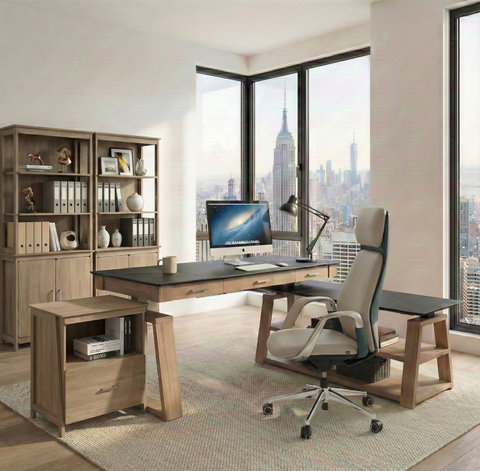
To achieve a minimalist aesthetic, you must start with a foundation that prioritizes clean lines and hidden functionality. The goal is to create a space that feels "Elegant" and "Mindful."
Step 1: The Foundation
A minimalist desk should be an anchor, not an eyesore. We often recommend the Zen Pro Series, 87"/72" Executive Standing Desk with Cabinets Set. Its Lauren Black Gold Sintered Stone desktop provides a sophisticated texture that feels premium without being distracting. The integrated side cabinets allow you to tuck away peripherals and paperwork, maintaining that "Workspace Sanctuary" vibe.
Step 2: Cable Discipline
Nothing ruins a minimalist "Aesthetic" faster than a "spaghetti" of cables. In our customer support interactions, we’ve found that the most common frustration for new standing desk owners is "cable snag" at maximum height. To avoid this, use integrated cable trays and ensure your monitor arms have internal routing.
Step 3: Diffused Ambiance
A common mistake in minimalist setups is over-lighting. Harsh, direct light creates shadows that make a clean desk look sterile or cold. Instead, use diffused, warm ambient lighting. A single, high-quality desk lamp or a monitor light bar can provide enough "Inspiration" for late-night sessions without breaking the visual calm.

Space Transformation: The Maximalist Cockpit
Maximalism isn't about chaos; it’s about "curated abundance." It’s the art of displaying your personality in a way that feels intentional and high-energy.
Step 1: The Multi-Functional Anchor
For the maximalist, a desk needs to handle more than just a laptop. It needs to support multiple monitors, microphone arms, and perhaps a dedicated lighting rig. The Ark X Executive Standing Desk (60"x26") is a perfect bridge here. Its blend of oak paper and black leather provides a rich, tactile base that pairs beautifully with RGB accents and personalized accessories.
Step 2: Layered Lighting
In a maximalist setup, lighting is your most powerful tool. However, novices often overcrowd their RGB zones. Based on our observations of successful streamers, the most effective approach is to limit primary RGB accents to 2-3 synchronized zones—such as the desk perimeter and the area behind your monitors. Use static or slow color cycles to maintain "Workflow" without causing eye fatigue.
Step 3: Vertical Expression
Since the desk surface can get crowded quickly, look to the walls. Use pegboards or floating shelves to display the items that define your brand. This keeps your "immediate work area" minimalist for performance while keeping the "on-camera backdrop" maximalist for the audience.
Linking Functionality with Emotion: The Ergonomic Core
Whether you choose a clean or a busy look, the underlying "Ergonomics" must be non-negotiable. A beautiful desk that causes back pain is not a sanctuary—it’s a liability.
According to the ISO 9241-5:2024 standard, a workstation must support postural requirements that allow for frequent movement. This is why we advocate for height-adjustable solutions. Shifting from a sitting to a standing position isn't just about physical health; it’s a psychological reset. Transitioning to a standing mode can signal your brain to move from "Execution" (answering emails) to "Thinking" (brainstorming your next video).
The 20-8-2 Rhythm
We recommend following the "20-8-2" rule popularized by the Cornell University Ergonomics Web:
- 20 Minutes Sitting: Maintain a neutral posture.
- 8 Minutes Standing: Activate your core and reduce sedentary time.
- 2 Minutes Moving: Stretch or walk to promote circulation.
Methodology Note: The 20-8-2 rule is a heuristic designed to interrupt prolonged static sitting. While individual needs vary, this ratio is a widely accepted baseline in office ergonomics to mitigate the risks of musculoskeletal disorders.
| Ergonomic Feature | Minimalist Application | Maximalist Application |
|---|---|---|
| Desk Height | Set to elbow height for "Mindfulness" and focus. | Set for comfort during high-energy streaming. |
| Monitor Placement | Single monitor at eye level for a "Clean" look. | Triple monitors angled to minimize neck rotation. |
| Cable Management | Completely hidden for visual "Declutter." | Organized but accessible for frequent gear swaps. |
| Lighting | Warm, diffused for "Ambiance." | Multi-zone RGB for "Aesthetic" impact. |
The Hybrid Strategy: Professional on the Desk, Creator in the Back
The most successful modern professionals often employ a "Hybrid Strategy." They maintain a minimalist immediate workspace to protect their "Deep Work" sessions but use a maximalist backdrop for their digital presence.
For this setup, the Ark EL Executive Standing Desk (60"x26") is an excellent choice. Its unique trapezoidal legs provide a touch of "Aesthetic" flair that looks great on camera, while the oak texture keeps the vibe professional and grounded. By using a minimalist desk as your foundation, you allow your personality to be expressed through easily changeable accessories like monitor arms or desk mats.

The Science of the Setup: Standards and Safety
When investing in your "Workspace Sanctuary," it is vital to look beyond the surface. Professional-grade furniture should meet rigorous standards for safety and durability.
According to the Business and Institutional Furniture Manufacturers Association (BIFMA) G1-2013 Ergonomics Guideline, furniture should accommodate a wide range of the population (from the 5th to the 95th percentile). This means your desk should offer enough height adjustability to fit you whether you are 5'0" or 6'4".
Furthermore, we must consider the long-term impact of our environment. As detailed in The 2026 Workstation White Paper: Converging Ergonomic Science and Sustainable Engineering, the future of workspace design lies in the intersection of human-centric ergonomics and sustainable materials. Choosing a desk like the Ark Executive Standing Desk (63"x29") ensures you are using high-quality walnut finishes that are built to last, reducing the need for frequent replacements.
How to Verify Your Setup
To ensure your desk is truly ergonomic, follow this quick checklist derived from OSHA's Computer Workstation guidelines:
- Elbow Angle: Your elbows should be at a 90-degree angle while typing.
- Eye Level: The top third of your monitor should be at eye level to prevent neck strain.
- Legroom: Ensure there is enough clearance under the desk for your knees and thighs (BIFMA recommends specific clearance depths).
- Wrist Position: Keep your wrists straight and neutral, not bent up or down.
Personal Tips: Mastering Your Atmosphere
After years of helping creators optimize their spaces, here are a few non-obvious "Tips & Tricks" to elevate your sanctuary:
- The Greenery Effect: Adding a single plant to a minimalist setup can soften the "Aesthetic" and improve air quality. For maximalists, a "living wall" or multiple plants can add a natural texture that balances out the "visual noise" of RGB lighting.
- Texture Contrast: If you have a smooth sintered stone desk, use a leather or felt desk mat. This contrast in textures adds a "Premium" feel to your "Workflow" and provides a tactile boundary for your keyboard and mouse.
- Sound Dampening: Maximalist rooms often have more "stuff," which naturally helps with sound echoes. If you are a minimalist, consider adding a few tasteful acoustic panels or a thick rug to ensure your audio quality remains crisp during calls or recordings.
- The "End-of-Day" Reset: Regardless of your style, spend 2 minutes at the end of every day to "Declutter." Return your desk to its "base state." This ensures that when you walk in the next morning, you are greeted by "Inspiration" rather than yesterday's chaos.
Your Journey to a Transformed Workspace
Choosing between a minimalist and maximalist aesthetic is not about following a trend; it is about discovering what fuels your best work. A minimalist desk like the Zen Pro Series offers a path to "Mindfulness" and "Deep Work," while a customized, high-energy setup centered around the Ark X can be the spark for your most engaging content.
Your workspace is a reflection of your creative journey. By grounding your aesthetic choices in ergonomic science and high-quality engineering, you create more than just an office—you build a sanctuary where your best ideas can come to life.
Disclaimer: This article is for informational purposes only and does not constitute professional medical or ergonomic advice. If you have pre-existing musculoskeletal conditions, please consult with a qualified healthcare professional or an ergonomics specialist before making significant changes to your workstation setup.




Leave a comment