

Choose an office chair first when your current chair cannot support a workable seated position. Choose a standing desk first when the chair is already usable and a fixed-height desk is the main limitation. For a practical office chair or standing desk decision, assess the chair, desk, monitor, keyboard, and work pattern as one system before spending your budget.

Office Chair or Standing Desk: Which Should You Buy First?
Your first purchase should address the problem that limits the largest share of your workday. If seated support is the issue, buy the chair first. If seated work is already manageable but a fixed-height desk prevents useful position changes, start with the standing desk.
| Current setup or recurring problem | First upgrade | Why it comes first |
|---|---|---|
| The chair feels unsupportive, cannot be adjusted to a workable position, or creates a poor fit | Office chair | It establishes a sound seated baseline before you add another working position. |
| The chair works well, but the desk is fixed-height and limits practical position changes | Standing desk | It adds a work surface that can be raised or lowered for sitting and standing. |
| Work is mostly seated, and chair discomfort appears during ordinary tasks | Office chair | The chair affects the position you use for most work sessions. |
| You regularly need to alternate positions, and the chair remains workable | Standing desk | Height flexibility is the missing capability, as long as the rest of the setup works at both heights. |
| Both the chair and desk are inadequate | Whichever fixes the larger daily bottleneck | Choose the component tied to more work sessions, then make a simple adjustment to the other component before buying again. |
Start with the workstation as one system, rather than with the most visible product category. A chair purchase may leave a monitor or keyboard mismatch untouched, while a desk purchase cannot compensate for a chair that does not support seated work. If neither category clearly wins, fix the simplest setup mismatch first, then reassess which problem remains.

Buy an Office Chair First When Seated Support Fails
Buy the office chair first when your current chair prevents a stable, workable seated position or cannot be adjusted to fit the rest of your workstation. That recommendation applies even if a standing desk sounds appealing. Adding another position does not replace an adequate seated option.
Use these checks to decide whether the chair is the main bottleneck:
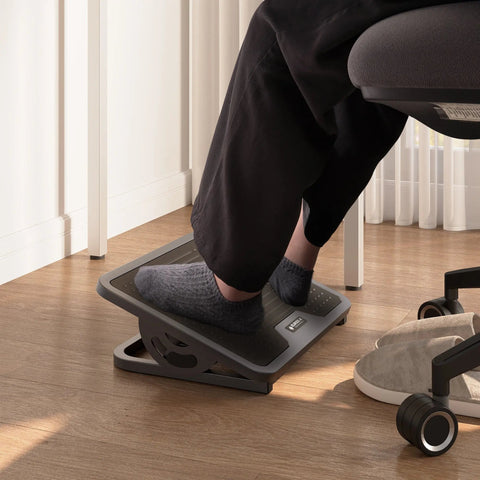
- Seat height and foot support: Your feet should have stable support, and changing the seat height should not create a new mismatch with the desk or keyboard. A footrest or another simple adjustment may solve a height issue without requiring a new chair.
- Seat depth and lower-body support: The seat should support your hips and thighs without forcing an awkward position. If the seat shape or depth makes ordinary seated work difficult, the chair has a stronger claim on your budget.
- Back support and recline: The backrest should support the way you actually work, whether you sit more upright or lean back slightly. A feature list or soft cushion alone does not establish fit.
- Armrest and input-device relationship: Armrests should not force your shoulders into an awkward position, and the chair should work with your keyboard and mouse placement. If adjusting one element makes another unusable, the complete workstation needs attention.
- Monitor relationship: Chair adjustments should leave the monitor in a workable viewing position. If the monitor is the real mismatch, an accessory or monitor adjustment may be a more direct first step than replacing the chair.
The chair fit guidance from OSHA supports evaluating back, seat, hip, thigh, foot, and keyboard relationships instead of treating comfort as a single product feature. Once those checks show that seated support is the limiting problem, you can browse ergonomic office chairs as a category. The collection is a shopping path, not proof that every chair fits every body or workstation.
A new chair is not a universal fix for discomfort. If the chair becomes workable after a simple adjustment and the main problem is being locked into one desk height, use the desk-first test instead.
Buy a Standing Desk First When Position Flexibility Is Missing
Choose a standing desk first when your chair already supports ordinary seated work and the missing capability is a practical way to change the work-surface height. A sit-stand desk raises or lowers the work surface so you can alternate between sitting and standing, as CCOHS guidance on sit-stand desks explains.
The desk-first choice is strongest when all of these conditions are true:
- The chair is already workable: You can sit for ordinary tasks without the chair being the main source of mismatch. The desk should add flexibility to a sound seated baseline, not conceal a failing chair.
- Fixed height is the actual limitation: You want to change positions, vary your working height, or accommodate different tasks, and the current desk cannot do that without disrupting your setup.
- The monitor and input devices can work in both positions: Check the monitor, keyboard, mouse, chair, and available room at seated and standing heights. A desk that moves while the equipment remains poorly positioned does not solve the complete problem.
- The room and surface support the workflow: Make sure the desk has usable space for the equipment you need and that cables, accessories, and nearby furniture will not restrict the height change.
- You will retain seated support: Standing is an alternate position, not a requirement to stand all day. Cornell's sitting and standing guidance explains why standing does not make a supportive seated option unnecessary.
Before buying, test whether the monitor, keyboard, mouse, chair, room, and cable reach can work in both positions. If your chair passes the seated test and height flexibility is the clear gap, browse adjustable standing desks by the dimensions, adjustment range, surface, and equipment compatibility your setup requires.
This is a flexibility recommendation, not a promise of better posture, productivity, circulation, or pain relief. Research on sit-stand workstations does not establish one universal outcome for every user, so tie the purchase to your actual setup and work pattern.
Plan the Second Upgrade Around the Remaining Bottleneck
Treat the second purchase as a response to the constraint that remains after the first upgrade, not as an automatic bundle. A staged approach keeps the buying decision tied to observable workstation fit instead of a general promise that owning both categories will solve every problem.
- Identify the dominant bottleneck. Decide whether seated support or position flexibility disrupts more of your representative work sessions.
- Buy the corresponding category. Choose the office chair when the seated baseline fails. Choose the standing desk when the chair works and fixed height is the main limitation.
- Use the revised setup during representative work sessions. Pay attention to what still interrupts your workflow. If the chair came first, look for a remaining height or equipment-alignment constraint. If the desk came first, look for a remaining seated-support constraint.
- Buy the second category only when it solves that remaining constraint. The second product should fit the equipment and component you already own. If a simple adjustment addresses the remaining issue, make that adjustment before another major purchase.
If you plan a broader refresh, home office furniture can be a general browsing path. The buying order is straightforward: choose the category linked to the problem occupying most of the workday, then reassess before adding the second one.
FAQ
Should I buy an office chair or standing desk first for long hours at a desk?
Long hours favor the office chair first when the current chair loses support, fits poorly, or makes seated work difficult. A standing desk can come first when the chair is already workable and the fixed-height desk is the main limitation. Check the chair's fit during a normal work session before shopping.
Should I buy a standing desk or ergonomic chair first for back or neck discomfort?
Do not treat discomfort alone as proof that either product is the answer. Inspect chair fit, desk height, monitor position, keyboard placement, and work habits as one setup. The question of whether to buy a standing desk or ergonomic chair for back pain is a buying decision, not a diagnosis. For persistent or severe symptoms, seek qualified professional evaluation rather than relying on a furniture purchase to identify or treat the cause.
What if I can afford only one home-office upgrade right now?
Choose the category tied to the problem affecting the greatest share of your work sessions. If the chair is the limiting component, buy the chair first. If the chair works and fixed height is the remaining constraint, buy the standing desk first, keep the other component workable, and reassess before funding the second upgrade.
Is a standing desk worth buying if my office chair is already comfortable?
It can be the more relevant first purchase when your main unmet need is position flexibility. Before buying, make sure the monitor, keyboard, mouse, chair, available room, and cable reach can work at both seated and standing heights. If those relationships cannot be made workable, the desk alone is unlikely to deliver the intended flexibility.




Leave a comment