

Often, the most significant barrier to workplace wellness is not a lack of movement, but a fundamental mismatch between the human body and the tools it uses. For individuals who stand under 5'4", the modern office environment is frequently a landscape of "one-size-fits-all" engineering that fits almost no one in the 5th percentile of the population. When a chair is too deep, a desk is too high, or armrests are too wide, the body compensates through awkward postures that, over time, manifest as chronic musculoskeletal pain.
The frustration of dangling feet or a backrest that feels miles away is more than a comfort issue; it is a physiological challenge. According to the U.S. National Institute for Occupational Safety and Health (NIOSH), musculoskeletal disorders (MSDs) are caused by a combination of repetitive motions, forceful exertions, and—most critically for petite users—sustained awkward postures. To address these risks, one must move beyond aesthetic furniture choices and adopt a rigorous, measurement-based approach to ergonomic selection.

The Physiology of the "Petite Mismatch"
The primary objective of ergonomics is to achieve a "neutral position," a posture where joints are naturally aligned and muscle strain is minimized. For petite users, the standard office chair—typically designed for a height range of 5'6" to 6'2"—acts as a catalyst for "static load." Static load occurs when muscles remain in a state of contraction to support a posture, such as when a user must lean forward because the seat pan is too deep to allow backrest contact.
When the seat depth exceeds the user's "buttock-popliteal length" (the distance from the back of the buttocks to the back of the knee), the front edge of the seat presses against the delicate tissues behind the knee. This pressure can restrict blood circulation and compress the sciatic nerve. To avoid this, users often slide forward, losing the support of the lumbar curve. This leads to "posterior pelvic tilt," where the lower spine flattens or rounds, placing immense pressure on the intervertebral discs.
As noted in the OSHwiki guide on musculoskeletal disorders and prolonged static sitting, long-term static postures are a primary risk factor for lower back pain. For the petite professional, the "neutral position" is a moving target that requires specific mechanical interventions to achieve.
The Petite Ergonomic Checklist: Essential Dimensions
Selecting a chair requires more than a brief "sit test." Technical benchmarks, such as those provided by the BIFMA G1-2013 Ergonomics Guideline, offer a framework for what constitutes a proper fit. For those under 5'4", the following checklist serves as the definitive guide for evaluation.
1. Seat Depth: The "Two-Finger" Rule
Seat depth is perhaps the most overlooked metric. Research from Cornell University Ergonomics suggests that for the 5th percentile female, a seat depth of approximately 16.5 inches is necessary to ensure backrest contact.
- The Check: Sit fully back in the chair so your sacrum is against the backrest.
- The Goal: There should be a gap of 1 to 2 inches (roughly 2-3 fingers' width) between the front edge of the seat and the back of your knees. If the seat touches your calves, it is too deep.
2. Seat Height and Popliteal Alignment
Your feet must rest flat on the floor to distribute body weight effectively. If your feet dangle, the weight of your legs pulls on the lower back, causing strain.
- The Check: Measure your "popliteal height"—the distance from the floor to the underside of your thigh behind the knee while wearing your typical work shoes.
- The Goal: The chair should adjust low enough so your knees are at a 90 to 100-degree angle with feet firmly planted.

3. 4D Armrest Adjustability
Standard armrests are often set too wide for petite frames, forcing the user to "abduct" their arms (reach outward). This creates a constant tension in the trapezius and neck muscles.
- The Check: Can the armrests slide inward toward your torso?
- The Goal: Your elbows should rest directly under your shoulders in a relaxed state. This is why 4D armrests—which adjust for height, depth, width, and angle—are a technical necessity, not a luxury.
4. Lumbar Support Placement
Many adjustable lumbar supports do not travel low enough to hit the "L4-L5" vertebrae of a smaller user.
- The Check: Does the curve of the chair meet the inward curve of your lower back?
- The Goal: The support should stabilize the lumbar lordosis without pushing you forward off the seat.
| Metric | Standard Chair Average | Petite Requirement (<5'4") | Physiological Consequence of Mismatch |
|---|---|---|---|
| Seat Height | 18" - 22" | 15" - 17.5" | Restricted circulation; lower back pull |
| Seat Depth | 18" - 20" | 14" - 16.5" | Loss of lumbar support; nerve compression |
| Armrest Width | 18" - 20" | 13" - 15.5" | Chronic neck and trapezius strain |
| Lumbar Apex | Fixed High | Adjustable/Low | Slouching and disc compression |

Engineering the Solution: Beyond the Chair
While a specialized chair is the foundation, the OSHA Hierarchy of Controls reminds us that "Engineering Controls"—physically changing the workstation—are more effective than simply trying to "sit better."
For many petite users, even the best chair cannot solve a desk that is too high. A standard 29-inch desk is often 3 inches too tall for a 5'2" individual, forcing them to raise their chair until their feet no longer touch the floor. In this scenario, two solutions emerge:
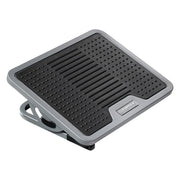
- The Footrest Intervention: According to the Safe Work Australia Workstation Setup Guide, if a desk cannot be lowered, a footrest is mandatory. An Adjustable Ergonomic Footrest allows you to raise your "floor" to meet your seated height, maintaining that crucial 90-degree knee angle.
- Height-Adjustable Desks: Modern workstations like the Ark Pro L-Shaped Standing Desk provide a much wider range of motion. By lowering the desk surface to roughly 25-26 inches, a petite user can keep their chair at its lowest, most stable setting while maintaining perfect elbow alignment.
Identifying Patterns: Scenario Analysis
To understand how these measurements translate to real-world use, let us examine two distinct workstation profiles.
Scenario A: The "Standard" Home Office Setup A 5'2" user sits in a standard executive chair at a fixed 29-inch dining table. Because the table is high, they raise the chair. Their feet dangle. To reach the keyboard, they lean forward, losing all backrest support. Within two hours, they experience a "burning" sensation in the upper back and numbness in the thighs. This is a classic case of postural collapse due to equipment mismatch.

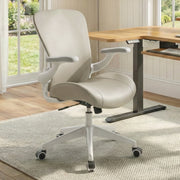
Scenario B: The Optimized Petite Workstation The same user utilizes a chair with a shallow seat depth, such as the Vera, Ergonomic Office Chair, which features a saddle-shaped cushion and highly adjustable lumbar support. They pair this with an Adjustable Ergonomic Footrest. By utilizing 4D armrests adjusted inward, their shoulders remain relaxed. They follow the Cornell "20-8-2" rhythm—sitting for 20 minutes, standing for 8, and moving for 2. The result is a significant reduction in static load and a marked increase in afternoon focus.
Eureka Ergonomic Adjustable Footrest for under desk use, textured surface for circulation.
Technical Deep Dive: The Mechanics of Support
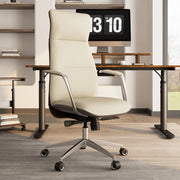
When evaluating high-performance seating like the Royal Slim, Executive Office Chair, it is essential to look at the "waterfall" edge of the seat pan. A well-engineered edge tapers downward to reduce pressure on the femoral arteries. For petite users, this taper must begin earlier in the seat's depth to be effective.
Furthermore, the The 2026 Workstation White Paper emphasizes that "active" ergonomic features—those that move with the user—are superior to "passive" ones. For a smaller frame, the tension of the tilt mechanism must be adjustable. If the "recline tension" is too high, a lighter, petite user will find themselves unable to lean back without significant effort, effectively turning their ergonomic chair into a rigid stool.
Practical Recommendations for Daily Use
Achieving the perfect setup is an iterative process. Use these steps to calibrate your workstation:
- Level the Seat First: Adjust your chair height so your feet are flat. If your desk is now too high, add a footrest. Do not sacrifice foot support for desk height.
- Clear the Knees: Ensure the 2-inch gap behind your knees is maintained. If your chair is too deep, use a specialized lumbar insert to "shorten" the seat depth.
- Align the Monitor: According to OSHA's guidelines on monitors, the top line of text should be at or slightly below eye level. Petite users often have their monitors too high, leading to neck extension (looking up).
- Test for Duration: As noted in the ISO 11226:2000 standard, static postures should be evaluated based on duration. Sit in your new configuration for at least 30 minutes to identify "creeping" pressure points that aren't obvious in a five-minute test.
For further reading on specific adjustments, consult our Guide to Adjusting Your Ergonomic Chair Correctly or explore how to Fit Your Ergonomic Chair for Short Users.
A Note on Long-Term Health
Investing in a chair that fits is not merely a purchase; it is a preventative health measure. A meta-analysis by Santos et al. (2025) confirmed that ergonomic interventions significantly reduce work-related musculoskeletal pain. By following a rigorous checklist and choosing furniture designed with precise adjustability, petite professionals can reclaim their comfort and productivity.

This article is for informational purposes only and does not constitute professional medical advice, diagnosis, or treatment. The ergonomic recommendations provided are based on general industry standards and may not be suitable for individuals with specific pre-existing medical conditions or chronic injuries. Always seek the advice of a qualified healthcare professional or a certified ergonomist before making significant changes to your workstation or starting a new postural routine.
Sources
- BIFMA G1-2013 Ergonomics Guideline for Furniture
- CCOHS: Office Ergonomics - Sit/Stand Desk
- Cornell University Ergonomics Web — Workstation Guides
- OSHA eTools: Computer Workstations - Neutral Working Postures
- Safe Work Australia: Workstation set-up
- Santos et al., 2025 – Ergonomic Interventions & Musculoskeletal Pain




Leave a comment