

The Physiological Cost of the Modern Workday
Many professionals experience a familiar pattern: the morning begins with focused energy, but by 3:00 PM, a dull ache radiates across the lower back, accompanied by tightness in the shoulders and a noticeable dip in cognitive clarity. This is not merely a byproduct of hard work; it is the physiological result of a mismatch between human biology and the static environment of a traditional workstation.
From a scientific perspective, ergonomics—or human factors—is the discipline dedicated to understanding the interactions between humans and the systems they inhabit. According to the U.S. National Institute for Occupational Safety and Health (NIOSH), the goal is to optimize well-being and overall system performance. When a workstation lacks proper adjustability, the body is forced into "compensatory postures." These positions, while sustainable for a few minutes, lead to Musculoskeletal Disorders (MSDs) when maintained over hours.
The primary culprit is often "static load." When muscles remain in a fixed state to support a posture, blood circulation is restricted, preventing the delivery of oxygen and the removal of metabolic waste products like lactic acid. Over time, this contributes to tissue fatigue and chronic discomfort. Understanding the science of ergonomics is the first step toward transforming the office from a source of physical stress into a platform for peak performance.
The Biomechanics of the Neutral Position
The cornerstone of ergonomic science is the "neutral position." This is the posture in which the joints are naturally aligned, and the muscles, tendons, and ligaments are at their most relaxed and efficient. According to OSHA’s guidelines on neutral working postures, achieving this state requires a workstation that can be tuned to the specific anthropometric dimensions of the user.
A neutral posture is characterized by:
- The S-Curve of the Spine: The human spine is not straight; it has natural inward curves at the neck (cervical) and lower back (lumbar), and an outward curve at the mid-back (thoracic).
- Joint Alignment: Elbows should be at a 90-to-120-degree angle, wrists should be straight (not tilted up or down), and hips, knees, and ankles should ideally reside at approximately 90-degree angles.
- Head Position: The head should be balanced over the shoulders, not jutting forward toward a screen, which significantly increases the effective weight of the head on the neck musculature.
Failure to maintain these alignments leads to "postural creep," where the ligaments begin to stretch and the spinal discs experience uneven pressure. Research compiled by EU-OSHA on musculoskeletal disorders and static sitting indicates that prolonged static positions are a significant risk factor for long-term spinal health issues.

The Engineering of Adjustability: Beyond "One Size Fits All"
Conventional office furniture often relies on a "one-size-fits-all" design philosophy, which typically targets the 50th percentile of the population. However, BIFMA G1-2013 Ergonomics Guidelines emphasize that furniture must accommodate a range from the 5th to the 95th percentile to be truly effective. This is why adjustability is not a luxury—it is a functional necessity.
Lumbar Support and Spinal Integrity
The lumbar spine is particularly vulnerable during seated work. A common mistake is setting lumbar support too high, where it pushes into the shoulder blades, or too low, where it fails to support the natural inward curve of the lower back. Based on common patterns from customer support and ergonomic audits (not a controlled lab study), the correct placement is typically at or just above the belt line. This provides a gentle forward push felt in the lower back, maintaining the lumbar lordosis.
Practitioners note that mesh-backed chairs often require more frequent re-tensioning of the lumbar adjustment as the material relaxes over time. This ensures the support remains firm enough to counteract the tendency to slouch as the day progresses.
Seat Depth and Circulation
Seat depth is a frequently overlooked adjustment. If the seat pan is too deep, it presses against the back of the knees, restricting blood flow and potentially causing numbness or deep vein thrombosis (DVT) over long periods. Conversely, a seat that is too shallow does not provide enough support for the thighs, increasing pressure on the "sit bones" (ischial tuberosities).
A reliable heuristic (rule of thumb) used by ergonomists is to ensure a gap of about two to three fingers' width between the back of the knee and the seat edge. This balance ensures maximum surface area for weight distribution while protecting popliteal circulation.
The Role of Synchronous Tilt
Experienced ergonomists observe that synchronous tilt mechanisms—where the seat and backrest move together at a fixed ratio (usually 2:1)—are often underutilized. Users frequently lock their chairs in a rigid upright position. However, a recline of 100 to 110 degrees is often optimal for reducing intervertebral disc pressure during focused work. This slight recline shifts a portion of the torso's weight to the backrest, relieving the spinal column.

Scenario Modeling: The Tall Professional’s Ergonomic Challenge
To demonstrate why precision adjustability matters, we can look at a specific scenario: the "Tall Professional." Using anthropometric data for a 195cm (6'5") male—representing the 95th percentile of the population—we can model the ergonomic deficits created by standard equipment.
Methodology & Assumptions
This analysis uses a deterministic parameterized model to estimate the gap between standard furniture and the needs of a tall user.
| Parameter | Value | Unit | Rationale / Source |
|---|---|---|---|
| User Stature | 195 | cm | 95th Percentile Male (ANSI/HFES 100-2007) |
| Standard Desk Height | 73.7 (29) | cm (in) | Industry standard fixed desk height |
| Calculated Sit Height | 80.5 | cm | Based on popliteal and elbow-to-seat ratios |
| Productivity Coefficient | 0.15 | ratio | Conservative estimate from ergonomic intervention studies |
| Daily Standing Target | 240 | min | Recommended 4-hour sit-stand rotation |
The "Ergonomic Gap" Findings
Our model indicates that a standard 29-inch fixed desk sits approximately 6.8cm (2.7 inches) too low for this user. This deficit forces a constant "shoulder shrug" or a permanent hunch to reach the keyboard. Over a year, this misalignment doesn't just cause pain; it impacts the bottom line.
Based on a $65/hour wage and a conservative 15% productivity improvement from proper ergonomic alignment, the estimated annual value gain is approximately $9,750. Furthermore, integrating a sit-stand rhythm at the correct height for this user could result in a metabolic increase of roughly 200 extra calories per day—equivalent to approximately 14 pounds of fat loss annually (assuming 3,500 kcal/lb).
Logic Summary: These metabolic and financial figures are scenario-based estimates derived from standard MET values and ergonomic productivity studies. They are intended to illustrate the potential ROI of ergonomic investment, not to guarantee specific health or financial outcomes.
Beyond the Chair: The Integrated Workstation
Ergonomics is a coupled system involving the chair, the desk, and the peripherals. According to the Canadian Centre for Occupational Health and Safety (CCOHS), the setup of your monitor and input devices is just as critical as the chair itself.
Visual Ergonomics and Monitor Arms
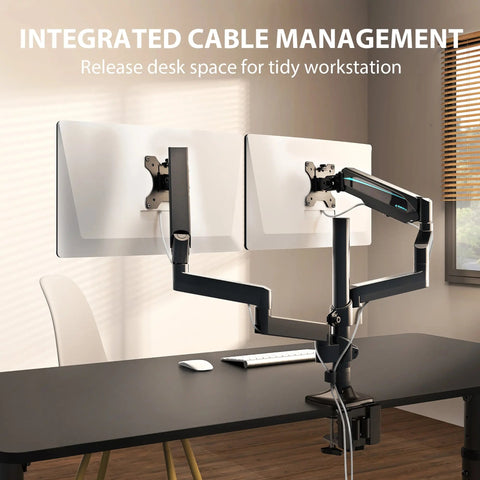
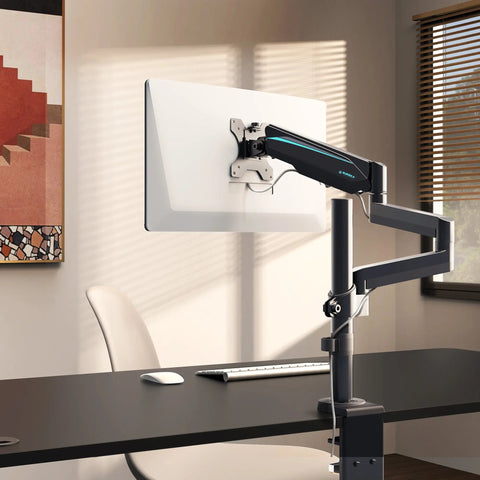
The height and distance of your monitor dictate your neck and head posture. OSHA eTools for monitors suggest that the top of the screen should be at or slightly below eye level. If the monitor is too low, the user develops "tech neck," a condition where the cervical spine is under constant strain.
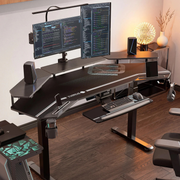
For users with multi-monitor setups, adjustable arms are essential. We modeled a "Battlestation" setup for a tall professional using three 34-inch ultrawide monitors. The total weight of such a setup, including heavy-duty arms and a liquid-cooled PC, can exceed 95kg. Our analysis shows that a single-motor standing desk would operate at ~119% capacity in this scenario, exceeding safety thresholds. A dual-motor system, operating at ~80% capacity, is mandatory for structural longevity and smooth adjustment.

The Foundation: Footrests and Legroom
For shorter users (the 5th percentile), even the lowest chair setting may leave their feet dangling. This puts immense pressure on the underside of the thighs and can lead to lower back pain. An adjustable ergonomic footrest allows these users to maintain a firm foundation, which is necessary for pelvic stability and proper spinal alignment.
Behavioral Ergonomics: The 20-8-2 Rule
Even the most advanced ergonomic chair cannot fully negate the risks of a sedentary lifestyle. The World Health Organization (WHO) 2020 Guidelines recommend reducing long periods of static behavior.
A leading heuristic for office health is the "20-8-2 Rule," popularized by Cornell University’s Ergonomics Web:
- 20 Minutes Sitting: Work in a neutral, supported position.
- 8 Minutes Standing: Switch to a standing desk to encourage blood flow and muscle engagement.
- 2 Minutes Moving: Walk, stretch, or perform light activity to reset the musculoskeletal system.
This rhythm prevents the buildup of static load and keeps the metabolism active. It is important to note that standing is not "exercise"—it is simply a different postural state. Prolonged standing can also lead to issues like varicose veins or lower limb fatigue, which is why alternating between positions is the scientifically supported approach.
Adjustable Ergonomic Footrest designed for under-desk use to improve posture.
Compliance and Quality Standards
When selecting ergonomic solutions, looking for industry certifications provides a baseline of trust and safety.
- BIFMA X5.1: This standard defines the safety and durability requirements for office chairs, involving rigorous testing for drop impacts and armrest strength.
- ISO 9241-5:2024: The latest international standard for workstation layout and postural requirements, emphasizing the need for posture changes.
- UL GREENGUARD: Ensures that the furniture has low chemical emissions, protecting indoor air quality.
- FSC Certification: For wood-based components, this ensures sustainable sourcing.
For a deeper dive into how these standards are evolving to meet the needs of the modern remote workforce, refer to The 2026 Workstation White Paper: Converging Ergonomic Science and Sustainable Engineering.
Summary of Ergonomic Adjustments
To ensure your workstation is optimized for your biology, use the following checklist derived from HSE's DSE Assessment:
- Eyes: Level with the top third of the screen; viewing distance of 20-30 inches.
- Shoulders: Relaxed, not elevated toward the ears.
- Elbows: Close to the body, forming a 90-to-120-degree angle.
- Wrists: Straight and neutral; avoid resting them on hard edges while typing.
- Back: Fully supported by the chair's lumbar curve; chair slightly reclined (100-110°).
- Feet: Flat on the floor or a footrest; knees slightly lower than or level with hips.
By treating ergonomics as a precise science rather than a matter of aesthetics, you can create a workspace that supports your health, enhances your focus, and protects your long-term well-being.
Disclaimer: This article is for informational purposes only and does not constitute professional medical advice. If you have pre-existing musculoskeletal conditions, chronic back pain, or other health concerns, please consult a qualified healthcare professional or an occupational therapist before making significant changes to your workstation or work habits.
References
- BIFMA G1-2013 Ergonomics Guideline for Furniture
- OSHA eTools: Computer Workstations - Neutral Working Postures
- Cochrane: Workplace interventions for reducing sitting at work
- WHO 2020 Guidelines on Physical Activity & Sedentary Behaviour
- ISO 9241-5:2024 Workstation layout & postural requirements
- Cornell University Ergonomics Web — Workstation Guides




Leave a comment