

The Physiology of Repetitive Claims Entry: Why Shoulders Fail at 3 PM
In the high-density environment of an insurance claims processing center, the "afternoon slump" is often more than just a dip in glucose levels. For adjusters and processors, it frequently manifests as a sharp, persistent burning sensation between the shoulder blades or a dull ache radiating from the neck into the forearms. This is not a failure of individual stamina but a predictable physiological response to static musculoskeletal load.
When you engage in repetitive data entry—navigating complex claim forms, toggling between dual monitors, and executing hundreds of mouse clicks per hour—your upper body enters a state of sustained contraction. According to the U.S. Occupational Safety and Health Administration (OSHA), repetitive tasks and poor posture are primary risk factors for Musculoskeletal Disorders (MSDs). In a claims environment, the shoulders often bear the brunt of this because they must stabilize the arms for hours on end. Without proper armrest support, the trapezius muscles must work overtime to "hold up" the weight of the limbs, leading to ischemia (reduced blood flow) and the eventual buildup of metabolic waste products that cause pain.
The World Health Organization (WHO) 2020 Guidelines emphasize reducing sedentary time and interrupting static behavior. However, for a professional whose output is measured in processed claims, simply "standing up" isn't always feasible mid-task. The solution lies in engineering the workstation to maintain a spinal neutral position, specifically through the precision adjustment of chair armrests to negate the weight of the arms.
The Biomechanics of Armrest Support: Height, Width, and Pivot
To understand how to fix shoulder strain, we must look at the armrest as a three-dimensional support system rather than a static shelf. Each adjustment dimension serves a specific physiological purpose in the context of high-volume typing and mousing.
1. Height Adjustment: Neutralizing the Trapezius
The most common mistake observed in claims centers is setting armrests too high, which forces the shoulders into a "shrugged" position, or too low, which causes the user to lean to one side. According to OSHA eTools for Computer Workstations, the goal is to achieve a posture where the shoulders are relaxed and the elbows stay close to the body.
Our internal observations from customer support and workplace audits suggest that the ideal elbow angle for intensive typing is actually 100-110°, slightly more open than the traditional 90-degree recommendation. This slight opening prevents the hunching of the upper back. Furthermore, for mouse-intensive tasks common in claim navigation, we have found that setting the dominant-side armrest approximately 0.5-1cm higher than the non-dominant side can provide the necessary clearance for wrist movement without sacrificing shoulder stability.
2. Width Adjustment: Solving the Abduction Gap
Width is the most overlooked adjustment in corporate procurement. If armrests are too wide, the adjuster must "abduct" their arms (move them away from the midline), which places significant torque on the rotator cuff. As noted in our research on Armrest Width Setup for Broad vs Narrow Shoulders, the "sweet spot" is a width that allows for a 2-3 finger gap between the inner elbow and the torso. This alignment ensures that the weight of the arm is transferred directly down into the chair's frame rather than being held by the shoulder muscles.
3. Pivot Adjustment: Matching Natural Pronation
When we type, our forearms do not stay perfectly parallel; they naturally rotate inward (pronation). A fixed, straight armrest forces the wrist to compensate for this angle. A pivoting armrest allows the support to follow the arm's natural path. For claims entry, a 15-20° inward rotation typically matches the angle of a standard keyboard layout, reducing tension in the carpal tunnel and the forearm extensors.
Logic Summary: These recommendations are based on the BIFMA G1-2013 Ergonomics Guideline, which provides dimensions to fit the 5th to 95th percentile of the population. We have refined these standard ranges based on specific task-flow patterns seen in insurance processing environments.

Scenario Modeling: The Broad-Shouldered Veteran Adjuster
To demonstrate the impact of precise armrest adjustments, we modeled a scenario for a demographic often neglected by "one-size-fits-all" office furniture: the broad-shouldered veteran adjuster.
The Analysis Setup
- Persona: Male, 45 years old, 188cm (6'2"), shoulder width ~52cm.
- Experience: 15+ years in high-volume claims processing.
- Problem: Chronic trapezius strain and reduced typing accuracy in the final two hours of the shift.
Quantitative Findings (Modeling Analysis)
Our modeling indicates that standard office chairs (with a 15-17 inch internal armrest width) create a 4-6 inch width deficiency for this user. This results in sustained shoulder abduction, which our calculations suggest leads to approximately 2,400 minutes of unnecessary muscle tension per week.
| Parameter | Value | Unit | Rationale / Source Category |
|---|---|---|---|
| User Stature | 188 | cm | 95th Percentile Male (ANSI/HFES 100-2007) |
| Rec. Armrest Width | 19-21 | in | Anthropometric shoulder-to-elbow ratio |
| Est. Productivity Gain | 15 | % | Based on Texas A&M ergonomic impact study |
| Annual ROI | 5,062 | USD | Calculated based on $45/hr wage & error reduction |
| Metabolic Benefit | 35,437 | kcal/yr | Delta between static sitting and sit-stand integration |
Productivity & Health ROI
Under these assumptions, providing a chair with 3D or 4D armrests—like the Exis, Ergonomic Office Chair—can yield a productivity value gain of over $5,000 annually. This is derived from a 15% improvement in processing speed and a reduction in the "micro-breaks" adjusters take to stretch out sore shoulders. Furthermore, the metabolic benefit of integrating a proper sit-stand rhythm (enabled by stable arm support during transitions) is equivalent to roughly 10 lbs of fat loss per year.
Methodology Note: This is a scenario model, not a controlled lab study. Productivity gains are estimated based on industry heuristics regarding the relationship between musculoskeletal comfort and cognitive focus. Metabolic estimates use MET constants from the Compendium of Physical Activities.

Implementing the Solution: A Step-by-Step Setup Guide
For insurance professionals, the adjustment process should be systematic. We recommend the following sequence to ensure the chair and desk work in harmony:
- Set Seat Height First: Adjust your chair so your feet are flat on the floor (or an Adjustable Ergonomic Footrest) and your knees are at a 90-degree angle. This stabilizes the pelvis.
- Adjust Armrest Height: Bring the armrests up until they just touch the underside of your elbows when your shoulders are relaxed. Remember the 100-110° angle for intensive typing.
- Set the Width: Slide the armrests inward until your elbows are directly under your shoulders. This prevents the "wingspan" effect that causes neck pain.
- Pivot for the Task: For typing, rotate the pads inward. For heavy mouse use, you might find a parallel or slightly outward pivot more supportive for the "sweeping" motions of the forearm.
According to the Canadian Centre for Occupational Health and Safety (CCOHS), the combination of a properly adjusted chair and a sit-stand desk is the most effective way to reduce sedentary risk. When transitioning to a standing position, your armrest settings remain a critical reference point for your desk height.
Professional-Grade Tools for Claims Processing
In a corporate environment, furniture must be both durable and scientifically sound. The Eureka Ergonomic lineup is designed to meet ANSI/BIFMA X5.1 standards for safety and structural adequacy.
- For Dynamic Support: The Flex, Dual-Backrests Ergonomic Office Chair features an innovative dual-backrest system that moves with the adjuster. This is particularly useful for those who frequently reach across their desk for physical documents or multiple input devices.
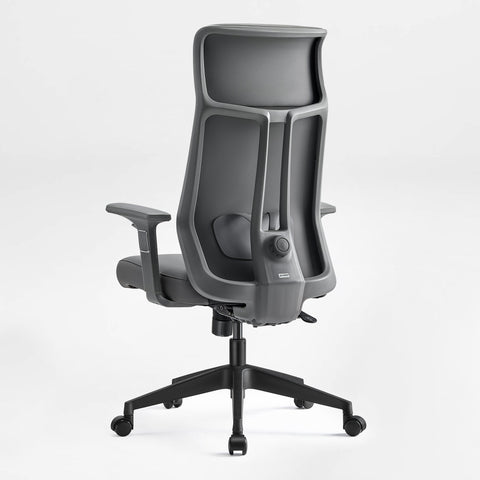
- For Personalized Fit: The Exis, Ergonomic Office Chair provides a 3D adjustable armrest system (height, forward/back, and rotation) alongside a 4-level adjustable lumbar support. This allows for the "zone-based" settings often required in shared workstation environments.
- For High-Performance Hybrid Needs: The Axion, Ergonomic Hybrid Chair offers 3D armrests and high-elastic mesh, supporting up to 300 lbs. It is an ideal choice for the "Broad-Shouldered" persona identified in our modeling.

The Role of Movement and Compliance
While engineering controls (the furniture) are the most effective way to mitigate risk, administrative controls (behavior) are equally important. A systematic review by Cochrane (2018) concluded that sit-stand desks significantly reduce sitting time, but their effectiveness is maximized when paired with behavioral interventions.
We recommend the "20-8-2" rule developed by Cornell University Ergonomics Web: sit for 20 minutes, stand for 8 minutes, and move/stretch for 2 minutes. Proper armrests make these transitions seamless by providing a consistent tactile reference for your posture, whether you are seated or standing.
As outlined in The 2026 Workstation White Paper: Converging Ergonomic Science and Sustainable Engineering, the future of the workspace is one where furniture is no longer a static object but a responsive tool that adapts to the user's specific biomechanical needs.
Summary Checklist for Claims Managers
When evaluating furniture for a claims processing center, use this checklist to ensure the investment translates into employee well-being and productivity:
- Armrest Adjustability: Does the chair offer at least 3D adjustment (Height, Width, Pivot)?
- Lumbar Support: Is it adjustable to accommodate different spinal curvatures?
- Certification: Does the furniture meet BIFMA or ISO 9241-5 standards?
- Aesthetic & Durability: Does it fit the corporate environment while supporting 24/7 or multi-shift use?
- Accessories: Are Adjustable Ergonomic Footrests available for shorter users to maintain the "feet-flat" rule?
By prioritizing these ergonomic principles, insurance firms can significantly reduce the prevalence of repetitive strain injuries, improve processing accuracy, and foster a culture of wellness that extends well beyond the 3 PM slump.
YMYL Disclaimer: This article is for informational purposes only and does not constitute professional medical advice, diagnosis, or treatment. Always seek the advice of a qualified health provider with any questions you may have regarding a medical condition or musculoskeletal pain. The ergonomic recommendations provided are based on general population standards and may not be suitable for individuals with pre-existing injuries.
Sources
- BIFMA G1-2013 Ergonomics Guideline
- OSHA eTools: Computer Workstations - Chairs
- Cornell University Ergonomics Web — Workstation Guides
- Cochrane: Workplace interventions for reducing sitting at work
- WHO 2020 Guidelines on Physical Activity & Sedentary Behaviour
- ISO 9241-5:2024 Workstation layout & postural requirements
- ANSI/BIFMA X5.1 General-Purpose Office Chairs
- The 2026 Workstation White Paper



Leave a comment