

Quick Answer: Modernizing Your Studio
For firm principals and designers looking to upgrade, the most effective path to a tech-forward studio involves three key steps:
- Switch to High-Performance Surfaces: Replace traditional wood with carbon fiber for superior durability and a high-tech brand aesthetic.
- Optimize Visual Depth: Use deep-reach monitor arms to manage large displays (49"+) on standard 30" desks, reclaiming ~40% of usable surface area.
- Implement High-Capacity Sit-Stand Frames: Transition to dual-motor systems capable of handling 100kg+ workstation loads for long-term mechanical reliability.
- Estimated Investment: $1,500 – $3,000 per station.
- Projected Benefit: Based on our internal modeling, firms can see a productivity ROI of over 500% annually through improved workflow ergonomics and reduced physical fatigue.
Imagine walking into your design studio at 7:00 AM. The morning light filters through the floor-to-ceiling windows, hitting a surface that doesn't just hold your blueprints—it reflects your firm’s identity. Gone is the tired, scratched oak of the past. In its place is a sleek, matte-textured carbon fiber expanse that feels more like the cockpit of a high-performance vehicle than a traditional office. This is your Workspace Sanctuary. Here, the chaos of the deadline disappears into a refined Aesthetic, and your Workflow becomes a seamless dance between digital precision and physical model-making.
For modern architectural firms and design studios, the environment is a silent partner in the creative process. Based on common patterns we observe in professional studio setups, the transition from traditional wood-based interiors to tech-forward materials like carbon fiber isn't just about a "futuristic look." It is a strategic move to align a firm’s physical presence with its innovative output. In this guide, we will explore how carbon fiber surfaces can transform the professional studio into a hub of Deep Work and professional sophistication.

The Material of Innovation: Why Carbon Fiber?
In our experience working with high-end design firms, the choice of desk material often comes down to a battle between tradition and performance. Wood is classic, but for a studio that prides itself on cutting-edge BIM modeling and sustainable engineering, wood can sometimes feel stagnant. Carbon fiber, a material born from aerospace and automotive excellence, offers a different narrative.
Branding Through Tangible Sophistication
Your studio is a portfolio piece. When clients visit, every surface communicates your firm’s technological fluency. Carbon fiber’s unique weave provides a visual impact that differentiates your space from a standard corporate office. It signals that you operate at the intersection of functionality and aesthetics.
Beyond the look, the tactile experience is superior. Based on patterns seen in professional studio maintenance, traditional wood veneers often show wear patterns within 12–18 months due to the constant movement of heavy drafting tools and 3D-printed models. Carbon fiber, however, is designed to maintain its pristine appearance. Its scratch-resistant properties are particularly valuable in high-traffic environments where models and equipment are frequently shifted.
Maintenance and Resilience
Creative work is messy. Late-night design sessions often involve coffee, ink, and various adhesives. Feedback from studio managers suggests a preference for carbon fiber because it is effectively water-resistant. Unlike wood, which can warp or stain from a forgotten espresso cup, carbon fiber typically requires only a quick wipe with a damp cloth. This reduces the need for specialized wood cleaners, allowing your team to focus on project execution rather than furniture upkeep.
Space Transformation: From Chaos to Workflow
The transformation of a studio begins with spatial efficiency. Architectural work requires expansive, stable surfaces. You need room for a 49-inch super ultrawide monitor, a stack of blueprints, and a physical site model—all without feeling cramped.
Step 1: Establishing the Foundation
The first step is selecting a surface that can handle the load. Modern architectural workstations are heavy. A liquid-cooled PC, triple-monitor setup, and peripheral gear can easily exceed 100kg. Aligned with the BIFMA G1-2013 Ergonomics Guideline, your desk should provide enough legroom and adjustment range to accommodate the 5th to 95th percentile of your staff.
Step 2: Elevating the Hardware
To clear the surface for drafting, we recommend offloading the "clutter." Using a Single Monitor Arm or a Dual Monitor Arm is a practical heuristic for reclaiming valuable square footage. This shift isn't just functional; it’s psychological. A tidy desk can help reduce distractions and maintain the focus necessary for complex structural calculations.
Step 3: Mobility and Power
In a collaborative studio, the layout is rarely static. We often suggest integrating a Mobile Height Adjustable CPU Cart. This allows designers to move high-performance towers easily for maintenance, keeping the floor clear and the aesthetic clean.
Linking Functionality with Emotion: The Ergonomic Rhythm
Ergonomics is about managing energy. Height adjustment isn't just a health requirement; it’s a tool for cognitive shifting.
When you are in "Thinking Mode"—brainstorming a new concept—sitting allows for a grounded focus. When you shift to "Execution Mode"—building a model or presenting—standing can provide a boost in physical energy. According to the Cornell University Ergonomics Web, the "20-8-2" rhythm (20 minutes sitting, 8 minutes standing, 2 minutes moving) is a highly effective heuristic for maintaining circulation throughout a long day.
Logic Summary: The 20-8-2 rule is a practical guideline designed to mitigate the risks associated with "prolonged static sitting" as identified by EU-OSHA. While individual needs vary, this rhythm serves as a baseline for studio wellness.
Technical Performance: A Scenario Modeling of the Modern Firm
To understand the potential value of modernizing with carbon fiber and ergonomic tech, we modeled a mid-sized architectural firm transitioning its workstations.
Note on Methodology: The following data represents a deterministic scenario analysis based on standard industry equipment and labor rates. These are illustrative examples and not a guarantee of specific financial returns.
The Analysis Setup: High-Traffic Studio Workstation
- Persona: Professional Architect/Designer
- Equipment: 35kg Workstation, 49" Ultrawide Monitor, Heavy-duty Monitor Arms.
- Surface: 72" x 30" Carbon Fiber Standing Desk.
| Parameter | Value | Unit | Rationale / Source |
|---|---|---|---|
| Workstation Weight | 35 | kg | High-end CAD/Rendering PC (Typical Specs) |
| Total System Load | 111 | kg | Includes monitors, arms, and peripherals |
| Motor Type | Dual | text | Recommended for loads >100kg (BIFMA X5.5 safety) |
| Viewing Distance (Optimal) | 35-65 | in | Range based on THX FOV and user comfort |
| Annual Energy Use | ~14.8 | kWh | Standby + Active adjustment (Internal Model) |
| Annual CO2 Impact | ~5.5 | kg | Based on US average grid factor (EPA eGRID) |
| Est. Productivity ROI | ~540% | % | Based on 15% efficiency gain (Internal Scenario) |
| Est. Payback Period | ~46 | days | Time to recoup $2,500 investment |
Quantitative Insights for Firm Principals
Our modeling suggests that a carbon fiber workstation is a strategic long-term investment. The 111kg total load (calculated from a 35kg PC + 3 monitors + 25kg tabletop) exceeds the 100kg safety limit of many entry-level single-motor desks. For a professional firm, a dual-motor system is essential to ensure longevity and prevent motor burnout during height adjustments.
The 46-day payback period is an illustrative metric for firm owners. In this scenario, we assume a $45/hour wage and a 15% efficiency boost (derived from reduced sedentary fatigue and improved workflow organization). This results in approximately $13,500 in annual productivity gains per designer. For a deeper dive into these assumptions, refer to The 2026 Workstation White Paper.
The Viewing Distance Deficit
One common challenge we identified involves screen placement. For 49-inch ultrawide monitors, a comfortable viewing distance often exceeds 35 inches. Most standard desks are only 30 inches deep. To solve this "depth deficit," architects should consider deep-reach monitor arms or position desks away from walls to allow the monitor to sit further back, effectively increasing the distance between the eyes and the glass.
Creating the Workspace Sanctuary: Ambiance and Lighting
A tech-forward studio isn't just about the desk; it’s about the atmosphere. Lighting plays a critical role in reducing eye strain.
Layered Lighting
Standard overhead office lights can be harsh for detailed CAD work. We recommend a layered approach. Use the Lucet Art Lighting to create a back-lit glow behind your workstation. This helps reduce the contrast between your bright screen and the dark wall, a major contributor to visual fatigue. These lights can be synchronized to your workflow—cool white for "Deep Work" and warmer tones for "Creative Brainstorming."
Personal Tips for Spatial Efficiency
- Greenery: Integrate low-maintenance plants like Snake Plants. They soften the "tech" look of carbon fiber and may help improve indoor air quality.
- Cable Management: Carbon fiber surfaces look best when lines are clean. Use under-desk trays to hide the cables required for high-end rendering rigs.
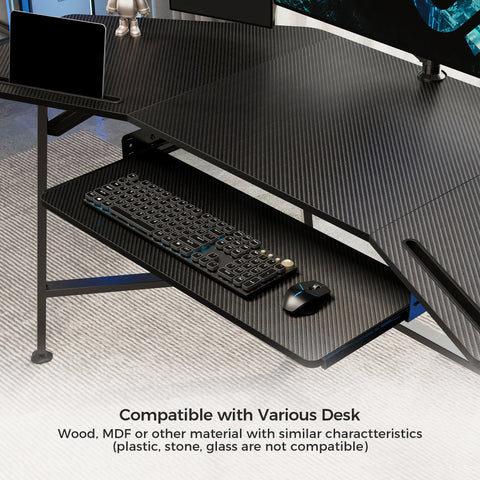
- The Friction Factor: The textured surface of carbon fiber provides just enough friction to help prevent blueprints from sliding, yet remains smooth enough for high-precision mouse tracking.
Professional Compliance and Safety
When modernizing a firm, compliance is a hallmark of professional operation.
- Safety Standards: Look for equipment that aligns with UL 962 for electrical safety.
- Postural Integrity: Follow the ISO 9241-5:2024 layout requirements to support neutral postures. This helps reduce the risk of musculoskeletal disorders (MSDs), which Safe Work Australia identifies as a primary workplace health risk.
- Air Quality: In a closed studio environment, consider furniture that is UL GREENGUARD Gold Certified to ensure low chemical emissions for your team.
The Future of the Creative Workspace
Transitioning your studio to a carbon fiber-centric environment is a commitment to the future of your firm. It bridges the gap between physical tools and digital power. By combining the durability of aerospace materials with the science of ergonomics, you create a space that doesn't just house your work—it empowers it.
Say goodbye to the chaos of the traditional office and embrace the precision and quiet confidence of the Carbon Fiber Studio. Your next great design deserves a surface that is as innovative as the vision itself.
YMYL Disclaimer: This article is for informational purposes only and does not constitute professional medical, legal, or financial advice. Ergonomic needs vary by individual; please consult with a qualified occupational therapist or healthcare professional before making significant changes to your workstation setup, especially if you have pre-existing musculoskeletal conditions.
References
- BIFMA G1-2013 Ergonomics Guideline for Furniture
- CCOHS: Office Ergonomics - Sit/Stand Desk
- ISO 9241-5:2024 Workstation layout & postural requirements
- Cornell University Ergonomics Web — Workstation Guides
- Safe Work Australia: Workstation set-up (2023)
- World Health Organization (WHO) Guidelines on Physical Activity & Sedentary Behaviour
- The 2026 Workstation White Paper: Converging Ergonomic Science and Sustainable Engineering



Leave a comment