

A desk with built-in features is worth considering when it solves a problem you face repeatedly—such as cable clutter, limited charging access, or a lack of monitor storage—without creating harder-to-manage dependencies. Before buying, compare each feature with a separate accessory, verify that it fits your devices and room, trace the power and cable path, and read the exact model’s warranty and return policy. If the electronics fail, you should know what remains usable and how support works.

Decide Whether Built-In Features Earn Their Cost
An integrated feature earns its cost when its everyday convenience, space savings, and cleaner setup outweigh its added dependencies and potential service hassles. There is no universal payback point, so evaluate the feature against your actual routine rather than assuming a product-page claim guarantees time or money savings.
Start by naming the recurring problem. “I want a smart desk” is less useful than “I need a reachable place to charge,” “I want to hide power bricks,” or “I need lighting that doesn’t take up desk space.” Then compare the integrated option with a separate accessory using these five questions:

| Comparison point | What to ask | Why it changes the decision |
|---|---|---|
| Problem solved | Will I use the feature several times a week? | An occasional convenience may not justify added complexity. |
| Separate alternative | What would a comparable light, charger, shelf, or speaker cost? | Include the accessory, mounting, cable management, and outlet use. |
| Dependency | Does it require a specific connector, app, power source, or control? | More dependencies mean more compatibility checks. |
| Failure consequence | If it stops working, what access or function do I lose? | A removable accessory is usually easier to replace independently. |
| Upgrade flexibility | Can I change the feature later? | Integrated parts may limit future choices compared with plug-in equipment. |
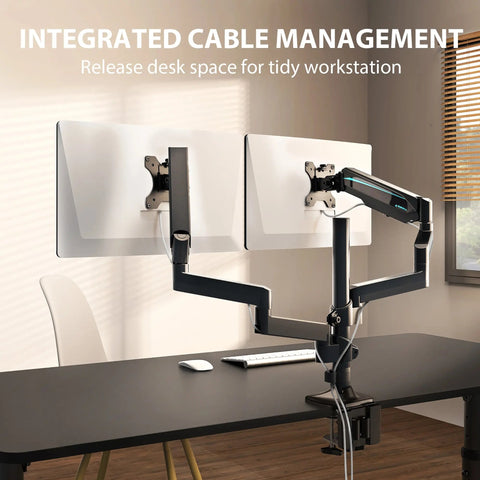
Cable management is a common point of comparison, but it doesn’t prove that a particular routing system will fit your cables or remain accessible. Use it as a prompt to inspect the cable path and replacement access, not as a measured savings claim. For a broader baseline, see our standing desk buying guide.
A feature is not a good fit when its compatibility is unclear, its controls depend on unfamiliar software, or a failed component would make an important part of the workstation unusable. In those cases, a standard desk plus a removable accessory may offer less visual integration but more control over replacements and upgrades.
How a Desk With Built-In Features Fits Your Actual Setup
Feature fit depends on your devices, dimensions, controls, and work habits. Treat every product-page feature as a starting point, then verify the exact connector, output, clearance, ventilation, and access details in the model documentation before ordering.
| Feature area | Problem solved | Fit inputs to verify | Dependency and failure consequence | Removable alternative |
|---|---|---|---|---|
| Lighting | Adds task or ambient light without a separate lamp | Reach, controls, brightness, power, and clearance | A failed light may require support or leave the area without the intended lighting | Desk lamp |
| Charging | Keeps a charging point within reach | Port type, output, cable length, and device requirements | A failed port may remove the charging convenience while the desk remains usable | Charger or power strip |
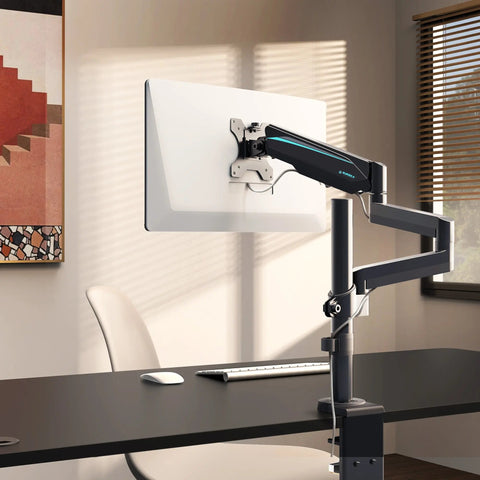
| Monitor support | Raises or organizes a display | Monitor width, stand or arm footprint, height, and weight limits | Poor fit can block cables or reduce usable space | Monitor stand, arm, or riser |
| Storage | Keeps peripherals or papers off the work surface | Drawer or opening dimensions, clearance, and access | Fixed storage cannot be upgraded or repositioned easily | Filing unit, shelf, or under-desk drawer |
| Speakers | Provides sound without separate desktop equipment | Connection method, controls, placement, and call use | A failed speaker may require separate audio equipment | Removable speakers or headset |
| Cooling | Moves air without a separate fan | Vent clearance, noise, controls, and cleaning access | Blocked or failed cooling may reduce the feature’s usefulness | Removable fan or cooling accessory |
Lighting and Charging: Verify the Daily Workflow
Lighting and charging are useful only when the physical and electrical workflow matches your equipment. Check these items before treating them as a reason to buy:
- Device: List the laptop, phone, tablet, lamp, or other equipment you expect to connect.
- Placement: Confirm that the built-in port or light is within reach of where you actually work.
- Connection and power: Verify the connector type, required power, output, and any stated restrictions for the exact model.
- Controls: Check the switch location, independent controls, app requirements, and whether the feature works without another device.
- Access: Find out whether ports, adapters, and cables remain reachable after the desk is assembled.
- Fallback: Ask whether the desk remains fully usable as ordinary furniture if charging or lighting is unavailable.
A product labeled as a desk with integrated lighting is still a model-specific purchase: the label alone doesn’t establish brightness, connector compatibility, service access, or warranty coverage.
Monitor Support and Storage: Check Fit Before Convenience
Measure your equipment and the usable space instead of relying on a broad compatibility label. A monitor shelf or storage compartment must fit the equipment you own while preserving access to cables and everyday work surfaces.
Record the tightest measurement, not just the desk’s overall width and depth. Also check whether a height-adjustable setup changes clearance or cable reach as it moves.
Speakers and Cooling: Weigh Dependencies and Noise
Built-in speakers or cooling features add another set of checks: connection method, controls, airflow, cleaning access, and noise. Noise may matter more than convenience in a shared room or during calls, while cooling equipment may need clear vents and regular cleaning.
- Connection: Confirm whether speakers use Bluetooth, USB, an audio cable, or another stated method.
- Controls: Check how volume, power, and cooling settings are adjusted and whether an app is required.
- Noise and airflow: Look for stated noise information and confirm that vents have room to breathe.
- Fallback: Decide whether a removable speaker or fan would be easier to replace if the integrated feature fails.
Check Power, Cables, and Service Access
Before relying on integrated electronics in your office, trace every connection from the wall outlet to the desk and then to each feature. Confirm that the path remains reachable, free of avoidable strain or pinch points, and easy to understand after installation. Don’t assume electronic components are user-serviceable.
Use this pre-purchase sequence:
- Trace the outlet to the desk. Identify the wall connection, power strip or adapter, desk connection, switch, and each feature connection.
- Record dependencies. Note which feature stops working if an adapter, control, or shared power connection fails.
- Inspect cable exits. Check reach, movement clearance, strain, and whether the desk or another piece of furniture could pinch the cord. The CPSC guidance on electric lighting products supports treating routing and accessibility as physical inspection points, not as proof that any particular desk is unsafe.
- Check access after installation. Make sure required connections can still be reached for troubleshooting or replacement without dismantling more furniture than expected.
- Inspect visible components. Look for damaged cords and confirm that plugs fit securely. Don’t repair electrical parts yourself; follow the manufacturer’s instructions or use qualified help where appropriate.
Test the Failure and Repair Scenario
Ask what happens if one feature fails. Can the light, charger, speaker, or control be isolated while the desktop remains usable? Are there manuals, support contacts, parts information, or written limits on repairs? A product page that lists a feature doesn’t by itself promise replacement parts, field repair, or continued operation after a failure.
Write down the support route before checkout: the product support page, model number, order channel, and any required serial information. If the answer depends on opening an electrical enclosure or modifying wiring, stop at the documentation question and seek manufacturer guidance or qualified help rather than planning a do-it-yourself repair.
If the product page doesn’t clearly show cable exits, adapters, or installation access, ask support for a manual or installation diagram before ordering. Our remote desk setup checklist can help with the surrounding workstation plan, but it can’t substitute for model-specific electrical documentation.
Compare Warranty Coverage With Ownership Risk
Read the exact written warranty for the model and purchase channel. Confirm coverage for the frame, desktop, electronics, controls, cables, labor, shipping, exclusions, and claim timing before treating the feature as protected. The FTC warranty guidance explains why the written warranty—not a broad marketing phrase—should determine your understanding of coverage.
For online purchases, written warranty information should be available before purchase; save it with the product page and order record. Mark each item as confirmed, excluded, or needs written clarification. Don’t assume the electronics receive the same treatment as the furniture, and don’t treat a longer frame term as evidence that a control, adapter, or lighting module has identical coverage.
| Component or cost | Confirmed coverage | Exclusion or limit to find | Clarification needed before purchase |
|---|---|---|---|
| Frame and desktop | Exact term and remedy | Weight, finish, assembly, or misuse exclusions | Does the term apply to this exact model? |
| Electronic modules | Named light, charger, speaker, or cooling component | Separate term, excluded consumables, or no listed coverage | Is the feature itself covered? |
| Controls and cables | Control box, switch, adapter, and included cables | Wear, damage, or accessory exclusions | What happens if one control fails? |
| Installation-related damage | Any stated treatment | Incorrect assembly or modified wiring | Who decides whether damage is covered? |
| Labor and shipping | Responsibility stated in writing | Customer-paid diagnosis, freight, or return shipping | Who pays to send a failed part or desk? |
| Claim timing and support | Deadline and contact method | Proof of purchase, serial number, or channel limits | What records must be retained? |
Use the matrix as a decision aid, not as a category-wide warranty comparison. If a model’s written terms don’t clearly identify electronics, the remedy, labor, shipping responsibility, or claim process, request clarification before checkout. A broad warranty headline isn’t enough to price the ownership risk.
For additional purchase-planning context, see our desk purchase safety checklist, while keeping model-specific warranty questions separate from general desk guidance.
Run a Final Fit Check Before Adding to Cart
Add the desk to your cart only after the feature solves a defined problem, fits your room and equipment, has a traceable power and service path, and comes with written warranty and return terms you can accept. If a nonessential electronic feature has unclear compatibility, inaccessible service points, or coverage that doesn’t match the ownership risk, compare a standard desk instead.
- Define the problem. Write the recurring task the integrated feature must improve.
- Measure the setup. Record room clearance, desktop space, monitor and accessory dimensions, outlet location, and cable reach.
- Verify feature fit. Check connectors, power requirements, controls, ventilation, noise, included components, and independent use for the exact model.
- Trace the power path. Identify every outlet, adapter, switch, cable exit, and possible pinch point.
- Confirm the service path. Find the manual, support contact, parts information, and failure fallback. Don’t assume a repair route.
- Save the documents. Keep the exact model number, product page, installation manual, written warranty, order record, and return policy.
- Price the alternative. Compare the desk with a standard desk plus removable accessories, including mounting, cable management, outlet use, upgrades, and likely failure consequences.
- Decide your boundary. Choose the simpler option if a key answer remains unavailable or if the desk isn’t useful without the integrated feature.
When you’re ready to compare categories, you can browse standing desks or compare desk options. Use those pages for navigation, then return to the exact product documentation for the final compatibility, warranty, and return checks. For a desk with built-in features, unresolved documentation is part of the purchase cost.
FAQs
These questions focus on situations where a small difference in equipment, records, or return terms can change the purchase decision.
Are Built-In Desk Features Worth It for a Laptop-Only Setup?
Compare the feature with the way you use your laptop, especially if you need only charging or cable management. A removable accessory may be the better choice when the built-in feature doesn’t solve a recurring problem or would be difficult to replace.
Can I Use My Own Charger or Power Strip With an Integrated Desk?
Only after checking the exact port or outlet type, power requirements, cable length, clearance, and stated restrictions. Ask support for written specifications if the product page is incomplete.
What Should I Save Before Installing a Desk With Electronics?
Save the order confirmation, model and serial details, product page, manuals, included-parts list, warranty, and return terms. Keep the packaging until you understand the defect and return process.
Does Adding Accessories Later Cost Less Than Buying Integrated Features?
Compare the accessory, mounting, cable management, outlet use, setup, and replacement costs with the price of the integrated feature. Use your actual equipment and space rather than a generic estimate.
What Return Costs Should I Check Before Buying a Desk With Electronics?
Check the return window, disassembly and condition rules, packaging requirement, return-shipping responsibility, restocking charges, and defect process. Confirm whether an electronics problem follows the return policy or a separate warranty route.




Leave a comment