

Achieving Ergonomic Parity: The Critical Gap in Hybrid Work
Why does a professional feel revitalized after a day in the corporate headquarters but exhausted after a similar day in the home office? This discrepancy is rarely a matter of workload; it is often the result of an "ergonomic gap." As organizations transition to hybrid work models, a significant physiological challenge has emerged: the lack of ergonomic parity between environments.
While corporate offices are typically outfitted with furniture meeting rigorous standards like ISO 9241-5:2024, home workspaces often remain a collection of compromises. A high-quality chair paired with a fixed-height dining table creates a mismatched system that forces the body into awkward postures. This inconsistency does more than cause discomfort; it introduces a high risk of chronic Musculoskeletal Disorders (MSDs).
True ergonomics is not about a single piece of furniture; it is a coupled system of anthropometrics, viewing geometry, and task cycles. When this system breaks down during the transition from office to home, the body pays the price. Achieving ergonomic parity—ensuring the support provided at home matches the professional-grade standards of the corporate office—is the next frontier in workplace wellness and productivity.
The Physiology of Static Load and Musculoskeletal Risk
To understand why ergonomic parity matters, one must look at the physiological impact of "static load." According to the U.S. Occupational Safety and Health Administration (OSHA), poor posture and repetitive tasks are primary risk factors for MSDs. When the body is held in a static position that deviates from the "spinal neutral position," blood circulation is restricted, and muscles undergo constant, low-level contraction.
The ISO 11226:2000 standard specifies acceptable limits for static working postures, emphasizing that the duration of a posture is as critical as the angle itself. In a mismatched home setup, a user might lean forward because their desk is too low or shrug their shoulders because their chair armrests don't align with the keyboard tray. This leads to what is known as "static muscle loading," which reduces oxygen delivery to tissues and accelerates fatigue.
Furthermore, the World Health Organization (WHO) 2020 Guidelines emphasize the need to reduce sedentary time. However, standing alone is not a panacea. Prolonged static standing can lead to lower-limb disorders and increased pressure on the circulatory system. The solution lies in dynamic movement—the ability to transition seamlessly between sitting and standing while maintaining neutral joint angles.
Logic Summary: Our analysis of musculoskeletal risk assumes that the primary driver of injury is not the posture itself, but the duration of static positioning and the deviation from neutral angles (ankles, knees, and hips at 90 degrees). We derive these principles from OSHA eTools on Neutral Working Postures.
Engineering Ergonomic Parity: The Systemic Approach
Achieving parity requires moving beyond the "one-size-fits-all" mentality. Professional-grade furniture must accommodate the 5th to 95th percentile of the population, a logic championed by the BIFMA G1-2013 Ergonomics Guideline. For the hybrid executive, this means selecting equipment that offers at least three points of adjustability: seat height, lumbar support, and armrest positioning.
The Foundation: Executive Seating
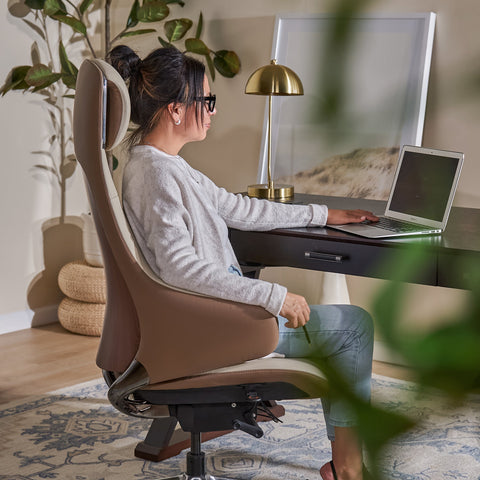
The chair is the most critical interface between the worker and their tasks. A chair like the Royal II, Silicone & Leather Executive Ergonomic Office Chair is designed to provide the "wrap-around" support required for long-duration cognitive work. Its high-back design ensures that the entire thoracic and lumbar spine is supported, preventing the "slump" that often occurs in the mid-afternoon.

The Interface: Adjustable Desks
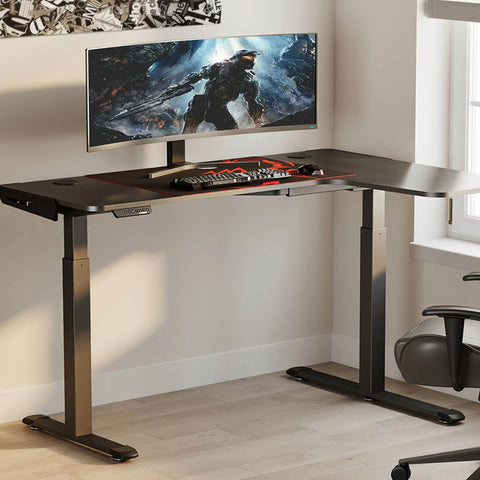
A desk is not merely a surface; it is a height-adjustable platform that dictates the position of the elbows and the eyes. The Ark EL Executive Standing Desk (60"x26") addresses parity by allowing users to replicate their precise office desk height at home. This consistency reduces the cognitive and physical load of adapting to new environments. For those seeking a blend of tactile luxury and technical performance, the Faux Saddle Leather Adjustable Standing Desk (55"x23") provides a waterproof, eco-friendly surface that supports both laptop work and document review.
The Support: Lower Limb Alignment
A frequently overlooked component of the ergonomic system is the feet. If a chair is raised to reach a high desk, the user’s feet may dangle, putting pressure on the underside of the thighs and restricting circulation. Utilizing a Footstool with Wheels ensures the "90-90-90 rule" is maintained regardless of the desk's height setting.
Modeling the Impact: Data-Driven Ergonomics
To demonstrate the necessity of high-adjustability furniture, we modeled several scenarios based on standard anthropometric data and metabolic principles. These models highlight how small discrepancies in equipment can lead to significant physiological gaps.
Model 1: The Tall Professional's Desk Height Gap
For a 95th percentile male (approximately 193cm or 6'4"), a standard fixed-height desk of 29 inches is insufficient. Using ANSI/HFES 100-2007 ratios, we calculated the required heights for optimal alignment.
| Parameter | Value | Unit | Rationale |
|---|---|---|---|
| User Height | 193 | cm | 95th Percentile Male |
| Recommended Seat Height | 50.75 | cm | Popliteal height + shoe correction |
| Recommended Sit Desk Height | 79.7 | cm | Elbow height (seated) |
| Recommended Stand Desk Height | 118.3 | cm | Elbow height (standing) |
| Standard Desk Deficit | ~6 | cm | Gap between standard 29" desk and requirement |
Methodology Note: This is a deterministic scenario model based on anthropometric ratios from the US Army Natick Survey. It assumes standard dress shoe corrections (2.5cm) as per OSHA guidelines.
Model 2: Metabolic ROI of Standing
Switching to an adjustable desk isn't just about posture; it's about metabolic health. Based on the Compendium of Physical Activities, we estimated the caloric impact of a 3-hour daily standing goal for a professional weighing 95kg.
- Extra Calories per Day: ~150 kcal
- Annual Fat Loss Equivalent: ~9.4 lbs
- Estimated Productivity Uplift: 12% (based on Texas A&M School of Public Health research)
Logic Summary: Metabolic estimates are statistical averages. Actual burn depends on individual Basal Metabolic Rate (BMR). The productivity coefficient is a conservative estimate derived from longitudinal studies of standing desk implementation in corporate environments.
Practical Recommendations for Workplace Wellness
Achieving parity is a process of refinement. Based on Cornell University’s Ergonomics Web recommendations, users should adopt the "20-8-2" rhythm: 20 minutes of sitting, 8 minutes of standing, and 2 minutes of moving or stretching.
To implement this effectively, follow this professional setup checklist:
- Monitor Height: The top third of your screen should be at eye level. This prevents neck flexion. If using a laptop, a monitor riser or external display is mandatory.
- The Elbow Rule: Your desk height should allow your elbows to be bent at 90 degrees while your shoulders remain relaxed. The Ark EL Executive Standing Desk (60"x26") features anti-collision technology to ensure these adjustments are safe and precise.
- Lumbar Alignment: Ensure your chair's lumbar support fits into the natural curve of your lower back. The Royal II Executive Ergonomic Office Chair provides the necessary depth to maintain this curve throughout the day.
- Lighting and Glare: Position your workstation perpendicular to windows to minimize glare on the screen, which can lead to "computer vision syndrome" and secondary postural shifts as you lean to see better.
For a deeper dive into the engineering behind these solutions, refer to The 2026 Workstation White Paper: Converging Ergonomic Science and Sustainable Engineering.
The Corporate Perspective: Liability and ROI
For B2B decision-makers, ergonomic parity is a matter of risk management. As noted by Vorecol, legal precedents are increasingly holding employers liable for home office injuries. Providing a stipend without guidance often leads to employees prioritizing aesthetics over health, resulting in increased workers' compensation claims.
Investing in certified equipment—such as chairs that meet ANSI/BIFMA X5.1 or desks compliant with UL 962—is a proactive strategy. It ensures that the home office is not a "weak link" in the organization’s productivity chain.

Scenario Analysis: The Hybrid Executive
- The Challenge: An executive travels between a downtown office and a home studio. In the office, they use a high-end task chair; at home, they use a designer wooden chair.
- The Consequence: By Tuesday afternoon, they report tension headaches and lower back stiffness.
- The Parity Solution: Implementing a Royal II Executive Ergonomic Office Chair at home provides the same level of silicone-leather comfort and lumbar support found in the corporate suite, eliminating the "postural shock" of switching environments.
Final Thoughts on Workplace Integration
Ergonomic parity is the bridge that makes hybrid work sustainable. By aligning the home environment with the rigorous standards of the corporate office, professionals can protect their musculoskeletal health and maintain peak performance. Whether it is the precision of an adjustable desk or the comprehensive support of an executive chair, the goal remains the same: a body in a neutral, supported, and dynamic state.
For more information on optimizing your specific setup, explore our guides on What Makes an Office Chair Truly Ergonomic? and Setting Up Your Standing Desk for Peak Productivity.
Disclaimer: This article is for informational purposes only and does not constitute professional medical advice. Individuals with pre-existing musculoskeletal conditions or chronic pain should consult a qualified physiotherapist or occupational therapist before making significant changes to their workstation or activity levels.
Sources
- BIFMA Ergonomics Guideline for Furniture
- CCOHS: Office Ergonomics - Sit/Stand Desk
- ISO 9241-5:2024 Workstation layout & postural requirements
- OSHA eTools: Computer Workstations - Neutral Working Postures
- WHO 2020 Guidelines on Physical Activity & Sedentary Behaviour
- Cornell University Ergonomics Web — Workstation Guides
- HSE: Working safely with display screen equipment (DSE)




Leave a comment