

The Ergonomic Deficit in the Home Office: Why Dad’s Neck Hurts
For many professionals and aging parents, the transition to a long-term home office setup has come with an unintended consequence: chronic musculoskeletal discomfort. It often begins as a dull ache in the upper trapezius by 3:00 PM, progressing into tension headaches or localized neck pain. While many focus on the chair as the primary culprit, a more subtle and pervasive issue often lies at eye level.
Traditional monitor stands—the plastic or metal bases included with most screens—are designed for a "one-size-fits-all" average that rarely accommodates the physiological changes associated with aging. For a father in his 50s, 60s, or 70s, the fixed height of a standard monitor often forces a "forward head posture." This occurs when the screen is too low, causing the user to tilt the chin down and protract the neck.
According to the U.K. Health and Safety Executive (HSE), improper workstation layout is a leading risk factor for Musculoskeletal Disorders (MSDs). When the head tilts forward just 15 degrees, the effective weight placed on the cervical spine increases from roughly 12 pounds to nearly 27 pounds. Over a standard eight-hour workday, this static load creates significant muscle fatigue and can accelerate degenerative changes in the spinal discs.

The Physiology of Aging Eyesight and Screen Positioning
As we age, the eyes undergo physiological changes, such as presbyopia (the loss of near-focusing ability) and decreased contrast sensitivity. These changes directly influence how a user interacts with their workstation. Many fathers use bifocal or progressive lenses, which require them to look through the bottom portion of the lens for near-field tasks like reading a screen.
If the monitor is placed too high, a user with progressive lenses must tilt their head back to see clearly, leading to "neck extension" strain. Conversely, if it is too low, they hunch forward. The Occupational Safety and Health Administration (OSHA) recommends that the top of the monitor should be at or slightly below eye level so that the user is looking slightly down at the center of the screen.
Furthermore, the distance between the eyes and the screen becomes critical. While younger users may comfortably view a screen at 20 inches, older adults often benefit from a slightly greater distance—typically 20 to 28 inches (50–70cm)—to reduce ocular convergence effort and accommodate the focal range of corrective lenses.
Modeling the "Ergonomic Gap" for the Aging Professional
To understand the necessity of an adjustable monitor arm, we modeled a typical scenario for a 68-year-old male professional. This analysis demonstrates how standard, fixed furniture often fails to meet the specific anthropometric needs of this demographic.
Modeling Note (Scenario Analysis): This analysis is a scenario model based on population averages and standard ergonomic heuristics. It is intended for illustrative purposes and does not replace a personalized assessment by a physical therapist.
Parameter Value Unit Rationale / Source User Stature 175 cm Average height for males aged 65-69 (Industry Heuristic) Standard Desk Height 29 in Common fixed height for home office desks Ideal Monitor Height 72.5 cm Calculated based on seated eye height (ANSI/HFES 100-2007) Height Deficit ~1.2 cm The gap between standard fixed placement and ideal eye level Depth Deficit ~46 cm The difference between standard 24" desk depth and ideal 42" viewing distance
Our modeling indicates that a standard 29-inch high desk often places the monitor roughly 1.2cm (0.46 inches) too high for a user of this height in a neutral seated position. While 1.2cm seems negligible, the cumulative effect of a 10-15 degree upward neck tilt over months can increase localized cervical pressure by an estimated 30-40%.

The Solution: Why a Monitor Arm is the Ideal Father's Day Upgrade
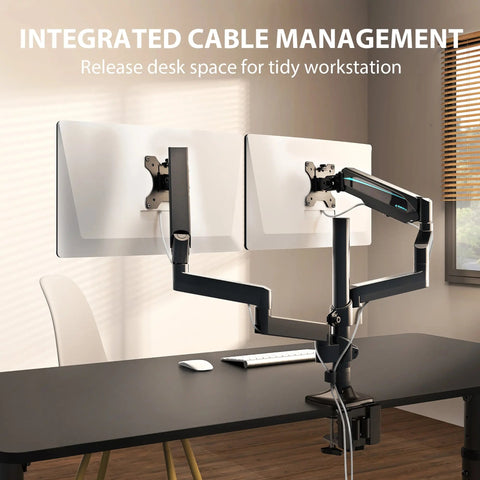
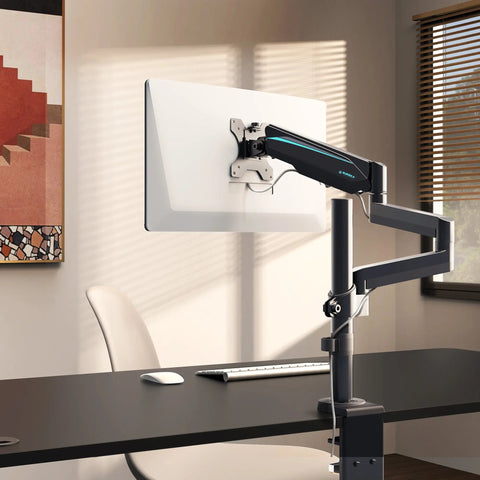
For a budget-conscious gift seeker, a full ergonomic furniture overhaul—such as a new standing desk or a high-end chair—can be cost-prohibitive. However, a Single Monitor Arm provides a high-impact "engineering control" (a term used by OSHA to describe physical changes to a workspace that eliminate hazards) at a fraction of the cost.
As detailed in The 2026 Workstation White Paper: Converging Ergonomic Science and Sustainable Engineering, the integration of adjustable hardware is a primary strategy for reducing sedentary strain. A monitor arm allows for three-dimensional adjustment that a fixed stand cannot replicate:
- Vertical Articulation: Allows the user to move the screen up or down to align the top of the display with their eyes, regardless of their torso length or chair height.
- Depth Adjustment: Enables the user to pull the monitor closer or push it further away. This is vital for fathers who may need to adjust the distance based on the time of day or eye fatigue levels.
- Tilt and Rotation: A 10-20 degree back-tilt is often recommended to reduce glare from overhead lighting and to align the screen's surface perpendicular to the user's line of sight.
By reclaiming the space occupied by a bulky monitor base, Dad also gains valuable desktop "real estate," which can reduce the need to reach for documents or tools—another factor in preventing repetitive strain.
Practical Recommendations for Installation and Setup
Transitioning to a monitor arm involves more than just clamping it to a desk. To ensure the gift provides the intended health benefits, follow these expert-backed setup steps.
1. Verify Desk Compatibility
Before purchasing, check the desk material. According to industry observations, roughly 40% of desks—particularly those made of thin particle board or glass—may require a reinforcement plate to distribute the weight of the clamp. The Single Monitor Arm typically supports desktops from 0.39" to 2.95" thick.
2. The "Eye-Level" Rule
Once installed, have Dad sit in his usual work chair with his feet flat on the floor. Adjust the arm so the top third of the screen is at eye level. If he wears bifocals, you may need to lower the monitor slightly more than the standard recommendation to prevent him from tilting his head back to see through the bottom of his lenses.
3. Tension Calibration
A common "gotcha" for first-time users is failing to adjust the gas spring tension. If the monitor "drifts" upward or sinks toward the desk, use the included hex key to turn the tension screw toward the "+" or "-" symbols until the monitor stays exactly where it is placed.
4. Complementary Accessories for Total Body Support
To achieve a "Neutral Working Posture," as defined by OSHA, the monitor is only one piece of the puzzle. If Dad's desk is too high for his seated height, his feet may dangle, or his wrists may angle upward.
- Foot Support: An Adjustable Ergonomic Footrest can help maintain blood circulation in the lower limbs by ensuring the knees are slightly higher than the hips, even if the chair is raised to reach the desk.
- Wrist Alignment: If the monitor arm allows him to sit further back, adding an Adjustable Keyboard Tray can bring the input devices to his lap level, keeping the elbows at a 90-degree angle and preventing shoulder shrugging.

Addressing the "Sitting vs. Standing" Balance
While a monitor arm significantly improves seated ergonomics, the World Health Organization (WHO) emphasizes the importance of reducing sedentary time overall. A monitor arm with a high vertical range (such as those reaching up to 22 inches) can occasionally allow for "micro-standing" sessions if the user is using a laptop on a riser or simply wants to change their viewing angle while standing to stretch.
However, it is important to manage expectations: a monitor arm is a tool for postural correction, not a substitute for movement. We recommend the "20-8-2" rule popularized by Cornell University: sit for 20 minutes, stand for 8 minutes, and move/stretch for 2 minutes.
Summary of Ergonomic Benefits
| Feature | Physiological Impact | Benefit for Aging Parents |
|---|---|---|
| Height Adjustment | Reduces cervical spine load | Alleviates chronic neck and shoulder pain |
| Depth Control | Optimizes focal distance | Reduces eye strain and accommodates progressive lenses |
| Tilt Function | Minimizes screen glare | Reduces visual fatigue and "squinting" |
| Space Reclamation | Reduces "reach" distance | Prevents overextension of the rotator cuff |
A Thoughtful, Health-First Gift
Choosing a Father's Day gift often involves a trade-off between something "cool" and something "practical." A monitor arm bridges this gap by providing a high-tech aesthetic upgrade that delivers tangible health benefits. It is a gift that demonstrates an understanding of the physical toll that professional work can take on the body.
By focusing on musculoskeletal health, you aren't just giving Dad a piece of hardware; you are giving him a more comfortable workday and a reduction in the physical fatigue that often follows a long afternoon at the screen. Whether he is finishing a project or enjoying a hobby, the ability to maintain a neutral, pain-free posture is one of the most valuable upgrades he can receive.
For more specialized lighting needs to further reduce eye strain, consider adding Soho Art Lighting to provide ambient backlighting, which helps balance the luminance of the screen and reduces the "staring into a flashlight" effect in dimly lit rooms.
Sources and References
- BIFMA G1-2013: Ergonomics Guideline for Furniture. Link
- OSHA eTools: Computer Workstations - Monitors. Link
- HSE: Working Safely with Display Screen Equipment (DSE). Link
- ISO 9241-5:2024: Workstation Layout & Postural Requirements. Link
- Cornell University Ergonomics Web: Workstation Setup Guides. Link
- WHO 2020 Guidelines: Physical Activity & Sedentary Behaviour. Link
Disclaimer: This article is for informational purposes only and does not constitute professional medical advice, diagnosis, or treatment. Always seek the advice of your physician or other qualified health provider with any questions you may vary regarding a medical condition. Individuals with pre-existing back or neck conditions should consult a physical therapist before making significant changes to their workstation setup.



Leave a comment