

In the high-precision environment of architectural firms and design studios, the workstation is more than a desk; it is a structural component of the creative process. While standard office furniture is designed to support the static load of a laptop and a few peripherals, the demands of physical model making introduce complex mechanical stresses. Studio managers frequently observe that the weight of architectural models is underestimated by 30-50% due to material density variations and the often-overlooked mass of presentation bases.
When a desk fails to meet these engineering requirements, the consequences range from minor wobbles that ruin delicate assembly to catastrophic motor failure in height-adjustable systems. Understanding the physics of load capacity and its impact on musculoskeletal health is essential for maintaining a productive, safe, and durable professional workspace.
The Physiological and Physical Principles of Static Loading
The primary challenge in architectural modeling is the combination of high-density materials and prolonged static working postures. According to the Occupational Safety and Health Administration (OSHA), excessive force and poor posture are core risk factors for Musculoskeletal Disorders (MSDs). In a studio setting, these risks are amplified by the physical nature of the work.
The Physics of Concentrated Loads
A common misconception in workstation procurement is that a desk's "Max Load Capacity" is a universal guarantee. However, most commercial ratings assume an even weight distribution across the surface. In physical model making, heavy sections—such as solid MDF bases or acrylic structures—often create concentrated loads. If a model section weighing 40kg is placed on one corner of a desk rated for 100kg, the localized stress can exceed the structural integrity of the desktop or the lifting capacity of a single motor.
Dynamic Forces vs. Static Weight
Experienced practitioners recognize that the static weight of a model is only the baseline. As noted in the The 2026 Workstation White Paper: Converging Ergonomic Science and Sustainable Engineering, professional-grade construction must account for dynamic forces. When an architect leans on the desk to adjust a delicate component or shifts a heavy model across the surface, the effective load can increase by approximately 30%. This "dynamic shock" is the leading cause of motor burnout and structural fatigue in lower-tier furniture.
Logic Summary: Our analysis assumes that for professional architectural models, a desk must provide at least 1.5x the expected maximum static load to accommodate these dynamic forces during assembly and client presentations.
Scenario Modeling: Load Capacity in the Urban Planning Studio
To demonstrate the critical nature of load specifications, we modeled the requirements for a high-capacity urban planning studio. This scenario involves the creation of a 1:500 scale city model, utilizing dense materials and sophisticated hardware.
Methodology & Assumptions
The following analysis utilizes a deterministic parameterized model to evaluate motor safety margins.
| Parameter | Value | Unit | Rationale / Source |
|---|---|---|---|
| Model Weight | 65 | kg | MDF base + model structure (Urban Planning Obs.) |
| Equipment Weight | 37 | kg | Workstation PC, dual 27" monitors, tools |
| Tabletop Weight | 25 | kg | 25mm thick MDF for vibration dampening |
| Total Static Load | 127 | kg | Sum of all components |
| Recommended Threshold | 0.8 | ratio | 80% utilization for motor longevity (Engineering Best Practice) |
Analysis of Motor Performance
Under these assumptions, the choice of motor configuration becomes a matter of engineering necessity rather than aesthetic preference.
- Single Motor Desk Utilization: ~159%. This represents a critical overload condition. Single-motor systems typically exhibit audible strain and gradual height adjustment failure within months when subjected to such loads.
- Standard Dual Motor Desk (120kg capacity): ~106%. Even "premium" standard desks are technically overloaded in this professional scenario, leaving no margin for dynamic forces.
- High-Capacity Dual Motor (160kg capacity): ~79%. This configuration falls within the 80% utilization threshold, ensuring smooth operation and long-term durability.
Modeling Note: These findings apply specifically to heavy-duty model-making environments. Smaller firms with lighter models (e.g., foam core or 3D prints) may find lower capacities sufficient, provided they maintain a 20% safety buffer.

Engineering Solutions for Precision Work
To address these technical challenges, professional studios must prioritize engineering specifications that go beyond the capabilities of consumer-grade furniture.
Dual Motor Synchronization and Stability
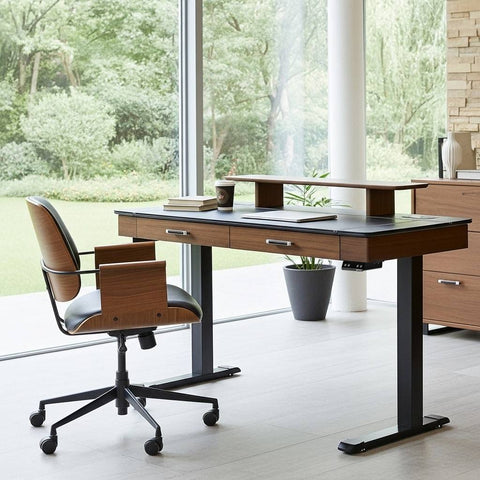
For surfaces like the Zen Pro Series, 87"/72" Executive Standing Desk with Cabinets Set, dual motors are mandatory. Unlike single-motor systems that rely on a hex rod to transfer power, dual motors provide independent lifting force at each leg. This ensures that even with asymmetrical loading—a common occurrence when a model is positioned to one side—the desktop remains level.
Furthermore, dual-motor desks often feature cross-bracing or reinforced columns. This is critical for preventing "wobble," which can be disastrous when working with delicate model components that require micron-level precision.
Desktop Integrity and Material Science
The choice of desktop material is equally vital. High-density fiberboard (MDF) or sintered stone surfaces, such as those found on the Zen Pro Series, 87"/72" Executive Standing Desk with Cabinets Set, offer superior resistance to warping under heavy static loads. According to the BIFMA X5.5-2021 standard, desks must undergo rigorous testing for top-load durability. Professional studios should look for furniture that meets or exceeds these industry benchmarks to prevent the "sagging" effect that occurs over time with cheaper particleboard alternatives.
Ergonomic Optimization for the Modeling Workflow
While load capacity ensures the safety of the equipment, ergonomic setup ensures the well-being of the practitioner. Architectural modeling often requires long periods of leaning and fine motor tasks, which can lead to Repetitive Strain Injury (RSI) and poor blood circulation.
The Ideal Sit-Stand Rhythm
The Cornell University Ergonomics Web recommends a "20-8-2" rhythm: 20 minutes of sitting, 8 minutes of standing, and 2 minutes of moving or stretching. For model makers, a height-adjustable desk like the Opal Executive Standing Desk (66"x29") facilitates these transitions without disrupting the workflow.
Height Precision and Neutral Posture
Proper desk height is critical for maintaining a "Neutral Position." Based on the ISO 9241-5:2024 standards for workstation layout, the desk height should allow the elbows to be at a 90-degree angle while the shoulders remain relaxed.
For an average male architect (approx. 175cm), our anthropometric modeling suggests:
- Recommended Seated Desk Height: ~71 cm.
- Recommended Standing Desk Height: ~106 cm.
Standard fixed-height desks are often set at 29 inches (~74 cm), which may be over an inch too high for the average user, forcing them into compensatory postures that strain the trapezius and lower back.
Managing Visual Fatigue
In addition to the desk, monitor placement is essential. Using a Single Monitor Arm allows the architect to position digital references at eye level, reducing neck rotation while they focus on the physical model below. This setup aligns with the HSE: Working safely with display screen equipment (DSE) guidelines, which emphasize the importance of adjustable viewing angles to minimize strain.
Practical Recommendations for Studio Managers
To ensure a safe and efficient workstation environment, studio managers should implement the following technical checklist:
- Calculate the "True Load": Sum the weight of the model, the base, all hardware, and add a 30% buffer for dynamic forces.
- Prioritize Dual Motors: For any workstation intended to support more than 60kg of equipment and materials, dual motors are the industry standard for reliability.
- Verify Stability Specs: Look for desks with reinforced leg columns and wide footings to dampen vibrations during detailed assembly.
- Implement Cable Management: High-capacity desks often move heavy loads; ensure all cables have sufficient slack to prevent tension or disconnection at maximum height.
- Standardize Adjustability: Use desks like the L-Shaped Standing Desk with Accessories Set (60"x23") to provide expansive corner space for both digital drafting and physical assembly.
Addressing Common Pitfalls
A frequent mistake in studio design is prioritizing aesthetics over engineering. While "gaming" desks or basic office furniture may look sleek, they often lack the structural rigidity required for architectural tasks. Does a Heavier Desk Guarantee Better Stability? explores how engineering—rather than just bulk weight—is the true driver of performance.
Another "gotcha" is the underestimate of material density. A model constructed from solid wood or thick acrylic will weigh significantly more than one made from foam board. Always verify material weights using resources like the Weights of Building Materials Table before finalizing workstation requirements.
Investing in Long-Term Studio Health
The decision to invest in high-capacity, professional-grade workstations is an investment in both human capital and project integrity. By adhering to international standards such as BIFMA G1-2013 and ISO 11226, firms can create an environment that supports the intense physical and cognitive demands of architectural design.
When load capacity is treated as a non-negotiable technical specification, the result is a studio that operates with precision, safety, and a reduced risk of the musculoskeletal issues that often plague the profession.
Disclaimer: This article is for informational purposes only and does not constitute professional medical or engineering advice. Always consult with a qualified ergonomist or structural engineer when designing high-load workspaces, especially if users have pre-existing musculoskeletal conditions.
References
- BIFMA G1-2013 Ergonomics Guideline for Furniture
- CCOHS: Office Ergonomics - Sit/Stand Desk
- ISO 9241-5:2024 Workstation layout & postural requirements
- OSHA eTools: Computer Workstations - Neutral Working Postures
- Cornell University Ergonomics Web — Workstation Guides
- The 2026 Workstation White Paper: Converging Ergonomic Science and Sustainable Engineering



Leave a comment