

Lower back pain relief through ergonomic chair adjustments usually starts with the seat, not the lumbar pad. If you are dealing with ergonomic chair back pain, the first check is simple: feet flat, thighs supported, and your back able to rest naturally in the chair within ten minutes.

Start With Seat Height and Seat Depth
Start with the chair base first. OSHA recommends a neutral lower-body foundation with feet flat on the floor and thighs roughly parallel to the ground. That is the quickest way to tell whether the chair is helping or forcing you to compensate.
- Set seat height so your feet rest flat and your knees are about level with, or slightly below, your hips.
- Slide seat depth until you have a knee gap of roughly 2 to 3 inches behind the knees.
- Sit back fully. If you keep drifting forward, the seat is still too deep, too high, or both.
The point is not perfect posture. It is to remove obvious pressure points first so the pelvis can sit back against the backrest instead of hovering at the edge of the chair. If the thighs feel pinched or the seat pan cuts off circulation, the rest of the ergonomic chair back pain setup usually gets harder, not easier.

A useful self-check is simple: feet grounded, thighs supported, and no need to brace yourself just to stay seated. If that is not true yet, keep working on seat height and depth before touching lumbar support or recline. If it is true, move to the next step.
Set Lumbar Support to Match Your Lower Back
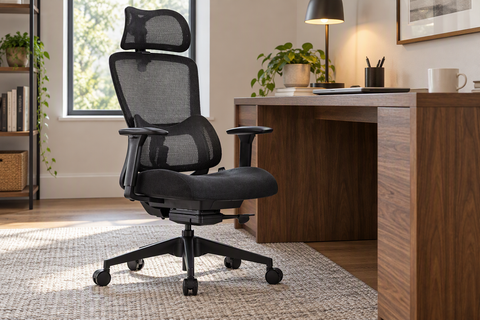
Once the seat is right, position lumbar support in the small of the back, not in the middle of the back. That is the safest way to think about the adjustment sequence for ergonomic chair back pain: the support should meet the natural curve without shoving the torso forward. Spine-health describes lumbar placement in the small of the back as the place to fill the inward curve, but the practical test matters more than the term.
Find the Right Lumbar Height
Move the support up or down in small steps until it sits where your lower back naturally curves inward. If you have to arch or twist to feel it, the height is probably off.
The best starting point is gentle contact, not pressure. You should be able to sit back naturally without bracing against the pad. If the lumbar pushes you forward, it is too aggressive for comfort-oriented use.
Balance Lumbar Pressure
Too little support can feel like the chair is doing nothing. Too much support can feel like a shove. The useful middle is light, continuous contact that keeps the lower back filled in but still relaxed.
This is where many people overcorrect. They turn lumbar support into a posture-correction tool and end up with more tension. For lower back pain relief through ergonomic chair adjustments, the better goal is comfort and support, not a forced arch.
Check Support After Ten Minutes
Sit for a short work block before deciding the setup is right. If the lower back relaxes and the contact still feels even, you are close. If the area starts to feel irritated, pushy, or hot, reduce the pressure or shift the pad slightly.
That ten-minute check matters because a setup can feel fine for one minute and wrong by the end of a meeting. Keep the change small, then retest. That makes the lumbar support adjustment easier to trust.
Dial in Recline Tension and Back Angle
A slight recline can reduce lower-back load compared with sitting in a strict upright position. OSHA's chair guidance notes that a slight recline can reduce lower-back load, so recline is worth adjusting after seat fit and lumbar placement are already close.
| Setting | What It Feels Like | What To Change Next |
|---|---|---|
| Too tight | You feel pinned upright and may brace through your lower back | Ease the tension a little and retest support contact |
| Moderate | You can lean back slightly without losing support | Keep this as the baseline for desk work |
| Too loose | You sink back too far and lose active control | Tighten the tension or add more support at the lumbar area |
The key question is not whether recline is "good" or "bad." It is whether the chair still supports the lower back while the torso rests a little more naturally than a rigid 90-degree posture. For focused desk work, many people do best when the backrest stays responsive enough to move with them, but not so loose that they collapse into it.
If you spend long blocks at a keyboard, a moderate recline often feels better than forcing yourself perfectly upright. If you are writing, reading, or on calls, a slightly more relaxed back angle may be easier on the lower back. The wrong fit is usually obvious: you either feel locked in place or you lose enough support that you start slumping.
Fine-Tune Armrests, Desk Height, and Sitting Time
After the main chair settings are close, the secondary tweaks can remove the last bit of strain.
- Adjust the armrests so your shoulders stay relaxed. Well-placed arm support can reduce shoulder bracing, which often shows up as tension lower down.
- Check desk height and monitor position. If you are reaching forward or leaning to see the screen, the chair gains get canceled fast.
- Take short standing or walking breaks. Breaks can help, but they do not replace a good chair setup.
- If you notice numbness, radiating pain, or worsening symptoms, stop treating the issue as a chair-fix problem and get evaluated. OSHA says radiating or numb symptoms need evaluation.
For readers who spend most of the day in one chair, these smaller changes often matter more than another round of lumbar tweaking. The goal is to keep the upper body from working against the chair.
When to Keep Tweaking or Get Help
Use a simple rule: keep the setup if sitting feels more tolerable, tweak one variable at a time if something still feels off, and stop if symptoms get worse. Recheck the chair after a day or two of normal use, because comfort can change once you stop overfocusing on the adjustment.
If the discomfort is persistent, severe, numb, or radiating, do not keep chasing the perfect chair setting. That is the point to pause and get professional input. If you are still comparing chairs after the fit checks, review chair options for back support or chair adjustment basics before you buy.
FAQs
How Should I Adjust Lumbar Support for Back Pain?
Start with the small of the back, then move in small steps until the support feels even and light rather than forceful. If the pad pushes your torso forward or makes you tense up, back it off. The best sign is that you can sit back naturally without having to resist the chair.
What Chair Setting Should I Change First for Lower Back Pain?
Change seat height first, then seat depth. That order matters because the seat creates the base for lumbar and recline settings to work properly. If your feet are not flat or the seat presses behind the knees, the rest of the adjustments can feel misleading.
Can Recline Help Reduce Lower Back Strain?
Yes, a slight recline can help some people feel less sustained load than a rigid upright posture. The useful boundary is that recline should still let you keep support contact and control at your desk. If the chair feels too loose, the recline is too aggressive for work time.
How Do I Know If My Chair Is Making Back Pain Worse?
If discomfort keeps increasing, or you develop numbness or radiating pain, the setup is probably not the whole story. That is a signal to stop chasing chair settings and get evaluated. A chair should feel easier to sit in over time, not more irritating after each adjustment.
Can an Ergonomic Chair Help With Sciatica-Related Sitting Discomfort?
It may help some people sit more comfortably, but it is not a sciatica treatment. If symptoms radiate, numbness shows up, or the pain worsens, a clinician should evaluate it. Use the chair as a comfort tool, not as a substitute for medical care.




Leave a comment