

An office chair uncomfortable after sitting for a long work block is not automatically a cushion problem. A brief sitting check captures initial comfort, but typing, reaching, heat, a fixed posture, and repeated contact can reveal a mismatch later. Start by recording three clues: when the discomfort begins, where you feel it, and whether standing or repositioning changes the pattern. Then test fit, pressure, posture drift, material feel, and movement one at a time. This is a troubleshooting path, not a diagnosis. Persistent, severe, worsening, or concerning symptoms should not be attributed to the chair alone; seek qualified professional guidance.

Office Chair Uncomfortable After Sitting: What to Check
A chair can feel comfortable at first but become uncomfortable later when sustained work exposes a fit or workstation mismatch. The useful question is not simply "Is the cushion soft enough?" but "What changed between the first few minutes and the moment discomfort appeared?"
Record the onset time, location, task, and response to standing or repositioning. For example, discomfort that starts only during keyboard work points toward the chair–desk relationship, while a repeatable pressure spot points toward contact or positioning. A pattern that changes when you stand suggests that uninterrupted sitting is worth testing, but it does not identify a medical cause.

Adjustability gives you more ways to test different sitting positions and fit relationships. OSHA's chair guidance supports adjusting the chair to fit the user; it does not guarantee comfort or relief. Change one cause category at a time so you can tell whether the chair, workstation, or work pattern is changing the result.
Check Chair Fit Before Blaming the Cushion
Check seat height, seat depth, foot support, armrests, and desk alignment against the symptom pattern before deciding that the cushion is at fault. A fixed chair offers fewer ways to correct a mismatch, while an adjustable chair gives you more variables to test during comparable work blocks.
Seat Height and Depth
Use your feet and knee position to choose the first check:
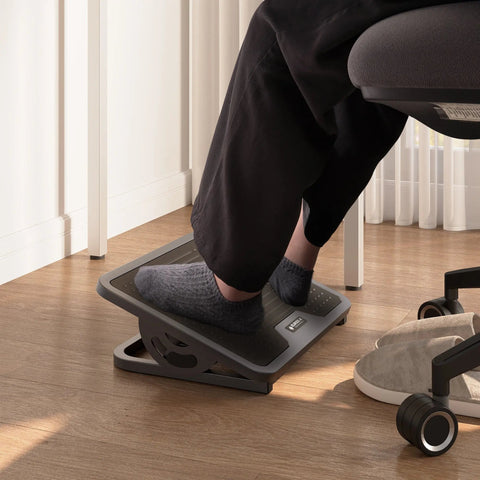
- If your feet do not stay supported, or you slide forward to reach the desk, test seat height and foot support. OSHA recommends checking whether the feet are supported and whether the seat lets you stay supported at the work surface. A footrest may be relevant when lowering the chair would make the desk relationship worse.
- Sit fully back and notice whether the seat front presses against the backs of your knees. The OSHA workstation checklist treats rear-knee contact and seat-pan length as fit checks; it does not establish a universal finger or inch gap.
- If you cannot sit back without front-edge contact, test seat depth if it is adjustable. If it is fixed, record that dimension as a possible built-in limitation rather than immediately buying a softer cushion.
Make one change at a time and compare a similar task. For more detailed, symptom-linked chair adjustment steps, use the chair's own adjustment range as the starting point rather than copying a universal posture rule.
Armrest and Desk Alignment
When an office chair feels fine until keyboard or mouse work begins, inspect armrests and desk interference before changing the cushion. Armrests that are too high, too wide, or blocked by the desk can make it harder to move close enough to the work surface; reaching or raised shoulders may then become part of the pattern.
Adjust the armrests so the lower arms receive light support while the upper arms remain close and the shoulders can relax. As a practical trial, CCOHS armrest guidance suggests starting with elbows at about a right angle and adjusting until the armrests barely contact the undersides of the elbows. This is a setup experiment, not a medically correct position for every person. If the armrests prevent the chair from getting close to the desk, lower them, remove them if possible, or test the workstation without relying on them.
Trace Pressure Points and Weight Distribution
If discomfort grows in one location, inspect the contact point and sitting position before blaming general cushion firmness. Location, timing, and response to repositioning can identify what to check next, but temporary relief is not proof of a medical cause.
Use Location and Timing as Clues
| Discomfort clue | Area to inspect | Next simple check |
|---|---|---|
| Pressure at the backs of the knees | Seat depth and front edge | Sit fully back and test whether the seat pan can move or whether the edge still contacts the knees. |
| Concentrated hip or tailbone contact | Seat position and weight distribution | Reposition yourself, sit fully back, and compare whether support feels more even during the same task. |
| Pressure on one side or off-center | Chair level, sitting position, and desk reach | Check whether you are leaning, twisting, or reaching to one side; reset one variable and repeat the task. |
The point of this matrix is to identify a chair or workstation area, not to label the sensation as restricted circulation, nerve compression, or injury. A repeated pressure point is a reason to inspect contact and positioning.
Test Contact and Weight Distribution
Run a controlled comparison:
- Change one variable, such as seat position or recline, while keeping the task similar.
- Repeat the same type of work and check whether sitting fully back creates more even contact.
- Record whether the same pressure returns before moving to a replacement decision.
If the pressure changes with one adjustment, continue testing that variable rather than changing several settings at once. A chair discomfort checklist can be a useful navigation resource, but the chair's repeatable response matters more than a feature list.
Spot Posture Drift During the Work Block
The position at the moment discomfort begins is more informative than the position you had when you first sat down. If you gradually slide forward, round toward the screen, or lean on one arm, test the chair–desk relationship that permits that drift instead of treating posture as a pass-or-fail rule.
At the start of a task, note whether your feet are supported, your keyboard and mouse are reachable, and your shoulders are relaxed. When discomfort appears, observe what changed: Did you move toward the screen? Did the chair stop you from getting close to the desk? Did one arm take more of your weight? OSHA's workstation-alignment guidance addresses the relationship between the user and computer components.
Reset one setting tied to the observation. You might adjust the chair distance, desk relationship, armrests, or monitor position, then compare whether the same drift returns during a similar task. If it does, the unresolved issue may be the arrangement rather than the cushion. Keep the test practical; there is no single posture that must be maintained rigidly all day.
Check Heat, Material Feel, and Movement
Separate heat and material feel from fit and support. Warmth, moisture, stickiness, abrasion, or excessive firmness may become more noticeable as a work block continues, but the available evidence does not establish that mesh, leather, fabric, or one firmness level is universally better.
Separate Material and Heat Effects
Compare similar work blocks while noting room conditions, clothing, moisture, and how the seat feels over time. If the chair becomes noticeably warm or damp before the discomfort appears, treat that as a personal material-comfort clue. If the same discomfort occurs in different conditions and locations, return to fit and contact checks.
Do not assume a breathable material guarantees comfort, or that a softer cushion solves a seat-depth or pressure problem. If you are comparing options, focus on the characteristic you actually need—such as a different surface feel or a documented adjustment—rather than counting "ergonomic" features.
Test Movement and Position Changes
Use movement response as a comparison clue, not as treatment:
- Note whether standing, walking, reclining, or changing leg position alters the discomfort.
- Introduce position changes before the discomfort peaks during another comparable task.
- Compare when the discomfort returns, if it returns, and whether the pattern changes when you avoid staying still.
OSHA's position guidance recommends changing working position frequently and making small chair or backrest adjustments. The practical takeaway is to test whether uninterrupted sitting is part of your pattern. If movement does not change the issue and fit checks also fail, carry that result into the adjust-versus-replace decision.
Decide Whether to Adjust or Replace the Chair
Adjust first when a specific, repeatable clue maps to an available setting. Consider replacement when the needed dimension or material characteristic is built into the chair and the same mismatch persists after controlled testing; there is no supported universal number of hours that applies to everyone.
Use an Adjustment Trial When the Pattern Is Specific
Use this sequence:
- Match the strongest clue to one variable: height, depth, armrests, recline, support position, or movement.
- Compare similar work blocks after changing only that variable.
A chair that responds to the relevant adjustment remains testable. If you are shopping, prioritize documented specifications that match the missing requirement. For example, the Nico mesh ergonomic chair lists adjustable seat depth and 3D armrests, which are specifications to compare when those are the unresolved fit variables—not proof that the chair will feel comfortable for every user.
Replace When the Unresolved Mismatch Is Built In
Replacement becomes more reasonable when the needed seat dimension, armrest relationship, or material characteristic is unavailable and the same pattern returns across comparable work blocks. A fixed seat that repeatedly creates front-edge contact, for example, has a narrower path for correction than a chair with adjustable depth.
Choose the next chair by the unresolved requirement: seat-depth range for a depth problem, armrest range for an upper-body alignment problem, or a different surface characteristic for a heat or tactile problem. Treat specifications as compatibility information, not proof of relief. If discomfort is persistent, severe, worsening, or concerning, do not assume a replacement chair is the answer; seek qualified professional guidance.
FAQs
Use the questions below to narrow the pattern to one bounded check. They can help you decide what to test next, but they cannot determine whether discomfort has a medical cause.
Why Is My Office Chair Uncomfortable After Sitting?
Log when it starts, where you feel it, and what task you were doing. Test the related chair–desk variable before changing several settings.
Can an Office Chair Cause Leg or Knee Pressure?
Check rear-knee contact, foot support, and seat depth when pressure appears. A contact pattern is a reason to inspect fit, not proof of a medical cause.
What Should I Check If Chair Discomfort Improves When I Stand Up?
Compare standing, walking, reclining, or changing leg position during similar tasks. This tests whether uninterrupted sitting is part of the pattern; it does not identify a medical cause.
How Long Should I Test an Office Chair Adjustment Before Replacing It?
There is no universal test duration. Change one variable, compare similar work blocks, and consider replacement when the needed adjustment is unavailable or the same mismatch persists.




Leave a comment