

Energy Efficiency in Smart Desks: Do Dual Motors Waste Power?
A common hesitation among professionals transitioning to a high-performance home office is the perceived "hidden cost" of motorized furniture. As we integrate more mechatronic systems into our living spaces, the concern over "phantom loads"—devices that consume electricity even when idle—has intensified. Specifically, the question arises: Does a dual-motor standing desk, with its increased lifting capacity and speed, represent a significant energy drain compared to single-motor alternatives or traditional static desks?
The reality of modern ergonomic engineering suggests otherwise. While a desk is no longer "just furniture" once it incorporates control electronics and power distribution, the energy footprint of these systems is often misunderstood. To build a truly sustainable and healthy workspace, we must look past the peak wattage and examine the holistic efficiency of the workstation ecosystem.
The Physiological Cost of Static Posture
Before addressing the electrical consumption of the desk, it is vital to understand the physiological "cost" of the alternative: prolonged static sitting. According to EU-OSHA research on musculoskeletal disorders (MSDs), static sitting leads to increased intradiscal pressure and reduced blood circulation in the lower limbs. These are not merely discomforts; they are precursors to chronic conditions.
When we remain in a seated position for hours, our muscles endure a "static load." This lack of movement prevents the "muscle pump" mechanism from assisting blood flow, which can lead to localized inflammation and tissue adaptation issues. The World Health Organization (WHO) 2020 Guidelines emphasize that adults should reduce sedentary time and interrupt long periods of static behavior to mitigate cardiovascular risks.
An adjustable workstation is an "engineering control"—the most effective level in the hierarchy of safety controls—designed to facilitate the "spinal neutral position." By allowing for frequent, seamless transitions between sitting and standing, a dual-motor system addresses the root cause of MSDs more effectively than manual behavioral interventions alone.
Dual-Motor Engineering: Performance vs. Consumption
A frequent misconception is that two motors must consume double the energy of one. In the context of mechatronics, efficiency is often a function of load management rather than motor count.
The Mechanics of Synchronization
Dual-motor systems, such as those found in the Ark Executive Standing Desk (63"x29"), utilize a dedicated motor for each leg. This design eliminates the need for a hex rod or a complex transmission system required by single-motor desks. By applying force directly to both lifting columns, the system operates with higher synchronization and less mechanical friction.
According to technical benchmarks on brushless motor efficiency, these systems are most efficient when operating at 60–80% of their rated load. A dual-motor desk typically offers a higher weight capacity (often exceeding 220 lbs), meaning that for a standard setup—laptop, monitors, and accessories—each motor is working well within its efficiency "sweet spot."
Peak Power vs. Real-World Usage
While a dual-motor desk might have a peak operational draw of 200W to 300W, this power is only consumed during the 15 to 20 seconds it takes to adjust the height. In a typical 8-hour workday, if a user adjusts their desk ten times, the total active motor time is less than four minutes.
Modeling Note: Energy Consumption Scenario
Parameter Value Unit Rationale Peak Operational Power 250 Watts Typical dual-motor draw under load Standby Power (Deep Sleep) 0.5 Watts Modern controller specification Adjustments per Day 10 Count Recommended sit-stand frequency Adjustment Duration 20 Seconds Average travel time (30" to 45") Annual Work Days 250 Days Standard full-time employment Analysis: Based on this model, the annual energy consumption for active movement is approximately 3.5 kWh. The standby consumption accounts for roughly 4.4 kWh. Totaling ~8 kWh per year, the annual cost at an average rate of $0.15/kWh is approximately $1.20. This is a hypothetical estimate based on scenario modeling, not a controlled lab study.
The Sustainability Gain: Beyond the Electricity Bill
When evaluating the environmental impact of a smart desk, the electricity used by the motors is the smallest variable in the equation. A truly "green" office is built on durability, material sourcing, and the reduction of e-waste.
Lifecycle Impact and Durability
The real sustainability gain comes from the desk's design life. A high-quality dual-motor frame is built to withstand thousands of cycles. By choosing a desk that meets ANSI/BIFMA X5.5 standards for desk products, you ensure the unit will not need replacement for a decade or more. This longevity prevents the carbon-intensive process of manufacturing and shipping a replacement desk.
Furthermore, premium executive solutions like the Ark Executive Standing Desk (63"x29") often utilize sustainable materials. Look for certifications like FSC Certification for wood components, which ensures responsible forest management. As noted in The 2026 Workstation White Paper: Converging Ergonomic Science and Sustainable Engineering, the convergence of mechatronic reliability and eco-friendly materials is the new benchmark for corporate responsibility.
Indoor Air Quality (VOC Emissions)
Sustainability also encompasses the health of the immediate environment. Low-quality furniture can off-gas Volatile Organic Compounds (VOCs). Authoritative brands prioritize UL GREENGUARD Certification, ensuring that the desk—despite its electronic components—does not compromise indoor air quality. This is particularly critical for home offices where ventilation may be less robust than in commercial buildings.

Practical Recommendations for an Efficient Workspace
To maximize the health benefits of your desk while maintaining peak energy efficiency, follow these expert-backed setup guidelines.
1. The Ideal Sit-Stand Rhythm
The Cornell University Ergonomics Web recommends the "20-8-2" rule: for every 30 minutes of work, sit for 20 minutes, stand for 8 minutes, and move or stretch for 2 minutes. Modern dual-motor controllers often include "sedentary alerts" or memory presets to make this rhythm effortless. Using these features does not significantly increase power draw but drastically improves blood circulation.
2. Optimize Your Monitor and Accessory Placement
A desk is only as ergonomic as its peripheral layout. To reduce neck and shoulder strain, your monitor should be positioned so the top third of the screen is at eye level.
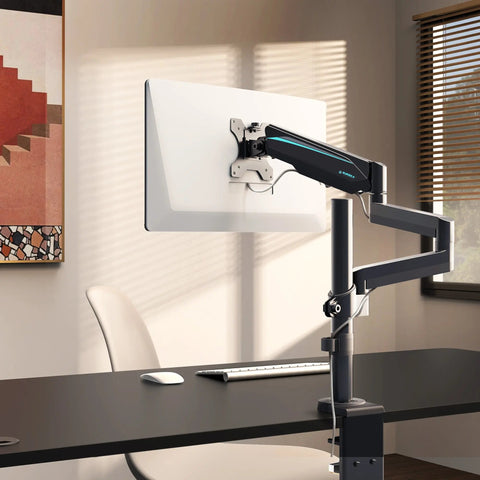
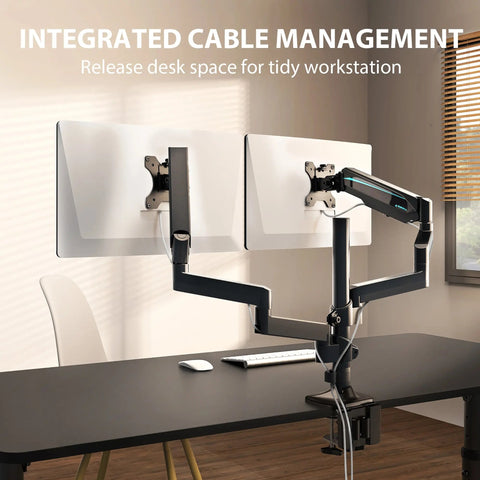
- Monitor Arms: Utilizing a Dual Monitor Arm allows for precise adjustment, preventing the "forward head posture" that often occurs when screens are too low.
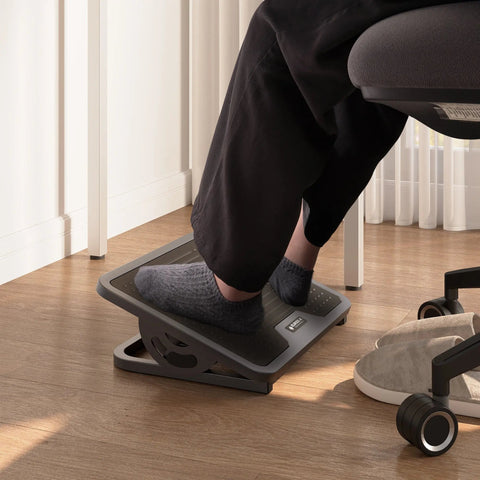
- Footrests: When seated, your feet should be flat on the floor. If your chair height prevents this, an Adjustable Ergonomic Footrest can help maintain a neutral pelvis and reduce pressure on the thighs, as suggested by OSHA eTools for Computer Workstations.
3. Manage Your "Standby" Environment
While the desk's standby power is negligible, the combined draw of monitors, docking stations, and computers can be substantial.
- Smart Power Strips: Plug your peripherals into a smart strip that cuts power to "slave" outlets (monitors, speakers) when the "master" device (computer) is turned off.
- Deep Sleep Modes: Ensure your desk controller is set to its energy-saving mode. Most modern units automatically enter a deep sleep state (<0.5W) after 30 seconds of inactivity.

Addressing Common "Gotchas" in Smart Desk Setup
Based on patterns observed in customer support and facility management (not a controlled lab study), here are the most frequent mistakes users make when moving to a motorized desk:
- Cable Tension at Max Height: Users often forget to leave "slack" in their cable management for the desk's full range of motion. This can lead to strained ports or even damage to the motor controller if a cable snag creates an artificial "collision."
- Visual Parallax Errors: Many users set their standing height too high because they align the desk surface with their elbows while looking down at the screen. Always set the height so your elbows are at a 90-degree angle and your gaze is neutral.
- The "Standing Fatigue" Trap: Standing for four hours straight is just as detrimental as sitting for four hours. The goal is movement, not just standing. Use a desk like the Blossom Dynamics® Office Standing Desk (70"x46") which provides ample space for micro-movements and varied task layouts.
Summary of Energy and Health ROI
To provide a clear decision-making framework, we have summarized the impact of upgrading to a dual-motor smart desk compared to traditional setups.
| Factor | Static Desk | Single-Motor Desk | Dual-Motor Smart Desk |
|---|---|---|---|
| Annual Energy Cost | $0 | ~$0.80 - $1.00 | ~$1.10 - $1.30 |
| Lifting Capacity | N/A | Low to Moderate | High (Stable for multi-monitors) |
| Adjustment Speed | N/A | ~0.6 - 1.0 inches/sec | ~1.3 - 1.5 inches/sec |
| Health Impact | High risk of MSDs | Moderate (Encourages movement) | High (Facilitates frequent movement) |
| Durability Basis | Structural only | Mechanical wear on single motor | Distributed load (Higher longevity) |
Note: Energy costs are estimated based on average residential utility rates and typical usage patterns.
Investing in Holistic Well-being
The concern that dual motors waste power is a relic of older, less efficient electronic designs. In the modern home office, a high-quality motorized desk is a high-efficiency tool that costs less to operate annually than a single LED light bulb left on for a few days.
The real value of a dual-motor system lies in its ability to support your health without friction. By providing a stable, fast, and quiet transition, it removes the "behavioral barrier" to movement. When you consider the long-term ROI—reduced healthcare costs, improved productivity, and a lower environmental footprint through durability—the minimal electricity used becomes a negligible investment in a sustainable professional life.
Disclaimer: This article is for informational purposes only and does not constitute professional medical advice. Individuals with pre-existing musculoskeletal conditions or chronic back pain should consult a qualified physiotherapist or ergonomic specialist before adopting a new sit-stand routine.
References
- BIFMA G1-2013 Ergonomics Guideline for Furniture
- CCOHS: Office Ergonomics - Sit/Stand Desk
- Cornell University Ergonomics Web — Workstation Guides
- EU-OSHA: Musculoskeletal disorders and prolonged static sitting
- ISO 9241-5:2024 Workstation layout & postural requirements
- OSHA eTools: Computer Workstations - Neutral Working Postures
- UL 962 — Safety of Height-Adjustable Desks
- WHO 2020 Guidelines on Physical Activity & Sedentary Behaviour
- The 2026 Workstation White Paper: Converging Ergonomic Science and Sustainable Engineering




Leave a comment