


Smart standing desk features are worth paying for when they make a repeat task easier, not when they just sound advanced. For most home offices and hybrid workspaces, the useful features are the ones that help you return to a good setup faster, change positions with less effort, and keep cords from taking over the desk. The strongest case is routine support, not guaranteed productivity gains.

Which Smart Desk Features Actually Help
A smart desk earns its keep when it removes friction from the parts of the day you repeat over and over. That usually means starting work, switching between sitting and standing, plugging in devices, and resetting the desk at the end of the day. In that sense, a smart standing desk is less about automation for its own sake and more about making a familiar routine easier to keep.
The reason this matters is simple: research on sit-stand work points toward a dynamic routine, not one static posture all day. The CDC's Take-a-Stand Project found benefits when people reduced sedentary time, and Cornell's ergonomics guidance frames the best setup around frequent transitions rather than sitting or standing forever. That means the best smart features are the ones that support movement and quick resets.
Here is the practical filter: if a feature helps you get back to the right height, the right cable setup, or the next position with less effort, it is worth attention. If it only sounds futuristic and does not change your daily routine, it is probably a gimmick.
Memory Presets That Make Position Changes Faster
Memory presets are the clearest smart desk feature for most buyers because they save a repeatable setup. If you use the desk the same way every morning, or if two people share the same workstation, preset buttons can cut out the trial-and-error part of height adjustment.
The practical target is not "smartness," it is repeatability. OSHA's workstation checklist recommends a setup where elbows rest around a 90-degree angle and the monitor sits at eye level, so a preset is useful when it reliably returns the desk to those heights. That matters more than the number of features on the control panel.
In daily use, presets help in three common moments. Morning setup becomes faster because you do not have to hunt for the same height again. A midday shift feels less disruptive because one button can move you from seated to standing. And if you share the desk, the next person does not have to rebuild your setup from scratch.
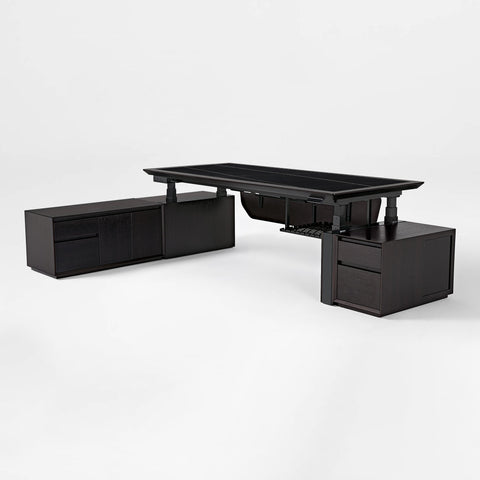
A 47x23 office desk with storage is a concrete example of a desk that combines two programmable memory presets with built-in power, which shows how the feature can fit a real routine. That is useful only if the desk can reach the heights you need and still feel stable at those positions.
How Presets Speed Up Daily Adjustments
The biggest win from presets is not drama, it is reduced interruption. Instead of fine-tuning the desk every time you change positions, you can return to a familiar height quickly and keep moving through the day.
That is why presets matter most in shared spaces or in solo routines with multiple sit-stand transitions. If you rarely adjust the desk, the feature is less valuable. If you switch positions often, it can save enough annoyance to matter.
What to Check Before You Buy
Before paying extra for presets, check three things: how many positions are stored, whether the controls are easy to reach, and whether the desk can actually hit your preferred seated and standing heights. Presets are helpful only if they lock in a setup you would want to use again tomorrow.
If the desk cannot reach your proper heights, presets do not fix the problem. They only make a mismatch faster.
Automation and Reminders for Routine Support
Reminder features are useful when they cue a habit you already want to keep, such as standing breaks, an end-of-day reset, or a quick check that your cables and devices are back in place. They are best treated as nudges, not as a promise that your workday will run itself.
That fits the way smart desks are usually discussed in workplace coverage. The New York Times has noted that reminder and sensor features are meant to nudge users toward standing intervals, which is a much safer claim than saying they improve output or focus on their own.
For many buyers, that is enough. A reminder can prevent the all-too-common problem of sitting for too long and forgetting to move. But if your routine is already simple, full app control may feel unnecessary. A feature should reduce forgetfulness or setup friction, not add another thing you have to manage.
The most useful way to think about automation is this: does it help you keep a better habit with less effort? If yes, it belongs on the shortlist. If not, you can skip it without missing much.
Reminder Features That Fit Real Workflows
The best reminder features fit a routine you already recognize. A standing prompt during a long focus block, a reset cue before the end of the day, or a device check when you leave the office can all be useful if they match your habits.
This is where a connected desk can support daily work without pretending to replace good judgment. The reminder is the helper, not the decision-maker.
Where Automation Helps and Where It Does Not
Automation helps most when the action is repetitive, like returning to a saved height or nudging you to move at regular intervals. It helps less when your schedule changes constantly or when you do not want the desk app involved in your routine.
If you want a desk that quietly supports habits, automation can be a nice fit. If you want a simple workstation with fewer moving parts, you may prefer basic controls instead.
Questions to Ask About App Control
Before you buy, ask what the app actually does, whether basic controls still work without it, and whether you need an account to use the main features. That check matters because some buyers only want the reminder function, while others want a more hands-on connected desk.
If the app is central to basic use, make sure you are comfortable with that. If it is optional, it is easier to treat it as a bonus rather than a requirement.
Built-In Charging and Cable Convenience
A standing desk with built in charging station features can be genuinely helpful when the desk is the place where your phone, headset, tablet, or laptop accessories get topped off every day. But charging convenience should be judged as a clutter and touchpoint problem, not as an automatic upgrade.
The table below shows the practical difference between integrated power and cable organization alone.
| Feature | What It Adds | When It Matters |
|---|---|---|
| Built-in outlets | One desk-side place to plug in devices without reaching for a wall outlet | Best when the desk is your daily command center and cords stay put most of the day |
| USB ports | Convenient charging access for smaller devices and accessories | Useful when you plug and unplug the same items often |
| Wireless charging | A fast-drop resting spot for a phone on the desktop | Helpful if you already keep a phone nearby and want one less cable on the surface |
| Cable management only | Keeps cords organized without integrated power | Best when clutter is the main issue and you do not need the desk to supply charging |
A Cable Management System can clean up power, data, and audio/video cords without built-in charging, which is why integrated power is a convenience threshold rather than a universal must-have. If your main problem is messy wires, a separate organizer may solve enough of it.
The 47x23 office desk with storage shows the other side of that trade-off: built-in outlets, USB ports, a wireless charger, and cable accessories can reduce daily reach-and-reset habits when the desk really is the center of your work routine. That is valuable only if the ports and charger fit the devices you actually use.

What Charging Convenience Is Really Buying You
What you are paying for is less clutter, fewer loose chargers, and less time spent moving cords around the desk. That can make a workspace feel calmer and easier to reset, especially if you share the room or leave devices on the desk between work sessions.
It is not a reason to assume faster charging or broader compatibility. The value is convenience, not a technical upgrade.
When Separate Cable Management Is Enough
If you already have a power strip or you only care about a cleaner desktop, separate cable management may be enough. In that case, the right call is often to organize the cords first and decide later whether integrated power is still worth paying for.
That is especially true in smaller rooms where a few well-placed cable accessories can solve most of the mess without adding a more complex desk feature.
How to Choose the Smart Features Worth Paying For
The easiest way to choose a smart standing desk is to rank features by how often you will use them in a normal week. A feature that saves a daily step is more valuable than one that sounds impressive but barely affects your routine.
Use this quick filter:
- Identify your main friction. Is it repeated height changes, forgotten breaks, charging clutter, or cable mess?
- Match the feature to the friction. Presets help with repeat heights, reminders help with habit cues, and built-in power helps with device clutter.
- Check the core desk fit first. Size, height range, stability, and load capacity still matter more than any smart add-on.
- Confirm the convenience extras. Make sure the controls are usable, the power ports fit your devices, and the cable setup matches your room.
- Review the purchase details. Shipping, returns, and warranty terms can matter as much as the feature list.
The Mayo Clinic's office ergonomics guidance is a useful reminder that the goal is movement across the day, not standing all day. In other words, the best desk is usually the one that makes your next position easier to reach, not the one with the longest feature list.
If you want a more basic setup, a Modern Standing desk can still be a better fit than a heavily connected model. If you want help easing into the habit, this sitting-to-standing transition guide is a useful follow-up after you decide which features you actually need.
For broader context on how workplaces are reassessing desk setups, see office desk trends. And if you are building out a room with more devices and accessories, desktop accessories can be a practical next stop for keeping the setup tidy.
Quick Buyer's Checklist Before You Decide
Before you buy, check the features you will touch most often, not the ones that look best on the product page. If memory presets, charging, and cable organization solve real daily friction, they are worth a closer look. If not, keep the setup simpler.
- Does the desk return to your real seated and standing heights?
- Are presets, controls, and power features easy to use in your room?
- Do the outlets, USB ports, or charging surface match your devices?
- Is cable clutter actually a problem, or would separate management be enough?
- Do shipping, returns, and room dimensions fit your purchase plan?
If the answer is yes to the first two or three questions, a connected desk may be a good fit. If not, a simpler smart standing desk or a basic standing setup may be the better buy.
Final Takeaway
The smart desk features that matter most are the ones that reduce repeat friction. Memory presets help you get back to the right height faster, reminders can nudge better habits, and built-in charging can clean up a busy workstation when the desk is your daily command center. If a feature does not change your routine, you can safely skip it.





Leave a comment