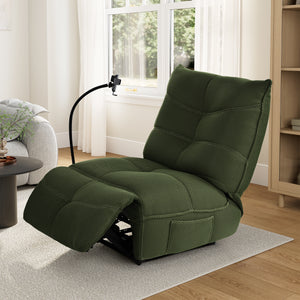
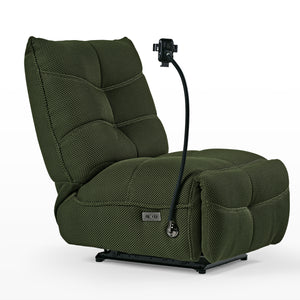
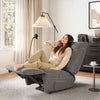
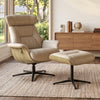
A recliner chair gives you more control over how you sit, rest, read, or watch TV. This collection includes power and manual recliners with padded support, adjustable reclining positions, and practical features for living rooms, reading areas, home offices, and entertainment spaces.
Compare the reclining mechanism, seat dimensions, upholstery, movement, power requirements, and weight capacity before choosing your chair.
Choose Between a Power and Manual Recliner
The main difference is how the chair changes position. A power recliner uses a motor and must be placed near a suitable outlet. A manual recliner uses a handle or body pressure and does not need electricity for reclining.
Power Recliners
A power recliner is useful if you want smooth, button-operated adjustment. It allows you to stop at different points within the supported reclining range instead of choosing only between upright and fully reclined positions.
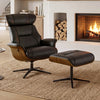
The Linx Recliner with Wireless Charging and USB adjusts from 118° to 148°. It also includes USB and Type-C ports, an adjustable wireless charging phone holder, and a side storage pocket.
Because the reclining mechanism and charging features require power, plan where the cord and outlet will be before placing the chair.
Manual Recliners
A manual recliner is a straightforward choice for users who do not need electronic adjustment or integrated charging. It can also provide more placement flexibility because reclining does not depend on an outlet.
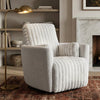
The Lucia Swivel Rocking Manual Recliner combines manual reclining with a 360° swivel base and gentle rocking motion. Its padded seat, backrest, and armrests are designed for relaxed seating in living rooms, reading corners, and informal office lounge areas.
What Makes an Ergonomic Recliner?
An ergonomic recliner should support a comfortable seated position while allowing you to change your back and leg angles. Comfort still depends on how well the chair fits your body, so the word “ergonomic” should not replace checking the actual dimensions.
When comparing ergonomic recliners, consider:
- Backrest shape: Look for a backrest that stays in contact with your back without forcing your shoulders forward.
- Seat depth: Your back should reach the backrest without the seat edge pressing heavily behind your knees.
- Seat width: Allow enough room to sit naturally without feeling restricted by the armrests.
- Footrest length: Your legs and feet should remain comfortably supported when the footrest is open.
- Reclining range: Check whether the available angles suit upright reading, casual viewing, or more laid-back rest.
- Cushioning: A chair should feel supportive as well as soft. Excessively deep cushioning may make it harder for some users to stand.
- Weight capacity: Always follow the capacity listed on the individual product page.
A recliner can support more relaxed postures, but it is not a medical device and does not guarantee relief from back, joint, circulation, or sleep problems.
Where Can You Use a Recliner Chair?
Recliners need more planning than fixed chairs because the backrest and footrest move beyond the chair’s upright footprint.
Living Rooms
A recliner can provide individual seating for reading, watching TV, or relaxing without requiring a full reclining sofa. Check how its color and overall width will work alongside your sofa, side tables, and walkways.
Entertainment and Gaming Areas
For longer movies or casual gaming, a power recliner makes it easier to adjust your position without getting up. Charging ports and a phone holder can also help keep personal devices nearby. These features vary by model, so check the product specifications rather than assuming every recliner includes them.
Reading Corners
For reading, prioritize head, back, arm, and leg support. A manual swivel recliner can help you turn toward a window, lamp, bookshelf, or side table without moving the entire chair.
Home Offices
An ergonomic recliner can create a separate place for reading documents, taking calls, or resting between tasks. It should not replace an adjustable ergonomic office chair for prolonged computer work. Recliners generally do not provide the seat-height, armrest, or desk-position adjustments needed for focused task seating.
For more fixed and swivel relaxation seating, explore the full lounge chair collection.
What to Check Before Buying a Recliner
Choosing the right recliner involves more than measuring its upright width.
Measure the Full Reclining Area
Check the chair’s upright dimensions and allow additional space for the backrest and footrest to open. Keep moving parts away from walls, tables, rugs that bunch easily, and frequently used walkways.
Check the Delivery Route
Measure doorways, hallways, stair turns, elevators, and the final room entrance. Also review the packaged dimensions and weight. Larger recliners may require two people to move safely after delivery.
Choose the Right Movement
Not every recliner swivels or rocks. The Linx focuses on powered angle adjustment, while the Lucia combines manual reclining with swivel and rocking movement. Choose features based on how the chair will be used rather than assuming more movement is always better.
Review Power and Charging Requirements
A power recliner must use the power supply specified for that model. Do not connect a universal battery pack, third-party adapter, or replacement transformer unless compatibility has been confirmed by Eureka Ergonomic customer support.
USB ports and wireless charging are intended for compatible personal devices. Charging speed and compatibility may vary by device.
Match the Upholstery to Your Routine
Consider how the material feels, how easily it shows dust or stains, and how it should be cleaned. Follow the care code for the specific model. Avoid applying general fabric cleaners, leather products, or solvents unless the product instructions allow them.