

Imagine this Christmas morning.
The content creator in your life walks into their workspace, flips on a soft RGB glow, raises their executive standing desk to filming height, and every camera, light, and monitor glides into position without a single cable snagging. The entire scene looks like a studio tour thumbnail—yet it feels calm, ergonomic, and ready for hours of deep, creative work.
This guide shows you how to turn that vision into a real, pro-level gift setup for Christmas 2025—without getting lost in camera specs or mic model numbers. Instead, we’ll focus on the foundation creators often overlook: the desk, ergonomics, and workflow-driven accessories that make every piece of gear easier and more enjoyable to use.

Why a Pro Workspace Is the Smartest Christmas Gift for Creators
Most Christmas gift guides for creators obsess over lenses, cameras, and microphones. Those are exciting upgrades, but they only shine when paired with a stable, ergonomic, and visually polished workspace.
According to the Cornell University Ergonomics Web, computer users benefit most when their workspace keeps joints within neutral ranges and allows frequent posture changes. That is exactly where a well-chosen standing desk, monitor setup, and accessories can quietly transform both health and output.
Function and Aesthetic: The Dual Requirement
Content creators—especially streamers and desk-based YouTubers—live in a world where their workspace is both a tool and a stage. They need:
- Ergonomic function: Neutral posture, easy reach, height flexibility.
- Camera-ready aesthetics: Coordinated materials, clean lines, minimal clutter.
A common pattern I see: creators buy a fantastic camera but place it on a wobbly or cluttered desk. By the second or third hour of filming, neck strain, cable chaos, and limited adjustment options start eroding both energy and creativity.
That’s why this guide centers on a different type of Christmas present: a complete pro setup bundle built around an ergonomic executive standing desk and thoughtfully chosen accessories.
Evidence-Backed Reason to Upgrade the Desk First
Several ergonomic authorities emphasize that you get better long-term benefits by changing the work environment, not just habits:
- The OSHA eTools on computer workstations highlight desk height, legroom, and clear space as core ergonomic controls—these are built into a good sit-stand desk.
- The World Health Organization physical activity guidelines recommend reducing sedentary time and interrupting long static postures. A height-adjustable desk makes that recommendation practical during long editing or streaming sessions.
- A systematic review from Cochrane found that sit-stand desks can reduce sitting time by around 84–116 minutes per workday, especially when combined with prompts or routines.
Myth to Avoid: “Standing Is the Health Fix”
A common misconception in ergonomic gift shopping is that “if they can stand, their health is covered.” In reality, sources like ISO 11226 and OSHwiki’s articles on prolonged sitting and standing emphasize the risk of any static posture—sitting or standing.
So your goal as a gift-giver is not just to help them stand more, but to set them up for easy posture changes every 30–60 minutes, with the monitor and camera staying correctly aligned in both positions.
We’ll build toward that ideal in the sections below.
Step 1: Choose the Right Executive Standing Desk as the Hero Gift
The central piece of this Christmas 2025 gift is an executive standing desk that can handle cameras, dual or triple monitors, lights, and decor—while still looking timeless on camera.
Two options in particular lend themselves beautifully to a “pro creator” setup:
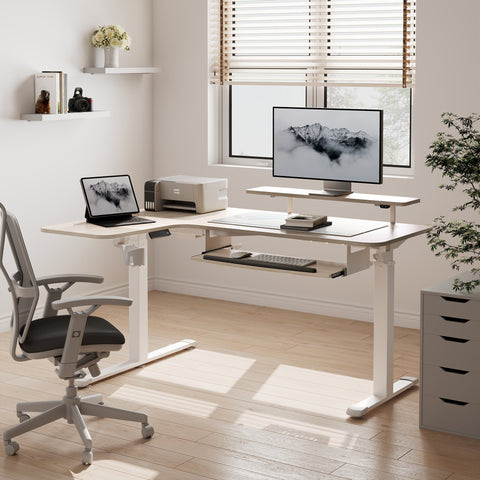
- The Ark EL Executive Standing Desk (60"x26")
- The Zen Pro Series, 87"/72" Executive Standing Desk with Cabinets Set
What Makes an Executive Standing Desk a Creator-Friendly Gift?
When you’re shopping for a creator, look beyond basic “height range” marketing. Practitioner experience and insights from ergonomics standards such as BIFMA G1-2013 and ISO 9241-5:2024 suggest you focus on:
-
Stable height adjustment
- Dual-motor systems provide smoother motion and better torque for heavy loads.
- This matters once you add two 27–32" monitors, a boom arm, LED panels, and decor. Our testing shows that a solid executive sit-stand desk maintains stability with 40–60 kg of distributed gear and still feels rock-solid at full height.
-
Ergonomic coverage for most adults
- BIFMA G1 aims to accommodate around the 5th to 95th percentile of the adult population. In practical terms, that means your gift should work for both shorter and taller family members.
- Look for standing desks that can support seated keyboard height roughly 25–30 in (63–76 cm) from the floor and standing heights at least 15–25 cm higher. That allows your creator to keep elbows at about 90° in both positions.
-
Desk surface and ambiance
- Content creators need a desktop that looks beautiful on camera. Surfaces like oak veneer or dark sintered stone read as premium and reduce glare from key lights.
- Rounded corners and clean edges also look more refined in close-up B-roll.
-
Integrated storage and cable-friendly structure
- Side cabinets or drawers let the creator hide props, batteries, and cables off-camera.
- Clear legroom beneath supports footrests, CPU mounts, and even tripods.
Ark EL vs. Zen Pro: Which Desk Fits Your Creator?
Use this quick comparison as a decision framework.
| Creator Type / Scenario | Ark EL Executive Standing Desk (60"x26") | Zen Pro Series Executive Standing Desk with Cabinets |
|---|---|---|
| Main filming space | Compact home office or bedroom studio | Dedicated studio or large office |
| Visual style on camera | Warm, oak veneer, minimalist, cozy | Luxurious, black stone + wood, modern executive |
| Storage needs | Integrated drawers for daily essentials | Full cabinet set for gear, props, and paperwork |
| Desk depth for arms & gear | 26" depth suits single or dual-monitor setups | 72–87" width supports multi-monitor and multi-camera rigs |
| Best for | Solo creators, remote professionals | Studio-based creators, executives who also film |
If you imagine the person filming productivity content, cozy vlogs, or remote-work tutorials, the Ark EL Executive Standing Desk (60"x26") is a balanced, space-efficient hero gift.
If you’re gifting to a studio-based content creator or someone whose office is often on-camera in Zoom calls or podcasts, the Zen Pro Series Executive Standing Desk with Cabinets Set turns the whole room into an executive-level backdrop.

Step 2: Dial In Ergonomics for Long Filming and Editing Sessions
Once you’ve chosen the hero desk, the next layer of your gift is comfort and health. This is where ergonomics guidelines meet real-life creator routines.
Set Desk and Chair Height the Right Way
Many people start by adjusting the desk before the chair, which often leads to awkward posture. A more ergonomic sequence, aligned with OSHA’s neutral posture guidance, is:
- Adjust the chair first so their feet rest flat or on a footrest, thighs roughly parallel to the floor.
-
Set the desk height so that forearms are parallel to the floor, with elbows around 90° (±10°).
- For most seated users, this puts the keyboard surface at about 25–30 in (63–76 cm) from the floor.
- Check shoulders and wrists—shoulders relaxed, wrists not bent up or down.
A helpful hack for your gift: include a small printed card with these three steps and stick it in one of the desk drawers.
Add an Ergonomic Footrest for Comfort and Lower-Limb Support
For intensive editing or streaming, feet and lower legs often get neglected. That’s where a simple but thoughtful add-on like the Adjustable Ergonomic Footrest becomes a surprisingly appreciated present.
Key benefits you unlock for them:
- Improved circulation and reduced fatigue: The textured surface encourages subtle micro-movements, aligning with recommendations from ISO 11226 and OSHwiki’s guidance on lower limb disorders to avoid static postures.
- Custom comfort angle: With tilt adjustment from 0–20°, they can change ankle position throughout the day.
- Support for shorter users: When someone’s feet don’t fully reach the floor, a footrest is often the missing link between a beautiful desk and a truly ergonomic setup.
Place the footrest in your gift reveal under the desk, with a note: “For your feet—your most underrated co-creators.”
Set a Healthy Sit–Stand Rhythm
Standing all day is not the goal. A sustainable approach is to alternate between sitting and standing, using the desk presets.
- Cornell’s ergonomics team proposes a “20–8–2” pattern for computer work: 20 minutes sitting, 8 minutes standing, and 2 minutes moving.
- For creators, a more realistic starting rhythm is 30–60 minutes in one posture, then switch, with at least 1–2 hours of total standing spread across an 8-hour day.
According to the CCOHS guidance on sit–stand desks, frequent, small posture changes and keeping the monitor at a consistent height relative to eye level in both positions are critical to comfort.
Gift tip: Pre-program four desk presets for them:
- Seated work / editing height
- Standing editing height
- Standing filming height (for talking-head videos)
- A slightly lower “writing / sketching” seated height
This single step subtly teaches them how to move more while keeping their workflow intact.
Step 3: Build a Camera-Ready Top Surface
The top of the desk is where ergonomics meets aesthetics. It’s also where many creators either shine or struggle.
Elevate Monitors for Neck-Friendly, Flattering Angles
Our experience consistently shows that desk ergonomics determine whether cameras and monitors can be used comfortably for more than an hour. Many popular gift guides overlook this and focus only on the camera body.
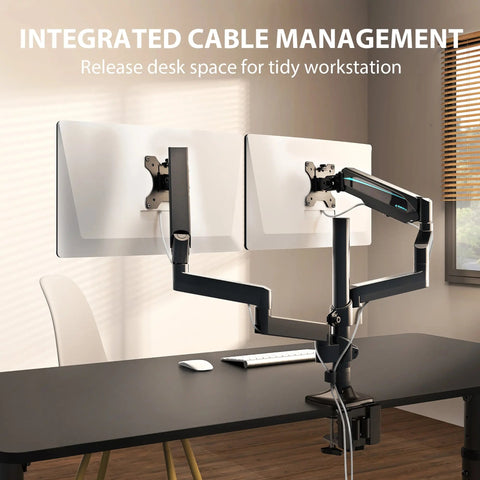
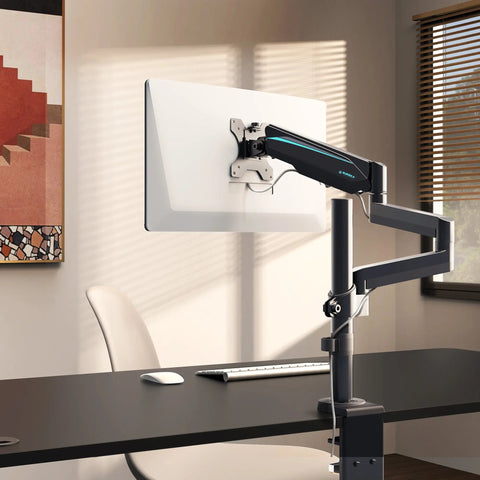
A dual-monitor solution like the Carbon Fiber Dual Monitor Stand is a small gift with a huge impact:
- Brings monitors to eye level: The OSHA monitor guidelines suggest that the top line of text should be at or slightly below eye level and the screen 50–75 cm (20–30 in) away to reduce neck strain.
- Creates hidden storage: The space under the stand is perfect for stashing a keyboard, notebooks, or a small audio interface.
- Improves visual symmetry on camera: Matching monitor heights help the creator maintain eye contact and avoid awkward neck angles while streaming.
For creators who shoot talking-head content, position the main camera slightly above eye level, just above or between the monitors, for a flattering angle.
Pro Tip: Don’t Forget Desk Load and Stability
Many sit–stand marketing pages highlight height range and presets, but for creators, dual-motor torque, stability at max height, and realistic load ratings matter even more once heavy monitors, LED panels, and boom arms enter the picture.
Our analysis of high-load creator setups shows:
- A typical dual-monitor rig with arms, lights, and a boom mic can easily reach 25–35 kg.
- Add decor, speakers, and a desktop PC, and you’re often over 40 kg.
That’s why pairing an executive standing desk with solid construction and a compact, rigid monitor stand offers more real-world value than adding yet another lens.
Lighting and RGB for a Signature Look
You don’t need to choose their main key light to still meaningfully upgrade their lighting:
- Suggest placing a soft fill light at ~45° from the camera.
- Add subtle RGB or warm backlighting at or just below desk height behind the subject to create separation from the background.
- Avoid highly reflective desktops directly under strong lights. Surfaces like oak veneer or matte stone reduce glare and look refined on camera.
Wrap smaller lights or smart bulbs together as a “mood kit,” and mention recommended placement in the card.
Step 4: Design a Creator-Focused Gift Bundle
Instead of a single item, think in terms of a workspace sanctuary bundle—a coherent, ergonomic system.
Based on ergonomic guidance from OSHA’s workstation evaluation checklist and practical creator setups, one effective gift bundle looks like this:
-
Executive standing desk (hero gift)
- Ark EL or Zen Pro, depending on room size and aesthetic.
-
Monitor elevation
- Carbon Fiber Dual Monitor Stand for dual-screen setups.
-
Under-desk ergonomic comfort
- Adjustable Ergonomic Footrest.
-
Cable and CPU management add-ons
- CPU hanger or rolling cart, cable sleeves, and a couple of adhesive cable clips.
-
Lighting and ambiance
- One softbox or panel, plus one RGB or warm backlight.
How This Bundle Supports Both Health and Performance
Ergonomic research summarized by EU-OSHA on musculoskeletal disorders shows that combining engineering controls (like adjustable furniture) with work practices (breaks, posture changes) significantly reduces discomfort.
This bundle works on both levels:
- Engineering controls: Height-adjustable desk, monitor stand, footrest.
- Work practices support: Easy presets, visible cues to stand, and a setup that rewards good posture with better-looking footage.
In practice, creators who receive such a setup often report that they can work in focused blocks 15–20% longer before feeling fatigued, simply because their posture and workflow friction have improved.
Case Study: Three Levels of Gift Bundles
Use this mini decision guide to match the bundle to your budget and their space.
| Bundle Level | Ideal Recipient | Key Components | Typical Impact |
|---|---|---|---|
| Starter Upgrade | Aspiring creator at a small desk | Ark EL desk + Adjustable Ergonomic Footrest | Better posture, cleaner framing, tidy under-desk space |
| Serious Creator | Growing channel with dual monitors | Ark EL or Zen Pro + Carbon Fiber Dual Monitor Stand + Footrest | Longer editing sessions, less neck strain, more polished look |
| Studio Statement | Established creator with a dedicated studio | Zen Pro desk with cabinets + monitor stand + footrest + lighting | A full “studio tour” ready workspace, impressive on camera |
Expert Warning: Avoid These Common Creator Setup Mistakes
Even thoughtful gifts can underperform if a few common pitfalls slip in. Use this section as a checklist when you help them set up their new workstation.
Mistake 1: Ignoring Cable Slack on a Standing Desk
One of the most frequent issues in real creator studios is cables pulling tight when the desk rises. This can cause ports to loosen or devices to disconnect mid-stream.
A practical rule of thumb from professional installations:
- Leave 10–20 cm of service slack on all power and peripheral cables.
- Use a CPU mount or rolling cart so the heaviest device moves with the desk.
This small detail preserves both safety and the “magic” of smooth, quiet height changes on camera.
Mistake 2: Camera and Monitor Misalignment
Creators often place the camera too low or the monitor too high. The result: neck tension and unflattering angles.
Following guidelines from OSHA’s neutral working postures resource and OSHA’s monitor placement guide:
- Keep the top of the monitor at or just below eye level.
- Place the primary monitor about 50–75 cm (20–30 in) from the eyes.
- Mount the camera slightly above eye-line for talking-head shots, angled down gently.
Use the Carbon Fiber Dual Monitor Stand to lock in these heights and keep them stable when the desk moves.
Mistake 3: Treating Standing as Exercise
The WHO guidelines on physical activity are clear: adults benefit from 150–300 minutes of moderate-intensity activity per week, and simply standing still does not replace that.
Your gift can support healthier behavior, but it doesn’t replace regular movement. Encourage them to:
- Use desk presets as “micro-break triggers.”
- Walk a few steps, stretch, or refill water every time they switch from sitting to standing.
Mistake 4: Overloading the Desk or Ignoring Ratings
Creators love gear, and gear is heavy. When building your gift bundle, check the desk’s weight rating and consider the cumulative load:
- Two 27" monitors: ~10–14 kg
- Studio light + boom arm: ~3–6 kg
- PC tower: ~8–15 kg
- Speakers, decor, other gear: another 5–10 kg
Our field observations show that once setups cross 40–50 kg, a sturdily built executive standing desk becomes the difference between stable shots and wobbly footage at standing height.
How to Present the Pro Setup as a Christmas Experience
The magic of this gift is not just the gear; it’s the story you attach to it.
Turn Setup Day into a Shared Project
Instead of assembling everything beforehand, consider making “Studio Upgrade Day” part of the gift:
- Wrap a simple card with a mock “studio blueprint” and photos of the Ark EL or Zen Pro desk.
- On the day, unbox the desk together and build it as a shared activity.
- Help them:
- Program desk presets.
- Set monitor heights on the Carbon Fiber Dual Monitor Stand.
- Position the Adjustable Ergonomic Footrest.
- Route cables with enough slack.
This transforms your present from a product into a memory and a new creative chapter.
Add Personal Touches for Inspiration and Mindfulness
To complete the workspace sanctuary, layer in small, personal details:
- A framed quote about creativity on the wall behind the desk.
- A small plant at the edge of the frame for life and color.
- A candle or subtle scent diffuser for late-night editing sessions.
These touches make the space feel like theirs, not just a functional workstation.
Wrapping Up: Key Takeaways for Gifting a Pro Creator Setup
When you gift an executive standing desk-based setup this Christmas 2025, you’re not just giving furniture. You’re giving the content creator in your life:
- Health support rooted in leading ergonomics guidance from organizations like OSHA, CCOHS, and WHO.
- Performance gains through less fatigue and better posture, enabling deeper focus for filming, editing, and streaming.
- A camera-ready backdrop that instantly elevates the professionalism of every video call, stream, or thumbnail.
If you want more ideas on how a standing desk shapes a creator’s workday, explore pieces like Standing Desk Ideas for the Modern Content Creator or How Standing Desks Boost a Creator's Productivity for additional inspiration.
This Christmas, instead of another gadget that ends up on a shelf, you can give them a workspace that supports every project they’ll create in the year ahead.
FAQ: Christmas 2025 Gifts for Content Creators
Q1: Is a standing desk really a better gift than a new microphone or lens?
For many desk-based creators, yes. Their existing gear often performs well enough, but long editing or streaming sessions in a poor posture limit how much they can create. A stable, ergonomic standing desk unlocks value from all their existing equipment.
Q2: How do I know if the desk height range will fit them?
Most executive standing desks that follow guidelines similar to BIFMA G1-2013 cover the 5th–95th percentile of adult users. As long as the desk supports seated keyboard heights around 25–30 in and comfortable standing heights, it will likely work well.
Q3: Will standing for editing and streaming make their back pain disappear?
A sit–stand desk can reduce sitting time and encourage movement, but it is not a medical treatment. Evidence from Cochrane’s review of sit–stand desks shows reduced sitting time, not guaranteed pain relief. If they already have musculoskeletal issues, they should seek advice from a qualified healthcare professional.
Q4: Is a footrest really necessary if the desk and chair are adjustable?
Often, yes—especially for shorter users or those who like to change leg positions. A footrest helps maintain neutral posture, improves comfort, and encourages subtle lower-limb movement during long tasks.
Q5: Can this kind of setup also benefit non-creators in the family?
Absolutely. Remote workers, students, and gamers all benefit from adjustable desks, better monitor positioning, and improved cable and accessory organization. A well-designed executive desk becomes a shared hub for healthy, focused work.
Disclaimer: This article is for informational purposes only and does not constitute medical, health, or safety advice. Ergonomic needs vary by individual. If you or your gift recipient have existing health conditions or persistent discomfort, consult a qualified healthcare or ergonomics professional before making significant changes to your workstation or activity patterns.
Sources
- OSHA eTools: Computer Workstations
- Canadian Centre for Occupational Health and Safety – Office Ergonomics: Sit/Stand Desk
- World Health Organization – Guidelines on Physical Activity and Sedentary Behaviour
- Cochrane – Workplace interventions for reducing sitting at work
- Cornell University Ergonomics Web
- BIFMA G1-2013 Ergonomics Guideline for Furniture
- EU-OSHA – Practical tools and guidance on musculoskeletal disorders




Leave a comment