

When desk height versus chair height conflicts, don't change everything at once. Start with your feet and legs. Keep both feet flat on the floor or supported by a footrest, with your hips and thighs comfortable, as OSHA recommends in its guidance on good working positions. Once your base is stable, check your keyboard against your elbows using OSHA's keyboard placement guidance. If your feet aren't supported, use a footrest first. Only then add a keyboard tray if the keyboard still sits too high or too far away.

The best first move depends on what you can adjust. If your desk height changes, you may be able to solve the problem at the work surface. If the desk is fixed, your chair and a footrest usually do the work instead. This guide explains that order and the common exceptions without becoming a full ergonomic setup guide.
The Feet-First Rule
Supported feet and relaxed legs are the foundation for every later adjustment. If changing the chair or desk leaves your feet unsupported, it's the wrong adjustment—even if it improves another part of your setup.
Start With Supported Feet
Before you adjust the keyboard, sit down and check your feet. They should rest fully on the floor or on a stable footrest if they can't reach it. Your hips and thighs should feel supported and stay generally parallel to the floor. According to OSHA's guidance on good working positions, this base posture supports the rest of your setup. Treat it as a requirement: any chair or desk adjustment must keep your feet supported.
When the Desk Can't Move
If your desk is fixed and too high for your chair, raise the chair enough to bring the keyboard closer to elbow height. That's the OSHA-supported approach: when a fixed work surface can't be lowered, raise the chair to fit the user and add a footrest if needed. If your desk is adjustable, move it first. Raising or lowering the work surface around your seated position can usually solve the conflict without an accessory.
Aligning the Keyboard and Elbows
Once your feet are supported, check the keyboard. It should sit near elbow height, with your shoulders relaxed and your wrists straight—not bent up, down, or to either side.
Set the Keyboard Near Elbow Height
Watch your elbows as you type. They should stay close to your body and sit roughly level with the keyboard, without forcing your shoulders toward your ears. OSHA's keyboard placement guidance recommends this position: elbows about level with the keyboard, relaxed shoulders, and wrists in a neutral, straight line. Judge the keyboard's position, not just the desk's height. A desk can be the right height overall while the keyboard sits too far back or too high on the surface.
Recheck After Every Chair Change
Whenever you raise or lower the chair to support your feet, recheck your elbows and wrists. Raising the chair can put your elbows above the keyboard and make your shoulders round forward. If the keyboard is still too high or too far away after you set the chair and desk, move the input surface itself instead of adjusting the chair back and forth.
Solving the Gap: When to Use a Tray or Footrest
After you check your feet and keyboard alignment, the remaining mismatch tells you whether you need an accessory. Use a footrest for unsupported feet and a tray for a keyboard that remains too high or too far away. If the work surface can meet both needs, adjust the desk first.
| Remaining mismatch | Recommended correction | Condition that applies |
|---|---|---|
| Feet don't reach the floor after raising the chair | Footrest | The chair had to move up to fix keyboard height |
| Keyboard is still too high or too far away after setting the chair and desk | Keyboard tray | The desk and chair alone can't achieve a good keyboard position |
| Adjustable desk can meet both needs | Desk adjustment | No accessory is needed yet |
Choose a Footrest for a Feet Gap
If raising your chair leaves your feet hanging, place a stable footrest under them before making another adjustment. Our adjustable ergonomic footrest tilts from 0 to 20 degrees and measures 17 inches wide by 13 inches deep, making it suitable for use under most desks. Once your feet are supported, recheck your elbows and wrists. A footrest closes the gap to the floor, but it doesn't change the keyboard's position.
Choose a Keyboard Tray for an Input-Surface Gap
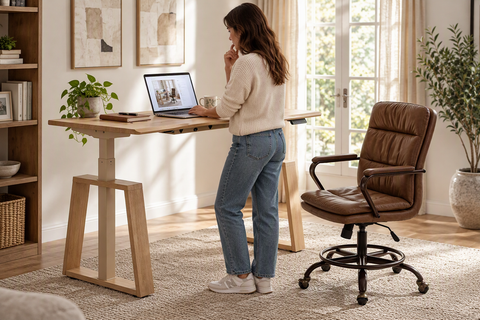
If your feet and legs are comfortable but the keyboard remains too high or too far away, the desk and chair have reached their limit. A keyboard tray is the targeted fix; keep adjusting the chair can create a new problem. Our adjustable keyboard tray offers height adjustment, a 360-degree swivel, and a 15-degree tilt, so you can bring the keyboard closer to elbow height. Before mounting it, confirm that your desktop is wood or MDF-engineered, at least 18 millimeters thick, and not glass, plastic, or stone. Also make sure installation leaves enough leg and foot clearance for your seated position. If you're tuning a sit-stand setup around an existing chair, our guide on pairing a standing desk with an ergonomic chair explains how the two pieces work together as you adjust them.
Use This If-Then Adjustment Checklist
Work through these steps in order. Check the result before moving to the next one.
- If your feet aren't supported, adjust the chair or add a footrest before doing anything else.
- If your elbows aren't near keyboard height after your feet are supported, adjust whichever surface can move—the chair or an adjustable desk.
- If the keyboard is still too high or too far away, add a keyboard tray instead of changing the chair again.
- After each change, recheck your feet, shoulders, elbows, and wrists before deciding you're done.
Conclusion
After any adjustment, do a quick reset. Keep the change only if your feet stay supported, your elbows and keyboard remain aligned, and your shoulders and wrists stay relaxed. If one of those conditions fails, undo the change and try the next narrowest fix instead of replacing the desk or chair.
Your body doesn't need to stay in one perfect position all day. Varying your posture and checking your setup regularly are part of a workable home-office routine, based on CDC/NIOSH's home workstation guidance. If an adjustment causes or worsens ongoing discomfort, stop relying on this general sequence and seek individualized guidance.
Sources and References
- Occupational Safety and Health Administration. "Computer Workstations eTool: Good Working Positions"
- Occupational Safety and Health Administration. "Computer Workstations eTool: Keyboards"
- Occupational Safety and Health Administration. "Computer Workstations eTool: Desks"
- Centers for Disease Control and Prevention, National Institute for Occupational Safety and Health. "Working from Home: How to Optimize Your Work Environment and Stay Healthy"
FAQs
Which comes first in a desk height versus chair height conflict?
Neither piece of furniture automatically comes first. Check your feet and legs first, then check your keyboard and elbows. Whether you move the desk or chair depends on which one is adjustable in your setup.
What should I do if my desk is too high for my office chair?
Raise your chair only enough to bring the keyboard closer to elbow height. If that lifts your feet off the floor, add a stable footrest. Then recheck the keyboard position before deciding the setup is complete.
Do I need a keyboard tray or a footrest?
It depends on what's still wrong after you set the chair and desk. A footrest supports feet that no longer reach the floor after you raise the chair. A keyboard tray corrects a keyboard that's still too high or too far away when your feet and elbows are otherwise in a good position.
Does the setup order change with a standing or adjustable desk?
Yes. An adjustable desk can usually move around your existing chair and body position, so try adjusting it before adding an accessory. With a fixed desk, the chair-and-footrest approach is more likely to help. Either way, change one thing at a time and recheck your position after every move.




Leave a comment