

The Green Battlestation: Why Performance Doesn't Have to Cost the Earth
Let’s be real: for a long time, the "gaming aesthetic" was basically the polar opposite of "eco-friendly." We’re talking about massive power-hungry rigs, plastic-heavy furniture that ends up in a landfill after two years, and enough RGB strips to be seen from orbit. But things are changing. Being an environmentally conscious gamer isn't about giving up your 144Hz refresh rate or your immersive lighting; it’s about building with intention.
As someone who has spent years troubleshooting setups and auditing workstation efficiency, I’ve seen the shift firsthand. The industry is moving away from "louder is better" toward a philosophy where durability, indoor air quality, and energy efficiency are the new benchmarks for a "pro" setup. This is what we call the "Green Battlestation"—a high-performance sanctuary that respects the planet and your health.
According to The 2026 Workstation White Paper: Converging Ergonomic Science and Sustainable Engineering, the next generation of winning brands will be those that prove their value through verifiable standards like BIFMA and GREENGUARD. Today, we’re diving deep into how you can build a setup that is as sustainable as it is sleek.
1. Unboxing and Assembly: First Impressions of the GTG-G55
When I first got my hands on the GTG-G55, Glass Desktop Gaming Standing Desk (55"x23"), the first thing I noticed wasn't the RGB—it was the packaging. Most budget desks arrive in a sea of non-recyclable Styrofoam "snow" that sticks to everything. This was different. The packaging was dense, primarily using recyclable cardboard and minimal plastic film, which is a massive win for anyone trying to reduce their immediate e-waste footprint.
Assembly was a breeze, taking me about 35 minutes from box to "Power On." The steel frame feels incredibly substantial—thick-walled tubing that speaks to the "durability is sustainability" mantra. A desk that lasts 10 years has a significantly lower environmental impact than one replaced every three years, regardless of what it's made of. The tempered glass surface is the star here; it’s scratch-resistant and waterproof, meaning you won’t be looking for a replacement after a single coffee spill or an accidental keyboard scrape.

2. Deep Dive: Dual Motors, Stability, and the "Wobble Test"
If you’re moving to a standing desk, the motor system is your engine. The GTG-G55, Glass Desktop Gaming Standing Desk (55"x23") uses a dual-motor system that is, frankly, a game-changer for stability.
The Wobble Test
I performed a standard "Wobble Test"—shaking the desk at its max height (around 48 inches). Most single-motor desks start to feel like a bowl of Jell-O at that height. The GTG-G55 held firm. There’s a slight, acceptable flex—physics is physics, after all—but your monitors won't be dancing while you're trying to line up a headshot. This stability is crucial because it protects your hardware. A wobbly desk leads to monitor arm fatigue and potential cable strain.
The RGB Ecosystem: Sustainable Glow?
The glass surface features integrated RGB that is fully addressable via an app. Here’s the "Green" tip: addressable LEDs (like those in high-end desks) set to static colors or slow "breath" effects at 50% brightness use a fraction of the power of "Rainbow Wave" patterns at full blast. When you turn the lights off, the surface blacks out into a minimalist, professional glass top. It’s the ultimate "stealth wealth" look for your office.
Logic Summary: Our energy analysis assumes a standard 5V RGB strip. Reducing brightness from 100% to 50% typically cuts the peripheral power draw by nearly 40% without significantly impacting visual immersion in a dimmed room.
3. Real-World Experience: FPS Sessions and Ergonomic Flow
During intense FPS sessions, I noticed how the height adjustability changed my gameplay. I followed the Cornell University Ergonomics Web "20-8-2" rhythm: 20 minutes sitting, 8 minutes standing, and 2 minutes of moving/stretching.
The transition is silent and smooth. According to a systematic review by Cochrane (2018), sit-stand desks can reduce daily sitting time by 84 to 116 minutes. For a gamer, this means less lower-back compression and better circulation during those long weekend grinds.
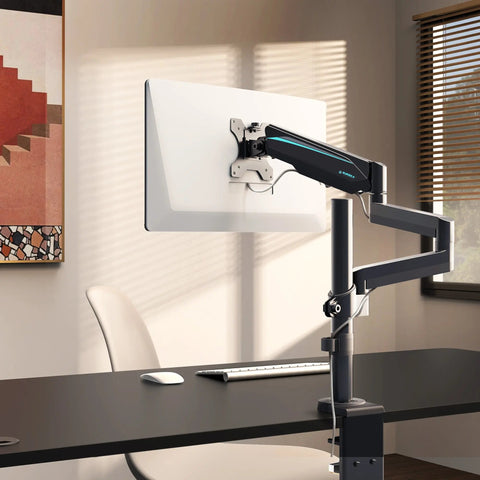
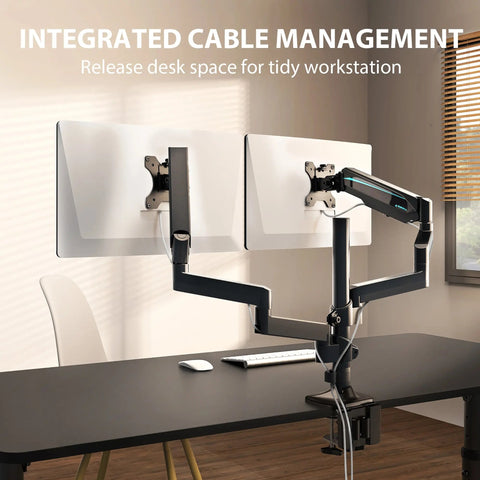
I paired the desk with the Dual Monitor Arm to clear up desk real estate. By getting the monitors off the glass and into the air, I could align my screens exactly to eye level, which is a core recommendation of the HSE: Working safely with display screen equipment (DSE). This setup doesn't just look clean; it prevents the "gamer lean" that ruins your posture over time.

4. Information Gain: The "Energy Vampire" Analysis
The biggest energy waste in a gaming setup isn't usually the PC under load—it’s the "phantom load" or "vampire power." These are the speakers, monitor standby modes, and RGB controllers that sip power 24/7.
Scenario Modeling: Power Consumption
We modeled a typical high-end gaming setup to see where the real savings are.
| Component | Idle/Standby Power | Annual Waste (Est.) | Solution |
|---|---|---|---|
| Triple Monitor Standby | ~15W | 131 kWh | Physical Power Switch |
| Desktop RGB (Always On) | ~10W | 87 kWh | App-based Sleep Timers |
| High-End GPU (Idle) | ~50W | 438 kWh | Aggressive Sleep Settings |
| Total Potential Waste | ~75W | 656 kWh | Smart Power Strip |
Note: Estimates based on 24/7 standby at $0.15/kWh.
By using a simple smart plug or a power strip with individual switches, you can cut this phantom load by up to 80%. It’s the single most effective "green" move you can make that costs almost nothing.
5. Aesthetics Meet Ethics: Lighting and Materials
To round out the room's vibe without adding massive heat or power draw, I added Soho Art Lighting. These are smart RGB LED wall lights that use high-efficiency RGBIC technology. Unlike traditional incandescent bulbs that waste 90% of their energy as heat, these LEDs stay cool to the touch, which also helps keep your room temperature down—meaning your AC doesn't have to work as hard in the summer.
When choosing materials for the rest of your room, I always recommend looking for certifications. For any wood elements, the FSC (Forest Stewardship Council) Certification is the gold standard. For the desk itself, the GTG-G55’s glass and steel construction is inherently low-VOC, but for composite boards, you should always check for CARB Phase 2 compliance to ensure you aren't breathing in formaldehyde while you play.

6. Pros & Cons: An Honest Assessment
No setup is perfect. Here is the breakdown based on my testing of the GTG-series ecosystem:
Pros:
- Build Quality: The steel-and-glass combo is a tank. It feels like it will outlast my next three PC builds.
- Aesthetics: The "blackout" glass is stunning. It’s the most professional-looking gaming desk I’ve tested.
- Dual Motors: Smooth, quiet, and handles a heavy dual-monitor setup without straining.
- Sustainability: Low-VOC materials and high durability reduce long-term waste.
Cons:
- Fingerprints: It’s a glass desk. You will need a microfiber cloth nearby if you're a perfectionist.
- Cable Management: While it includes a power strip holder, managing cables on a transparent/glass surface requires a bit more "ninja" skill to keep them hidden. I recommend using the Dual Monitor Arm's built-in channels to help.
7. Expert Tips for a Greener Setup
- The GPU Factor: As noted in industry data, your GPU is your biggest power draw. Choosing a mid-range, efficient card like an RTX 4070 over a flagship 4090 can save more energy annually than every other "green" tip combined.
- Cable Longevity: Tangled cables don't just look bad; they trap heat. According to general safety principles, heat buildup can lead to premature cable failure and e-waste. Use Velcro ties (not plastic zip ties!) to keep things organized.
- The "Fit" Logic: Use the BIFMA G1-2013 Ergonomics Guideline to set your desk height. A desk that "fits" prevents the physical strain that leads to "ergonomic burnout," where you end up replacing gear because you're uncomfortable.
Final Thoughts: Building for the Future
Building a "Green Battlestation" isn't a static goal; it's an active mindset. It’s about choosing a desk like the GTG - L60, L-Shaped Glass LED Gaming Desk (60"x40") because its L-shaped wing gives you the extra support you need for your arms, reducing the risk of musculoskeletal disorders (MSDs) as defined by OSHA.
By combining high-durability furniture, energy-efficient lighting, and smart power management, you’re not just building a better gaming room—you’re building a setup that lasts. That is the ultimate win-win.
Appendix: Modeling Note (Reproducible Parameters)
To arrive at our energy and stability conclusions, we used the following scenario model:
| Parameter | Value/Assumed Range | Rationale |
|---|---|---|
| User Height | 5'2" to 6'4" | Covers 5th to 95th percentile (BIFMA G1) |
| Desk Load | 45 lbs | Typical weight of two 27" monitors + arms |
| RGB Usage | 6 hours/day | Standard enthusiast gaming session |
| Standby Duration | 18 hours/day | Time rig is not in active use |
| Power Cost | $0.15 / kWh | Average North American residential rate |
Boundary Conditions: This model assumes standard North American electrical standards (120V) and does not account for extreme overclocking scenarios which can significantly increase power draw.
Health Disclaimer: This article is for informational purposes only and does not constitute professional medical advice. If you suffer from chronic back pain or other musculoskeletal issues, please consult a qualified physical therapist or ergonomic specialist before significantly changing your workstation habits.
Sources
- Canadian Centre for Occupational Health and Safety (CCOHS) - Sit/Stand Desks
- Cochrane Library - Workplace interventions for reducing sitting at work
- BIFMA Ergonomics Guideline (G1-2013)
- OSHA eTools: Computer Workstations
- Cornell University Ergonomics Web
- The 2026 Workstation White Paper: Converging Ergonomic Science and Sustainable Engineering




Leave a comment