

An executive gaming setup works best when it looks like a polished office on video calls and still feels ready for serious play after hours. The winning formula is simple: calm materials, hidden utility, and performance hardware that stays organized instead of visually taking over the room.

Why Executive Gaming Looks Different Now
The executive gamer is not trying to hide gaming gear, but to make it look deliberate. That usually means fewer neon accents, less exposed clutter, and a stronger role for wood, leather, stone, and matte finishes. In a work-visible room, those materials read as more settled and less temporary than an RGB-heavy layout.
For most professionals, the question is not whether the setup is impressive. It is whether the room looks credible during the day and still supports immersion at night. A wealth-manager desk layout shows the same basic logic: the desk, chair, and cable runs should help the room feel composed before any gaming gear enters the picture.
The best executive gaming setup usually treats tech as part of the architecture. Monitors, docks, and lighting should fit the room, not compete with it. If the first thing people notice is the cable tangle or the glow, the room has started leaning gamer-themed instead of executive.
Luxury Materials That Still Feel Technical
Wood, leather, stone, and matte surfaces matter because they soften the visual temperature of the room. They also make the setup easier to live with over time, since the space does not depend on novelty lighting or overly reflective finishes to feel designed. That makes the room feel more permanent, which matters in a hybrid office.

Wood and Sintered Surfaces
Wood veneer and stone-like surfaces give a gaming workspace a grounded look. They work especially well when the desk is visible on camera, because they reduce the sense that the room was built around a single hobby.
A mixed-material desk can still feel technical if the shape is clean and the finish is restrained. A sculptural profile is fine, but sharp gloss and mirrored edges usually make cables, monitors, and light spill more obvious. The more visible the room is on calls, the more important that quiet finish becomes.
Leather and Soft-Touch Finishes
Leather brings the setup closer to an executive office than a racing cockpit. It signals restraint, which is why it works so well in a room that doubles as a work space. The key is silhouette as much as material: a leather surface with a simpler form usually reads better on camera than an aggressively styled gaming chair.
That is also where maintenance matters. Leather and soft-touch finishes are often chosen because they look composed with less visual noise than glossy plastics or high-contrast gaming trims. If you are deciding between materials, premium leather chair value is worth reading before you commit to a more expensive seating choice.
Matte Over Gloss for Work-Visible Rooms
Matte finishes are usually the safer default in a hybrid office because they reduce visible glare and reflections from lighting and nearby devices. In plain terms, they make the room easier to look at when the camera is on and the lights are not perfectly controlled. That matters more than most people expect.
A glossy desk can look dramatic in a showroom, but it often makes cable runs, finger marks, and monitor reflections easier to see. A matte top does not erase those issues, but it does lower their visual impact. For a room that is both a battlestation and a client-facing workspace, that trade-off is usually worth it.
Metal Accents and Hidden Utility
Metal is best used as structure, trim, or support, not as a spotlight feature. In an executive gaming setup, the goal is for the hardware to feel capable without becoming decorative clutter. Hidden brackets, recessed cable paths, and understated supports all help the room stay calm.
The same idea applies to storage. If the desk or credenza has drawers, they should absorb controllers, charging gear, and small accessories that otherwise scatter across the surface. That makes the setup feel finished, not improvised.
Build the Desk Around Power and Storage
The desk does most of the heavy lifting in a luxury gaming office. It has to hold work gear, gaming peripherals, chargers, and often one or more monitors without looking busy. A clean desk is not just a style choice. It changes how often you need to re-stage the room before a call or session.
| Setup Priority | Why It Matters In An Executive Gaming Setup | What To Look For |
|---|---|---|
| Built-in power | Reduces visible adapters and extension cords | Desktop outlets, USB ports, or integrated charging points |
| Cable management | Keeps the room from looking temporary | Cable trays, brackets, pass-throughs, or hidden routing paths |
| Storage | Prevents accessories from taking over the surface | Drawers, cabinets, or side storage that stays visually quiet |
| Height adjustability | Supports meetings, focus work, and gaming without changing rooms | Smooth sit-stand range and programmable settings |
| Device support | Handles monitors and gear without wobble or clutter | Stable frame, sensible capacity, and room for ventilation |
If you want a desk that combines executive styling with built-in utility, the Ark SWS executive standing desk offers a smaller footprint with drawers, cable support, and built-in charging. For larger, more statement-making layouts, the Magma Pro executive standing desk is a stronger fit when you want an expansive surface and built-in storage.
One practical rule: choose a sit-stand desk if the same room handles meetings, focus work, and gaming. Choose a fixed desk only if you are sure the room will not need multiple working positions. Once the room becomes hybrid, adjustability usually pays off in daily convenience more than it does in style alone.
Choose a Chair That Looks Professional
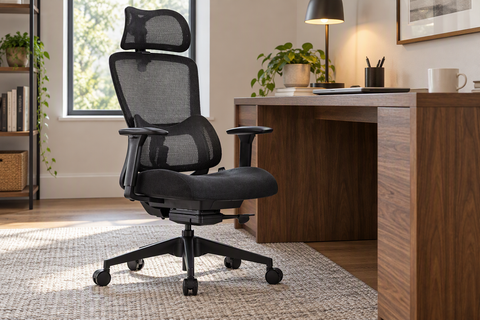
A chair can make or break the room visually, especially if your office appears in calls all day. The cleanest executive gaming setup usually avoids high-bolstered racing-chair shapes unless the rest of the room is already very minimal. A more restrained leather chair tends to look more intentional in a work setting.
Leather Executive Chairs for Camera-Visible Rooms
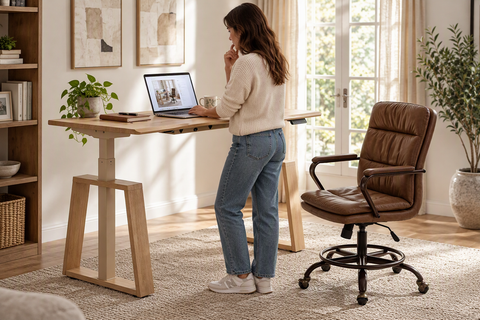
Leather chairs work well when the goal is a polished, client-friendly backdrop. A chair like the Serene Aaron genuine leather executive office chair fits that direction with a high-back silhouette, adjustable headrest, and a more traditional executive profile. It is the sort of chair that can look at home in both a home office and an evening gaming session.
Faux Leather Options for a Polished Look
Synthetic leather can still look sharp if the silhouette is restrained and the color palette stays calm. The benefit is that it often keeps the executive look without asking the room to read as overly formal. That can work well when the rest of the setup already includes stone or wood and you want the chair to recede visually.
The Office Seatings collection is the broader browsing path if you want to compare multiple seating styles side by side.
Sizing, Support, and Tilt for Long Sessions
Style matters, but it should not erase fit. Seat depth, back height, and tilt range all change how a chair feels during work blocks and long gaming sessions. In practice, the chair that looks best on camera is not always the chair that feels best after several uninterrupted hours.
For a hybrid room, the safest choice is usually a chair that balances support with a simpler visual profile. If you prefer a more obviously luxurious leather chair, the trade-off is usually worth it only when the room itself is already quiet and refined.
Tune the Tech Without the Visual Noise
The easiest way to ruin an executive gaming setup is to let accessories spread everywhere. Chargers, controllers, adapters, and spare cables should be grouped into zones, not scattered as if the desk is mid-setup. The room should feel powered, not packed.
- Start with monitor and peripheral placement. Keep the most visible gear aligned so the desk reads cleanly from the main camera angle and from the doorway.
- Hide the cables next. Route power and data through trays, brackets, or rear channels so the desktop stays visually quiet.
- Manage lighting with restraint. Use light that improves visibility and mood, but do not make the lighting itself the room’s main feature.
- Simplify accessories. Dock controllers, chargers, and small devices in one place instead of spreading them across the work surface.
- Check the room on camera and at night. If the setup looks professional in both conditions, the balance is probably right.
A good upgrade path here is to make the most visible hardware do double duty. For broader browsing, the New Ark Sets Series helps compare executive-style desks when you want the room to stay disciplined.
That said, the most important visual test is still simple: if the desk looks busy with the gaming gear removed, it will usually look even busier once the full setup is live. Fix the structure first, then add the performance pieces back in.
A Final Setup Check for Work and Play
Before you call the room finished, make sure it reads as an office first and a gaming station second. The surface should stay clear, the cable paths should disappear, and the chair should fit the room’s tone instead of fighting it.
- The room looks polished on camera and in daylight.
- The visible materials stay calm, not flashy.
- The desk has enough power and storage to keep clutter off the surface.
- The chair supports long sessions without looking like a racing seat.
- Every visible object earns its place in both work and play.
If that checklist holds, your executive gaming setup is probably in the right lane.
FAQs
Q1. How Do You Make a Gaming Setup Look Professional on Video Calls?
Keep the camera-facing side simple. Use wood, leather, matte finishes, and hidden cable paths so the room looks deliberate instead of crowded. The cleanest result usually comes from reducing visible adapters, limiting RGB to accent use, and keeping gaming gear grouped outside the frame.
Q2. What Materials Work Best for a Luxury Gaming Desk?
Wood veneer, stone-like surfaces, leather accents, and matte finishes are the safest visual choices for a luxury gaming desk. They tend to look calmer and more permanent than glossy plastics or mirror-like tops. The best choice depends on glare, maintenance, and how often the desk appears on camera.
Q3. Can a Gaming Chair Still Fit a Professional Office Aesthetic?
Yes, but only if the chair has a restrained shape and a more refined material palette. If the silhouette is aggressive or heavily bolstered, it usually reads as more gamer-themed than executive. In a client-facing room, a leather executive chair is often the cleaner fit.
Q4. How Much Tech Should Be Visible in a Hybrid Office Setup?
Only the tech that has to be seen should stay visible. Monitors, a dock, and one charging point are usually fine. Adapters, extra controllers, spare cables, and unused accessories are better hidden in drawers or behind the desk so the room stays calm.
Q5. What Is the Best First Upgrade for an Executive Gaming Setup?
Start with the desk or chair. Those two pieces set the room’s tone, define the camera view, and determine whether the space feels temporary or permanent. Once those are right, smaller gaming accessories are much easier to integrate without breaking the look.




Leave a comment