

The Invisible Friction: Why Studio Workstations Slow Down
In the high-stakes environment of an architectural firm or a large-format design studio, the workstation is more than a desk; it is a heavy-duty production hub. Professional designers often observe a curious phenomenon: a standing desk that once transitioned seamlessly between heights begins to groan, vibrate, or move with a noticeable lethargy after a few months of use. This is not merely an inconvenience. For a senior architect billing at high hourly rates, a three-minute struggle with a sluggish motor several times a day represents a direct hit to firm-wide productivity and a disruption of the creative "flow state."
The root cause often lies in a widespread misunderstanding of equipment loads and motor physics. While a desk may be rated for a specific capacity, the reality of architectural work—involving high-end workstations, multiple ultrawide displays, physical models, and heavy reference materials—often pushes equipment toward its mechanical limits. When a desk operates near its maximum rated capacity, it doesn't just work harder; it works differently, often at the expense of the user's health and the equipment's lifespan.
The Physics of Performance: Why Lifting Speed Drops
To optimize a heavy-duty studio desk, one must first understand the relationship between load and the linear actuators (motors) that power the lift. Most high-quality standing desks utilize DC motor linear actuators. According to manufacturer specifications and engineering models, these actuators experience an inherent speed reduction as the load increases. A motor that moves at 26mm/s with no load may drop to 19mm/s at its rated load—a reduction of approximately 27% (MathWorks, 2024).
In professional studio environments, we have observed that most professionals underestimate their actual equipment load by 30-40%. This "perception gap" occurs because users often account for the PC and monitors but overlook the weight of reinforced tabletops, heavy-duty monitor arms, drawing tablets, and the uneven distribution of physical blueprints or models.
The 70% Threshold and Speed Degradation
The critical threshold for maintaining optimal lifting speed appears to be around 70% of a system's rated capacity. Beyond this point, speed degradation becomes non-linear. Our scenario modeling suggests a speed reduction of approximately 15-20% for every additional 10% of capacity utilized beyond that 70% mark.
Logic Summary: This estimation is based on standard DC motor torque-speed curves where efficiency peaks in the mid-range of the load capacity. Operating in the final 30% of capacity forces the motor to draw higher current, generating significant heat.
When a motor consistently operates in this "high-stress" zone, the thermal load increases exponentially. This heat buildup accelerates the wear on internal gears and lubricants, eventually leading to the "groaning" sounds or jerky movements often reported in overloaded studio desks.

The Health Implications of a Sluggish Desk
The primary purpose of a height-adjustable desk is to facilitate frequent posture changes. According to the World Health Organization (WHO) 2020 Guidelines, adults should reduce sedentary time and interrupt long periods of static behavior. However, if a desk is slow or unstable under load, users are psychologically less likely to adjust it.
A sluggish desk transforms an "engineering control" (the desk itself) into a "barrier." If it takes 30 seconds of noisy, vibrating movement to reach a standing height, the architect is more likely to remain seated, succumbing to what the European Agency for Safety and Health at Work (EU-OSHA) identifies as the risks of prolonged static sitting: reduced blood circulation, increased musculoskeletal strain, and long-term metabolic risks.
Furthermore, the Cochrane Library notes that while sit-stand desks can significantly reduce sitting time by 84–116 minutes per day, their effectiveness is highly dependent on how easily they integrate into the user's workflow. A high-performance, dual-motor system ensures that the transition is fast enough to be an afterthought, rather than a chore.
Modeling the Architectural Power User: Perceived vs. Actual Load
To illustrate the impact of load underestimation, we modeled a typical senior architect's workstation. The disparity between what a professional thinks their equipment weighs and the actual mechanical load is the primary driver of premature motor failure in studio environments.
Methodology & Modeling Disclosure
This analysis uses a deterministic parameterized model to compare perceived versus actual loads in a professional design context.
| Parameter | Perceived Value | Actual Value | Unit | Rationale |
|---|---|---|---|---|
| Workstation PC | 20 | 30 | kg | High-end BIM/CAD towers with liquid cooling |
| 3x 34" Ultrawide Monitors | 15 | 27 | kg | Includes heavy-duty monitor arms (~3kg each) |
| Peripherals & Models | 8 | 12 | kg | Tablets, blueprints, and physical models |
| Reinforced Tabletop | 16 | 22 | kg | Heavy-duty studio grade surfaces |
| Total Load | 59 | 91 | kg | ~35% Underestimation Gap |
Boundary Conditions:
- Assumes a static distributed load; dynamic shock loads (e.g., leaning on the desk) are not included.
- Calculations based on standard architectural equipment specifications.
- Motor utilization assumes a standard single-motor capacity of 80kg.
In this scenario, the user believes they are operating at ~74% capacity, which feels safe. In reality, the 91kg load puts a standard 80kg single-motor desk at 114% utilization. This leads to immediate speed degradation and a halving of the expected maintenance interval due to thermal stress.
Strategic Solutions: Engineering for the Studio
For firms managing heavy equipment, the solution is not just "more power," but smarter engineering. This is where the transition from single-motor to dual-motor systems becomes a technical necessity rather than a luxury.
1. Dual-Motor Synchronicity
In a dual-motor system, the load is distributed across two independent actuators. This not only doubles the total capacity but, more importantly, keeps the utilization of each motor well below the 70% critical threshold. Placing heavier items, such as the PC tower, toward the center or balancing them between the two motor columns reduces the "strain differential." This preserves speed consistency and prevents the asymmetric wear that often causes desks to tilt or bind.
2. Space Optimization and Organization
A cluttered desk is often an unevenly loaded desk. Utilizing accessories like the Convertible Desktop Shelves, set of 2 allows for vertical storage of reference materials and smaller peripherals. By moving weight off the primary surface and onto structured shelving, you can better manage the center of gravity of the entire workstation, which is critical for motor longevity.

3. Supporting the User: Beyond the Desk
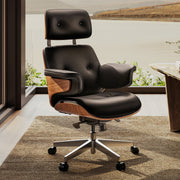
The desk is only one part of the ergonomic equation. For professionals spending hours in a high-concentration "deep work" state, the interface between the body and the furniture must be seamless. A high-performance chair like the Serene, Napa Leather Executive Office Chair provides the musculoskeletal support necessary to maintain a neutral spinal position while seated.
To further combat the "static load" identified by ISO 11226:2000, integrating an Adjustable Ergonomic Footrest or a Footstool with Wheels encourages micro-movements of the lower limbs, promoting blood circulation even during long seated sessions.
Practical Recommendations for Studio Optimization
To ensure your heavy-duty workstation operates at peak efficiency, follow these technical optimization strategies derived from industry best practices and BIFMA G1-2013 guidelines.
Calculate Your "True Load"
Do not rely on estimates. Use the manufacturer's spec sheets for every piece of equipment.
- The +20% Rule: Once you have your total weight, add 20% to account for cables, power strips, and the occasional weight of the user leaning on the desk.
- Target Capacity: Aim for a desk with a rated capacity that is at least 40% higher than your "True Load." This ensures you stay within the 70% "Golden Zone" for motor speed and longevity.
Optimize Weight Distribution
- The Centralization Heuristic: Place the heaviest single item (usually the PC) as close to a motor column as possible, or perfectly centered between two columns.
- Monitor Alignment: Use a multi-monitor rail or individual arms that allow the weight of the displays to be centered over the desk's support structure. According to OSHA eTools, proper monitor placement also reduces neck strain, providing a dual benefit.
Maintenance Intervals
For desks operating consistently above 50% capacity, standard maintenance intervals should be halved.
- Quarterly Check: Inspect all bolts for tightness. Heavy equipment creates micro-vibrations that can loosen hardware over time, affecting stability.
- Clean the Columns: Dust and debris on the lifting columns can increase friction, forcing the motors to work harder. A simple wipe-down every three months can prevent unnecessary strain.
The ROI of Over-Specifying
For an architectural firm, the decision to invest in a heavy-duty, dual-motor workstation is a financial one. Based on our "Architectural Power User" model, a high-performance desk that maintains its lifting speed can recover approximately 3-5 minutes of billable time per day per employee.
At a senior architect billing rate of $75/hour, this efficiency gain translates to $900 - $1,500 in recovered billable time annually. This does not even account for the potential reduction in absenteeism related to musculoskeletal disorders (MSDs), which the EU-OSHA 2019 Report identifies as a major economic burden on professional services.
As detailed in The 2026 Workstation White Paper: Converging Ergonomic Science and Sustainable Engineering, the future of professional workspaces lies in the intersection of high-capacity performance and human-centric design. By understanding the technical limits of your equipment and optimizing for the "70% Rule," you ensure that your studio remains a place of peak productivity and long-term well-being.
Disclaimer: This article is for informational purposes only and does not constitute professional medical, legal, or engineering advice. Always consult with a qualified ergonomist or medical professional before making significant changes to your workstation setup, especially if you have pre-existing musculoskeletal conditions.
Sources
- BIFMA G1-2013 Ergonomics Guideline for Furniture
- Canadian Centre for Occupational Health and Safety (CCOHS): Sit/Stand Desk
- Cochrane: Workplace interventions for reducing sitting at work
- EU-OSHA: Musculoskeletal disorders and prolonged static sitting
- ISO 11226:2000 Evaluation of static working postures
- WHO 2020 Guidelines on Physical Activity & Sedentary Behaviour
- OSHA eTools: Computer Workstations - Monitors
- MathWorks: Linear Electric Actuator (Motor Model)
- The 2026 Workstation White Paper: Converging Ergonomic Science and Sustainable Engineering




Leave a comment